Solved Help! Flash drive is seconds from disaster

ish4d0w

New member
Member
VIP
Local time
12:36 AM
Messages
179
Hi!

Today I got a really strange problem! I know we have great experts here so I would like to ask you guys, what do you think?

I got a 32 GB flashdrive (Corsair Voyager USB 3.0) about a year or two old. No problems so far. Until now.
Suddenly (from one day to the another) it started to give me an error message: "Drive is write protected".
I'm not able to save files anymore to it. But I can still access it and I can see the directory and file list.

This doesn't look right so I started to get data off of it immediately.
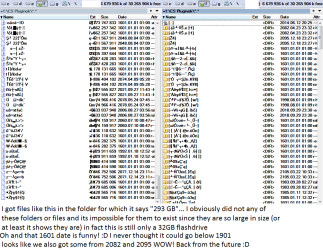
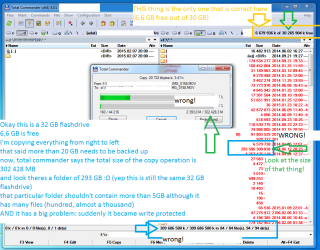
Here's the result. This is insane. Look at the numbers! It's showing I have a 293 GB folder on a 32 GB flashdrive! (that folder shouldn't be larger than 5 GB).

Check out this picture. I tried to rightclick, properties, and then do disk repair (chkdsk), it cannot access it. I tried it on different computers (also Windows 7 and I even tried it on a macbook), its the same. They all say write protected.

Help me! What do I do now? I need those files + I need this drive to get back working. It might still have warranty, but I'm not sure. But I'm afraid they would delete my files.

Edit: wow check out pic 2 too!
flashdrive.png

flashdrive2.png


(keywords for google) > flash drive problem fail readonly read only write protected cant write can't unable to save read backup back up copy size pen thumb key usb usb3 3.0 how to recover data from flash drive
 

My Computer

Computer type
Laptop
Computer Manufacturer/Model Number
HP Compaq 6720s
OS
Microsoft® Windows 7 Professional 64-bit
CPU
Intel(R) Pentium(R) Dual CPU T2310 @ 1.46GHz
Motherboard
Hewlett-Packard 30D8
Memory
4,00 GB
Graphics Card(s)
(1) Mobile Intel(R) 965 Express Chipset Family (2) Mobile
Sound Card
(1) Bluetooth Hands-free Audio (2) Bluetooth Stereo Audio
Screen Resolution
1280 x 800 x 32 bits (4294967296 colors) @ 59 Hz
Hard Drives
(1) Hitachi HTS542516K9SA00 ATA Device (2) Multi Flash Reader USB Device
It appears that the drive is seriously corrupted and may need to be replaced. I would not trust it.

Flash drives are the least reliable of modern storage media and add to that the possibility that they may be lost, stolen, or physically damaged. Such drives should not be trusted as primary storage of important files but used primarily as a transport media. All important files, wherever they are stored, require at least one backup copy while those of particular importance need 2 or more backup copies. Having no backups is asking for trouble. Recovery methods after a problem develops cannot be relied on.

It may be possible to recover some of your files but I have never had the need.
 

My Computer

Computer type
PC/Desktop
Computer Manufacturer/Model Number
HP
OS
Windows 7 Pro 64 bit
CPU
Xeon W3520
Memory
8 GB
Graphics Card(s)
Nvidia Geforce 210
I've had that write protected error myself. I wasn't able to recover anything and didn't break my neck trying because the data wasn't critical.

LMiller7 is right. USB thumb drives are flimsy commodities. They work for a while and then don't. Don't rely on them for anything important. They are a convenience only.

As far as I know, the best tools to try would be PhotoRec and TestDisk. I've never used either.

Get them in one package here:

PhotoRec - CGSecurity

Below is member Jumanji's guide to using PhotoRec:

http://www.sevenforums.com/software/193467-guide-using-photorec-recovery-software.html
 

My Computer

Computer type
PC/Desktop
Computer Manufacturer/Model Number
Ignatz Special; 4 speed manual gearbox; factory air conditioning; one of one
OS
Windows 7 Home Premium SP1, 64-bit
CPU
Intel Skylake i5-6600K, not overclocked
Motherboard
AsRock Z170M Extreme 4, micro ATX
Memory
8 GB HyperX DDR4-2666 (2 x 4 GB)
Graphics Card(s)
none; graphics are integrated on CPU
Sound Card
onboard: Realtek ALC1150; external: USB Behringer UF0-202
Monitor(s) Displays
Dell S2340M 23 inch IPS
Screen Resolution
1600 x 900
Hard Drives
System: Crucial MX100 series SSD, 128 GB;
Data: Samsung Spinpoint 103SJ, 1 TB;
Backup: WD Caviar Green WD30EZRX-00D8PB0, 3 TB
PSU
Rosewill SilentNight 500 watt fanless, semi-modular
Case
Antec Solo II
Cooling
Noctua NH-U12S; Noctua F12 intake, Noctua S12A exhaust
Keyboard
Microsoft 200 6JH-00001 USB
Mouse
Dell or Microsoft optical wired; USB
Antivirus
Microsoft Security Essentials and Malwarebytes Premium
Browser
Pale Moon
Other Info
All fans PWM; speeds at idle: CPU circa 500 rpm; intake circa 600 rpm; exhaust circa 600 rpm; CPU temps 27 idle and 47 C load in a warm room (27 C/81 F) when running Intel Extreme Tuning Utility stress test.
It appears that the drive is seriously corrupted and may need to be replaced. I would not trust it.
Yes you are definitely right. :)


Flash drives are the least reliable of modern storage media and add to that the possibility that they may be lost, stolen, or physically damaged. Such drives should not be trusted as primary storage of important files but used primarily as a transport media. All important files, wherever they are stored, require at least one backup copy while those of particular importance need 2 or more backup copies. Having no backups is asking for trouble. Recovery methods after a problem develops cannot be relied on.

It may be possible to recover some of your files but I have never had the need.

Of course I have copies of many things on the drive but there are still some data which I'd like to pull. It seems I have some luck because I'm still able to read some files (but not all)


I've had that write protected error myself. I wasn't able to recover anything and didn't break my neck trying because the data wasn't critical.

LMiller7 is right. USB thumb drives are flimsy commodities. They work for a while and then don't. Don't rely on them for anything important. They are a convenience only.

As far as I know, the best tools to try would be PhotoRec and TestDisk. I've never used either.

Get them in one package here:

PhotoRec - CGSecurity

Below is member Jumanji's guide to using PhotoRec:

http://www.sevenforums.com/software/193467-guide-using-photorec-recovery-software.html

Thank you! This guide is great! I'll definitely give it a go in a few days and I'll report back with the results, just in case someone finds this thread later with a similar problem.
 

My Computer

Computer type
Laptop
Computer Manufacturer/Model Number
HP Compaq 6720s
OS
Microsoft® Windows 7 Professional 64-bit
CPU
Intel(R) Pentium(R) Dual CPU T2310 @ 1.46GHz
Motherboard
Hewlett-Packard 30D8
Memory
4,00 GB
Graphics Card(s)
(1) Mobile Intel(R) 965 Express Chipset Family (2) Mobile
Sound Card
(1) Bluetooth Hands-free Audio (2) Bluetooth Stereo Audio
Screen Resolution
1280 x 800 x 32 bits (4294967296 colors) @ 59 Hz
Hard Drives
(1) Hitachi HTS542516K9SA00 ATA Device (2) Multi Flash Reader USB Device
I managed to pull some data.

I can not even format the disk! It says write protected. How do I format it?
 

My Computer

Computer type
Laptop
Computer Manufacturer/Model Number
HP Compaq 6720s
OS
Microsoft® Windows 7 Professional 64-bit
CPU
Intel(R) Pentium(R) Dual CPU T2310 @ 1.46GHz
Motherboard
Hewlett-Packard 30D8
Memory
4,00 GB
Graphics Card(s)
(1) Mobile Intel(R) 965 Express Chipset Family (2) Mobile
Sound Card
(1) Bluetooth Hands-free Audio (2) Bluetooth Stereo Audio
Screen Resolution
1280 x 800 x 32 bits (4294967296 colors) @ 59 Hz
Hard Drives
(1) Hitachi HTS542516K9SA00 ATA Device (2) Multi Flash Reader USB Device
Most likely the data is corrupted because of some internal failure which a format will not correct. While it may be possible to format the drive I would never trust it. Flash drives usually fail without warning or apparent cause.

Best to replace the drive.
 

My Computer

Computer type
PC/Desktop
Computer Manufacturer/Model Number
HP
OS
Windows 7 Pro 64 bit
CPU
Xeon W3520
Memory
8 GB
Graphics Card(s)
Nvidia Geforce 210
I managed to pull some data.

I can not even format the disk! It says write protected. How do I format it?

Windows isn't very flexible in the way it allows you to format USB drives, so there are a variety of downloadable tools out there that give you more control over file system and allocation unit size.

But they wouldn't help you get around a drive failure such as you've experienced, probably a controller issue.

If you are using those tools you downloaded correctly, I'd say there is nothing left to do.

You could RMA the drive to the manufacturer if it's under warranty and you have no anxiety over turning over private data to the manufacturer who may be able to read it using some heroic measures or tools unavailable to you. I don't know what that risk is, but I don't RMA drives due to privacy concerns.
 

My Computer

Computer type
PC/Desktop
Computer Manufacturer/Model Number
Ignatz Special; 4 speed manual gearbox; factory air conditioning; one of one
OS
Windows 7 Home Premium SP1, 64-bit
CPU
Intel Skylake i5-6600K, not overclocked
Motherboard
AsRock Z170M Extreme 4, micro ATX
Memory
8 GB HyperX DDR4-2666 (2 x 4 GB)
Graphics Card(s)
none; graphics are integrated on CPU
Sound Card
onboard: Realtek ALC1150; external: USB Behringer UF0-202
Monitor(s) Displays
Dell S2340M 23 inch IPS
Screen Resolution
1600 x 900
Hard Drives
System: Crucial MX100 series SSD, 128 GB;
Data: Samsung Spinpoint 103SJ, 1 TB;
Backup: WD Caviar Green WD30EZRX-00D8PB0, 3 TB
PSU
Rosewill SilentNight 500 watt fanless, semi-modular
Case
Antec Solo II
Cooling
Noctua NH-U12S; Noctua F12 intake, Noctua S12A exhaust
Keyboard
Microsoft 200 6JH-00001 USB
Mouse
Dell or Microsoft optical wired; USB
Antivirus
Microsoft Security Essentials and Malwarebytes Premium
Browser
Pale Moon
Other Info
All fans PWM; speeds at idle: CPU circa 500 rpm; intake circa 600 rpm; exhaust circa 600 rpm; CPU temps 27 idle and 47 C load in a warm room (27 C/81 F) when running Intel Extreme Tuning Utility stress test.
Okay thanks everyone. As per your suggestions, I returned it in warranty. It seems there is no other way around.
 

My Computer

Computer type
Laptop
Computer Manufacturer/Model Number
HP Compaq 6720s
OS
Microsoft® Windows 7 Professional 64-bit
CPU
Intel(R) Pentium(R) Dual CPU T2310 @ 1.46GHz
Motherboard
Hewlett-Packard 30D8
Memory
4,00 GB
Graphics Card(s)
(1) Mobile Intel(R) 965 Express Chipset Family (2) Mobile
Sound Card
(1) Bluetooth Hands-free Audio (2) Bluetooth Stereo Audio
Screen Resolution
1280 x 800 x 32 bits (4294967296 colors) @ 59 Hz
Hard Drives
(1) Hitachi HTS542516K9SA00 ATA Device (2) Multi Flash Reader USB Device
Back
Top