
Help for installing .sys files

vteckickedinyo

New member
Local time
11:46 AM
Messages
10
So I just got 2 .sys files that need to be updated, but the thing is... I'm completely unsure how to apply the .sys files.


Files to be applied: SiRemFil.sys & SiWinAcc.sys

Also, nwifi.sys but I actually haven't found an updated driver for that one yet.
Halp?
 

My Computer

Computer Manufacturer/Model Number
ME
OS
Windows 7 64-bit
CPU
AMD Phenom II X3 720
Motherboard
Gigabyte GA-MA790X-UD4P
Memory
OCZ Plat. DDR2 800Mhz 4x1Gb
Graphics Card(s)
ASUS NVIDIA GeForce 9800GT 512MB
Sound Card
Onboard HD Audio
Monitor(s) Displays
Samsung 21.3'' Widescreen LCD
Hard Drives
Western Digital 500GB SATA WD5000AAKS-22YGA0 & Samsung 150GB SP1604N ATA
PSU
650W (Can't remember)
Case
Antec 300
Cooling
Air vents and plenty of 120MM fans + 140MM fan
Not sure why you would be trying to update the first 2 as they are driver files for SiL controllers, which unless you have a controller card with a SiL chip on it your motherboard doesn't have one according to the specs for it,

GA-MA790X-UD4P (rev. 1.0) - GIGABYTE - Product - Motherboard - Specification

It has an AMD controller (part of the SB750) and what they call a Gigabyte controller (actual JMicron, I downloaded the Gigabyte driver and had a look at the INF).

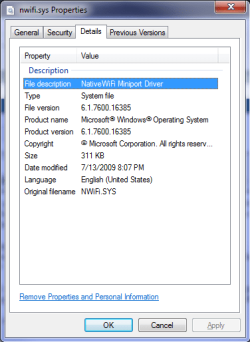
That third file is a Windows default wifi driver,

nwifi.png

which I would assume the only way for it to update would be if Microsoft put it out through Windows Update.
 

My Computer

Computer type
PC/Desktop
Computer Manufacturer/Model Number
Me
OS
Win 7 Ultimate x64
CPU
FX-8350 @ 4.6 GHz so far
Motherboard
Asus M5A97 EVO
Memory
ADATA XPG V1 Series Black 8GB DDR3 1600
Graphics Card(s)
Sapphire R9 270x Dual-X
Sound Card
Xonar DGX w/ Corsair Vengence 1300
Monitor(s) Displays
Acer S232HL Abid
Screen Resolution
1920x1080
Hard Drives
120 GB OCZ Vertex 3
500 GB Seagate 7200.12
PSU
Antec Earthwatts 650W Green
Case
Antec Three Hundred
Cooling
Cooler Master 212 EVO
Keyboard
Logitech G510
Mouse
Logitech G500s
Internet Speed
35000/3000
I totally see what you're saying, I get on and make a post here and get told to update some .sys files. Now that I do some re-reading on the subject, I think "zigzag3143" was trying to tell me that my nwifi.sys is corrupt and I need a "fresh" copy.
 

My Computer

Computer Manufacturer/Model Number
ME
OS
Windows 7 64-bit
CPU
AMD Phenom II X3 720
Motherboard
Gigabyte GA-MA790X-UD4P
Memory
OCZ Plat. DDR2 800Mhz 4x1Gb
Graphics Card(s)
ASUS NVIDIA GeForce 9800GT 512MB
Sound Card
Onboard HD Audio
Monitor(s) Displays
Samsung 21.3'' Widescreen LCD
Hard Drives
Western Digital 500GB SATA WD5000AAKS-22YGA0 & Samsung 150GB SP1604N ATA
PSU
650W (Can't remember)
Case
Antec 300
Cooling
Air vents and plenty of 120MM fans + 140MM fan
That would explain looking to update the nwifi.sys. not sure that you can even find it online yet, but if needed I can upload it for you (need to know whether 32 bit or 64 bit).

Next are you even using anything wifi on your computer? If not open Services and disable the wireless service and that should stop that driver from causing a BSOD.

As for the 2 SiL drivers (Silicon Image), do you have an extra SATA or IDE controller card installed? If so visit the card manufacturer's site for the latest driver for the card.
 

My Computer

Computer type
PC/Desktop
Computer Manufacturer/Model Number
Me
OS
Win 7 Ultimate x64
CPU
FX-8350 @ 4.6 GHz so far
Motherboard
Asus M5A97 EVO
Memory
ADATA XPG V1 Series Black 8GB DDR3 1600
Graphics Card(s)
Sapphire R9 270x Dual-X
Sound Card
Xonar DGX w/ Corsair Vengence 1300
Monitor(s) Displays
Acer S232HL Abid
Screen Resolution
1920x1080
Hard Drives
120 GB OCZ Vertex 3
500 GB Seagate 7200.12
PSU
Antec Earthwatts 650W Green
Case
Antec Three Hundred
Cooling
Cooler Master 212 EVO
Keyboard
Logitech G510
Mouse
Logitech G500s
Internet Speed
35000/3000
I'm working with 64-bit.
Yeah, a Belkin USB Wireless N dongle. (Yuck... but it works...)
As for the PCI to IDE/SATA card, No, I actually don't have such a thing. I'm only using one port as well, and just for my video card on a PCI-E 2.0.
 

My Computer

Computer Manufacturer/Model Number
ME
OS
Windows 7 64-bit
CPU
AMD Phenom II X3 720
Motherboard
Gigabyte GA-MA790X-UD4P
Memory
OCZ Plat. DDR2 800Mhz 4x1Gb
Graphics Card(s)
ASUS NVIDIA GeForce 9800GT 512MB
Sound Card
Onboard HD Audio
Monitor(s) Displays
Samsung 21.3'' Widescreen LCD
Hard Drives
Western Digital 500GB SATA WD5000AAKS-22YGA0 & Samsung 150GB SP1604N ATA
PSU
650W (Can't remember)
Case
Antec 300
Cooling
Air vents and plenty of 120MM fans + 140MM fan
Installed the drivers for the wireless card from Belkin? Whether it will help or not here is a copy of the nwifi.sys from my System32 folder,

View attachment nwifi.zip

May have to boot to safe mode to replace the original (good idea to rename the original to something like nwifi.old before adding the new one).

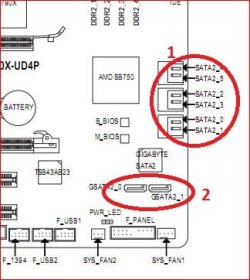
OK, so no extra controller card. Which of the SATA ports do you have your SATA drive attached too (group 1 or group 2)?

sataports.JPG

If it is #2, I would connect it to #1 and disable the "Onboard GSATA-II Ctrl" in the bios. And if nothing is connected to either of the GSATA ports, again disable it.
 

My Computer

Computer type
PC/Desktop
Computer Manufacturer/Model Number
Me
OS
Win 7 Ultimate x64
CPU
FX-8350 @ 4.6 GHz so far
Motherboard
Asus M5A97 EVO
Memory
ADATA XPG V1 Series Black 8GB DDR3 1600
Graphics Card(s)
Sapphire R9 270x Dual-X
Sound Card
Xonar DGX w/ Corsair Vengence 1300
Monitor(s) Displays
Acer S232HL Abid
Screen Resolution
1920x1080
Hard Drives
120 GB OCZ Vertex 3
500 GB Seagate 7200.12
PSU
Antec Earthwatts 650W Green
Case
Antec Three Hundred
Cooling
Cooler Master 212 EVO
Keyboard
Logitech G510
Mouse
Logitech G500s
Internet Speed
35000/3000
Alllllll righty, I booted into safe mode, had to "Take Ownership" of my files too before renaming nwifi.sys to .old. (Why did MS make it so hard to do? ...I downloaded a great windows tool to take ownership by right clicking.)
Then swung by the BIOS and disabled the GSATA (I did not plug my SATA HD into the GSATA, the manual was kind enough to tell me not to for slower drives, But had NO clue that enabled option without the faster drive could make a difference.)

Well, now I'm just waiting for a BSOD. Got uTorrent open & downloading, Firefox open with 3 pages of YouTube going, messengers up. The usual that gets me to Blue Screen.

Edit: 3 Hours in. Played 2 hours of video, half an hour of game, left everything still open so far so good. Maybe Final Edit?: Well I was able to run my system for 24 hours+, I'll be ok for now. Thanks. Also, I just destroyed my Windows 7 boot by installing an OS on another hard drive for a side project. Meh. I know how to fix it but it's just time that I don't have for a bit. Ehhhhh.
 
Last edited:

My Computer

Computer Manufacturer/Model Number
ME
OS
Windows 7 64-bit
CPU
AMD Phenom II X3 720
Motherboard
Gigabyte GA-MA790X-UD4P
Memory
OCZ Plat. DDR2 800Mhz 4x1Gb
Graphics Card(s)
ASUS NVIDIA GeForce 9800GT 512MB
Sound Card
Onboard HD Audio
Monitor(s) Displays
Samsung 21.3'' Widescreen LCD
Hard Drives
Western Digital 500GB SATA WD5000AAKS-22YGA0 & Samsung 150GB SP1604N ATA
PSU
650W (Can't remember)
Case
Antec 300
Cooling
Air vents and plenty of 120MM fans + 140MM fan
Back
Top