HELP for Newbie

Good morning ! Well, I did everything you advised but it's still the same. I still get the icon saying downloading 89%. If I could clear that 89% of downloaded files do you think that would cure the problem? I do appreciate all the help and time you are giving me.
 

My Computer

OS
Windows 7
Maybe will try this hard method.I have never done this before,but always is the first time:

You have such error:

Problem signature:
P1: TrustedInstaller.exe
P2: 6.1.7600.16385
P3: 4a5bc1b4
P4: msvcrt.dll
P5: 7.0.7600.16385
P6: 4a5bda6f
P7: c00000fd
P8: 0000b4ac
P9:
P10:

Attached files:
C:\Windows\Temp\WERF631.tmp.appcompat.txt
C:\Windows\Temp\WERF75A.tmp.WERInternalMetadata.xml
C:\Windows\Temp\WERF77A.tmp.hdmp
C:\Windows\Temp\WERFB52.tmp.mdmp

attache above files to post.

Download & run Process Monitor Process Monitor,when you run PM,try again install only one any update -when WU return error,save log in PM as *.PML format, pack it to *.rar or *.7z format and upload on RapidShare: 1-CLICK Web hosting - Easy Filehosting
 

My Computer

Computer Manufacturer/Model Number
Custom made
OS
Windows 7 Professional x64 PL
CPU
AMD Athlon 4450e
Motherboard
Giga-Byte GA-MA69G-S3H
Memory
GoodRam DDR2 2x2048MB (FSB 800MHz)
Graphics Card(s)
nVidia GeForce 9600GT (G94-300) 1024 MB
Monitor(s) Displays
SAMSUNG SyncMaster HS2P301688
Hard Drives
Seagate ST3750330AS 750GB
PSU
Corsair 550W
Cooling
AeroCool ExtremeEngine 3T
Hi, WU doesn't return an error. It just sits there saying it's downloading but doing nothing.
 

My Computer

OS
Windows 7
I last successfully updated windows on the 15th. Should I do a System Restore to there and then try to download other updates one at a time?
 

My Computer

OS
Windows 7
I last successfully updated windows on the 15th. Should I do a System Restore to there and then try to download other updates one at a time?
Yes use system restore if you have good check point
 

My Computer

Computer Manufacturer/Model Number
Custom made
OS
Windows 7 Professional x64 PL
CPU
AMD Athlon 4450e
Motherboard
Giga-Byte GA-MA69G-S3H
Memory
GoodRam DDR2 2x2048MB (FSB 800MHz)
Graphics Card(s)
nVidia GeForce 9600GT (G94-300) 1024 MB
Monitor(s) Displays
SAMSUNG SyncMaster HS2P301688
Hard Drives
Seagate ST3750330AS 750GB
PSU
Corsair 550W
Cooling
AeroCool ExtremeEngine 3T
I need also files who I asked you in post 22

C:\Windows\Temp\WERF631.tmp.appcompat.txt
C:\Windows\Temp\WERF75A.tmp.WERInternalMetadata.xml
C:\Windows\Temp\WERF77A.tmp.hdmp
C:\Windows\Temp\WERFB52.tmp.mdmp
 

My Computer

Computer Manufacturer/Model Number
Custom made
OS
Windows 7 Professional x64 PL
CPU
AMD Athlon 4450e
Motherboard
Giga-Byte GA-MA69G-S3H
Memory
GoodRam DDR2 2x2048MB (FSB 800MHz)
Graphics Card(s)
nVidia GeForce 9600GT (G94-300) 1024 MB
Monitor(s) Displays
SAMSUNG SyncMaster HS2P301688
Hard Drives
Seagate ST3750330AS 750GB
PSU
Corsair 550W
Cooling
AeroCool ExtremeEngine 3T
Those files are not in Temp.

In this cas you have generate new dumpchecks files manually.

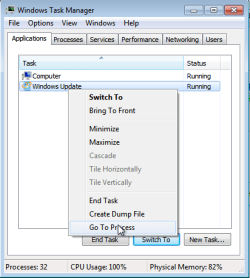
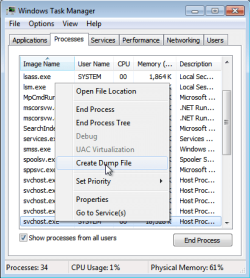
run task manager,next Run again Windows Update ,next go to task manager ,right click on Windows Update Application and choose "go to process"

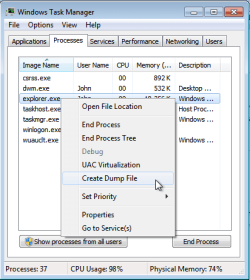
c1.pngc2.png

next create *.DMP files for explorer.exe and wuauclt.exe

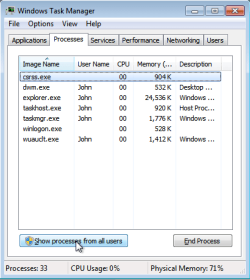
next click "show prcesses for all users"
c2a.png
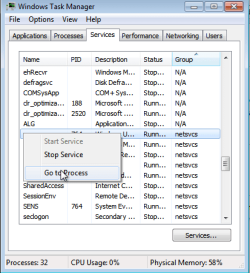
,go to services list

c4.pngc5.png
choose wuauserv ,right click on it,go to process,it will redirect to one of many svchost processes,right click on highlighted svchost.exe and choose "create dump file",in Processes tab find TrustedInstaller.exe and also create dump file for it.

All dump files pack to *.zip or *rar and attache to post
 

My Computer

Computer Manufacturer/Model Number
Custom made
OS
Windows 7 Professional x64 PL
CPU
AMD Athlon 4450e
Motherboard
Giga-Byte GA-MA69G-S3H
Memory
GoodRam DDR2 2x2048MB (FSB 800MHz)
Graphics Card(s)
nVidia GeForce 9600GT (G94-300) 1024 MB
Monitor(s) Displays
SAMSUNG SyncMaster HS2P301688
Hard Drives
Seagate ST3750330AS 750GB
PSU
Corsair 550W
Cooling
AeroCool ExtremeEngine 3T
Hi ! I am uploading the dump files to Rapidshare as they are too large to attach here, but it looks like it is going to take about an hour to do so! I will send the link when done. Witrh regards to TrustedInstaller.exe, it is not showing in the Processes tab. It is showing in Services but not Processes.
 

My Computer

OS
Windows 7
Not too much any susspicious in your logs :rolleyes:...

Check below things:

1.Delete folder C:\Users\User\AppData\LocalLow\HPAppData
2.In regedit (Start>>Search>>regedit) delete key HKEY_CURRENT_USER\Software\Microsoft\Windows\Shell\AttachmentExecute


+ restart
 

My Computer

Computer Manufacturer/Model Number
Custom made
OS
Windows 7 Professional x64 PL
CPU
AMD Athlon 4450e
Motherboard
Giga-Byte GA-MA69G-S3H
Memory
GoodRam DDR2 2x2048MB (FSB 800MHz)
Graphics Card(s)
nVidia GeForce 9600GT (G94-300) 1024 MB
Monitor(s) Displays
SAMSUNG SyncMaster HS2P301688
Hard Drives
Seagate ST3750330AS 750GB
PSU
Corsair 550W
Cooling
AeroCool ExtremeEngine 3T
Hi ! The HPAppData folder was not on my Hard Drive. I deleted AttachmentExecute. Restarted and tried to download various updates. Each one said it was 99% downloaded but nothing else happens. I was wondering, is there a special file where the downloaded files are stored before being loaded into the Hard Drive?
 

My Computer

OS
Windows 7
Hi ! The HPAppData folder was not on my Hard Drive.
Are you sure you can see hidden folders too?Folder C:\Users\User\AppData is hidden and of course it's subfolders too.To have it visible you have go to Control Panel>>Folder Options and check "Show hidden files and folders" or use any 3p file manager i.e Total Commander

I was wondering, is there a special file where the downloaded files are stored before being loaded into the Hard Drive?
All files are downloaded to C:\Windows\SoftwareDistribution folder.You have strange problems with installing updates not with downloading,you said you cannot even install standalone updates from Micrososft Download Center Microsoft Download Center: Download Category Search Results so download location have nothing to that.

Try methods from posts 8-10 of this thread http://www.sevenforums.com/windows-updates-activation/63139-windows-updates-fail-repeatedly.html

If it also fail make repair install http://www.sevenforums.com/tutorials/3413-repair-install.html
 

My Computer

Computer Manufacturer/Model Number
Custom made
OS
Windows 7 Professional x64 PL
CPU
AMD Athlon 4450e
Motherboard
Giga-Byte GA-MA69G-S3H
Memory
GoodRam DDR2 2x2048MB (FSB 800MHz)
Graphics Card(s)
nVidia GeForce 9600GT (G94-300) 1024 MB
Monitor(s) Displays
SAMSUNG SyncMaster HS2P301688
Hard Drives
Seagate ST3750330AS 750GB
PSU
Corsair 550W
Cooling
AeroCool ExtremeEngine 3T
I'm wondering about one more thing from your post 5

In aggresive mode, it ran halfway and then the following appeared:

Service 'Windows Update'(WUAUSERV) could not be stopped. Verify that you have sufficient privileges to stop system services.

That means "MS Fix it" could not stop this service due to unidentified reasons

Try below also:

1.Turn off and next turn on back system protection - http://www.sevenforums.com/tutorials/330-system-protection-turn-off.html

2.Import this fix to registry View attachment wuauservWIn7disable.zip (It disable WU service through registry,to apply changes it require reboot computer) +restart
3.Delete manualy C:\Windows\SoftwareDistribution folder
4.Run again "MS Fix it" from KB971058 in aggressive mode
5.Go to Start>>Search>>services and make sure Windows Update service again is set to AUTO(DelAYED) and started,if not,fix it manually.
 

My Computer

Computer Manufacturer/Model Number
Custom made
OS
Windows 7 Professional x64 PL
CPU
AMD Athlon 4450e
Motherboard
Giga-Byte GA-MA69G-S3H
Memory
GoodRam DDR2 2x2048MB (FSB 800MHz)
Graphics Card(s)
nVidia GeForce 9600GT (G94-300) 1024 MB
Monitor(s) Displays
SAMSUNG SyncMaster HS2P301688
Hard Drives
Seagate ST3750330AS 750GB
PSU
Corsair 550W
Cooling
AeroCool ExtremeEngine 3T
Good morning ! When I turn System Protection off, do you want me to also delete All Restore Points?
 

My Computer

OS
Windows 7
Good morning ! When I turn System Protection off, do you want me to also delete All Restore Points?
Yes.You don't need them any longer (you tried already),and they would cuase some issues.
 

My Computer

Computer Manufacturer/Model Number
Custom made
OS
Windows 7 Professional x64 PL
CPU
AMD Athlon 4450e
Motherboard
Giga-Byte GA-MA69G-S3H
Memory
GoodRam DDR2 2x2048MB (FSB 800MHz)
Graphics Card(s)
nVidia GeForce 9600GT (G94-300) 1024 MB
Monitor(s) Displays
SAMSUNG SyncMaster HS2P301688
Hard Drives
Seagate ST3750330AS 750GB
PSU
Corsair 550W
Cooling
AeroCool ExtremeEngine 3T
Everything worked perfectly until I tried to download 1 update. It stopped at 45%.
 

My Computer

OS
Windows 7

My Computer

Computer Manufacturer/Model Number
Custom made
OS
Windows 7 Professional x64 PL
CPU
AMD Athlon 4450e
Motherboard
Giga-Byte GA-MA69G-S3H
Memory
GoodRam DDR2 2x2048MB (FSB 800MHz)
Graphics Card(s)
nVidia GeForce 9600GT (G94-300) 1024 MB
Monitor(s) Displays
SAMSUNG SyncMaster HS2P301688
Hard Drives
Seagate ST3750330AS 750GB
PSU
Corsair 550W
Cooling
AeroCool ExtremeEngine 3T
1. It downloads ok, but when I open it the WU Standalone Installer appears looking for installed updates. Nothing happens.

2. Yes, it turns On and Off ok.
 

My Computer

OS
Windows 7
Back
Top