Help. Geforce 9600 GT Win7 = terrible performance.

abc

New member
Local time
9:35 PM
Messages
7
Hello!!!!!!!!!

My system is as follows,

Windows 7 64bit
Gigabyte M720-US3
Phenom 2 945
2gb corsair XMS2 DDR2 800mhz
Display driver 195.62

I'm getting really bad graphics performance. I lost like 10 FPS on RE5 benchmark versus windows XP 32bit. On Left 4 dead 2 my average FPS is around 35-45, and even lower if I turn shader quality up to maximum (which the game recommends)

On my old system (AMD 3800 X2 Win XP) I never got any slow down on L4D 1 and there isn't much difference between the 2 games graphically.

I ran SiSoft Sandra GPU benchmarks and my GT 9600 scored quite a bit lower then the reference cards.

My memory and CPU clock are both at stock.

Is this a driver problem? What can I do to improve things, please?

Add a reply
 

My Computer My Computer

Computer Manufacturer/Model Number
Gigabyte GA720 US3
OS
7 64
CPU
phenon 945
Motherboard
Gigabyte GA720 US3
Memory
2GB 4-4-12 corsair XMS2
Graphics Card(s)
Palit geforce 9600 GT
Sound Card
Audigy SE
Monitor(s) Displays
1
Hard Drives
1 Sata 1 IDE 1 USB
PSU
585w poweron tsunami
Case
some generic
Cooling
AMD and generic
Install the latest chipset/motherboard drivers and also video card driver from NVIDIA's website.
 

My Computer My Computer

OS
Windows 7
Install the latest chipset/motherboard drivers and also video card driver from NVIDIA's website.

Tried. in my OP it shows I have the latest Nvidia drivers anyway.

Anyone, please?
 

My Computer My Computer

Computer Manufacturer/Model Number
Gigabyte GA720 US3
OS
7 64
CPU
phenon 945
Motherboard
Gigabyte GA720 US3
Memory
2GB 4-4-12 corsair XMS2
Graphics Card(s)
Palit geforce 9600 GT
Sound Card
Audigy SE
Monitor(s) Displays
1
Hard Drives
1 Sata 1 IDE 1 USB
PSU
585w poweron tsunami
Case
some generic
Cooling
AMD and generic

My Computer My Computer

OS
Windows 7
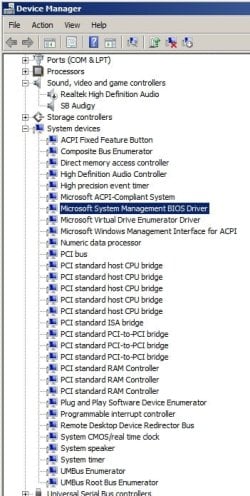
I tried the Gigabyte drivers. It's very strange beccause the installer will only give me the option of installing the Nvidia away mode driver. There isn't much evidence of nvidia in devicemanager / hardware. I'm actually not certain if the drivers are properly installed but I wonder if there is an efficient way to check?
 

My Computer My Computer

Computer Manufacturer/Model Number
Gigabyte GA720 US3
OS
7 64
CPU
phenon 945
Motherboard
Gigabyte GA720 US3
Memory
2GB 4-4-12 corsair XMS2
Graphics Card(s)
Palit geforce 9600 GT
Sound Card
Audigy SE
Monitor(s) Displays
1
Hard Drives
1 Sata 1 IDE 1 USB
PSU
585w poweron tsunami
Case
some generic
Cooling
AMD and generic
Yes. You can look at the dates of the drivers in C:\Windows\System32

You can also use the device manager to install for each driver, but you have to know which ones first:

Right click. Update driver software. Browse my computer. Let me pick. Have disk. Browse. Find the extracted .inf from the installer. Double click it. Hit ok. Hit next.

All NVIDIA drivers start with NV like nvstor.sys etc...
 

My Computer My Computer

OS
Windows 7
I've attached a S/S of my device manager. It's very hard to know which driver goes where. All the drivers are Microsofts own. I know this just can't be quite right. Auto-update search just says the latest and greatest driver is installed. Sigh.

I'm supprised Gigabyte are so lazy with their driver installation software. I know I won't be buying from then again!!!
 

Attachments

  • Untitled.jpg
    Untitled.jpg
    42.6 KB · Views: 53

My Computer My Computer

Computer Manufacturer/Model Number
Gigabyte GA720 US3
OS
7 64
CPU
phenon 945
Motherboard
Gigabyte GA720 US3
Memory
2GB 4-4-12 corsair XMS2
Graphics Card(s)
Palit geforce 9600 GT
Sound Card
Audigy SE
Monitor(s) Displays
1
Hard Drives
1 Sata 1 IDE 1 USB
PSU
585w poweron tsunami
Case
some generic
Cooling
AMD and generic
Was this an upgrade or clean install?
 

My Computer My Computer

Computer type
PC/Desktop
Computer Manufacturer/Model Number
DELL VOSTRO 3650
OS
Windows 8.1 PRO
CPU
3rd Generation Intel Core i7‐3612QM CPU @ 2.10GHZ
Memory
8GB DDR3
Graphics Card(s)
NVIDIA GeForce GT 525M (128 bit), 1GB Grpahics
Screen Resolution
1920X1080
Hard Drives
750GB 5400RPM
You should be able to install the drivers just by running the installer from the link I gave, for "Chipset/Lan" drivers, to completion. It will install anything that needs an update.
 

My Computer My Computer

OS
Windows 7
No, I tried the gigabyte link (which i've tried in the past) only wants to install the away mode driver, like I could care less about that one lol. The driver from guru 3d said no compatible hardware was detected for the drivers on the system. Facepalm.

Yes this is a clean install, format > windows 7.
 

My Computer My Computer

Computer Manufacturer/Model Number
Gigabyte GA720 US3
OS
7 64
CPU
phenon 945
Motherboard
Gigabyte GA720 US3
Memory
2GB 4-4-12 corsair XMS2
Graphics Card(s)
Palit geforce 9600 GT
Sound Card
Audigy SE
Monitor(s) Displays
1
Hard Drives
1 Sata 1 IDE 1 USB
PSU
585w poweron tsunami
Case
some generic
Cooling
AMD and generic
Well, for sure you can update the lan and Serial ATA controller using the device manager and the .infs.

You could also try doing so with the PCI ones in your screenshot. One of them controls the PCI-e bus that is important for the video card.

You have to find the correct inf too, from the extracted installer, or else it won't install at all.
 

My Computer My Computer

OS
Windows 7

My Computer My Computer

Computer type
PC/Desktop
Computer Manufacturer/Model Number
DELL VOSTRO 3650
OS
Windows 8.1 PRO
CPU
3rd Generation Intel Core i7‐3612QM CPU @ 2.10GHZ
Memory
8GB DDR3
Graphics Card(s)
NVIDIA GeForce GT 525M (128 bit), 1GB Grpahics
Screen Resolution
1920X1080
Hard Drives
750GB 5400RPM
Hey, this is strange. I re-downloaded the drivers from the link above. Just out of curiosity, I deleted the away mode driver folder. Now when I run the installer, it says it cannot find any compatible hardware blah blah. I really don't quite know whats going on here but it seems like there are (no) working drivers. I have yet to do things manually however.

My card is set at x16 @ 2.0pcie. My bios is F6 also.

Really wierd, maybe windows 7 isnt really supported?
 

My Computer My Computer

Computer Manufacturer/Model Number
Gigabyte GA720 US3
OS
7 64
CPU
phenon 945
Motherboard
Gigabyte GA720 US3
Memory
2GB 4-4-12 corsair XMS2
Graphics Card(s)
Palit geforce 9600 GT
Sound Card
Audigy SE
Monitor(s) Displays
1
Hard Drives
1 Sata 1 IDE 1 USB
PSU
585w poweron tsunami
Case
some generic
Cooling
AMD and generic
Hello!!!!!!!!!

My system is as follows,

Windows 7 64bit
Gigabyte M720-US3
Phenom 2 945
2gb corsair XMS2 DDR2 800mhz
Display driver 195.62

I'm getting really bad graphics performance. I lost like 10 FPS on RE5 benchmark versus windows XP 32bit. On Left 4 dead 2 my average FPS is around 35-45, and even lower if I turn shader quality up to maximum (which the game recommends)

On my old system (AMD 3800 X2 Win XP) I never got any slow down on L4D 1 and there isn't much difference between the 2 games graphically.

I ran SiSoft Sandra GPU benchmarks and my GT 9600 scored quite a bit lower then the reference cards.

My memory and CPU clock are both at stock.

Is this a driver problem? What can I do to improve things, please?

Add a reply


You see what I made bold? You see the difference? Just as the main RAM is 2x the size, the data on the GPU ram is 2x the size... So do you understand a performance loss with double the registers? Yeah it affects all aspects of the system. Now also I'm going to say the 9600 GT series was a huge letdown, given the fact that some of the 8xxx series cards performed better....that and the fact that the 8800/9800 are the same card..... I'm going to say the that being 64 bit might be part of the issue, as my card has problems with higher textures even though it's rated for them. Though on a 32bit system it runs quicker. =)
 

My Computer My Computer

Computer Manufacturer/Model Number
Custom
OS
Windows 7, Linux
CPU
AMD Phemon II x2 3@3750
Motherboard
ASRock M3A770DE
Memory
1G Crucial 1666
Graphics Card(s)
8800GT OC (custom OC)
Sound Card
Sound Blaster Live! (never changes!)
Monitor(s) Displays
Vivitron 22"
Screen Resolution
1600x1200
Hard Drives
Western Digital 120G/160G SATA
Maxtor 80G IDE
PSU
450w
Case
Unknown
Cooling
Custom Air cooled
Keyboard
Logitech
Mouse
Logitech M-BZ15A Laser
Internet Speed
Cable 10mbit
Essentially, 2GB isn't enough for gaming and even though GIgabyte is an excellent motherboard manufacturer doesn't that board have an nvidia chipset? You should have reconsidered and gone for an AM3 board. That said install more RAM and upgrade the GPU - 64 shaders is not enough for new games and neither is the 650MHz core clock or the other specs. As has been mentioned upgrade the chipset, BIOS, firmware if necessary etc.
 

My Computer My Computer

Computer Manufacturer/Model Number
Sony Vaio Z46GDU
OS
Windows 7 Ultimate x86-64
CPU
[email protected] 1066MHz FSB
Motherboard
Sony branded
Memory
6GB DDR3 1066MHz
Graphics Card(s)
9300M GS 256MB Dedicated (Speed) + Intel4500MHD (Stamina)
Sound Card
Realtek HD Audio
Monitor(s) Displays
13.1' WXGA
Screen Resolution
1600x900
Hard Drives
320GB 7200RPM w/ 16MB cache
Internet Speed
1MB/s
No the 2G main memory is fine, that's what I'm using. But 512 128bit memory on the gfx card isn't enough for the gfx processing. 650/1500 core/shader is fine.... But if your using 64bit the 128bit RAM (I'm just guessing your running a 9600 that has 512 with 128bit DDR3?) doesn't have the speeds required to move the data as fast as it would on 32bit.... This is NOT related to your 2G main ram, as it has plenty of space for running the games... I can run COD4 MW2 with 2G just fine, I had 1G and it ran pretty smooth. Although I am running DDR3 at 833 dual chan... So a ram upgrade wouldn't be a bad idea, though a better GFX card would be ideal for 64bit.
 

My Computer My Computer

Computer Manufacturer/Model Number
Custom
OS
Windows 7, Linux
CPU
AMD Phemon II x2 3@3750
Motherboard
ASRock M3A770DE
Memory
1G Crucial 1666
Graphics Card(s)
8800GT OC (custom OC)
Sound Card
Sound Blaster Live! (never changes!)
Monitor(s) Displays
Vivitron 22"
Screen Resolution
1600x1200
Hard Drives
Western Digital 120G/160G SATA
Maxtor 80G IDE
PSU
450w
Case
Unknown
Cooling
Custom Air cooled
Keyboard
Logitech
Mouse
Logitech M-BZ15A Laser
Internet Speed
Cable 10mbit
The clocks are not fine - 64 shaders? Precisely why I bought a 4890 - for the price 800 shaders and a core of 850MHz is enough for today's games. Lucky that card has a 256-bit memory bus, although GDDR3 is being replaced by GDDR5.
 

My Computer My Computer

Computer Manufacturer/Model Number
Sony Vaio Z46GDU
OS
Windows 7 Ultimate x86-64
CPU
[email protected] 1066MHz FSB
Motherboard
Sony branded
Memory
6GB DDR3 1066MHz
Graphics Card(s)
9300M GS 256MB Dedicated (Speed) + Intel4500MHD (Stamina)
Sound Card
Realtek HD Audio
Monitor(s) Displays
13.1' WXGA
Screen Resolution
1600x900
Hard Drives
320GB 7200RPM w/ 16MB cache
Internet Speed
1MB/s
The clocks are not fine - 64 shaders? Precisely why I bought a 4890 - for the price 800 shaders and a core of 850MHz is enough for today's games. Lucky that card has a 256-bit memory bus, although GDDR3 is being replaced by GDDR5.

Dude, I'm running an 8800GT at 625/1625/922 speeds and I can play every game out to date max quality. The only thing I lack is the transfer speeds for high res pictures, so higher resolutions won't work as well... this is also due to my 512MB ram on my card.... Do you want screenshots? No? The speeds for the GeF275 aren't even as high as the 850MHz you have for your ATi, it's how they do the architecture as well. Maybe I should start getting my refrences posted, but I've been doing this bs since The voodoo's and I know how the speeds affect the FPS in new games. Infact the core clock isn't even the big one, it's the shader clock that really makes the fps boost.... But on top of that what's the #1 kicker for performance? RAM speeds and interface! Oh yeah, the 256 > 128 ect ect... And the lower end cards have 96-128 and I'm betting his is 128.... Oh wait, here let me get you specs for the G275

Code:
[B]                     [SIZE=4]XFX GX260XADJC GeForce GTX 260 [SIZE=7]896MB 448-bit DDR3[/SIZE] PCI Express 2.0  x16 HDCP Ready SLI Support Video Card - Retail                     [/SIZE][/B]


[LIST]
[*][B]Chipset Manufacturer:[/B] NVIDIA
[*][B]Core Clock:[/B]  576MHz
[*][B]Shader Clock:[/B] 1296MHz
[*][B]Memory Clock:[/B]  2000MHz
[/LIST]
Oh you see that bold? YOu see the ram interface? My 8800GT has higher clock/shader than this bad boy but probably sucks **** compared to it.... Why? BECAUSE OF WHAT I SAID EARLIER!!! ATi has over spec'd **** because they don't do the card's arch as nice as NV. It's just how ****'s been for a long time.

[edit] Oh my bad, that's the 260, oh wait that's STILL newer than both our cards.

[seccond edit]

  • Stream Processors: 216 Processor Cores
Oh I forgot it has twice the stream processors as my 8800GT but that doesn't do much on low res pictures, as I get 60+ fps on any game max quality with all options on.... Even Stalker COP works fine.... Oh but you probably figured that out already.
 

My Computer My Computer

Computer Manufacturer/Model Number
Custom
OS
Windows 7, Linux
CPU
AMD Phemon II x2 3@3750
Motherboard
ASRock M3A770DE
Memory
1G Crucial 1666
Graphics Card(s)
8800GT OC (custom OC)
Sound Card
Sound Blaster Live! (never changes!)
Monitor(s) Displays
Vivitron 22"
Screen Resolution
1600x1200
Hard Drives
Western Digital 120G/160G SATA
Maxtor 80G IDE
PSU
450w
Case
Unknown
Cooling
Custom Air cooled
Keyboard
Logitech
Mouse
Logitech M-BZ15A Laser
Internet Speed
Cable 10mbit
Uhh I know that my GT9600 isn't up there with the best, but I only bought it last year and it cost me plenty of money and I'd rather get the best out of it for another year or two before upgrading my video card (again!)

Right now I'm not getting the best out of it and losing 15-20% of its performance just due to a OS upgrade won't do. So any further suggestions would be really, really appreciated.
 

My Computer My Computer

Computer Manufacturer/Model Number
Gigabyte GA720 US3
OS
7 64
CPU
phenon 945
Motherboard
Gigabyte GA720 US3
Memory
2GB 4-4-12 corsair XMS2
Graphics Card(s)
Palit geforce 9600 GT
Sound Card
Audigy SE
Monitor(s) Displays
1
Hard Drives
1 Sata 1 IDE 1 USB
PSU
585w poweron tsunami
Case
some generic
Cooling
AMD and generic
Switch back to 32bit and see how that goes?

[edit] Err I mean try Win7 32bit.
 

My Computer My Computer

Computer Manufacturer/Model Number
Custom
OS
Windows 7, Linux
CPU
AMD Phemon II x2 3@3750
Motherboard
ASRock M3A770DE
Memory
1G Crucial 1666
Graphics Card(s)
8800GT OC (custom OC)
Sound Card
Sound Blaster Live! (never changes!)
Monitor(s) Displays
Vivitron 22"
Screen Resolution
1600x1200
Hard Drives
Western Digital 120G/160G SATA
Maxtor 80G IDE
PSU
450w
Case
Unknown
Cooling
Custom Air cooled
Keyboard
Logitech
Mouse
Logitech M-BZ15A Laser
Internet Speed
Cable 10mbit
Back
Top