help - how do i extract items from themes?

Madz

New member
Local time
5:51 PM
Messages
13
Hi,

I'll try to simplify the best i can, i have a theme from which i'd like to extract both aero windows and taskbar, but keep other options intact (which was exactly what i had when i applied the theme, before all other theme resource changes and .exe's).

Also in other situation i'd like to only remove the orbz (also installed by generic theme .exe). Thing is, the orbz is not working well (see pic) and i can't remove the icon using W7StartButtonChanger.

ex1g.jpg


Theme is Infinity Glass.

INSTRUCTIONS:

1. Create a System Restore Point in case any problems occur.
2. Patch your system using the Universal Theme Patcher (depending on your system x86 or x64) and then reboot.
3. Install Theme Resource Changer (depending on your system x86 or x64).
4. Run Infiniti.exe
5. For better results, run the theme with Black Glass Enhanced(optional).


[edit] - Also, i'm currently using fences to arrange my desktop icons, but i was trying to find out if theres any Mac/OSX like bar that can stay small at a corner of the screen with all my icons.
 
Last edited:

My Computer

Computer Manufacturer/Model Number
Asus 1201N
OS
Win7Ultx86
CPU
C2D Atom N330
Memory
Kingston(4GB/800MHz+8GB/SDReadyboost)
Graphics Card(s)
Nvidia ION
Monitor(s) Displays
HDMI
Hard Drives
250GB + 2.5TB USB
Welcome to the Seven Forums
Will you post a link to the theme and I will try to help you.
Jerry
 

My Computer

Computer type
Laptop
Computer Manufacturer/Model Number
Sager NP9170
OS
Win 7 Pro x64 / Win 10 Pro
CPU
Intel(R) Core(TM) i7-3630QM CPU @ 2.40GHz
Motherboard
CLEVO P170EM
Memory
12 GB
Graphics Card(s)
(1) Intel(R) HD Graphics 4000 (2) NVIDIA GeForce GTX 675M
Sound Card
(1) Realtek High Definition Audio (2) Intel(R) Display Aud
Monitor(s) Displays
17.3
Screen Resolution
1920x1080
Hard Drives
(1) Samsung 860 EVO 500GB(OS) (1) Samsung 860 EVO 500GB(Data)
Keyboard
Backlite
Antivirus
MSE, Malwarebytes Pro
Browser
Firefox
Other Info
DESKTOP: Custom-built.
OS: Win 10 Pro x64.
CASE: Rosewill R5.
CPU: Intel I5 4670K CPU @ 3.40GHz.
CPU COOLER: Cool Master Hyper 212 EVO.
MOTHERBOARD: Asus Z87-A.
MEMORY: Kingston HyperX 2x4 GB.
GPU: Nvidia Geforce 650 TI.
PSU: Corsair TX750.
DRIVES: (1) Samsung 840 120 GB SSD (2) Western Digital blue 500 GB 7200 RPM.
Hi, Thanks 4 u'r reply.

i wasn't sure i could post the link(didn't read the rules, ooops), cool.

Code:
http://www.filefactory.com/file/ceddc4d/n/Infiniti_Glass.rar

If you need any more info just ask. Thanks again.

Cumpz!
 

My Computer

Computer Manufacturer/Model Number
Asus 1201N
OS
Win7Ultx86
CPU
C2D Atom N330
Memory
Kingston(4GB/800MHz+8GB/SDReadyboost)
Graphics Card(s)
Nvidia ION
Monitor(s) Displays
HDMI
Hard Drives
250GB + 2.5TB USB
Do you want just the theme and none of the extras?
Jerry
 

My Computer

Computer type
Laptop
Computer Manufacturer/Model Number
Sager NP9170
OS
Win 7 Pro x64 / Win 10 Pro
CPU
Intel(R) Core(TM) i7-3630QM CPU @ 2.40GHz
Motherboard
CLEVO P170EM
Memory
12 GB
Graphics Card(s)
(1) Intel(R) HD Graphics 4000 (2) NVIDIA GeForce GTX 675M
Sound Card
(1) Realtek High Definition Audio (2) Intel(R) Display Aud
Monitor(s) Displays
17.3
Screen Resolution
1920x1080
Hard Drives
(1) Samsung 860 EVO 500GB(OS) (1) Samsung 860 EVO 500GB(Data)
Keyboard
Backlite
Antivirus
MSE, Malwarebytes Pro
Browser
Firefox
Other Info
DESKTOP: Custom-built.
OS: Win 10 Pro x64.
CASE: Rosewill R5.
CPU: Intel I5 4670K CPU @ 3.40GHz.
CPU COOLER: Cool Master Hyper 212 EVO.
MOTHERBOARD: Asus Z87-A.
MEMORY: Kingston HyperX 2x4 GB.
GPU: Nvidia Geforce 650 TI.
PSU: Corsair TX750.
DRIVES: (1) Samsung 840 120 GB SSD (2) Western Digital blue 500 GB 7200 RPM.
Well windows theme, fonts, taskbar and start bar, but i dont want the black backgrounds, etc..
The idea is use these details, and my own orb, icons, wallpapers, etc..
Also, if you could share some of the utilities to create your own themes, would be great!

Thanx.

[edit] - Also, i'm currently using fences to arrange my desktop icons, but i was trying to find out if theres any Mac/OSX like bar that can stay small at a corner of the screen with all my icons.
 
Last edited:

My Computer

Computer Manufacturer/Model Number
Asus 1201N
OS
Win7Ultx86
CPU
C2D Atom N330
Memory
Kingston(4GB/800MHz+8GB/SDReadyboost)
Graphics Card(s)
Nvidia ION
Monitor(s) Displays
HDMI
Hard Drives
250GB + 2.5TB USB
First thing to do is a system restore to before you install this. Then you need to patch the system files.
You will need to do 1 of these 2 ways of Enabling custom themes for it to work.
http://www.sevenforums.com/tutorials/34579-enabling-custom-themes-windows-7-a.html
Or
http://www.sevenforums.com/tutorials/28377-theme-how-apply-custom-themes.html?filter

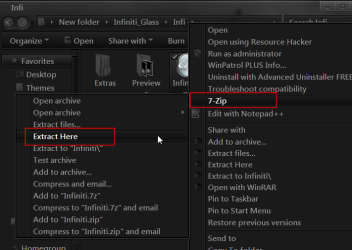
You will need to download and install 7-zip Download
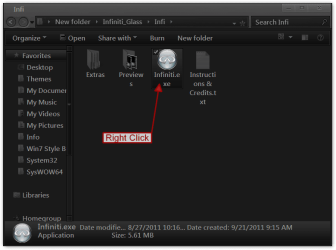
Then right click on the Infiniti.exe go to 7-zip> Extract Here
1a.png1.png

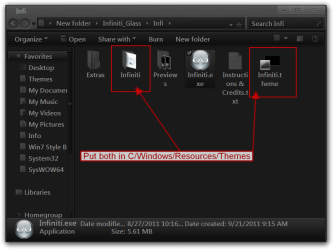
Then put both 1 theme folder and 1 .theme file highlighted in red in C/Windows/Resources/Themes
now you should have just the theme.
3.png


I use Ave's Windows7 Style Builder to customize themes with gimp to edit the images.
Let me know if you need more help.
Jerry
 

My Computer

Computer type
Laptop
Computer Manufacturer/Model Number
Sager NP9170
OS
Win 7 Pro x64 / Win 10 Pro
CPU
Intel(R) Core(TM) i7-3630QM CPU @ 2.40GHz
Motherboard
CLEVO P170EM
Memory
12 GB
Graphics Card(s)
(1) Intel(R) HD Graphics 4000 (2) NVIDIA GeForce GTX 675M
Sound Card
(1) Realtek High Definition Audio (2) Intel(R) Display Aud
Monitor(s) Displays
17.3
Screen Resolution
1920x1080
Hard Drives
(1) Samsung 860 EVO 500GB(OS) (1) Samsung 860 EVO 500GB(Data)
Keyboard
Backlite
Antivirus
MSE, Malwarebytes Pro
Browser
Firefox
Other Info
DESKTOP: Custom-built.
OS: Win 10 Pro x64.
CASE: Rosewill R5.
CPU: Intel I5 4670K CPU @ 3.40GHz.
CPU COOLER: Cool Master Hyper 212 EVO.
MOTHERBOARD: Asus Z87-A.
MEMORY: Kingston HyperX 2x4 GB.
GPU: Nvidia Geforce 650 TI.
PSU: Corsair TX750.
DRIVES: (1) Samsung 840 120 GB SSD (2) Western Digital blue 500 GB 7200 RPM.

My Computer

Computer type
Laptop
Computer Manufacturer/Model Number
Sager NP9170
OS
Win 7 Pro x64 / Win 10 Pro
CPU
Intel(R) Core(TM) i7-3630QM CPU @ 2.40GHz
Motherboard
CLEVO P170EM
Memory
12 GB
Graphics Card(s)
(1) Intel(R) HD Graphics 4000 (2) NVIDIA GeForce GTX 675M
Sound Card
(1) Realtek High Definition Audio (2) Intel(R) Display Aud
Monitor(s) Displays
17.3
Screen Resolution
1920x1080
Hard Drives
(1) Samsung 860 EVO 500GB(OS) (1) Samsung 860 EVO 500GB(Data)
Keyboard
Backlite
Antivirus
MSE, Malwarebytes Pro
Browser
Firefox
Other Info
DESKTOP: Custom-built.
OS: Win 10 Pro x64.
CASE: Rosewill R5.
CPU: Intel I5 4670K CPU @ 3.40GHz.
CPU COOLER: Cool Master Hyper 212 EVO.
MOTHERBOARD: Asus Z87-A.
MEMORY: Kingston HyperX 2x4 GB.
GPU: Nvidia Geforce 650 TI.
PSU: Corsair TX750.
DRIVES: (1) Samsung 840 120 GB SSD (2) Western Digital blue 500 GB 7200 RPM.
Hi Jerry.

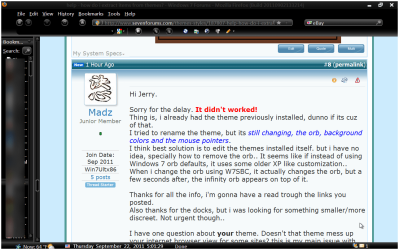
Sorry for the delay. It didn't worked!
Thing is, i already had the theme previously installed, dunno if its cuz of that.
I tried to rename the theme, but its still changing, the orb, background colors and the mouse pointers.
I think best solution is to edit the themes installed itself. but i have no idea, specially how to remove the orb.. It seems like if instead of using W7 orb defaults, it uses some older XP like customization.. When i change the orb using W7SBC, it actually changes the orb, but a few seconds after, the infinity orb appears on top of it.

Thanks for all the info, i'm gonna have a read trough the links you posted.
Also thanks for the docks, but i was looking for something smaller/more discreet. Not urgent though..

I have one question about your theme. Doesn't that theme mess up your internet browser view for some sites? this is my main issue with different background/font colors. when i navigate on the internet due to font color changes i can't read properly most sites.

One more thing, unrelated to the topic, when i'm tryin to change my programs default icon, i can't, because of IconPackager. I used IP to change my default icons, but such icons don't even appear on IP customization tab. when i try to change the default icon directly on the app proprieties, and click 'apply', i get a IP pop-up that doesn't let me change it..:(
unledxiy.png


Sorry for all these questions but i'm tryin' to eliminate all doubts at once.. Thanks again for all your help.


Cumpz!..
 

My Computer

Computer Manufacturer/Model Number
Asus 1201N
OS
Win7Ultx86
CPU
C2D Atom N330
Memory
Kingston(4GB/800MHz+8GB/SDReadyboost)
Graphics Card(s)
Nvidia ION
Monitor(s) Displays
HDMI
Hard Drives
250GB + 2.5TB USB
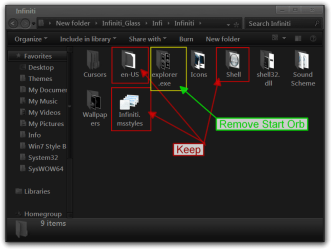
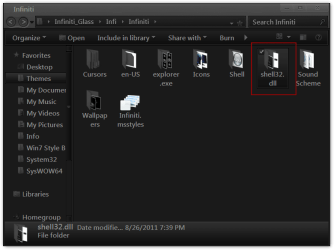
Go to C:\Windows\Resources\Themes\Infiniti and remove explorer.exe folder that should fix the Start Orb the others are up to you but keep the 3 highlighted in red.
Infiniti.png

I use Firefox with a custom theme so it's OK
help - how do i extract items from themes - Windows 7 Forums - Mozilla Firefox (Build 2011090213.png

For the icons after using a IconPackager it's hard to say how many .dll have been changed so it would be hard to go back without a clean install of Windows 7
Try this http://www.sevenforums.com/tutorials/49819-icon-cache-rebuild.html
Jerry
 

My Computer

Computer type
Laptop
Computer Manufacturer/Model Number
Sager NP9170
OS
Win 7 Pro x64 / Win 10 Pro
CPU
Intel(R) Core(TM) i7-3630QM CPU @ 2.40GHz
Motherboard
CLEVO P170EM
Memory
12 GB
Graphics Card(s)
(1) Intel(R) HD Graphics 4000 (2) NVIDIA GeForce GTX 675M
Sound Card
(1) Realtek High Definition Audio (2) Intel(R) Display Aud
Monitor(s) Displays
17.3
Screen Resolution
1920x1080
Hard Drives
(1) Samsung 860 EVO 500GB(OS) (1) Samsung 860 EVO 500GB(Data)
Keyboard
Backlite
Antivirus
MSE, Malwarebytes Pro
Browser
Firefox
Other Info
DESKTOP: Custom-built.
OS: Win 10 Pro x64.
CASE: Rosewill R5.
CPU: Intel I5 4670K CPU @ 3.40GHz.
CPU COOLER: Cool Master Hyper 212 EVO.
MOTHERBOARD: Asus Z87-A.
MEMORY: Kingston HyperX 2x4 GB.
GPU: Nvidia Geforce 650 TI.
PSU: Corsair TX750.
DRIVES: (1) Samsung 840 120 GB SSD (2) Western Digital blue 500 GB 7200 RPM.
Thanx! Gr8 info!
Just help me figure this out, i want to remove "the orb, background colors and the mouse pointers"(and the wallpapers :))
I need to delete cursors folder, explorer.exe and wallpapers, but, to remove the black backgrounds, etc. which folder or files should i delete?
I'm gonna try to rename the shell32.dll folder to see if it does the trick, but somehow i'm not convinced it's gonna do the trick..

I love the base skin on firefox perfected to my needs, plus i use chrome in simultaneous, so think it's best for me to keep the white background.
unledkrc.png


Thanx 4 all u'r help! U've been gr8!
 

My Computer

Computer Manufacturer/Model Number
Asus 1201N
OS
Win7Ultx86
CPU
C2D Atom N330
Memory
Kingston(4GB/800MHz+8GB/SDReadyboost)
Graphics Card(s)
Nvidia ION
Monitor(s) Displays
HDMI
Hard Drives
250GB + 2.5TB USB
I need to delete cursors folder, explorer.exe and wallpapers, but, to remove the black backgrounds, etc. which folder or files should i delete?
Yes delete them. Post a screenshot of the black background so I know which one.
Jerry
 

My Computer

Computer type
Laptop
Computer Manufacturer/Model Number
Sager NP9170
OS
Win 7 Pro x64 / Win 10 Pro
CPU
Intel(R) Core(TM) i7-3630QM CPU @ 2.40GHz
Motherboard
CLEVO P170EM
Memory
12 GB
Graphics Card(s)
(1) Intel(R) HD Graphics 4000 (2) NVIDIA GeForce GTX 675M
Sound Card
(1) Realtek High Definition Audio (2) Intel(R) Display Aud
Monitor(s) Displays
17.3
Screen Resolution
1920x1080
Hard Drives
(1) Samsung 860 EVO 500GB(OS) (1) Samsung 860 EVO 500GB(Data)
Keyboard
Backlite
Antivirus
MSE, Malwarebytes Pro
Browser
Firefox
Other Info
DESKTOP: Custom-built.
OS: Win 10 Pro x64.
CASE: Rosewill R5.
CPU: Intel I5 4670K CPU @ 3.40GHz.
CPU COOLER: Cool Master Hyper 212 EVO.
MOTHERBOARD: Asus Z87-A.
MEMORY: Kingston HyperX 2x4 GB.
GPU: Nvidia Geforce 650 TI.
PSU: Corsair TX750.
DRIVES: (1) Samsung 840 120 GB SSD (2) Western Digital blue 500 GB 7200 RPM.
Never mind the background! It's working gr8 on the browsers now! I'm gonna test drive it for a while and get back to you if either everything is gr8 or i have any other doubts.

Only thing i want to remove is the infinity pics in the shell32.dll folder, but i don't know if i merely can delete them... Everything else looks gr8.
unledrns.png


Cumpz!
 

My Computer

Computer Manufacturer/Model Number
Asus 1201N
OS
Win7Ultx86
CPU
C2D Atom N330
Memory
Kingston(4GB/800MHz+8GB/SDReadyboost)
Graphics Card(s)
Nvidia ION
Monitor(s) Displays
HDMI
Hard Drives
250GB + 2.5TB USB
:cool: Let me know if you need more help.
Jerry
 

My Computer

Computer type
Laptop
Computer Manufacturer/Model Number
Sager NP9170
OS
Win 7 Pro x64 / Win 10 Pro
CPU
Intel(R) Core(TM) i7-3630QM CPU @ 2.40GHz
Motherboard
CLEVO P170EM
Memory
12 GB
Graphics Card(s)
(1) Intel(R) HD Graphics 4000 (2) NVIDIA GeForce GTX 675M
Sound Card
(1) Realtek High Definition Audio (2) Intel(R) Display Aud
Monitor(s) Displays
17.3
Screen Resolution
1920x1080
Hard Drives
(1) Samsung 860 EVO 500GB(OS) (1) Samsung 860 EVO 500GB(Data)
Keyboard
Backlite
Antivirus
MSE, Malwarebytes Pro
Browser
Firefox
Other Info
DESKTOP: Custom-built.
OS: Win 10 Pro x64.
CASE: Rosewill R5.
CPU: Intel I5 4670K CPU @ 3.40GHz.
CPU COOLER: Cool Master Hyper 212 EVO.
MOTHERBOARD: Asus Z87-A.
MEMORY: Kingston HyperX 2x4 GB.
GPU: Nvidia Geforce 650 TI.
PSU: Corsair TX750.
DRIVES: (1) Samsung 840 120 GB SSD (2) Western Digital blue 500 GB 7200 RPM.
I spoke too soon..:confused:
I'm still having problems with my backgrounds/fonts colors.. Notice the light gray default font color. Can you solve problems like these without changing the font color?
The main issue is that for me to use black fonts in these apps, i need to have my background to white, otherwise it won't make sense..


Thanx again!
 
Last edited:

My Computer

Computer Manufacturer/Model Number
Asus 1201N
OS
Win7Ultx86
CPU
C2D Atom N330
Memory
Kingston(4GB/800MHz+8GB/SDReadyboost)
Graphics Card(s)
Nvidia ION
Monitor(s) Displays
HDMI
Hard Drives
250GB + 2.5TB USB
with refrence to you wanting to stop the cursor changing ,if you type "mouse pointer " in the start search then select change how the mouse pointer looks, then check the box or uncheck the box that says "allow themes to change ....."
2011-09-23_1011.png
 

My Computer

Computer Manufacturer/Model Number
Hewlett packard/p6512uk
OS
Microsoft Windows 7 Home Premium 64-bit 7600
CPU
IIx4 amd athelon 635 processor
Motherboard
FOXCONN 2AA9
Memory
2x2gb
Graphics Card(s)
ati radeon HD 5450
Sound Card
(1) Realtek High Definition Audio (2) AMD High Definition
Monitor(s) Displays
samsung lcd tv 32"
Screen Resolution
1360x 768
Hard Drives
(1) WDC WD10 01FAES-60Z2A0 SATA Disk Device (2) Maxtor OneTouch USB Device (3) ST310003 33AS USB Device (4) WD My Book 1111 USB Device
PSU
?
Cooling
air!
Keyboard
wireless hp
Mouse
wireless Hp,optical
Internet Speed
1.10mb/s
Antivirus
MSE
Browser
Firefox
Thanx 4 the useful info booh, but that issue was already resolved.

In the spirit of moving forward, the current issues in hand are background and font colors affecting other apps, and not having a decent icon soft to manipulate my system icons.
I must admit i still didn't get the time to read all links provided by Bongo, but any additional info provided is appreciated.

Thanx!
Cumpz!
 

My Computer

Computer Manufacturer/Model Number
Asus 1201N
OS
Win7Ultx86
CPU
C2D Atom N330
Memory
Kingston(4GB/800MHz+8GB/SDReadyboost)
Graphics Card(s)
Nvidia ION
Monitor(s) Displays
HDMI
Hard Drives
250GB + 2.5TB USB
I spoke too soon..:confused:
I'm still having problems with my backgrounds/fonts colors.. Notice the light gray default font color. Can you solve problems like these without changing the font color?
The main issue is that for me to use black fonts in these apps, i need to have my background to white, otherwise it won't make sense..


Thanx again!
Most likely it is a browser issue not the theme.
Are you using BlackGlassEnhanced.exe with this theme?
:warn::note: You may want to remove the one screen shot with joana's e-mail address showing.
Jerry
 

My Computer

Computer type
Laptop
Computer Manufacturer/Model Number
Sager NP9170
OS
Win 7 Pro x64 / Win 10 Pro
CPU
Intel(R) Core(TM) i7-3630QM CPU @ 2.40GHz
Motherboard
CLEVO P170EM
Memory
12 GB
Graphics Card(s)
(1) Intel(R) HD Graphics 4000 (2) NVIDIA GeForce GTX 675M
Sound Card
(1) Realtek High Definition Audio (2) Intel(R) Display Aud
Monitor(s) Displays
17.3
Screen Resolution
1920x1080
Hard Drives
(1) Samsung 860 EVO 500GB(OS) (1) Samsung 860 EVO 500GB(Data)
Keyboard
Backlite
Antivirus
MSE, Malwarebytes Pro
Browser
Firefox
Other Info
DESKTOP: Custom-built.
OS: Win 10 Pro x64.
CASE: Rosewill R5.
CPU: Intel I5 4670K CPU @ 3.40GHz.
CPU COOLER: Cool Master Hyper 212 EVO.
MOTHERBOARD: Asus Z87-A.
MEMORY: Kingston HyperX 2x4 GB.
GPU: Nvidia Geforce 650 TI.
PSU: Corsair TX750.
DRIVES: (1) Samsung 840 120 GB SSD (2) Western Digital blue 500 GB 7200 RPM.
Only thing i want to remove is the infinity pics in the shell32.dll folder, but i don't know if i merely can delete them... Everything else looks gr8.
unledrns.png


Cumpz!

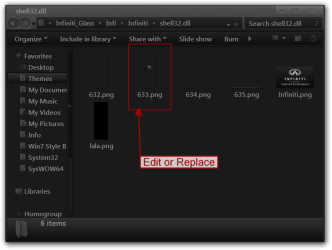
Go to C:\Windows\Resources\Themes\Infiniti\shell32.dll And edit or replace 633.png I have already edited that .png and put it in the .rar if you would like to use it.
Jerry
Infiniti.pngshell32.dll.png
 

Attachments

My Computer

Computer type
Laptop
Computer Manufacturer/Model Number
Sager NP9170
OS
Win 7 Pro x64 / Win 10 Pro
CPU
Intel(R) Core(TM) i7-3630QM CPU @ 2.40GHz
Motherboard
CLEVO P170EM
Memory
12 GB
Graphics Card(s)
(1) Intel(R) HD Graphics 4000 (2) NVIDIA GeForce GTX 675M
Sound Card
(1) Realtek High Definition Audio (2) Intel(R) Display Aud
Monitor(s) Displays
17.3
Screen Resolution
1920x1080
Hard Drives
(1) Samsung 860 EVO 500GB(OS) (1) Samsung 860 EVO 500GB(Data)
Keyboard
Backlite
Antivirus
MSE, Malwarebytes Pro
Browser
Firefox
Other Info
DESKTOP: Custom-built.
OS: Win 10 Pro x64.
CASE: Rosewill R5.
CPU: Intel I5 4670K CPU @ 3.40GHz.
CPU COOLER: Cool Master Hyper 212 EVO.
MOTHERBOARD: Asus Z87-A.
MEMORY: Kingston HyperX 2x4 GB.
GPU: Nvidia Geforce 650 TI.
PSU: Corsair TX750.
DRIVES: (1) Samsung 840 120 GB SSD (2) Western Digital blue 500 GB 7200 RPM.
Thanx 4 the tip, didn't noticed the email..:confused:
Not using BGE. The problem is not restricted to browser, actually i felt more difference in WinLiveMsn (like it was showing in the deleted PrtSc), but all other apps that use blank background, it's a problem, cuz the font appears in light gray(hard to read). Only solution i see viable is blank background, unless you have a tip for me.

Thanx!
I'll be out for a few hours, but will reply ASAP.
 

My Computer

Computer Manufacturer/Model Number
Asus 1201N
OS
Win7Ultx86
CPU
C2D Atom N330
Memory
Kingston(4GB/800MHz+8GB/SDReadyboost)
Graphics Card(s)
Nvidia ION
Monitor(s) Displays
HDMI
Hard Drives
250GB + 2.5TB USB
Thanx 4 the tip, didn't noticed the email..:confused:
Not using BGE. The problem is not restricted to browser, actually i felt more difference in WinLiveMsn (like it was showing in the deleted PrtSc), but all other apps that use blank background, it's a problem, cuz the font appears in light gray(hard to read). Only solution i see viable is blank background, unless you have a tip for me.

Thanx!
I'll be out for a few hours, but will reply ASAP.
I did not use WinLiveMsn So if you could give me some examples of the other apps that I could download and test let me know.
Jerry
 

My Computer

Computer type
Laptop
Computer Manufacturer/Model Number
Sager NP9170
OS
Win 7 Pro x64 / Win 10 Pro
CPU
Intel(R) Core(TM) i7-3630QM CPU @ 2.40GHz
Motherboard
CLEVO P170EM
Memory
12 GB
Graphics Card(s)
(1) Intel(R) HD Graphics 4000 (2) NVIDIA GeForce GTX 675M
Sound Card
(1) Realtek High Definition Audio (2) Intel(R) Display Aud
Monitor(s) Displays
17.3
Screen Resolution
1920x1080
Hard Drives
(1) Samsung 860 EVO 500GB(OS) (1) Samsung 860 EVO 500GB(Data)
Keyboard
Backlite
Antivirus
MSE, Malwarebytes Pro
Browser
Firefox
Other Info
DESKTOP: Custom-built.
OS: Win 10 Pro x64.
CASE: Rosewill R5.
CPU: Intel I5 4670K CPU @ 3.40GHz.
CPU COOLER: Cool Master Hyper 212 EVO.
MOTHERBOARD: Asus Z87-A.
MEMORY: Kingston HyperX 2x4 GB.
GPU: Nvidia Geforce 650 TI.
PSU: Corsair TX750.
DRIVES: (1) Samsung 840 120 GB SSD (2) Western Digital blue 500 GB 7200 RPM.
Back
Top