
Help in changing branding logo

Ayoosh

New member
Member
Local time
6:14 AM
Messages
21
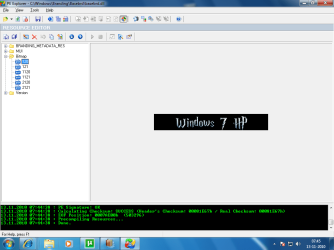
hey guyz i am a gr8 HP fan and i decided to create harry potter version of my w7 . i replaced the bitmaps in basebrd.dll but the result is strange.. where the screen shot can u tell where i m lacking

but infact the image doesnt show itslef bit wraps itself in the windows 7 ultimate logo
 

Attachments
  • Untitled.png
    Untitled.png
    33.9 KB · Views: 66

My Computer

Computer Manufacturer/Model Number
Myself
OS
Windows 7/ Windows XP/ Mac OSX Snow leopard
CPU
Core i7 950
Motherboard
Gigabyte X58
Memory
4 gb
Graphics Card(s)
Sapphire ATI Radeon 4350 HD
Im going to take a shot at the dark.

Something tells me you extracted the images you wanted to edit. You opened up your image editor and then copied and pasted your Harry Potter graphic on top of that.

Thats fine with a non-alpha bitmap. However most win7 bitmaps are ALPHA bitmaps! When you use alpha bitmaps, you gotta also edit the apha layer (google it for more info).

The best thing to do is create a transparent png with your hp graphic. Then use that 32 bit png converter app to convert it to an alpha bitmap.

Trust me, editing alpha layers is not easy. Its soooo much easier to simply create a png then convert it to an alpha bitmap.

Start orbs images are the same way.

Hope this helps.
 

My Computer

OS
Windows 7 Ultimate x86
CPU
amd64

My Computer

Computer type
PC/Desktop
Computer Manufacturer/Model Number
Self Assembled
OS
Microsoft Windows 10 Pro Insider Preview 64-bit
CPU
Intel(R) Core(TM) i3-4130 CPU @ 3.40GHz
Motherboard
Gigabyte Technology Co., Ltd. B85M-D3H
Memory
Corsair Vengence 4GB x2 (8.00GB Dual-Channel DDR3 @ 798MHz)
Graphics Card(s)
2047MB GeForce GTS 450 (ZOTAC International)
Sound Card
Onboard (Realtek High Definition Audio)
Monitor(s) Displays
LG Flatron E2040T
Screen Resolution
1600x900
Hard Drives
Western Digital 1 TB
Seagate 500 GB
PSU
Corsair VS550
Case
Cooler Master K380
Cooling
Cooler Master Seidon 120V Plus
Keyboard
Logitech MK260r
Mouse
Logitech MK260r
Internet Speed
PMPL Broadband
Antivirus
Windows Defender + MBAM
Browser
Firefox
Other Info
Dell Studio 15" Laptop
Im going to take a shot at the dark.

Something tells me you extracted the images you wanted to edit. You opened up your image editor and then copied and pasted your Harry Potter graphic on top of that.

Thats fine with a non-alpha bitmap. However most win7 bitmaps are ALPHA bitmaps! When you use alpha bitmaps, you gotta also edit the apha layer (google it for more info).

The best thing to do is create a transparent png with your hp graphic. Then use that 32 bit png converter app to convert it to an alpha bitmap.

Trust me, editing alpha layers is not easy. Its soooo much easier to simply create a png then convert it to an alpha bitmap.

Start orbs images are the same way.

Hope this helps.

thanx dude , u helped me... i got i t
as fasr as creating aplha bitmaps, photoshop makes a life easier . i got aplpha channels in jst two clicks. btw, heats off to u
 

My Computer

Computer Manufacturer/Model Number
Myself
OS
Windows 7/ Windows XP/ Mac OSX Snow leopard
CPU
Core i7 950
Motherboard
Gigabyte X58
Memory
4 gb
Graphics Card(s)
Sapphire ATI Radeon 4350 HD
Back
Top