
Help, Installed Win7 on Recovery Partition and Primary, Crashes Alot

TJGOA

New member
Local time
2:31 PM
Messages
93
I accidently installed win 7 ultimate on recovery partition 15gb and it is marked as Healthy (System, Active, Primary Partition). I also Have win 7 installed on the larger partition 1tb and it is marked as Healthy (Boot, Page File, Crash Dump, Primary Partition). I think I installed win 7 on recovery first. I am having frequent BSOD where the screen freezes with horizontal lines. (I won't bother uploading crash dump data cause that leads no where. I am on dell inspirion one 2305 and I believe it might have something to do with a loose SATA cable.) In any case I would like to mark the larger partition as the system and format the recovery. Could this maybe solve the crashing problem?
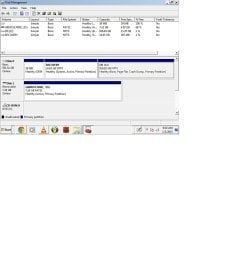
Untitled.jpg
 
Last edited:

My Computer My Computer

At a glance

Windows 7 Home Premium 64-bit SP16.00GB Dual-Channel DDR3 @ 666MHz (9-9-9-24)2 gigNSPIRON ONE (1280x768@60Hz) ATI Mobility Rade...
Computer type
PC/Desktop
Computer Manufacturer/Model Number
custom build
OS
Windows 7 Home Premium 64-bit SP1
CPU
6.00GB Dual-Channel DDR3 @ 666MHz (9-9-9-24)
Motherboard
Dell Inc. 0DPRF9 (CPU 1)
Memory
2 gig
Graphics Card(s)
NSPIRON ONE (1280x768@60Hz) ATI Mobility Radeon HD 4200 (Del
Hard Drives
System 500gb
Primary 500GB
I accidently installed win 7 ultimate on recovery partition 15gb and it is marked as Healthy (System, Active, Primary Partition). I also Have win 7 installed on the larger partition 1tb and it is marked as Healthy (Boot, Page File, Crash Dump, Primary Partition). I think I installed win 7 on recovery first. I am having frequent BSOD where the screen freezes with horizontal lines. (I won't bother uploading crash dump data cause that leads no where. I am on dell inspirion one 2305 and I believe it might have something to do with a loose SATA cable.) In any case I would like to mark the larger partition as the system and format the recovery. Could this maybe solve the crashing problem?

View attachment 299968

Hi TJGOA,

Have you tried booting the system with the C: drive and check if you can format the system using disk management.

You could also boot the system using a disk and then format the recovery partition:

http://www.sevenforums.com/tutorials/682-command-prompt-startup.html

http://www.sevenforums.com/tutorials/2668-partition-volume-delete.html

And best would be if you have the data backup then clean the complete disk and clean install windows now, as recovery partition is already corrupt now and would be of no use.

http://www.sevenforums.com/tutorials/52129-disk-clean-clean-all-diskpart-command.html

http://www.sevenforums.com/tutorials/1649-clean-install-windows-7-a.html

Kindly update your system specs here by following this.Keep us posted with the results so we can advise you further.
 

My Computer My Computer

At a glance

Winndows 7 32 bit
Computer type
PC/Desktop
OS
Winndows 7 32 bit
How did you install win7 on the 15GB recovery partition? Normally that partition has about 14GB of data (used to recover the C stuff). In the small amount of free space it's impossible to install win7.
 

My Computer My Computer

At a glance

Microsoft Windows 7 Home Premium 64-bits 7601...Intel(R) Core(TM) i3 CPU M 370 @ 2.40GHz4,00 GBATI Mobility Radeon HD 5400 Series
Computer type
Laptop
Computer Manufacturer/Model Number
ACER ASPIRE 5742G
OS
Microsoft Windows 7 Home Premium 64-bits 7601 Multiprocessor Free Service Pack 1
CPU
Intel(R) Core(TM) i3 CPU M 370 @ 2.40GHz
Motherboard
Acer Aspire 5742G
Memory
4,00 GB
Graphics Card(s)
ATI Mobility Radeon HD 5400 Series
Sound Card
(1) AMD High Definition Audio Device (2) Realtek High Defi
Screen Resolution
1366 x 768 x 32 bits (4294967296 colors) @ 60 Hz
Hard Drives
WDC WD5000BEVT-22ZAT0
How did you install win7 on the 15GB recovery partition? Normally that partition has about 14GB of data (used to recover the C stuff). In the small amount of free space it's impossible to install win7.

Hi Kaktussoft,

I believe OP must have format the recovery partition instead of the OS one and then reinstalled OS on the wrong partition.

If that would be the case I doubt there is a way to restore the recovery partition.
 

My Computer My Computer

At a glance

Winndows 7 32 bit
Computer type
PC/Desktop
OS
Winndows 7 32 bit
Back
Top