
Unrealmaster287
Banned
- Local time
- 1:20 AM
- Messages
- 94
Hey,
Im having trouble getting soft 7 v2 theme to fully work on my machine.
I put the soft 7 folder in my C:\Windows\Resources\Themes and i put the soft 7 2.0 and soft7 2.0 (top) theme files as well.
and the theme works, hover when i try to install the explorerframe.dll i run into trouble
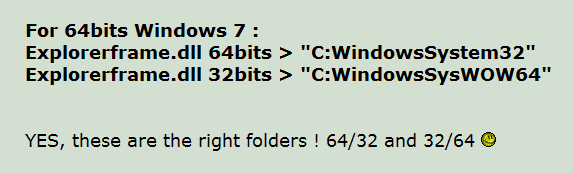
I am running windows 7 ultimate x64 SP1 and there are 2 folders from what i understand that contain the explorerframe that has to be replaced:
c:\windows\system32
c:\windows\sysWOW64
and soft7 provides a dll for 64 and 32, so do i place the:
i have tried to place the 64 dll in the, c:\windows\system32 and the 32 dll in c:\windows\sysWOW64 but no luck
Thanks in advance
Im having trouble getting soft 7 v2 theme to fully work on my machine.
I put the soft 7 folder in my C:\Windows\Resources\Themes and i put the soft 7 2.0 and soft7 2.0 (top) theme files as well.
and the theme works, hover when i try to install the explorerframe.dll i run into trouble
I am running windows 7 ultimate x64 SP1 and there are 2 folders from what i understand that contain the explorerframe that has to be replaced:
c:\windows\system32
c:\windows\sysWOW64
and soft7 provides a dll for 64 and 32, so do i place the:
- explorerframe.dll x64 in the c:\windows\sysWOW64
- explorerframe.dll x32 in the c:\windows\system32
i have tried to place the 64 dll in the, c:\windows\system32 and the 32 dll in c:\windows\sysWOW64 but no luck
Thanks in advance
My Computer
- Computer Manufacturer/Model Number
- Dell Studio XPS 16
- OS
- Windows 7 Ultimate x64
- CPU
- Intel(R) Core(TM)2 Duo CPU T9600 @ 2.80 GHz 6MB cache
- Memory
- 6 GB DDR3
- Graphics Card(s)
- ATI Mobility Radeon HD 4670
- Monitor(s) Displays
- 1
- Screen Resolution
- 1920x1080
- Cooling
- NZXT Cryo LX
- Mouse
- Logitech G9X
- Internet Speed
- 512 Kbps


 good to hear you found the solution the dpi settings can make a big difference when making a custom theme some theme makers only do the 100%