
Help Installing Windows7 and merging two partitions

patmos

New member
Member
Local time
12:26 AM
Messages
53
Location
Mauritius
I need help before installing new Windows7. My present configuration is Drive D: WinXP (Home office) 59 GB for general use
Drive F: WinXP (Home Studio) 40 GB for music
Drive C: Win7 RC - have been testing it since RC launch.
Now I want to install a new win7 32-bit . I intend to have more space for it. I plan to merge Drives C and F, format and install win7 on it.
secondly convert Home Office to Home Studio and shrink Drive D to 40GB.
My question is how to do it. My experience is with Win XP. If it were WinXP,I would boot from CD and delete partition / create partition. Is it same with win7. Can I start this way.
 

My Computer

Computer Manufacturer/Model Number
1.Custom PC 2.Acer laptop
OS
1.Windows7 32bit 2. Win7 64 bit
CPU
INTEL Core 2 Quad Q6600 2.4Ghz
Motherboard
GIGABYTE GA-EP45-DS3R
Memory
RAM=2X2GB DDR2 667MHz kingston
Graphics Card(s)
GIGABYTE Nvidia GEFORCE 9500GT 512MB (Twin DVI)
Sound Card
Realtek on Board + M-Audio delta 1010
Monitor(s) Displays
ViewSonic VA2226w
Screen Resolution
1680x1050
Hard Drives
Hitachi 160 GB
Seagate 500 GB
Keyboard
Logitech
Mouse
Logitech
Internet Speed
2048 MB
Other Info
Technisat Skystar 2 DVB PCI driver 4.5.1
I need help before installing new Windows7. My present configuration is Drive D: WinXP (Home office) 59 GB for general use
Drive F: WinXP (Home Studio) 40 GB for music
Drive C: Win7 RC - have been testing it since RC launch.
Now I want to install a new win7 32-bit . I intend to have more space for it. I plan to merge Drives C and F, format and install win7 on it.
secondly convert Home Office to Home Studio and shrink Drive D to 40GB.
My question is how to do it. My experience is with Win XP. If it were WinXP,I would boot from CD and delete partition / create partition. Is it same with win7. Can I start this way.

Please fill in your specs, this will allow us to understand your hardware so we can give better answers.

For all the information use this free program:
SIW - System Information for Windows

If you can get a snip or screen shot of Disk Management it will let us see what your trying to do.
 

My Computer

Computer type
PC/Desktop
Computer Manufacturer/Model Number
76~2.0
OS
Windows 7 Ult x64 - SP1/ Windows 8 Pro x64
CPU
Intel Core i5-3570K 4.6GHz
Motherboard
Gigabyte GA-Z77X UD3H, f18
Memory
8GB (2X4GB) DDR3 1600 Corsair Vengeance CL8 1.5v
Graphics Card(s)
Sapphire HD 7770 Vapor-X OC 1GB DDR5
Sound Card
Onboard VIA VT2021
Monitor(s) Displays
22" LCD Dell
Screen Resolution
1680x1050
Hard Drives
Samsung 840Pro 128GB SSD,
Seagate Barracuda 500GB SATA2 7200rpm 32MB cache, Seagate Barracuda 1TB SATA2 7200rpm 32MB cache,
PSU
Corsair HX650W
Case
Cooler Master Storm Scout
Cooling
Corsair H80 2x12cm Noctua NF P12 , 2x14cm case fans
Keyboard
Logitech Wave
Mouse
CM Sentinel
Internet Speed
Dismal
Antivirus
Avast
Browser
Opera Next
Other Info
Haswell laptop: HP Envy 17t-j, i7-4700MQ, GeForce 740M 2GB DDR3, 17.3" Full HD 1920x1080, 16GB RAM, Samsung 840 Pro 128GB, 1TB Hitachi 7200 HDD,
Desktop: eSATA ports,
External eSATA Seagate 500GB SATA2 7200rpm,
External WD USB 500GB
Thank you for reply. I've installed SIW but do not know what you need to know from it.My PC is Win XP/windows7 32bit SP2 RAM=4GB DDR2 667MHz kingston ,INTEL Core 2 Quad Q6600 2.4Ghz
GIGABYTE GA-EP45-DS3R
GIGABYTE Nvidia GEFORCE 9500GT 512MB (Twin DVI)
 

Attachments

  • mypc.jpg
    mypc.jpg
    124.8 KB · Views: 362

My Computer

Computer Manufacturer/Model Number
1.Custom PC 2.Acer laptop
OS
1.Windows7 32bit 2. Win7 64 bit
CPU
INTEL Core 2 Quad Q6600 2.4Ghz
Motherboard
GIGABYTE GA-EP45-DS3R
Memory
RAM=2X2GB DDR2 667MHz kingston
Graphics Card(s)
GIGABYTE Nvidia GEFORCE 9500GT 512MB (Twin DVI)
Sound Card
Realtek on Board + M-Audio delta 1010
Monitor(s) Displays
ViewSonic VA2226w
Screen Resolution
1680x1050
Hard Drives
Hitachi 160 GB
Seagate 500 GB
Keyboard
Logitech
Mouse
Logitech
Internet Speed
2048 MB
Other Info
Technisat Skystar 2 DVB PCI driver 4.5.1
Patmos, please filll in your specs in the "My system Specs" session. You can get to it clicking the link on the left bottom of your posts. It will allow people to see them without having to come back to this post
Has theog answered your doubts? If not, another possibility is to use Gparted to move / format / resize the partitions around. It is a good program for that.
 

My Computer

Computer Manufacturer/Model Number
Wally, Innc.
OS
Windows 7 x64 finally!
CPU
AMD Athlon II X2 240
Motherboard
Biostar TA790GX XE
Memory
OCZ Platinum 4GB DDR2 1066 (will not work past 800MHz)
Graphics Card(s)
MSI R4670-MD1G Radeon HD 4670 1GB 128-bit GDDR3
Sound Card
ATI High Definition Audio Device Realtek ALC888
Monitor(s) Displays
HP w19e
Screen Resolution
1440x900
Hard Drives
Western Digital Caviar Green WD5000AADS 500GB SATA
Western Digital Caviar Blue WD5000AAKS 500GB SATA
PSU
Athena Power Micro ATX 400W
Case
HEC 6T 6T10BB Black MicroATX Mini Tower
Cooling
stock
Keyboard
wired, many keys
Mouse
HP wireless, 2 buttons, 1 wheel
Internet Speed
DSL 2Mb (recently getting 1.65M!)
Thank you for reply. I've installed SIW but do not know what you need to know from it.My PC is Win XP/windows7 32bit SP2 RAM=4GB DDR2 667MHz kingston ,INTEL Core 2 Quad Q6600 2.4Ghz
GIGABYTE GA-EP45-DS3R
GIGABYTE Nvidia GEFORCE 9500GT 512MB (Twin DVI)

At the top tool bar of any page you will see "User CP" click on this, it will bring you to your User Control Panel.
Near the top left side you will see "Edit System Spec", click it
Fill in as much as you can, list all hard drives that you use, IDE or SATA, Size, Internal and external, brand name etc.

Click "Save Changes" at the bottom when you are done.
 

My Computer

Computer type
PC/Desktop
Computer Manufacturer/Model Number
76~2.0
OS
Windows 7 Ult x64 - SP1/ Windows 8 Pro x64
CPU
Intel Core i5-3570K 4.6GHz
Motherboard
Gigabyte GA-Z77X UD3H, f18
Memory
8GB (2X4GB) DDR3 1600 Corsair Vengeance CL8 1.5v
Graphics Card(s)
Sapphire HD 7770 Vapor-X OC 1GB DDR5
Sound Card
Onboard VIA VT2021
Monitor(s) Displays
22" LCD Dell
Screen Resolution
1680x1050
Hard Drives
Samsung 840Pro 128GB SSD,
Seagate Barracuda 500GB SATA2 7200rpm 32MB cache, Seagate Barracuda 1TB SATA2 7200rpm 32MB cache,
PSU
Corsair HX650W
Case
Cooler Master Storm Scout
Cooling
Corsair H80 2x12cm Noctua NF P12 , 2x14cm case fans
Keyboard
Logitech Wave
Mouse
CM Sentinel
Internet Speed
Dismal
Antivirus
Avast
Browser
Opera Next
Other Info
Haswell laptop: HP Envy 17t-j, i7-4700MQ, GeForce 740M 2GB DDR3, 17.3" Full HD 1920x1080, 16GB RAM, Samsung 840 Pro 128GB, 1TB Hitachi 7200 HDD,
Desktop: eSATA ports,
External eSATA Seagate 500GB SATA2 7200rpm,
External WD USB 500GB
cannot find user cp on the toolbar. Here is my screen.All partitions are on my 160GB drive.
Thank you theog. I think I got most of the answers on the tuto links.
one more question. since my first winxp is on drive D, I understand it has the boot.ini. That's why I told I would keep it though I would prefer to keep Home Studio on Drive F. Is it possible to delete the first WinXP and keep the second?
 

Attachments

  • MY SYS.jpg
    MY SYS.jpg
    158.8 KB · Views: 61

My Computer

Computer Manufacturer/Model Number
1.Custom PC 2.Acer laptop
OS
1.Windows7 32bit 2. Win7 64 bit
CPU
INTEL Core 2 Quad Q6600 2.4Ghz
Motherboard
GIGABYTE GA-EP45-DS3R
Memory
RAM=2X2GB DDR2 667MHz kingston
Graphics Card(s)
GIGABYTE Nvidia GEFORCE 9500GT 512MB (Twin DVI)
Sound Card
Realtek on Board + M-Audio delta 1010
Monitor(s) Displays
ViewSonic VA2226w
Screen Resolution
1680x1050
Hard Drives
Hitachi 160 GB
Seagate 500 GB
Keyboard
Logitech
Mouse
Logitech
Internet Speed
2048 MB
Other Info
Technisat Skystar 2 DVB PCI driver 4.5.1
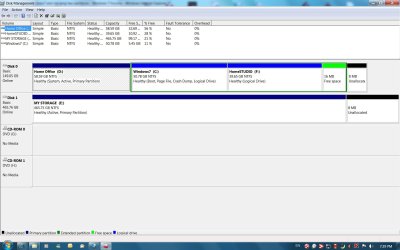
cannot find user cp on the toolbar. Here is my screen.All partitions are on my 160GB drive.
Thank you theog. I think I got most of the answers on the tuto links.
one more question. since my first winxp is on drive D, I understand it has the boot.ini. That's why I told I would keep it though I would prefer to keep Home Studio on Drive F. Is it possible to delete the first WinXP and keep the second?

The system specs go in the Seven Forums web site, not in SIW.

First, be sure to backup your hard drive in case things don't work like we hope. Keep the backups in a separate physical HD or media.

To move your MBR:
How to Restore the Windows 7 MBR (Master Boot Record)

If your comfortable using Diskpart or Gparted these will do the job for you.

As another option you can try the free program:
Partition Wizard

It will move the partitions and keep the data intact.
 

My Computer

Computer type
PC/Desktop
Computer Manufacturer/Model Number
76~2.0
OS
Windows 7 Ult x64 - SP1/ Windows 8 Pro x64
CPU
Intel Core i5-3570K 4.6GHz
Motherboard
Gigabyte GA-Z77X UD3H, f18
Memory
8GB (2X4GB) DDR3 1600 Corsair Vengeance CL8 1.5v
Graphics Card(s)
Sapphire HD 7770 Vapor-X OC 1GB DDR5
Sound Card
Onboard VIA VT2021
Monitor(s) Displays
22" LCD Dell
Screen Resolution
1680x1050
Hard Drives
Samsung 840Pro 128GB SSD,
Seagate Barracuda 500GB SATA2 7200rpm 32MB cache, Seagate Barracuda 1TB SATA2 7200rpm 32MB cache,
PSU
Corsair HX650W
Case
Cooler Master Storm Scout
Cooling
Corsair H80 2x12cm Noctua NF P12 , 2x14cm case fans
Keyboard
Logitech Wave
Mouse
CM Sentinel
Internet Speed
Dismal
Antivirus
Avast
Browser
Opera Next
Other Info
Haswell laptop: HP Envy 17t-j, i7-4700MQ, GeForce 740M 2GB DDR3, 17.3" Full HD 1920x1080, 16GB RAM, Samsung 840 Pro 128GB, 1TB Hitachi 7200 HDD,
Desktop: eSATA ports,
External eSATA Seagate 500GB SATA2 7200rpm,
External WD USB 500GB
Ok thanks. already updated.
 

My Computer

Computer Manufacturer/Model Number
1.Custom PC 2.Acer laptop
OS
1.Windows7 32bit 2. Win7 64 bit
CPU
INTEL Core 2 Quad Q6600 2.4Ghz
Motherboard
GIGABYTE GA-EP45-DS3R
Memory
RAM=2X2GB DDR2 667MHz kingston
Graphics Card(s)
GIGABYTE Nvidia GEFORCE 9500GT 512MB (Twin DVI)
Sound Card
Realtek on Board + M-Audio delta 1010
Monitor(s) Displays
ViewSonic VA2226w
Screen Resolution
1680x1050
Hard Drives
Hitachi 160 GB
Seagate 500 GB
Keyboard
Logitech
Mouse
Logitech
Internet Speed
2048 MB
Other Info
Technisat Skystar 2 DVB PCI driver 4.5.1
Click on the link in my sig and fill yer specs out.. If you are unable to do this simple thing, how do you expect to follow the suggestions of those trying to assist you?? Im not trying to give you a hard time, I'm just saying.....
 

My Computer

Computer type
PC/Desktop
Computer Manufacturer/Model Number
LENOVO K450 @3.0GHZ
OS
64-bit Windows 8.1 Pro
CPU
Core(TM) i5 CPU 4330 Haswell @ 3.20GHz
Motherboard
LENOVO
Memory
12.00 GB
Graphics Card(s)
Intel(R) HD Graphics
Sound Card
Intel HD integtrated
Monitor(s) Displays
HP 25' ISP Monitor
Screen Resolution
1900/1020
Hard Drives
(1) ST1000DM003-1CH162 (2) Generic STORAGE DEVICE USB Device (3) Generic STORAGE DEVICE USB Device
Internet Speed
100mb down/10mb up
Tews thank you I'm following. see my reply.
 

My Computer

Computer Manufacturer/Model Number
1.Custom PC 2.Acer laptop
OS
1.Windows7 32bit 2. Win7 64 bit
CPU
INTEL Core 2 Quad Q6600 2.4Ghz
Motherboard
GIGABYTE GA-EP45-DS3R
Memory
RAM=2X2GB DDR2 667MHz kingston
Graphics Card(s)
GIGABYTE Nvidia GEFORCE 9500GT 512MB (Twin DVI)
Sound Card
Realtek on Board + M-Audio delta 1010
Monitor(s) Displays
ViewSonic VA2226w
Screen Resolution
1680x1050
Hard Drives
Hitachi 160 GB
Seagate 500 GB
Keyboard
Logitech
Mouse
Logitech
Internet Speed
2048 MB
Other Info
Technisat Skystar 2 DVB PCI driver 4.5.1
Good job. Nice rig
Let us know if you get it to work as you want
 

My Computer

Computer Manufacturer/Model Number
Wally, Innc.
OS
Windows 7 x64 finally!
CPU
AMD Athlon II X2 240
Motherboard
Biostar TA790GX XE
Memory
OCZ Platinum 4GB DDR2 1066 (will not work past 800MHz)
Graphics Card(s)
MSI R4670-MD1G Radeon HD 4670 1GB 128-bit GDDR3
Sound Card
ATI High Definition Audio Device Realtek ALC888
Monitor(s) Displays
HP w19e
Screen Resolution
1440x900
Hard Drives
Western Digital Caviar Green WD5000AADS 500GB SATA
Western Digital Caviar Blue WD5000AAKS 500GB SATA
PSU
Athena Power Micro ATX 400W
Case
HEC 6T 6T10BB Black MicroATX Mini Tower
Cooling
stock
Keyboard
wired, many keys
Mouse
HP wireless, 2 buttons, 1 wheel
Internet Speed
DSL 2Mb (recently getting 1.65M!)
I just want to keep on XP drive for music.
 

My Computer

Computer Manufacturer/Model Number
1.Custom PC 2.Acer laptop
OS
1.Windows7 32bit 2. Win7 64 bit
CPU
INTEL Core 2 Quad Q6600 2.4Ghz
Motherboard
GIGABYTE GA-EP45-DS3R
Memory
RAM=2X2GB DDR2 667MHz kingston
Graphics Card(s)
GIGABYTE Nvidia GEFORCE 9500GT 512MB (Twin DVI)
Sound Card
Realtek on Board + M-Audio delta 1010
Monitor(s) Displays
ViewSonic VA2226w
Screen Resolution
1680x1050
Hard Drives
Hitachi 160 GB
Seagate 500 GB
Keyboard
Logitech
Mouse
Logitech
Internet Speed
2048 MB
Other Info
Technisat Skystar 2 DVB PCI driver 4.5.1
Ok thanks. already updated.

OK, specs look good :)

I edited the previous post with some more information, decide how you want to proceed.

If I understand what you want to do, I would suggest to:
Install your new Win7 32bit OS into the 'Home Office (D)' partition first, let it run for a little while to make sure everything is smooth. This is the best location on your HD for an OS.

You can easily extend the (D) partition later, when you move the others around to get them the way you want.

You can delete (C), expand (D) all the way to (F) and you won't have to touch (F), with Disk Management, Partition Wizard or Gparted, include the 16 MB free space and 8 MB unallocated space at the same time. This will give you a large partition for your new Win7 OS. Your HomeSTUDIO partition can remain as it is.

Either way, let us know how everything goes.
Reply here if you have any questions.
Good luck

Edit:
Installing the new Win7 in your (D) partition will take care of the boot.ini issue.
 
Last edited:

My Computer

Computer type
PC/Desktop
Computer Manufacturer/Model Number
76~2.0
OS
Windows 7 Ult x64 - SP1/ Windows 8 Pro x64
CPU
Intel Core i5-3570K 4.6GHz
Motherboard
Gigabyte GA-Z77X UD3H, f18
Memory
8GB (2X4GB) DDR3 1600 Corsair Vengeance CL8 1.5v
Graphics Card(s)
Sapphire HD 7770 Vapor-X OC 1GB DDR5
Sound Card
Onboard VIA VT2021
Monitor(s) Displays
22" LCD Dell
Screen Resolution
1680x1050
Hard Drives
Samsung 840Pro 128GB SSD,
Seagate Barracuda 500GB SATA2 7200rpm 32MB cache, Seagate Barracuda 1TB SATA2 7200rpm 32MB cache,
PSU
Corsair HX650W
Case
Cooler Master Storm Scout
Cooling
Corsair H80 2x12cm Noctua NF P12 , 2x14cm case fans
Keyboard
Logitech Wave
Mouse
CM Sentinel
Internet Speed
Dismal
Antivirus
Avast
Browser
Opera Next
Other Info
Haswell laptop: HP Envy 17t-j, i7-4700MQ, GeForce 740M 2GB DDR3, 17.3" Full HD 1920x1080, 16GB RAM, Samsung 840 Pro 128GB, 1TB Hitachi 7200 HDD,
Desktop: eSATA ports,
External eSATA Seagate 500GB SATA2 7200rpm,
External WD USB 500GB
I now have winxp with boot.ini on on Home Office.if I install win7 on it Won't this affect dual boot operation? Home studio (F) has the second WinXp on it. If what you suggest is possible it would be nice.
 

My Computer

Computer Manufacturer/Model Number
1.Custom PC 2.Acer laptop
OS
1.Windows7 32bit 2. Win7 64 bit
CPU
INTEL Core 2 Quad Q6600 2.4Ghz
Motherboard
GIGABYTE GA-EP45-DS3R
Memory
RAM=2X2GB DDR2 667MHz kingston
Graphics Card(s)
GIGABYTE Nvidia GEFORCE 9500GT 512MB (Twin DVI)
Sound Card
Realtek on Board + M-Audio delta 1010
Monitor(s) Displays
ViewSonic VA2226w
Screen Resolution
1680x1050
Hard Drives
Hitachi 160 GB
Seagate 500 GB
Keyboard
Logitech
Mouse
Logitech
Internet Speed
2048 MB
Other Info
Technisat Skystar 2 DVB PCI driver 4.5.1
I now have winxp with boot.ini on on Home Office.if I install win7 on it Won't this affect dual boot operation? Home studio (F) has the second WinXp on it. If what you suggest is possible it would be nice.

So you have 2 each winxp and 1 each Win7RC, is that correct?
Triple boot ?
 

My Computer

Computer type
PC/Desktop
Computer Manufacturer/Model Number
76~2.0
OS
Windows 7 Ult x64 - SP1/ Windows 8 Pro x64
CPU
Intel Core i5-3570K 4.6GHz
Motherboard
Gigabyte GA-Z77X UD3H, f18
Memory
8GB (2X4GB) DDR3 1600 Corsair Vengeance CL8 1.5v
Graphics Card(s)
Sapphire HD 7770 Vapor-X OC 1GB DDR5
Sound Card
Onboard VIA VT2021
Monitor(s) Displays
22" LCD Dell
Screen Resolution
1680x1050
Hard Drives
Samsung 840Pro 128GB SSD,
Seagate Barracuda 500GB SATA2 7200rpm 32MB cache, Seagate Barracuda 1TB SATA2 7200rpm 32MB cache,
PSU
Corsair HX650W
Case
Cooler Master Storm Scout
Cooling
Corsair H80 2x12cm Noctua NF P12 , 2x14cm case fans
Keyboard
Logitech Wave
Mouse
CM Sentinel
Internet Speed
Dismal
Antivirus
Avast
Browser
Opera Next
Other Info
Haswell laptop: HP Envy 17t-j, i7-4700MQ, GeForce 740M 2GB DDR3, 17.3" Full HD 1920x1080, 16GB RAM, Samsung 840 Pro 128GB, 1TB Hitachi 7200 HDD,
Desktop: eSATA ports,
External eSATA Seagate 500GB SATA2 7200rpm,
External WD USB 500GB
yes Dave you're correct. Triple boot.
 

My Computer

Computer Manufacturer/Model Number
1.Custom PC 2.Acer laptop
OS
1.Windows7 32bit 2. Win7 64 bit
CPU
INTEL Core 2 Quad Q6600 2.4Ghz
Motherboard
GIGABYTE GA-EP45-DS3R
Memory
RAM=2X2GB DDR2 667MHz kingston
Graphics Card(s)
GIGABYTE Nvidia GEFORCE 9500GT 512MB (Twin DVI)
Sound Card
Realtek on Board + M-Audio delta 1010
Monitor(s) Displays
ViewSonic VA2226w
Screen Resolution
1680x1050
Hard Drives
Hitachi 160 GB
Seagate 500 GB
Keyboard
Logitech
Mouse
Logitech
Internet Speed
2048 MB
Other Info
Technisat Skystar 2 DVB PCI driver 4.5.1
patmos

What do you want your final config to be.
 

My Computer

Computer Manufacturer/Model Number
HP Pavillion dv-7 1005 Tx
OS
Win 8 Release candidate 8400
CPU
[email protected]
Memory
4 gigs
Graphics Card(s)
Nvidia 9600M
Sound Card
HD built-in
Monitor(s) Displays
17" Wxga
Screen Resolution
1440x900
Cooling
none
Internet Speed
45Mb down 5Mb up
yes Dave you're correct. Triple boot.

Yes, you can install the new Win7 in 'Home Office (D)' on top of the old xp with the boot files, Win7 will make the new boot menu.

Be sure to backup everything before you start.

Let us know how it goes,

zigzag3143, here is his current Disk Management

30459d1254757742-help-installing-windows7-merging-two-partitions-mypc.jpg
 

My Computer

Computer type
PC/Desktop
Computer Manufacturer/Model Number
76~2.0
OS
Windows 7 Ult x64 - SP1/ Windows 8 Pro x64
CPU
Intel Core i5-3570K 4.6GHz
Motherboard
Gigabyte GA-Z77X UD3H, f18
Memory
8GB (2X4GB) DDR3 1600 Corsair Vengeance CL8 1.5v
Graphics Card(s)
Sapphire HD 7770 Vapor-X OC 1GB DDR5
Sound Card
Onboard VIA VT2021
Monitor(s) Displays
22" LCD Dell
Screen Resolution
1680x1050
Hard Drives
Samsung 840Pro 128GB SSD,
Seagate Barracuda 500GB SATA2 7200rpm 32MB cache, Seagate Barracuda 1TB SATA2 7200rpm 32MB cache,
PSU
Corsair HX650W
Case
Cooler Master Storm Scout
Cooling
Corsair H80 2x12cm Noctua NF P12 , 2x14cm case fans
Keyboard
Logitech Wave
Mouse
CM Sentinel
Internet Speed
Dismal
Antivirus
Avast
Browser
Opera Next
Other Info
Haswell laptop: HP Envy 17t-j, i7-4700MQ, GeForce 740M 2GB DDR3, 17.3" Full HD 1920x1080, 16GB RAM, Samsung 840 Pro 128GB, 1TB Hitachi 7200 HDD,
Desktop: eSATA ports,
External eSATA Seagate 500GB SATA2 7200rpm,
External WD USB 500GB
looks good to me. just make sure to backup.

ken
 

My Computer

Computer Manufacturer/Model Number
HP Pavillion dv-7 1005 Tx
OS
Win 8 Release candidate 8400
CPU
[email protected]
Memory
4 gigs
Graphics Card(s)
Nvidia 9600M
Sound Card
HD built-in
Monitor(s) Displays
17" Wxga
Screen Resolution
1440x900
Cooling
none
Internet Speed
45Mb down 5Mb up
Back
Top