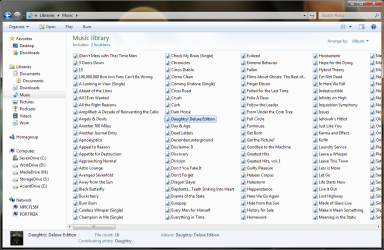
I do not seem to be able to produce a useful library view. I have 3,500 music albums divided between three folders on different hard drives. I would like to be able to use the library function within Windows Explorer to view a consolidated alphabetical text listing of all album folders.
In short, I want to be able to produce a alphabetical list view virtual folder of subfolders in Windows Explorer.
Right-click the library that you are using > Properties > make sure "Optimize this library for:" has "Music" selected. The contents of all the folders attached to this library must also be indexed by Windows Search. If all is well, at the very top right of the library view, "Arrange by:" you want to select "Album" proceeded to adjust the view settings.
My Computer
Computer type
PC/Desktop
Computer Manufacturer/Model Number
Alienware Aurora ALX R4
OS
Windows 10 Pro (x64)
CPU
Intel Core i7-3930K (3.2GHz - 4.5GHz)
Motherboard
Alienware Aurora-R4 x79
Memory
4x Samsung 4GB PC3-12800 DDR3 (16GB 1600MHz)
Graphics Card(s)
Nvidia Geforce GTX 690
Sound Card
SteelSeries Siberia Elite
Monitor(s) Displays
Dell UltraSharp U3011
Screen Resolution
2560x1600
Hard Drives
Samsung 850 Pro 256 GB, Seagate 1TB Desktop Hybrid HDD, 2x Western Digital 4TB Green HDD
PSU
875W Some Dell PSU <.<
Case
Alienware Aurora ALX
Cooling
Custom Liquid Cooling (EK CPU & GPU blocks) dual EK 480RAD
Keyboard
Logitech G710+ Mechanical
Mouse
Logitech G700s
Internet Speed
Verizon Fios (50 mbps average)
Other Info
Server: Intel NUC D54250WYK: i5-4250U, 16GB, 256 GB mSATA, Windows Server 2012 R2
Thank you all for the helpful replies but I find dealing with Windows interfaces since XP to be maddening. Every pane seems to waste screen real estate without providing much information. Thumbnails are a complete joke. I use Mediamonkey to easily manage my music but a powerful, efficient and informative file management system could save me time in many ways.
It seems Microsoft's software is never is good as third party apps. I am moving to Xplorer2.