
You are using an out of date browser. It may not display this or other websites correctly.
You should upgrade or use an alternative browser.
You should upgrade or use an alternative browser.
Solved Help Logging In broken monitor
- Thread starter nick91900
- Start date

Does the laptop have a VGA output like this:My younger brother accidently pulled my laptop off the computer desk about six months ago. I managed to get the laptop to output through the HDMI to a flat screen TV and have been using it like that since.
Last week we went on a vacation and I shut the laptop down before leaving. Now that I'm back home I can't get logged into the laptop because the screen is busted and it won't output to the HDMI anymore.
I'm running Windows 7 Home Premium SP1. There are 6 user accounts on the laptop and I need to get into the one on the bottom left.
Any advice on either how to get it to output through HDMI on the user account screen or any other method to get logged in would be greatly appreciated.
Thanks,
Nick

My Computer
At a glance
Windows 7 Professional x64 Service Pack 1AMD Athlon X4 6456GB DDR3 1066Sapphire Radeon HD 5670 512MB GDDR5
- Computer type
- PC/Desktop
- Computer Manufacturer/Model Number
- HP Pavilion P7-1010
- OS
- Windows 7 Professional x64 Service Pack 1
- CPU
- AMD Athlon X4 645
- Motherboard
- Foxxcon N-Alvorix RS880
- Memory
- 6GB DDR3 1066
- Graphics Card(s)
- Sapphire Radeon HD 5670 512MB GDDR5
- Sound Card
- Realtek Integrated Audio
- Monitor(s) Displays
- HP 2011x
- Screen Resolution
- 1600x900
- Hard Drives
- 1. Crucial M4 128GB SSD
2. 1TB Seagate Barracuda 7200.12 RPM
3. 1TB Western Digital Caviar Green 5400RPM
- PSU
- Seasonic S12 II Bronze 380 Watt
- Case
- HP OEM
- Cooling
- Coolermaster Heatsink, AVC Case Fan
- Keyboard
- HP OEM- Made by Chicony
- Mouse
- HP OEM- Made by Logitech
- Internet Speed
- 20MBit Down/4 Up
- Antivirus
- Microsoft Security Essentials
- Browser
- Internet Explorer 10
Do you have a monitor that has that port? A tv with that port? If you do get out a vga cable and connect your laptop to your tv. Then, power the laptop on and make sure the monitor or tv is set to vga.Yes it does.
It's a Sony VGN-NW240F
My Computer
At a glance
Windows 7 Professional x64 Service Pack 1AMD Athlon X4 6456GB DDR3 1066Sapphire Radeon HD 5670 512MB GDDR5
- Computer type
- PC/Desktop
- Computer Manufacturer/Model Number
- HP Pavilion P7-1010
- OS
- Windows 7 Professional x64 Service Pack 1
- CPU
- AMD Athlon X4 645
- Motherboard
- Foxxcon N-Alvorix RS880
- Memory
- 6GB DDR3 1066
- Graphics Card(s)
- Sapphire Radeon HD 5670 512MB GDDR5
- Sound Card
- Realtek Integrated Audio
- Monitor(s) Displays
- HP 2011x
- Screen Resolution
- 1600x900
- Hard Drives
- 1. Crucial M4 128GB SSD
2. 1TB Seagate Barracuda 7200.12 RPM
3. 1TB Western Digital Caviar Green 5400RPM
- PSU
- Seasonic S12 II Bronze 380 Watt
- Case
- HP OEM
- Cooling
- Coolermaster Heatsink, AVC Case Fan
- Keyboard
- HP OEM- Made by Chicony
- Mouse
- HP OEM- Made by Logitech
- Internet Speed
- 20MBit Down/4 Up
- Antivirus
- Microsoft Security Essentials
- Browser
- Internet Explorer 10
You cannot use another laptop as a monitor. You need a desktop monitor or a tv with a vga port.I have a second laptop that I'm using now that has a VGA port on it. Could I use the monitor on it until I switch the other to HDMI?
Its a Windows Vista Home Premium SP2
My Computer
At a glance
Windows 7 Professional x64 Service Pack 1AMD Athlon X4 6456GB DDR3 1066Sapphire Radeon HD 5670 512MB GDDR5
- Computer type
- PC/Desktop
- Computer Manufacturer/Model Number
- HP Pavilion P7-1010
- OS
- Windows 7 Professional x64 Service Pack 1
- CPU
- AMD Athlon X4 645
- Motherboard
- Foxxcon N-Alvorix RS880
- Memory
- 6GB DDR3 1066
- Graphics Card(s)
- Sapphire Radeon HD 5670 512MB GDDR5
- Sound Card
- Realtek Integrated Audio
- Monitor(s) Displays
- HP 2011x
- Screen Resolution
- 1600x900
- Hard Drives
- 1. Crucial M4 128GB SSD
2. 1TB Seagate Barracuda 7200.12 RPM
3. 1TB Western Digital Caviar Green 5400RPM
- PSU
- Seasonic S12 II Bronze 380 Watt
- Case
- HP OEM
- Cooling
- Coolermaster Heatsink, AVC Case Fan
- Keyboard
- HP OEM- Made by Chicony
- Mouse
- HP OEM- Made by Logitech
- Internet Speed
- 20MBit Down/4 Up
- Antivirus
- Microsoft Security Essentials
- Browser
- Internet Explorer 10

Have you checked that your tv is set to the correct HDMI connction ?
It may be worth checking.
It may be worth checking.
My Computer
At a glance
Windows 7 Ultimate x64AMD turion 64x2 TL-64 2.2GhzSodimm DDR2 4GBATI Radeon 1250 128MB IGP
- Computer Manufacturer/Model Number
- HP Compaq 6715B
- OS
- Windows 7 Ultimate x64
- CPU
- AMD turion 64x2 TL-64 2.2Ghz
- Motherboard
- HC030
- Memory
- Sodimm DDR2 4GB
- Graphics Card(s)
- ATI Radeon 1250 128MB IGP
- Hard Drives
- Fujitsu Siemens 500GB sata 3.0 Gb/s
That should work.I just check all the TV's in the house and none of them have it.
Would this cable work?
My Computer
At a glance
Windows 7 Professional x64 Service Pack 1AMD Athlon X4 6456GB DDR3 1066Sapphire Radeon HD 5670 512MB GDDR5
- Computer type
- PC/Desktop
- Computer Manufacturer/Model Number
- HP Pavilion P7-1010
- OS
- Windows 7 Professional x64 Service Pack 1
- CPU
- AMD Athlon X4 645
- Motherboard
- Foxxcon N-Alvorix RS880
- Memory
- 6GB DDR3 1066
- Graphics Card(s)
- Sapphire Radeon HD 5670 512MB GDDR5
- Sound Card
- Realtek Integrated Audio
- Monitor(s) Displays
- HP 2011x
- Screen Resolution
- 1600x900
- Hard Drives
- 1. Crucial M4 128GB SSD
2. 1TB Seagate Barracuda 7200.12 RPM
3. 1TB Western Digital Caviar Green 5400RPM
- PSU
- Seasonic S12 II Bronze 380 Watt
- Case
- HP OEM
- Cooling
- Coolermaster Heatsink, AVC Case Fan
- Keyboard
- HP OEM- Made by Chicony
- Mouse
- HP OEM- Made by Logitech
- Internet Speed
- 20MBit Down/4 Up
- Antivirus
- Microsoft Security Essentials
- Browser
- Internet Explorer 10
You said that the HDMI wouldn't work. I'm not going to guarantee tht this will work, but it's worth a try.I'm curious as to why the VGA would output while the HDMI won't. Explain please?
My Computer
At a glance
Windows 7 Professional x64 Service Pack 1AMD Athlon X4 6456GB DDR3 1066Sapphire Radeon HD 5670 512MB GDDR5
- Computer type
- PC/Desktop
- Computer Manufacturer/Model Number
- HP Pavilion P7-1010
- OS
- Windows 7 Professional x64 Service Pack 1
- CPU
- AMD Athlon X4 645
- Motherboard
- Foxxcon N-Alvorix RS880
- Memory
- 6GB DDR3 1066
- Graphics Card(s)
- Sapphire Radeon HD 5670 512MB GDDR5
- Sound Card
- Realtek Integrated Audio
- Monitor(s) Displays
- HP 2011x
- Screen Resolution
- 1600x900
- Hard Drives
- 1. Crucial M4 128GB SSD
2. 1TB Seagate Barracuda 7200.12 RPM
3. 1TB Western Digital Caviar Green 5400RPM
- PSU
- Seasonic S12 II Bronze 380 Watt
- Case
- HP OEM
- Cooling
- Coolermaster Heatsink, AVC Case Fan
- Keyboard
- HP OEM- Made by Chicony
- Mouse
- HP OEM- Made by Logitech
- Internet Speed
- 20MBit Down/4 Up
- Antivirus
- Microsoft Security Essentials
- Browser
- Internet Explorer 10
Your Tv is set now set your pc to display from your TV from personlise by right clicking and choose display and set accordingly.
My Computer
At a glance
Windows 7 Ultimate x64AMD turion 64x2 TL-64 2.2GhzSodimm DDR2 4GBATI Radeon 1250 128MB IGP
- Computer Manufacturer/Model Number
- HP Compaq 6715B
- OS
- Windows 7 Ultimate x64
- CPU
- AMD turion 64x2 TL-64 2.2Ghz
- Motherboard
- HC030
- Memory
- Sodimm DDR2 4GB
- Graphics Card(s)
- ATI Radeon 1250 128MB IGP
- Hard Drives
- Fujitsu Siemens 500GB sata 3.0 Gb/s
Have you tried letting the laptop stay on for about 10 minutes and leaving the vga connected?My mom brought a extra monitor from work. If I plug the VGA into the laptop the monitor displays "power saver mode" then goes black. If I plug the VGA into the old laptop it works (the resolution is off a bit but that's not important).
I've tried pushing all the buttons on the monitor and nothing happens when its plugged into the broken laptop but everything works as it should when its plugged into my old laptop
The monitor is a older IBM ThinkVision L170
My Computer
At a glance
Windows 7 Professional x64 Service Pack 1AMD Athlon X4 6456GB DDR3 1066Sapphire Radeon HD 5670 512MB GDDR5
- Computer type
- PC/Desktop
- Computer Manufacturer/Model Number
- HP Pavilion P7-1010
- OS
- Windows 7 Professional x64 Service Pack 1
- CPU
- AMD Athlon X4 645
- Motherboard
- Foxxcon N-Alvorix RS880
- Memory
- 6GB DDR3 1066
- Graphics Card(s)
- Sapphire Radeon HD 5670 512MB GDDR5
- Sound Card
- Realtek Integrated Audio
- Monitor(s) Displays
- HP 2011x
- Screen Resolution
- 1600x900
- Hard Drives
- 1. Crucial M4 128GB SSD
2. 1TB Seagate Barracuda 7200.12 RPM
3. 1TB Western Digital Caviar Green 5400RPM
- PSU
- Seasonic S12 II Bronze 380 Watt
- Case
- HP OEM
- Cooling
- Coolermaster Heatsink, AVC Case Fan
- Keyboard
- HP OEM- Made by Chicony
- Mouse
- HP OEM- Made by Logitech
- Internet Speed
- 20MBit Down/4 Up
- Antivirus
- Microsoft Security Essentials
- Browser
- Internet Explorer 10

I'm running Windows 7 Home Premium SP1. There are 6 user accounts on the laptop and I need to get into the one on the bottom left.
Any advice on either how to get it to output through HDMI on the user account screen or any other method to get logged in would be greatly appreciated.
Does this mean the display works until you try to log into Windows?
Can you see the BIOS / POST screen, etc.?
If so, have you tried starting Windows in Safe Mode?
My Computer
At a glance
Multi-Boot W7_Pro_x64 W8.1_Pro_x64 W10_Pro_x6...AMD Athlon II x4 6206GB GSkill DDR2 800AMD 4670 GPU + AMD 4200 IGP
- Computer type
- PC/Desktop
- Computer Manufacturer/Model Number
- home built
- OS
- Multi-Boot W7_Pro_x64 W8.1_Pro_x64 W10_Pro_x64 +Linux_VMs +Chromium_VM
- CPU
- AMD Athlon II x4 620
- Motherboard
- Gigabyte GA-MA785G-UD3H
- Memory
- 6GB GSkill DDR2 800
- Graphics Card(s)
- AMD 4670 GPU + AMD 4200 IGP
- Sound Card
- on board Realtek ALC889A
- Monitor(s) Displays
- RCA 40" LCD TV, Insignia 32" LCD TV, HP 15" LCD monitor
- Screen Resolution
- 1680 x 1050
- Hard Drives
- OCZ Vertex 3 120GB,
Samsung F3 1TB (3),
Several others - WD, Seagate, Hitachi, ...
- PSU
- Corsair 500 W
- Case
- Rosewill mid tower
- Cooling
- CM 90mm rifle
- Keyboard
- Gyration wireless, Logitech wireless, Dell USB wired
- Mouse
- Gyration wireless, Logitech wireless, V7 USB wired
- Internet Speed
- Spectrum - 100Mbps D / 10Mbps U
- Antivirus
- Avast, MBAM3, EMET, WinPatrol
- Browser
- Pale Moon, Firefox, IE
- Other Info
- 2 multi-boot PC's
Mainly HTPC/Office/Gen purpose (no gaming).
Trendnet USB KVM.
LG DVD burner/Blue Ray Player.
Tray system for removable SATA backup drives.
Not currently OCd, under-volted.
I use Hybrid sleep, rarely re-boot or shutdown.
Hauppauge HD-PVR, Avermedia PCIe TV Tuner, Hauppauge PCI TV Tuner.
His laptop's screen is broken, so he can't see anything. I'm thinking that there is an issue with the graphics card or another major component. The OP's best option is to get a new laptop.I'm running Windows 7 Home Premium SP1. There are 6 user accounts on the laptop and I need to get into the one on the bottom left.
Any advice on either how to get it to output through HDMI on the user account screen or any other method to get logged in would be greatly appreciated.
Does this mean the display works until you try to log into Windows?
Can you see the BIOS / POST screen, etc.?
If so, have you tried starting Windows in Safe Mode?
My Computer
At a glance
Windows 7 Professional x64 Service Pack 1AMD Athlon X4 6456GB DDR3 1066Sapphire Radeon HD 5670 512MB GDDR5
- Computer type
- PC/Desktop
- Computer Manufacturer/Model Number
- HP Pavilion P7-1010
- OS
- Windows 7 Professional x64 Service Pack 1
- CPU
- AMD Athlon X4 645
- Motherboard
- Foxxcon N-Alvorix RS880
- Memory
- 6GB DDR3 1066
- Graphics Card(s)
- Sapphire Radeon HD 5670 512MB GDDR5
- Sound Card
- Realtek Integrated Audio
- Monitor(s) Displays
- HP 2011x
- Screen Resolution
- 1600x900
- Hard Drives
- 1. Crucial M4 128GB SSD
2. 1TB Seagate Barracuda 7200.12 RPM
3. 1TB Western Digital Caviar Green 5400RPM
- PSU
- Seasonic S12 II Bronze 380 Watt
- Case
- HP OEM
- Cooling
- Coolermaster Heatsink, AVC Case Fan
- Keyboard
- HP OEM- Made by Chicony
- Mouse
- HP OEM- Made by Logitech
- Internet Speed
- 20MBit Down/4 Up
- Antivirus
- Microsoft Security Essentials
- Browser
- Internet Explorer 10

Hi there
try this
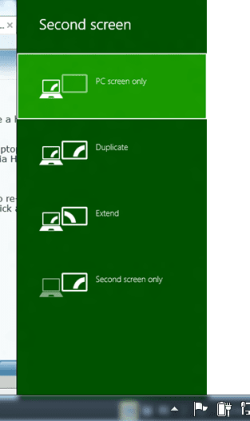
Windows key plus P should flip between the ist and second screen. You might also have a hardware Function key to switch between internal and external monitors.
Note you probably wont be able to see the options via Windows + P button since the laptop monitor is broken but press the down arrow 3 times and hit enter regardless ===> Voila output will appear via HDMI on the TV screen !!!!.
I had a similar problem although not a broken monitor with HDMI device -- and forgot to re-set to internal monitor. Well in an airport lounge I couldn't use the computer until I'd done the little trick above to set back to the primary display -.
Here's a screenshot I'm on W8 but it's the same for W7. Even though you won't see the image on your broken screen scroll down 3 and hit enter --should work regardless.
Cheers
jimbo
try this
Windows key plus P should flip between the ist and second screen. You might also have a hardware Function key to switch between internal and external monitors.
Note you probably wont be able to see the options via Windows + P button since the laptop monitor is broken but press the down arrow 3 times and hit enter regardless ===> Voila output will appear via HDMI on the TV screen !!!!.
I had a similar problem although not a broken monitor with HDMI device -- and forgot to re-set to internal monitor. Well in an airport lounge I couldn't use the computer until I'd done the little trick above to set back to the primary display -.
Here's a screenshot I'm on W8 but it's the same for W7. Even though you won't see the image on your broken screen scroll down 3 and hit enter --should work regardless.
Cheers
jimbo
Attachments
My Computer
At a glance
Linux CENTOS 7 / various Windows OS'es and se...Intel i7 Intel i58GB, 16GBOn Motherboard
- Computer type
- PC/Desktop
- Computer Manufacturer/Model Number
- Custom built, several laptops HP/ASUS
- OS
- Linux CENTOS 7 / various Windows OS'es and servers
- CPU
- Intel i7 Intel i5
- Memory
- 8GB, 16GB
- Graphics Card(s)
- On Motherboard
- Sound Card
- Realtek HD audio
- Monitor(s) Displays
- Apple Cinema display, Samsung LCD
- Screen Resolution
- 1920 X 1080
- Hard Drives
- 4 X 1TB SATA
- Mouse
- Toshiba wireless laser
- Internet Speed
- > 20MB up
Similar threads


- Replies
- 3
- Views
- 2K

- Replies
- 3
- Views
- 1K
