Solved Help me diagnose slow WIRED connection!

pzinser

New member
Local time
4:45 PM
Messages
5
I have a 3mbit download speed from my local ISP (a DSL service). When I'm downloading a file, I usually see speeds of ~300k/sec but as of a few days ago I'm only getting~30k/sec. Called the ISP and they say all is well on their end, it must be a virus or something with my machine.
I ran several scans with different products, which find no problems. I then tried hooking up to another computer I have, but rarely use, and have the SAME slow connections speed, which makes me doubtful it's an issue on my end.

Nevertheless, I followed some instructions for cleaning DNS history, cookies, history, etc. I tried to "rollback" my network adapter driver, but that option was "greyed-out" and unavailable. I then updated my network adapter driver from the manufacturer's website. NO improvement.

When I login into my DSL modem (D-Link 2320), however, it looks as if it "sees" the correct high download/upload speeds that I'm paying for!!

I really don't know what to do/try next?
Any suggestions would be very appreciated.
Thanks.
 

My Computer My Computer

At a glance

Windows 7 Home Premium 64bitIntel Core 2 Quad Q82008gb Corsair DDR2 PC24600ATI HD4350 512mb
Computer Manufacturer/Model Number
Custom build
OS
Windows 7 Home Premium 64bit
CPU
Intel Core 2 Quad Q8200
Motherboard
Gigabyte GA-EP43-UD3L LGA 775
Memory
8gb Corsair DDR2 PC24600
Graphics Card(s)
ATI HD4350 512mb
pzinser:

Go to SpeedGuide.net :: The Broadband Guide

From the Menu Choose: Broadband/Boadband Tools/SG TCP/IP Analyser

This is a great site with a lot of helpful information.

Welcome to SF!
 

My Computer My Computer

At a glance

Windows 7 Home Premium x64AMD Phenom II X6 1600T16GB PC3-10700 (1342MHz)ATI Radeon 5770 HD (x2) CrossFire
Computer Manufacturer/Model Number
OEM - Me
OS
Windows 7 Home Premium x64
CPU
AMD Phenom II X6 1600T
Motherboard
GigaByte GZ-990FXA-UD3
Memory
16GB PC3-10700 (1342MHz)
Graphics Card(s)
ATI Radeon 5770 HD (x2) CrossFire
Sound Card
On-board RealTek chipset
Monitor(s) Displays
3x Hanns-G 1920x1080 Monitors
Screen Resolution
3x Hanns-G 1920x1080 Monitors
Hard Drives
Intel 25-V SSD 40GB: 218 MB/s AT: 0.1ms
Intel X-25M SSD 80GB: 230MB/s AT: 0.1ms
Seagate 750GB: 133 MB/s AT: 13ms (perpendicular storage)
Buffalo HD-PCTU3 1TB External drive
PSU
OCZ Stealth X Stream 750W
Case
Cheap (unknown)
Cooling
Stock
Keyboard
HP USB
Mouse
LogiTech USB
Internet Speed
1.5 Mbps - Slow - At the tail-end of a rural network
Other Info
Printer: Epson Stylus C-84
Scanner: HP 3500C Flatbed
DVD-RW: Plextor
DVD-ROM: Unknown
WEI: 7.4
Thanks for your help.
The results are below.
Any suggestions?
Thanks again.
pz


« SpeedGuide.net TCP Analyzer Results »
Tested on: 11.27.2010 18:10
IP address: 67.211.xx.xxx
Client OS: Windows 7

TCP options string: 020405b40103030201010402
MSS: 1460
MTU: 1500
TCP Window: 65700 (multiple of MSS)
RWIN Scaling: 2 bits (2^2=4)
Unscaled RWIN : 16425
Recommended RWINs: 64240, 128480, 256960, 513920, 1027840
BDP limit (200ms): 2628kbps (329KBytes/s)
BDP limit (500ms): 1051kbps (131KBytes/s)
MTU Discovery: ON
TTL: 52
Timestamps: OFF
SACKs: ON
IP ToS: 00000000 (0)
 

My Computer My Computer

At a glance

Windows 7 Home Premium 64bitIntel Core 2 Quad Q82008gb Corsair DDR2 PC24600ATI HD4350 512mb
Computer Manufacturer/Model Number
Custom build
OS
Windows 7 Home Premium 64bit
CPU
Intel Core 2 Quad Q8200
Motherboard
Gigabyte GA-EP43-UD3L LGA 775
Memory
8gb Corsair DDR2 PC24600
Graphics Card(s)
ATI HD4350 512mb
Thanks for your help.
The results are below.
Any suggestions?
Thanks again.
pz


« SpeedGuide.net TCP Analyzer Results »
Tested on: 11.27.2010 18:10
IP address: 67.211.xx.xxx
Client OS: Windows 7

TCP options string: 020405b40103030201010402
MSS: 1460
MTU: 1500
TCP Window: 65700 (multiple of MSS)
RWIN Scaling: 2 bits (2^2=4)
Unscaled RWIN : 16425
Recommended RWINs: 64240, 128480, 256960, 513920, 1027840
BDP limit (200ms): 2628kbps (329KBytes/s)
BDP limit (500ms): 1051kbps (131KBytes/s)
MTU Discovery: ON
TTL: 52
Timestamps: OFF
SACKs: ON
IP ToS: 00000000 (0)

From the same site download TCP Optimizer. (be sure to get the latest version)
No installation necessary.
If you have a PPoeP ISP then check that box on the main program page.
Set the Slider to to your ISP's rated download speed.
When you are finished a re-boot will be required to complete the changes.

You can then run the TCP/IP Analyser again to see the difference (if any).
Most likely the TCP Window setting won't be a multiple of MSS, so make a note of it, run the Optimiser again and manually change the TCP Window to one of those suggested based on your latency.

If all this sounds confusing, you'll be able to make better sense of it once you have downloaded the optimizer utility.
 

My Computer My Computer

At a glance

Windows 7 Home Premium x64AMD Phenom II X6 1600T16GB PC3-10700 (1342MHz)ATI Radeon 5770 HD (x2) CrossFire
Computer Manufacturer/Model Number
OEM - Me
OS
Windows 7 Home Premium x64
CPU
AMD Phenom II X6 1600T
Motherboard
GigaByte GZ-990FXA-UD3
Memory
16GB PC3-10700 (1342MHz)
Graphics Card(s)
ATI Radeon 5770 HD (x2) CrossFire
Sound Card
On-board RealTek chipset
Monitor(s) Displays
3x Hanns-G 1920x1080 Monitors
Screen Resolution
3x Hanns-G 1920x1080 Monitors
Hard Drives
Intel 25-V SSD 40GB: 218 MB/s AT: 0.1ms
Intel X-25M SSD 80GB: 230MB/s AT: 0.1ms
Seagate 750GB: 133 MB/s AT: 13ms (perpendicular storage)
Buffalo HD-PCTU3 1TB External drive
PSU
OCZ Stealth X Stream 750W
Case
Cheap (unknown)
Cooling
Stock
Keyboard
HP USB
Mouse
LogiTech USB
Internet Speed
1.5 Mbps - Slow - At the tail-end of a rural network
Other Info
Printer: Epson Stylus C-84
Scanner: HP 3500C Flatbed
DVD-RW: Plextor
DVD-ROM: Unknown
WEI: 7.4
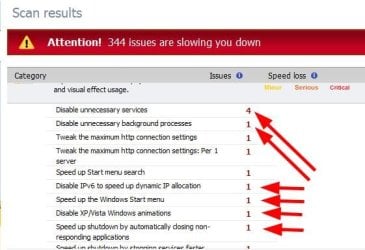
I just looked at SpeedUpMyPC and I don't trust it at all. For instance, this is what it said I should do on my computer:

UniBlue.jpg

It doesn't say what services or background tasks. My system is pretty lean already and I run only the services and processes I want. Allowing it to fix these would probably screw up my system seriously.
 

My Computer My Computer

At a glance

Windows 10 Pro X64Intel Quad Core i7-4770 @ 3.4Ghz16.0GB PC3-12800 DDR3 SDRAM 1600 MHzIntel Integrated HD Graphics
Computer type
PC/Desktop
Computer Manufacturer/Model Number
Lenovo IdeaCenter 450
OS
Windows 10 Pro X64
CPU
Intel Quad Core i7-4770 @ 3.4Ghz
Memory
16.0GB PC3-12800 DDR3 SDRAM 1600 MHz
Graphics Card(s)
Intel Integrated HD Graphics
Sound Card
Realtek HD Audio
Monitor(s) Displays
HP 22" LCD
Screen Resolution
1680 x 1050
Hard Drives
250GB Samsung EVO SATA-3 SSD
2TB Seagate ST2000DM001 SATA-2
1.5TB Seagate ST3150041AS SATA
Keyboard
Dell USB
Mouse
Lenovo USB
Internet Speed
Cable via Road Runner 3MB Upload, 30MB Download
Antivirus
Windows Defender, MBAM Pro, MBAE
Browser
Seamonkey
Other Info
UEFI/GPT
PLDS DVD-RW DH16AERSH
I just looked at SpeedUpMyPC and I don't trust it at all. For instance, this is what it said I should do on my computer:

View attachment 118317

It doesn't say what services or background tasks. My system is pretty lean already and I run only the services and processes I want. Allowing it to fix these would probably screw up my system seriously.

This is UniBlue- right?
I can't remember why, but the name UniBlue leaves a knot in my stomach...
 

My Computer My Computer

At a glance

Windows 7 Home Premium x64AMD Phenom II X6 1600T16GB PC3-10700 (1342MHz)ATI Radeon 5770 HD (x2) CrossFire
Computer Manufacturer/Model Number
OEM - Me
OS
Windows 7 Home Premium x64
CPU
AMD Phenom II X6 1600T
Motherboard
GigaByte GZ-990FXA-UD3
Memory
16GB PC3-10700 (1342MHz)
Graphics Card(s)
ATI Radeon 5770 HD (x2) CrossFire
Sound Card
On-board RealTek chipset
Monitor(s) Displays
3x Hanns-G 1920x1080 Monitors
Screen Resolution
3x Hanns-G 1920x1080 Monitors
Hard Drives
Intel 25-V SSD 40GB: 218 MB/s AT: 0.1ms
Intel X-25M SSD 80GB: 230MB/s AT: 0.1ms
Seagate 750GB: 133 MB/s AT: 13ms (perpendicular storage)
Buffalo HD-PCTU3 1TB External drive
PSU
OCZ Stealth X Stream 750W
Case
Cheap (unknown)
Cooling
Stock
Keyboard
HP USB
Mouse
LogiTech USB
Internet Speed
1.5 Mbps - Slow - At the tail-end of a rural network
Other Info
Printer: Epson Stylus C-84
Scanner: HP 3500C Flatbed
DVD-RW: Plextor
DVD-ROM: Unknown
WEI: 7.4
I've made some changes but not seen any improvement. Is it possible it is SOMETHING on the ISP end, even though they say not?? I've posted some modem diagnostic stuff below that "seems" to indicate it is "seeing" a 6mbit download speed (temporarily bumped up from my usual 3mbit package by the ISP to see if it made a difference, which it does not). Yet ANY computer I connect to the modem only gets d/l speeds of 30-60k.??

Device Info

Board ID: D-1P
Software Version: GE_DSL-2320B_3-06-04-1G00.A2pB021c.d19b
Bootloader (CFE) Version: 1.0.37-6.5

This information reflects the current status of your DSL connection.

Line Rate - Upstream (Kbps): 1360
Line Rate - Downstream (Kbps): 6142
LAN IP Address: 192.168.1.1
Default Gateway:
Primary DNS Server: 192.168.1.1
Secondary DNS Server: 192.168.1.1


br_0_35 Diagnostics

Your modem is capable of testing your DSL connection. The individual tests are listed below. If a test displays a fail status, click "Rerun Diagnostic Tests" at the bottom of this page to make sure the fail status is consistent. If the test continues to fail, click "Help" and follow the troubleshooting procedures.

Test the connection to your local network

Test your ENET Connection: PASS Help
Test your USB Connection: DOWN Help

Test the connection to your DSL service provider
Test ADSL Synchronization: PASS Help
Test ATM OAM F5 segment ping: FAIL Help
Test ATM OAM F5 end-to-end ping: FAIL Help
 

My Computer My Computer

At a glance

Windows 7 Home Premium 64bitIntel Core 2 Quad Q82008gb Corsair DDR2 PC24600ATI HD4350 512mb
Computer Manufacturer/Model Number
Custom build
OS
Windows 7 Home Premium 64bit
CPU
Intel Core 2 Quad Q8200
Motherboard
Gigabyte GA-EP43-UD3L LGA 775
Memory
8gb Corsair DDR2 PC24600
Graphics Card(s)
ATI HD4350 512mb
Have you tired completely turning off everything? Router/Modem, switch, computer etc. Then turning things on one at a time starting with the device closest to the internet and then working your way to your computer. Sometimes a complete shutdown will fix things. -WS
 

My Computer My Computer

At a glance

Windows 7 Enterprise (x64); Windows Server 20...16GB
Computer type
PC/Desktop
Computer Manufacturer/Model Number
Dell OP7010
OS
Windows 7 Enterprise (x64); Windows Server 2008 R2 (x64)
Memory
16GB
Monitor(s) Displays
4 Dell 24" LCD
Screen Resolution
1280x1024
Keyboard
Dell
Mouse
Dell Optical
Internet Speed
40meg
Yes, I've tried several times to no avail. I'm thinking it has to be something in the line or on the ISP end, since I get the same result with 3 different computers (trying one at a time) directly to the dsl modem. Are there any tests I can run that would "prove" the problem is on the ISP end??
 

My Computer My Computer

At a glance

Windows 7 Home Premium 64bitIntel Core 2 Quad Q82008gb Corsair DDR2 PC24600ATI HD4350 512mb
Computer Manufacturer/Model Number
Custom build
OS
Windows 7 Home Premium 64bit
CPU
Intel Core 2 Quad Q8200
Motherboard
Gigabyte GA-EP43-UD3L LGA 775
Memory
8gb Corsair DDR2 PC24600
Graphics Card(s)
ATI HD4350 512mb
Have you checked your download and upload speeds here - Speedtest.net - The Global Broadband Speed Test

This will show what speeds you're getting. I would then have a talk with your ISP provider to see why you're getting less than you're paying for as it does sound like a problem on their end.

My two cents.
 

My Computer My Computer

At a glance

Windows 10 ProIntel Core i7-4770K (3.5Ghz)32 gig Corsair Dominator Platinum (4x8Gig)Sapphire Tri-X R9 Fury
Computer type
PC/Desktop
Computer Manufacturer/Model Number
Custom built by me.
OS
Windows 10 Pro
CPU
Intel Core i7-4770K (3.5Ghz)
Motherboard
Gigabyte G1 Sniper 5 (F10 Bios)
Memory
32 gig Corsair Dominator Platinum (4x8Gig)
Graphics Card(s)
Sapphire Tri-X R9 Fury
Sound Card
Soundblaster ZXR
Monitor(s) Displays
NEC PA242W 24" LCD Monitor
Screen Resolution
1920 x 1200
Hard Drives
Primary - Samsung 850 Pro (512gig), Samsung 840 Pro (256gig), 2TB WD Caviar Black.
PSU
EVGA Supernova 1000 G2
Case
Cooler Master HAF X
Cooling
Corsair H100i with Corsair Air Series SP120 Quiet Fans
Keyboard
Logitech Wireless Wave
Mouse
Logitech Performance MX
Internet Speed
High Speed Cable
Antivirus
Norton Security
Browser
IE11
Other Info
Memory Timings - 1866MHz @ 9-9-9-27-1T @ 1.5 volts
Try this site: Speedtest.net - The Global Broadband Speed Test

Do a bunch of tests. Start with a site that is close to you and do a test every 5 minutes 3 times. Then use a site that is far from you, do a test every 5 minutes 3 times. Then check your results and see if you are getting the bandwidth you are paying for: Speedtest.net - Results

Please note that you could pick a bad site, so if you get bad results from a site over and over try a different site.
 

My Computer My Computer

At a glance

Windows 7 Enterprise (x64); Windows Server 20...16GB
Computer type
PC/Desktop
Computer Manufacturer/Model Number
Dell OP7010
OS
Windows 7 Enterprise (x64); Windows Server 2008 R2 (x64)
Memory
16GB
Monitor(s) Displays
4 Dell 24" LCD
Screen Resolution
1280x1024
Keyboard
Dell
Mouse
Dell Optical
Internet Speed
40meg
I see we both think alike as I just posted that site in the post above yours :)
 

My Computer My Computer

At a glance

Windows 10 ProIntel Core i7-4770K (3.5Ghz)32 gig Corsair Dominator Platinum (4x8Gig)Sapphire Tri-X R9 Fury
Computer type
PC/Desktop
Computer Manufacturer/Model Number
Custom built by me.
OS
Windows 10 Pro
CPU
Intel Core i7-4770K (3.5Ghz)
Motherboard
Gigabyte G1 Sniper 5 (F10 Bios)
Memory
32 gig Corsair Dominator Platinum (4x8Gig)
Graphics Card(s)
Sapphire Tri-X R9 Fury
Sound Card
Soundblaster ZXR
Monitor(s) Displays
NEC PA242W 24" LCD Monitor
Screen Resolution
1920 x 1200
Hard Drives
Primary - Samsung 850 Pro (512gig), Samsung 840 Pro (256gig), 2TB WD Caviar Black.
PSU
EVGA Supernova 1000 G2
Case
Cooler Master HAF X
Cooling
Corsair H100i with Corsair Air Series SP120 Quiet Fans
Keyboard
Logitech Wireless Wave
Mouse
Logitech Performance MX
Internet Speed
High Speed Cable
Antivirus
Norton Security
Browser
IE11
Other Info
Memory Timings - 1866MHz @ 9-9-9-27-1T @ 1.5 volts

My Computer My Computer

At a glance

Windows 7 Enterprise (x64); Windows Server 20...16GB
Computer type
PC/Desktop
Computer Manufacturer/Model Number
Dell OP7010
OS
Windows 7 Enterprise (x64); Windows Server 2008 R2 (x64)
Memory
16GB
Monitor(s) Displays
4 Dell 24" LCD
Screen Resolution
1280x1024
Keyboard
Dell
Mouse
Dell Optical
Internet Speed
40meg
If 3 different computers connected directly to the DSL modem have the same reduced speed then it's an ISP problem. You need to beat on them till they fix it.

Did you use the same Ethernet cable for each test? If so, try a different one.
 

My Computer My Computer

At a glance

Windows 10 Pro X64Intel Quad Core i7-4770 @ 3.4Ghz16.0GB PC3-12800 DDR3 SDRAM 1600 MHzIntel Integrated HD Graphics
Computer type
PC/Desktop
Computer Manufacturer/Model Number
Lenovo IdeaCenter 450
OS
Windows 10 Pro X64
CPU
Intel Quad Core i7-4770 @ 3.4Ghz
Memory
16.0GB PC3-12800 DDR3 SDRAM 1600 MHz
Graphics Card(s)
Intel Integrated HD Graphics
Sound Card
Realtek HD Audio
Monitor(s) Displays
HP 22" LCD
Screen Resolution
1680 x 1050
Hard Drives
250GB Samsung EVO SATA-3 SSD
2TB Seagate ST2000DM001 SATA-2
1.5TB Seagate ST3150041AS SATA
Keyboard
Dell USB
Mouse
Lenovo USB
Internet Speed
Cable via Road Runner 3MB Upload, 30MB Download
Antivirus
Windows Defender, MBAM Pro, MBAE
Browser
Seamonkey
Other Info
UEFI/GPT
PLDS DVD-RW DH16AERSH
I had the same problem with my DSL (Broadband) connection and my three computers. It was so bad, that only one computer could be used at a time. I live in the 'boonies' and finally got DSL 3 yrs ago. I was on dial-up for 6 years :(

Anyway, my ISP said that there were about 400 customers using the same line as me, but they were able to switch me over to a lesser used line ... huh?!! It was showing 4 - 6 kbs, speed picked up to what I'm paying for from there.

Keep calling your ISP!
 

My Computer My Computer

At a glance

Windows 7 Ultimate 32bit SP1Intel(R) Core(TM)2 Quad CPU @ 2.40GHz, 2400 MHz4 GBATI Radeon HD 2600 Pro
Computer type
PC/Desktop
Computer Manufacturer/Model Number
Bruce ... somewhere in his 40's
OS
Windows 7 Ultimate 32bit SP1
CPU
Intel(R) Core(TM)2 Quad CPU @ 2.40GHz, 2400 MHz
Motherboard
INTEL/D975XBX2
Memory
4 GB
Graphics Card(s)
ATI Radeon HD 2600 Pro
Monitor(s) Displays
Samsung SyncMaster 914v
Screen Resolution
1280 x 1024
Hard Drives
2/500GB each ... ST3500630AS ATA Device.
One is not connected
PSU
Rocketfish 700 W
Case
G.Skill Gigabyte Chassis
Keyboard
Standard PS/2 Keyboard
Mouse
Microsoft PS/2 Mouse
Internet Speed
DSL
Antivirus
Avira Internet Security
Browser
IE 11
Other Info
ATI HDMI Audio
I had the same problem with my DSL (Broadband) connection and my three computers. It was so bad, that only one computer could be used at a time. I live in the 'boonies' and finally got DSL 3 yrs ago. I was on dial-up for 6 years :(

Anyway, my ISP said that there were about 400 customers using the same line as me, but they were able to switch me over to a lesser used line ... huh?!! It was showing 4 - 6 kbs, speed picked up to what I'm paying for from there.

Keep calling your ISP!

Good info Jacee, thanks for your help.
 

My Computer My Computer

At a glance

Windows 7 Enterprise (x64); Windows Server 20...16GB
Computer type
PC/Desktop
Computer Manufacturer/Model Number
Dell OP7010
OS
Windows 7 Enterprise (x64); Windows Server 2008 R2 (x64)
Memory
16GB
Monitor(s) Displays
4 Dell 24" LCD
Screen Resolution
1280x1024
Keyboard
Dell
Mouse
Dell Optical
Internet Speed
40meg
Turns out it WAS an issue on the ISP end! Please close this thread, and thanks for everyone's help and suggestions.
 

My Computer My Computer

At a glance

Windows 7 Home Premium 64bitIntel Core 2 Quad Q82008gb Corsair DDR2 PC24600ATI HD4350 512mb
Computer Manufacturer/Model Number
Custom build
OS
Windows 7 Home Premium 64bit
CPU
Intel Core 2 Quad Q8200
Motherboard
Gigabyte GA-EP43-UD3L LGA 775
Memory
8gb Corsair DDR2 PC24600
Graphics Card(s)
ATI HD4350 512mb
ADSL PPOE service should have an MTU of 1492 not 1500.

Your dsl modem should have been configured with a disk and your puter upon initial service install.By you or service tech.????
If you are using a router, your modem should be in bridge mode and your router configured for your service.

W7 has many things going for it when it comes to network auto tuning. Getting your home equipment set right is really the only thing you have to do.
 

My Computer My Computer

At a glance

W7 Ulti/64, XP Pro/32INTEL i7 920 DO, Core2 Duo 6400KINGSTON DDR3 1333MHz, CORSAIR DDR2 800MHzEVGA GTX 260 x2, 8800 GTX
Computer Manufacturer/Model Number
DIY #3, #2
OS
W7 Ulti/64, XP Pro/32
CPU
INTEL i7 920 DO, Core2 Duo 6400
Motherboard
GIGABYTE EX58 UD3R-SLI, EP45-UD3R
Memory
KINGSTON DDR3 1333MHz, CORSAIR DDR2 800MHz
Graphics Card(s)
EVGA GTX 260 x2, 8800 GTX
Sound Card
REALTEK HD onboard, ditto
Monitor(s) Displays
SONY 40" BRAVIA LCD
Screen Resolution
1360 X 768
Hard Drives
OCZ VERTEX/RAID0 -3, Vertex 30GB
PSU
COOLERMASTER 900W, ENERMAX 850W
Case
COOLERMASTER HAF 932 x2
Cooling
stock
Keyboard
MS
Mouse
MS
Internet Speed
ADSL 3MB/768KBs
Other Info
amateur enthusiast
I just looked at SpeedUpMyPC and I don't trust it at all. For instance, this is what it said I should do on my computer:

View attachment 118317

It doesn't say what services or background tasks. My system is pretty lean already and I run only the services and processes I want. Allowing it to fix these would probably screw up my system seriously.
IMO, Stay away from 3rd party tweak software, You can make all same changes manually if that important. Manually will force you to learn what your doing and how to return it if bad.
 

My Computer My Computer

At a glance

W7 Ulti/64, XP Pro/32INTEL i7 920 DO, Core2 Duo 6400KINGSTON DDR3 1333MHz, CORSAIR DDR2 800MHzEVGA GTX 260 x2, 8800 GTX
Computer Manufacturer/Model Number
DIY #3, #2
OS
W7 Ulti/64, XP Pro/32
CPU
INTEL i7 920 DO, Core2 Duo 6400
Motherboard
GIGABYTE EX58 UD3R-SLI, EP45-UD3R
Memory
KINGSTON DDR3 1333MHz, CORSAIR DDR2 800MHz
Graphics Card(s)
EVGA GTX 260 x2, 8800 GTX
Sound Card
REALTEK HD onboard, ditto
Monitor(s) Displays
SONY 40" BRAVIA LCD
Screen Resolution
1360 X 768
Hard Drives
OCZ VERTEX/RAID0 -3, Vertex 30GB
PSU
COOLERMASTER 900W, ENERMAX 850W
Case
COOLERMASTER HAF 932 x2
Cooling
stock
Keyboard
MS
Mouse
MS
Internet Speed
ADSL 3MB/768KBs
Other Info
amateur enthusiast
Turns out it WAS an issue on the ISP end! Please close this thread, and thanks for everyone's help and suggestions.

Happy to hear we were able to help you get it sorted.

Peace :cool:
 

My Computer My Computer

At a glance

Windows 10 ProIntel Core i7-4770K (3.5Ghz)32 gig Corsair Dominator Platinum (4x8Gig)Sapphire Tri-X R9 Fury
Computer type
PC/Desktop
Computer Manufacturer/Model Number
Custom built by me.
OS
Windows 10 Pro
CPU
Intel Core i7-4770K (3.5Ghz)
Motherboard
Gigabyte G1 Sniper 5 (F10 Bios)
Memory
32 gig Corsair Dominator Platinum (4x8Gig)
Graphics Card(s)
Sapphire Tri-X R9 Fury
Sound Card
Soundblaster ZXR
Monitor(s) Displays
NEC PA242W 24" LCD Monitor
Screen Resolution
1920 x 1200
Hard Drives
Primary - Samsung 850 Pro (512gig), Samsung 840 Pro (256gig), 2TB WD Caviar Black.
PSU
EVGA Supernova 1000 G2
Case
Cooler Master HAF X
Cooling
Corsair H100i with Corsair Air Series SP120 Quiet Fans
Keyboard
Logitech Wireless Wave
Mouse
Logitech Performance MX
Internet Speed
High Speed Cable
Antivirus
Norton Security
Browser
IE11
Other Info
Memory Timings - 1866MHz @ 9-9-9-27-1T @ 1.5 volts
Back
Top