Help me please =(

lionelmessi

New member
Local time
9:21 PM
Messages
8
Hi all , i got a hp touchsmart .. it's been a while! i did something stupid , that a was a while ago too ! when windows 7 came out i directly formatted my touchsmart and install windows 7 ! well how fool of me isn't it ? the touchsmart software is gone so yeah.. it had windows vista on it!
Now what i wana do is restore it to its factory image .. i still have the drive d factory image.. but when i restart my pc and press f11 to restore the image , nothing happens! it just starts the pc normally. Is there anyone i can do restore the factory image? i really wana restore it to the way it was ? please help , thanks alot.
 

My Computer

OS
windows 7
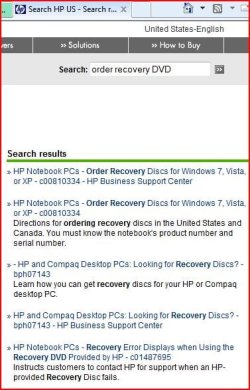
Try a search on HP web site.
 

Attachments

  • Capture2.JPG
    Capture2.JPG
    64.5 KB · Views: 16

My Computer

OS
ME/XP/Vista/Win7
If you look on the HP website Support Downloads page for your model, it may well have the Touchsmart software for you to download to Windows 7.

If this doesn't work for you, unhide files in Control Panel>Folder Options to post back a screenshot of the contents of the Recovery Partition as we might be able to help you run it by mounting an ISO file. Use Snipping Tool in Start Menu, attaching file with paper clip in reply box.
 
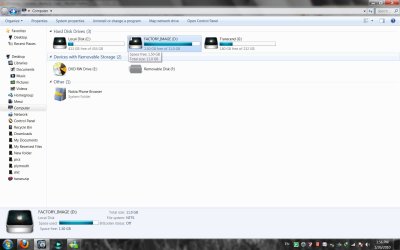
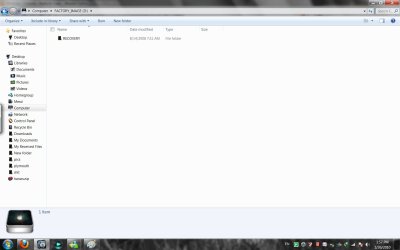
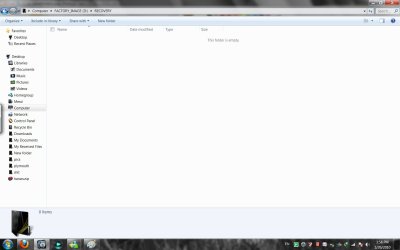
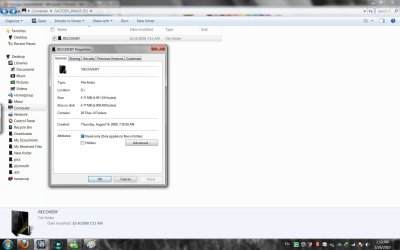
i tried , but couldn't find any! well i did unhide the files and im going to post the pictures here ! ITS WELL WEIRD ! The D drive is 11gb and it says 1.50gb free , when i open it all i see is a recovery file and nothing it , right click on the properties and its just 4mb? :confused:
 

Attachments

  • touchsmart1.jpg
    touchsmart1.jpg
    227.4 KB · Views: 14
  • touchsmart2.jpg
    touchsmart2.jpg
    155.6 KB · Views: 12
  • touchsmart3.jpg
    touchsmart3.jpg
    153.2 KB · Views: 7
  • touchsmart4.jpg
    touchsmart4.jpg
    231.2 KB · Views: 10

My Computer

OS
windows 7
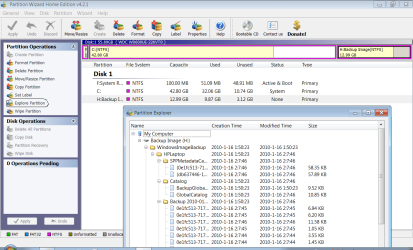
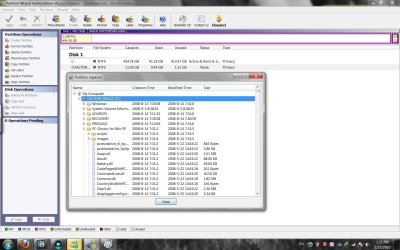
Hey man just did what you said and i found stuff :0 its really weird ! some one said to me , when i installed windows 7 it destroyed the recovery and stuff ! but i didn't quite get them.. anyways here's the screenshot.
 

Attachments

  • d partition.jpg
    d partition.jpg
    402 KB · Views: 52

My Computer

OS
windows 7
In your C: drive is there a folder called Windows.old?
 

My Computer

OS
ME/XP/Vista/Win7
You still have the recovery partition intact there. Let us see the contents of the Recovery folder.

If you have windows.old in the root of the C drive, then you can roll back to Vista using that.

I am not sure why you want to roll back to Vista. Win7 is optimized for touch-screen computers. If you are unable to look for the touchscreen software on the Support Downloads page for your exact computer model, then post back your model number so we can do it for you.
 
noo there is no windows old in my c drive , i want to roll back to vista just to get my touchsmart software back and theen ill update my computer the right way without losing the smart center software .. got me now , and hp .. there rules are just stupid! you can't download the smart center.. i tried but it didn't work..
my model is Hp Touchsmart IQ512me
 

My Computer

OS
windows 7
hi

i think you need this program to recover to vista. There seems to be a bug in the software and this little update helps you to run recovery and use f11- all mentioned in the notes to do with the update

this is 32 bit http://h10025.www1.hp.com/ewfrf/wc/softwareDownloadIndex?softwareitem=pv-77533-1&lc=en&dlc=en&cc=au〈=en&os=4062&product=3804379

this is 64 bit
http://h10025.www1.hp.com/ewfrf/wc/softwareDownloadIndex?softwareitem=pv-77533-1&lc=en&dlc=en&cc=au〈=en&os=4063&product=3804379

good luck
 

My Computer

Computer Manufacturer/Model Number
Hp DVD6 1242tx
OS
windows 7 Home premium 32 bit
CPU
intel core 2 duo cpu t6500 @ 2.10 ghz 2095 mhz
Memory
4
Graphics Card(s)
Ati mobility radeon hd 4530
couldn't you just go to the HP website and install the touch smart software onto your windows 7 installation ?
 

My Computer

Computer Manufacturer/Model Number
built my own
OS
win7 ultimate / virtual box
CPU
Intel Core i7 3770K,1155, Ivy Bridge
Motherboard
MSI Z77A-G43
Memory
GSkill Ripjaws Z Series 1600 CL 9.0 16GB
Graphics Card(s)
KFA2 GeForce GTX 670 EX OC 2048MB GDDR5 PCI-E gfx card
Sound Card
onboard Nvidia HDMI audio
Monitor(s) Displays
ASUS VK222H 22" widescreen LCD monitor
Screen Resolution
1680x1050
Hard Drives
Kingston 128gb SSD
OCZ Vertex 90gb SSD
500GB WDCaviar 16mb 5000KS
320GB WDCaviar 16mb 3200AAKS sata 2
1TB Samsung 16mb HD103SJ sata 2
PSU
Corsair HX 750W ATX2.2 Modular
Cooling
Antec 25 Kuhler H2O 620
Keyboard
logitech
Mouse
logitech MX518
Internet Speed
7mb adsl

My Computer

Computer Manufacturer/Model Number
Mesh
OS
win7 ultimate 32 , 64 ,XP
CPU
3.40
Memory
4 GB
Graphics Card(s)
GeForce GTX 480
Sound Card
Realtek
Monitor(s) Displays
LG 28" LCD
Screen Resolution
1600X1024
Hard Drives
2X500GB HDD sata
Western Digital Usb 2TB
PSU
650w
Keyboard
Wireless Logitech
Mouse
Wireless Logitech
Internet Speed
50 MB

My Computer

Computer Manufacturer/Model Number
built my own
OS
win7 ultimate / virtual box
CPU
Intel Core i7 3770K,1155, Ivy Bridge
Motherboard
MSI Z77A-G43
Memory
GSkill Ripjaws Z Series 1600 CL 9.0 16GB
Graphics Card(s)
KFA2 GeForce GTX 670 EX OC 2048MB GDDR5 PCI-E gfx card
Sound Card
onboard Nvidia HDMI audio
Monitor(s) Displays
ASUS VK222H 22" widescreen LCD monitor
Screen Resolution
1680x1050
Hard Drives
Kingston 128gb SSD
OCZ Vertex 90gb SSD
500GB WDCaviar 16mb 5000KS
320GB WDCaviar 16mb 3200AAKS sata 2
1TB Samsung 16mb HD103SJ sata 2
PSU
Corsair HX 750W ATX2.2 Modular
Cooling
Antec 25 Kuhler H2O 620
Keyboard
logitech
Mouse
logitech MX518
Internet Speed
7mb adsl
Hey man , i know about those updates .. tried them before it didn't work ! =[
it says your system does not meet the requirments.. somethin like that , went to the troubleshoot page in hp , did what they said and still same error.
So what ill do now is ill install vista again , and try f11 ? what do you think?
 

My Computer

OS
windows 7
Hey man just did what you said and i found stuff :0 its really weird ! some one said to me , when i installed windows 7 it destroyed the recovery and stuff ! but i didn't quite get them.. anyways here's the screenshot.

Can you do a screenshot of all the files in Recovery & Preload.
 

My Computer

OS
ME/XP/Vista/Win7
i did post a screen shot of the files in the recovery , it's in page 1 ?? check it again
 

My Computer

OS
windows 7
Hey man , i know about those updates .. tried them before it didn't work ! =[
it says your system does not meet the requirments.. somethin like that , went to the troubleshoot page in hp , did what they said and still same error.
So what ill do now is ill install vista again , and try f11 ? what do you think?

I would pursue this error and call hp to get it working, it could be something simple like picking 32 or 64 bit file etc ??
 

My Computer

Computer Manufacturer/Model Number
built my own
OS
win7 ultimate / virtual box
CPU
Intel Core i7 3770K,1155, Ivy Bridge
Motherboard
MSI Z77A-G43
Memory
GSkill Ripjaws Z Series 1600 CL 9.0 16GB
Graphics Card(s)
KFA2 GeForce GTX 670 EX OC 2048MB GDDR5 PCI-E gfx card
Sound Card
onboard Nvidia HDMI audio
Monitor(s) Displays
ASUS VK222H 22" widescreen LCD monitor
Screen Resolution
1680x1050
Hard Drives
Kingston 128gb SSD
OCZ Vertex 90gb SSD
500GB WDCaviar 16mb 5000KS
320GB WDCaviar 16mb 3200AAKS sata 2
1TB Samsung 16mb HD103SJ sata 2
PSU
Corsair HX 750W ATX2.2 Modular
Cooling
Antec 25 Kuhler H2O 620
Keyboard
logitech
Mouse
logitech MX518
Internet Speed
7mb adsl
Actually you didn't post back a screenshot of the Recovery folder contents as requested. Have been waiting to see it.

What happens when you tap the key given on first bootup screen for Recovery? Will it start? Check your manual for the exact key combination to start Recovery from BIOS boot screen.
 
The Recovery Folder is actually the 4th sub-folder shown there. Needs to have the + expanded so we can see the contents. Post multiple screenshots to include all of it if necc.

You can also look through all of the other folders for an .iso or .exe file and post that too.

Others may see something different, or know of another place to look for a possible .iso file to mount, or .exe file to run to trigger Recov.
 
Back
Top