
Help Me Set Up Wireless and Wired Network on New House

TheTemplai

New member
Power User
Local time
9:17 AM
Messages
168
Please,
So, this going to be my new house :cool:, and I need help to set up my Wireless and Wired network, like the best place to put the router and AP or RangeBoosters.

Questions: :huh:
Where is the best place to put the router (DIR-855 or DGL-4500)?
I gonna have one AP or range booster where to put (AP or RB)?

What do you think it's better, buy a range booster like this one (link) or this here (link) from Hawking or should I buy a AP like this one over here (link)?

This is my scenario: Big home (really big) with a DIR-855 Router, 2 notebooks equiped with DWA-160 adapters, 1 Nintendo Wii, 1 PS3. Wireless network and Wired Network. :devil:

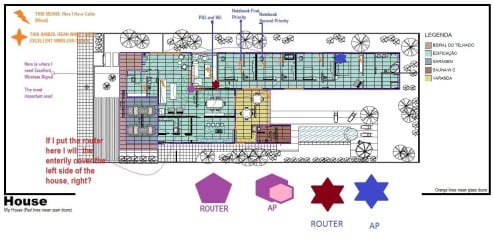
Here it is! My new brand house (Complete diagram, so you guys can help me):
33ur4h1.jpg


Hope my english is ok, and please, I want everybody opinions! Thanks Seven Forums! :party:
(Edit the picture with your opinions, please put a router picture where you think it's better)

Product links: DIR-855, DAP-1522, DWA-160, Is that enough information? :p

------------------------
PLEASE GO TO THE LAST POST, YOU DON'T NEED TO READ EVERY POST TO HELP ME.
http://tinypic.com/m/73nnf9/4
 
Last edited:

My Computer My Computer

At a glance

Windows 7 Ultimate x64Intel Core i7 2600KG.Skill RipJawsX 8GB (2x4GB) DDR3 PC3-12800AMD/ATI XFX Radeon HD 6970
Computer Manufacturer/Model Number
Desktop
OS
Windows 7 Ultimate x64
CPU
Intel Core i7 2600K
Motherboard
ASRock Fatal1ty P67 Professional
Memory
G.Skill RipJawsX 8GB (2x4GB) DDR3 PC3-12800
Graphics Card(s)
AMD/ATI XFX Radeon HD 6970
Screen Resolution
1920x1080
Hard Drives
WD Caviar Black 1TB
WD Caviar Blue 500GB
Crucial C300 64GB (SSD)
PSU
CM Silent Pro Gold 1000W
Case
CM HAF X
Cooling
Corsair A70
Keyboard
Thermaltake Tt eSPORTS Challenger Pro
Mouse
Thermaltake Tt eSPORTS Black
First off, Welcome to Seven Forums!

Looks like you have a really nice house on the way. Congratulations!

The first question I'd ask is what kind of internet access you're planning on installing. Cable, DSL? What speed?

Second: What devices are you planning on having wired vs wireless?

Third: What are the walls made of in the area where the primary coverage is? Drywall? Wood studs vs metal studs?

Last: What wired cable (ethernet) are you installing? CAT5, CAT5e or CAT6?

Let's start with the basic info and take it from there shall we?
 

My Computer My Computer

At a glance

W7 Ultimate 64bit W7 Premium 64bit W7 Premium...Athlon 64X2 5000+4GBATI X1300
Computer Manufacturer/Model Number
Dell C521
OS
W7 Ultimate 64bit W7 Premium 64bit W7 Premium 32bit WXP Home 32bit
CPU
Athlon 64X2 5000+
Motherboard
Dell
Memory
4GB
Graphics Card(s)
ATI X1300
Sound Card
On Board
Monitor(s) Displays
Dell 19" Flat
Screen Resolution
1280x1024
Hard Drives
500GB Western Digital Caviar Green
Mouse
Microsoft Wireless Intellimouse Explorer 2.0
Internet Speed
SBC DSL - 6Mbps
Ok just for placement only, I would put the router in the same room as the PS3. This was you can easily cable connect to it. For wifi access to the router, there shouldnt be any issue from the other two rooms, unless your house is an underground compound. :)
 

My Computer My Computer

At a glance

Windows 7 Ultimate 64BitGenuineIntel Intel(R) Core(TM) DuoCore T2400 ...2.00 GBMobile Intel(R) 945 Express Chipset
Computer Manufacturer/Model Number
Lenovo ThinkPad T60
OS
Windows 7 Ultimate 64Bit
CPU
GenuineIntel Intel(R) Core(TM) DuoCore T2400 @ 1.83GHz
Motherboard
Intel(R) 82801G (ICH7 Family)
Memory
2.00 GB
Graphics Card(s)
Mobile Intel(R) 945 Express Chipset
Sound Card
SoundMAX Integrated Digital HD Audio
Monitor(s) Displays
ThinkPad Display
Screen Resolution
1400x1050
Hard Drives
100Gb SATA
Keyboard
Standard Keyboard
Mouse
HID-compliant Mouse
Internet Speed
Cable Broadband - 54Mbps
Other Info
Intel(R) PRO/1000 PL Network Connection
11a/b/g Wireless LAN Mini PCI Express Adapter
First off, Welcome to Seven Forums!
Thank you very much! :geek:
Looks like you have a really nice house on the way. Congratulations
Yes, thank you again! :)
The first question I'd ask is what kind of internet access you're planning on installing. Cable, DSL? What speed?
Yes, DSL Cable and DSL Wireless, the speed should be 3.2Mb or 8.0Mb. Sorry I live in Brazil, and my city have only one DSL ISP, it's a monopoly, but GVT shoud come here nexter year. :rolleyes:
Second: What devices are you planning on having wired vs wireless?
Not shure if I understand this question, but the devices should be:
Router: D-Link DIR-855 (the DIR-855 have 4 Cable connection ports, so..).
Access Point: D-Link Xtreme N Duo Wireless Bridge DAP-1522 (Also have 4 Cable connection ports)
Adapters: Two Dwa-160 Xtreme N Dual Band USB Adapters

I think this is it.
Third: What are the walls made of in the area where the primary coverage is? Drywall? Wood studs vs metal studs?
Hmm, I think it's made of bricks :huh:, it's that the question?

Last: What wired cable (ethernet) are you installing? CAT5, CAT5e or CAT6?
Hmm, I think Cat5e is suitable to me, what do you think?
Let's start with the basic info and take it from there shall we?
Yes, thank you very very much for yourr help! :)

Thanks you too aem! But I need excellent (PLUS++) signal to my room (the first room). If I put the router in the PS3 room, the signal will be excellent (PLUS++)? :p
 

My Computer My Computer

At a glance

Windows 7 Ultimate x64Intel Core i7 2600KG.Skill RipJawsX 8GB (2x4GB) DDR3 PC3-12800AMD/ATI XFX Radeon HD 6970
Computer Manufacturer/Model Number
Desktop
OS
Windows 7 Ultimate x64
CPU
Intel Core i7 2600K
Motherboard
ASRock Fatal1ty P67 Professional
Memory
G.Skill RipJawsX 8GB (2x4GB) DDR3 PC3-12800
Graphics Card(s)
AMD/ATI XFX Radeon HD 6970
Screen Resolution
1920x1080
Hard Drives
WD Caviar Black 1TB
WD Caviar Blue 500GB
Crucial C300 64GB (SSD)
PSU
CM Silent Pro Gold 1000W
Case
CM HAF X
Cooling
Corsair A70
Keyboard
Thermaltake Tt eSPORTS Challenger Pro
Mouse
Thermaltake Tt eSPORTS Black
Ok just for placement only, I would put the router in the same room as the PS3. This was you can easily cable connect to it. For wifi access to the router, there shouldnt be any issue from the other two rooms, unless your house is an underground compound. :)


Best place of course would be the Middle room for a wireless router becuase its between the two rooms but the best router I think if your goign to connect your PS3 would be te DGL 4300 and that should be placed in the same room or if you could somehow hard wire it to theplaystation 3. that would really help out.

Because I know the Wii is wireless only... and then he has two wireless laptops
 

My Computer My Computer

At a glance

Windows 7 Ultimate x64AMD Phenom x6 1045t8 GBATI Radeon HD 5570
Computer Manufacturer/Model Number
HP Pavilion Elite HPE-410f
OS
Windows 7 Ultimate x64
CPU
AMD Phenom x6 1045t
Motherboard
N/A
Memory
8 GB
Graphics Card(s)
ATI Radeon HD 5570
Sound Card
Realtek Highdefinition Audio / 5.1 Dolby Setup
Monitor(s) Displays
HP w2207h Widescreen
Screen Resolution
1680*1050
Hard Drives
1 TB (fixed), 320 Portable maxtor, Server Hard drives
PSU
350 Watt
Case
HP CASE
Cooling
Bass
Keyboard
Logitech MX 5500
Mouse
Logitech MX 5500
Internet Speed
ROAD RUNNER 16MB D/512 U
Best place of course would be the Middle room for a wireless router becuase its between the two rooms but the best router I think if your goign to connect your PS3 would be te DGL 4300 and that should be placed in the same room or if you could somehow hard wire it to theplaystation 3. that would really help out.

Because I know the Wii is wireless only... and then he has two wireless laptops
I can't put the router in the middle room, first becouse the other rooms on the left will have cables, second my brother is in medical school, so the wireless max signal would be wasted, becouse he rarely came home.

And yes, the PS3 room will have one cable, and the DGL-4300 is inferior at DIR-855, I think you mean the DGL-4500?

What do you think? Can you edit the picture with your opnion, thank you. :geek:
 

My Computer My Computer

At a glance

Windows 7 Ultimate x64Intel Core i7 2600KG.Skill RipJawsX 8GB (2x4GB) DDR3 PC3-12800AMD/ATI XFX Radeon HD 6970
Computer Manufacturer/Model Number
Desktop
OS
Windows 7 Ultimate x64
CPU
Intel Core i7 2600K
Motherboard
ASRock Fatal1ty P67 Professional
Memory
G.Skill RipJawsX 8GB (2x4GB) DDR3 PC3-12800
Graphics Card(s)
AMD/ATI XFX Radeon HD 6970
Screen Resolution
1920x1080
Hard Drives
WD Caviar Black 1TB
WD Caviar Blue 500GB
Crucial C300 64GB (SSD)
PSU
CM Silent Pro Gold 1000W
Case
CM HAF X
Cooling
Corsair A70
Keyboard
Thermaltake Tt eSPORTS Challenger Pro
Mouse
Thermaltake Tt eSPORTS Black
I just want to say thank you so much for the diagram on the frist try. Tha helps us out about 80%. You can't imagine how many people write on here and tell us things and give us nothing. I appreicate that.

Now that we have an understanding of where your internet is coming in thats good.

Okay Set the 4500 router up where the WII and PS3 is. Hard Wire the PS3 into the router. and set the internet up in that room.

It is an extreme N router so you may have luck and it go through the walls. Never know until you try. Can you connect your laptop to the router and then walk to each room and tell us how much signal you have and loose?
 

My Computer My Computer

At a glance

Windows 7 Ultimate x64AMD Phenom x6 1045t8 GBATI Radeon HD 5570
Computer Manufacturer/Model Number
HP Pavilion Elite HPE-410f
OS
Windows 7 Ultimate x64
CPU
AMD Phenom x6 1045t
Motherboard
N/A
Memory
8 GB
Graphics Card(s)
ATI Radeon HD 5570
Sound Card
Realtek Highdefinition Audio / 5.1 Dolby Setup
Monitor(s) Displays
HP w2207h Widescreen
Screen Resolution
1680*1050
Hard Drives
1 TB (fixed), 320 Portable maxtor, Server Hard drives
PSU
350 Watt
Case
HP CASE
Cooling
Bass
Keyboard
Logitech MX 5500
Mouse
Logitech MX 5500
Internet Speed
ROAD RUNNER 16MB D/512 U
I just want to say thank you so much for the diagram on the frist try. Tha helps us out about 80%. You can't imagine how many people write on here and tell us things and give us nothing. I appreicate that.

Now that we have an understanding of where your internet is coming in thats good.

Okay Set the 4500 router up where the WII and PS3 is. Hard Wire the PS3 into the router. and set the internet up in that room.

It is an extreme N router so you may have luck and it go through the walls. Never know until you try. Can you connect your laptop to the router and then walk to each room and tell us how much signal you have and loose?
I think the DIR-855 is better then the DGL-4500, but that is one of my questions? What router is better the DIR or the DGL?

Hehe, my house is not ready yet, it's under contruction, should take 1 to 2 months, then my house will be finished :party:. Sorry can't help with that :huh:
 

My Computer My Computer

At a glance

Windows 7 Ultimate x64Intel Core i7 2600KG.Skill RipJawsX 8GB (2x4GB) DDR3 PC3-12800AMD/ATI XFX Radeon HD 6970
Computer Manufacturer/Model Number
Desktop
OS
Windows 7 Ultimate x64
CPU
Intel Core i7 2600K
Motherboard
ASRock Fatal1ty P67 Professional
Memory
G.Skill RipJawsX 8GB (2x4GB) DDR3 PC3-12800
Graphics Card(s)
AMD/ATI XFX Radeon HD 6970
Screen Resolution
1920x1080
Hard Drives
WD Caviar Black 1TB
WD Caviar Blue 500GB
Crucial C300 64GB (SSD)
PSU
CM Silent Pro Gold 1000W
Case
CM HAF X
Cooling
Corsair A70
Keyboard
Thermaltake Tt eSPORTS Challenger Pro
Mouse
Thermaltake Tt eSPORTS Black
I just want to say thank you so much for the diagram on the frist try. Tha helps us out about 80%. You can't imagine how many people write on here and tell us things and give us nothing. I appreicate that.

Now that we have an understanding of where your internet is coming in thats good.

Okay Set the 4500 router up where the WII and PS3 is. Hard Wire the PS3 into the router. and set the internet up in that room.

It is an extreme N router so you may have luck and it go through the walls. Never know until you try. Can you connect your laptop to the router and then walk to each room and tell us how much signal you have and loose?
I think the DIR-855 is better then the DGL-4500, but that is one of my questions? What router is better the DIR or the DGL?

Hehe, my house is not ready yet, it's under contruction, should take 1 to 2 months, then my house will be finished :party:. Sorry can't help with that :huh:


Your right it is a better router... but it really depends on what yo use it for... 4500 is designed for gaming... it has the game fuel built into it.

then the other ne is designed for speed and power to handle the speed & lenght. I mean if all you are going to do is go on the internet and play on the ps3 a few tiems by yourself theni would go with the dir router.....but if you are going to be doing alot of gaming and port forwarding... things lke that becuase it deals with alot of quality of service then i suggest the 4500
 

My Computer My Computer

At a glance

Windows 7 Ultimate x64AMD Phenom x6 1045t8 GBATI Radeon HD 5570
Computer Manufacturer/Model Number
HP Pavilion Elite HPE-410f
OS
Windows 7 Ultimate x64
CPU
AMD Phenom x6 1045t
Motherboard
N/A
Memory
8 GB
Graphics Card(s)
ATI Radeon HD 5570
Sound Card
Realtek Highdefinition Audio / 5.1 Dolby Setup
Monitor(s) Displays
HP w2207h Widescreen
Screen Resolution
1680*1050
Hard Drives
1 TB (fixed), 320 Portable maxtor, Server Hard drives
PSU
350 Watt
Case
HP CASE
Cooling
Bass
Keyboard
Logitech MX 5500
Mouse
Logitech MX 5500
Internet Speed
ROAD RUNNER 16MB D/512 U
Your right it is a better router... but it really depends on what yo use it for... 4500 is designed for gaming... it has the game fuel built into it.

then the other ne is designed for speed and power to handle the speed & lenght. I mean if all you are going to do is go on the internet and play on the ps3 a few tiems by yourself theni would go with the dir router.....but if you are going to be doing alot of gaming and port forwarding... things lke that becuase it deals with alot of quality of service then i suggest the 4500
What I'm going to do with the PS3 and the Wii? Play games like The Punisher online or CoD MW Reflex and Streaming media. I don't play PC games, but I do need internet quality for my notebook for P2P and P2M programs, also watch HD videos, like the Revision3 videos.

Thank you again. :geek:
 

My Computer My Computer

At a glance

Windows 7 Ultimate x64Intel Core i7 2600KG.Skill RipJawsX 8GB (2x4GB) DDR3 PC3-12800AMD/ATI XFX Radeon HD 6970
Computer Manufacturer/Model Number
Desktop
OS
Windows 7 Ultimate x64
CPU
Intel Core i7 2600K
Motherboard
ASRock Fatal1ty P67 Professional
Memory
G.Skill RipJawsX 8GB (2x4GB) DDR3 PC3-12800
Graphics Card(s)
AMD/ATI XFX Radeon HD 6970
Screen Resolution
1920x1080
Hard Drives
WD Caviar Black 1TB
WD Caviar Blue 500GB
Crucial C300 64GB (SSD)
PSU
CM Silent Pro Gold 1000W
Case
CM HAF X
Cooling
Corsair A70
Keyboard
Thermaltake Tt eSPORTS Challenger Pro
Mouse
Thermaltake Tt eSPORTS Black
Your right it is a better router... but it really depends on what yo use it for... 4500 is designed for gaming... it has the game fuel built into it.

then the other ne is designed for speed and power to handle the speed & lenght. I mean if all you are going to do is go on the internet and play on the ps3 a few tiems by yourself theni would go with the dir router.....but if you are going to be doing alot of gaming and port forwarding... things lke that becuase it deals with alot of quality of service then i suggest the 4500
What I'm going to do with the PS3 and the Wii? Play games like The Punisher online or CoD MW Reflex and Streaming media. I don't play PC games, but I do need internet quality for my notebook for P2P and P2M programs, also watch HD videos, like the Revision3 videos.

Thank you again. :geek:

Yes,
then the DIR would work perfectly for you and would be best for you.

I would be more than happy to help you configure everything to set it up for you.

another good thing with the DIR is that it has Wireless A not alot of wireless cards have it, some new computers are coming out wtih it but the good thing for that is the fact that it runs in 5.8 ghz unlike the B and G which runs in 2.4 ghz.
 

My Computer My Computer

At a glance

Windows 7 Ultimate x64AMD Phenom x6 1045t8 GBATI Radeon HD 5570
Computer Manufacturer/Model Number
HP Pavilion Elite HPE-410f
OS
Windows 7 Ultimate x64
CPU
AMD Phenom x6 1045t
Motherboard
N/A
Memory
8 GB
Graphics Card(s)
ATI Radeon HD 5570
Sound Card
Realtek Highdefinition Audio / 5.1 Dolby Setup
Monitor(s) Displays
HP w2207h Widescreen
Screen Resolution
1680*1050
Hard Drives
1 TB (fixed), 320 Portable maxtor, Server Hard drives
PSU
350 Watt
Case
HP CASE
Cooling
Bass
Keyboard
Logitech MX 5500
Mouse
Logitech MX 5500
Internet Speed
ROAD RUNNER 16MB D/512 U
Yes,
then the DIR would work perfectly for you and would be best for you.

I would be more than happy to help you configure everything to set it up for you.

another good thing with the DIR is that it has Wireless A not alot of wireless cards have it, some new computers are coming out wtih it but the good thing for that is the fact that it runs in 5.8 ghz unlike the B and G which runs in 2.4 ghz.

Hehe, you mean Wireless N right? And my notebook don't have Wireless N support, but that is why I going to buy the DWA-160 adapter. ;)

Thank you, you are a realy good helper, thank you man, you RedBirdDad and aem are awesome. :cool: And RedBirdDad, I'm waiting for your help :)
 

My Computer My Computer

At a glance

Windows 7 Ultimate x64Intel Core i7 2600KG.Skill RipJawsX 8GB (2x4GB) DDR3 PC3-12800AMD/ATI XFX Radeon HD 6970
Computer Manufacturer/Model Number
Desktop
OS
Windows 7 Ultimate x64
CPU
Intel Core i7 2600K
Motherboard
ASRock Fatal1ty P67 Professional
Memory
G.Skill RipJawsX 8GB (2x4GB) DDR3 PC3-12800
Graphics Card(s)
AMD/ATI XFX Radeon HD 6970
Screen Resolution
1920x1080
Hard Drives
WD Caviar Black 1TB
WD Caviar Blue 500GB
Crucial C300 64GB (SSD)
PSU
CM Silent Pro Gold 1000W
Case
CM HAF X
Cooling
Corsair A70
Keyboard
Thermaltake Tt eSPORTS Challenger Pro
Mouse
Thermaltake Tt eSPORTS Black
Why are you buying an adapter, and what adapter?
 

My Computer My Computer

At a glance

Windows 7 Ultimate 64BitGenuineIntel Intel(R) Core(TM) DuoCore T2400 ...2.00 GBMobile Intel(R) 945 Express Chipset
Computer Manufacturer/Model Number
Lenovo ThinkPad T60
OS
Windows 7 Ultimate 64Bit
CPU
GenuineIntel Intel(R) Core(TM) DuoCore T2400 @ 1.83GHz
Motherboard
Intel(R) 82801G (ICH7 Family)
Memory
2.00 GB
Graphics Card(s)
Mobile Intel(R) 945 Express Chipset
Sound Card
SoundMAX Integrated Digital HD Audio
Monitor(s) Displays
ThinkPad Display
Screen Resolution
1400x1050
Hard Drives
100Gb SATA
Keyboard
Standard Keyboard
Mouse
HID-compliant Mouse
Internet Speed
Cable Broadband - 54Mbps
Other Info
Intel(R) PRO/1000 PL Network Connection
11a/b/g Wireless LAN Mini PCI Express Adapter

My Computer My Computer

At a glance

Windows 7 Ultimate x64AMD Phenom x6 1045t8 GBATI Radeon HD 5570
Computer Manufacturer/Model Number
HP Pavilion Elite HPE-410f
OS
Windows 7 Ultimate x64
CPU
AMD Phenom x6 1045t
Motherboard
N/A
Memory
8 GB
Graphics Card(s)
ATI Radeon HD 5570
Sound Card
Realtek Highdefinition Audio / 5.1 Dolby Setup
Monitor(s) Displays
HP w2207h Widescreen
Screen Resolution
1680*1050
Hard Drives
1 TB (fixed), 320 Portable maxtor, Server Hard drives
PSU
350 Watt
Case
HP CASE
Cooling
Bass
Keyboard
Logitech MX 5500
Mouse
Logitech MX 5500
Internet Speed
ROAD RUNNER 16MB D/512 U
just run your CAT5/e/6 straight back like you have it, mount the wireless router with the console systems, if you want additional wireless range outside hook another wireless router up where the cable runs out by the pool, or place a range extender a in that area and it should cover your back yard in a wifi blanket.
 

My Computer My Computer

At a glance

Windows 7 Ultimate Signature EditionIntel Core i7 Extreme 3.33GHz12GB DDR32x EVGA 285 2GB in SLI
Computer Manufacturer/Model Number
Custom
OS
Windows 7 Ultimate Signature Edition
CPU
Intel Core i7 Extreme 3.33GHz
Motherboard
EVGA X-58 SLI Classified
Memory
12GB DDR3
Graphics Card(s)
2x EVGA 285 2GB in SLI
Sound Card
Creative Labs X-Fi ExtremeGamer
Monitor(s) Displays
30" Viewsonic
Hard Drives
2x1TB Western Digital 7200RPM in RAID 0/1TB WD My Book External HDD
PSU
Thermaltake 1000w supporting quad SLI
Case
Thermaltake Armor Full Tower
Cooling
Thermaltake V1 CPU+DIY Liquid cooling
I would definitly have the construction workers if you can run network cable in the walls if they havne't put it up already

I would run cat 5/6 out to the pool and set up a Access point so you can still access the network.

If you put a router out there. You would have to get a router that can be configured into an AP. If you set an range extender out there you have to remember everytime you put a range extender it will cut the wireless signal in half... for instance.. 54 will drop into 27, if you add another then 27 will be cut into half.... and therefore, ect.....
 

My Computer My Computer

At a glance

Windows 7 Ultimate x64AMD Phenom x6 1045t8 GBATI Radeon HD 5570
Computer Manufacturer/Model Number
HP Pavilion Elite HPE-410f
OS
Windows 7 Ultimate x64
CPU
AMD Phenom x6 1045t
Motherboard
N/A
Memory
8 GB
Graphics Card(s)
ATI Radeon HD 5570
Sound Card
Realtek Highdefinition Audio / 5.1 Dolby Setup
Monitor(s) Displays
HP w2207h Widescreen
Screen Resolution
1680*1050
Hard Drives
1 TB (fixed), 320 Portable maxtor, Server Hard drives
PSU
350 Watt
Case
HP CASE
Cooling
Bass
Keyboard
Logitech MX 5500
Mouse
Logitech MX 5500
Internet Speed
ROAD RUNNER 16MB D/512 U
I would definitly have the construction workers if you can run network cable in the walls if they havne't put it up already

I would run cat 5/6 out to the pool and set up a Access point so you can still access the network.

If you put a router out there. You would have to get a router that can be configured into an AP. If you set an range extender out there you have to remember everytime you put a range extender it will cut the wireless signal in half... for instance.. 54 will drop into 27, if you add another then 27 will be cut into half.... and therefore, ect.....

Hmm, so an AP would be better right? What AP device you recomend to me, need to work with the DIR-855. And yes I also think that the PCM card would be better but, I dont think my notebook have port to plug it :o

Why are you buying an adapter, and what adapter?
Becouse, my computer don't have Wireless N support and Dual band support.

just run your CAT5/e/6 straight back like you have it, mount the wireless router with the console systems, if you want additional wireless range outside hook another wireless router up where the cable runs out by the pool, or place a range extender a in that area and it should cover your back yard in a wifi blanket.
I don't think I will use internet at the pool, I just need to cover inside the house and the balcony.

Like I say in the first post, I will have an AP (I think this is the best one DAP-1522).

I'm was thinking to do the falowing: Put the router right outside the Home Theater (PS3 and Wii room), so the router can cover the enterily left side of the house. The only problem is how I will pass the cables, so I can connect them to the router :sarc:

What do you think? And where do I put the AP? Remenber I need excellent (PLUS++) signal at the first room.

See here please:
v5ag5w.jpg


Thank you guys again and sorry for my english it's 4:36Am here :sleepy:
 

My Computer My Computer

At a glance

Windows 7 Ultimate x64Intel Core i7 2600KG.Skill RipJawsX 8GB (2x4GB) DDR3 PC3-12800AMD/ATI XFX Radeon HD 6970
Computer Manufacturer/Model Number
Desktop
OS
Windows 7 Ultimate x64
CPU
Intel Core i7 2600K
Motherboard
ASRock Fatal1ty P67 Professional
Memory
G.Skill RipJawsX 8GB (2x4GB) DDR3 PC3-12800
Graphics Card(s)
AMD/ATI XFX Radeon HD 6970
Screen Resolution
1920x1080
Hard Drives
WD Caviar Black 1TB
WD Caviar Blue 500GB
Crucial C300 64GB (SSD)
PSU
CM Silent Pro Gold 1000W
Case
CM HAF X
Cooling
Corsair A70
Keyboard
Thermaltake Tt eSPORTS Challenger Pro
Mouse
Thermaltake Tt eSPORTS Black
First,
i would move it closer to your ps3... I dont think you need intenet access in the garage and the bathroom right? *lol*

second,
place the ap where i am showing you right. I will be perfectly honest with you. Your wireless signaal is going to be alot stronger than what your indicating in the photo.

THRID,
OVER BY WHERE I HAVE THE AP...
YOU CAN USE A POWER NETWORK ADAPTER INSTEAD OF RUNNING CABLE IF YOU LIKE.
PREFERELY I WOULD RUN CABLE... BUT ITS REALLY UP TO YOU
 

Attachments

  • v5ag5wREVISED.jpg
    v5ag5wREVISED.jpg
    115.7 KB · Views: 15

My Computer My Computer

At a glance

Windows 7 Ultimate x64AMD Phenom x6 1045t8 GBATI Radeon HD 5570
Computer Manufacturer/Model Number
HP Pavilion Elite HPE-410f
OS
Windows 7 Ultimate x64
CPU
AMD Phenom x6 1045t
Motherboard
N/A
Memory
8 GB
Graphics Card(s)
ATI Radeon HD 5570
Sound Card
Realtek Highdefinition Audio / 5.1 Dolby Setup
Monitor(s) Displays
HP w2207h Widescreen
Screen Resolution
1680*1050
Hard Drives
1 TB (fixed), 320 Portable maxtor, Server Hard drives
PSU
350 Watt
Case
HP CASE
Cooling
Bass
Keyboard
Logitech MX 5500
Mouse
Logitech MX 5500
Internet Speed
ROAD RUNNER 16MB D/512 U
Yes, but where you say to me put the router is in the corner behind two walls, the AP you show me is also behind two walls.

I prefer cable and like I say the router or the AP need to be near the first room, I need 200% :p wireless signaal over there.

Take a closer look here (in this photo you can see where the PS3, Wii and notebooks are going to be, I think this photo will help you help me :p):
jrtmw5.jpg

Thank you! :geek:

Edit: Hmm, but if I put the router where you say so, the router will be very close to the first room, hmm. I don't know anything anymore. :(
 

My Computer My Computer

At a glance

Windows 7 Ultimate x64Intel Core i7 2600KG.Skill RipJawsX 8GB (2x4GB) DDR3 PC3-12800AMD/ATI XFX Radeon HD 6970
Computer Manufacturer/Model Number
Desktop
OS
Windows 7 Ultimate x64
CPU
Intel Core i7 2600K
Motherboard
ASRock Fatal1ty P67 Professional
Memory
G.Skill RipJawsX 8GB (2x4GB) DDR3 PC3-12800
Graphics Card(s)
AMD/ATI XFX Radeon HD 6970
Screen Resolution
1920x1080
Hard Drives
WD Caviar Black 1TB
WD Caviar Blue 500GB
Crucial C300 64GB (SSD)
PSU
CM Silent Pro Gold 1000W
Case
CM HAF X
Cooling
Corsair A70
Keyboard
Thermaltake Tt eSPORTS Challenger Pro
Mouse
Thermaltake Tt eSPORTS Black
I'm not aware of the need for wireless N and dual band, is this a requirement for PS3?
 

My Computer My Computer

At a glance

Windows 7 Ultimate 64BitGenuineIntel Intel(R) Core(TM) DuoCore T2400 ...2.00 GBMobile Intel(R) 945 Express Chipset
Computer Manufacturer/Model Number
Lenovo ThinkPad T60
OS
Windows 7 Ultimate 64Bit
CPU
GenuineIntel Intel(R) Core(TM) DuoCore T2400 @ 1.83GHz
Motherboard
Intel(R) 82801G (ICH7 Family)
Memory
2.00 GB
Graphics Card(s)
Mobile Intel(R) 945 Express Chipset
Sound Card
SoundMAX Integrated Digital HD Audio
Monitor(s) Displays
ThinkPad Display
Screen Resolution
1400x1050
Hard Drives
100Gb SATA
Keyboard
Standard Keyboard
Mouse
HID-compliant Mouse
Internet Speed
Cable Broadband - 54Mbps
Other Info
Intel(R) PRO/1000 PL Network Connection
11a/b/g Wireless LAN Mini PCI Express Adapter
Back
Top