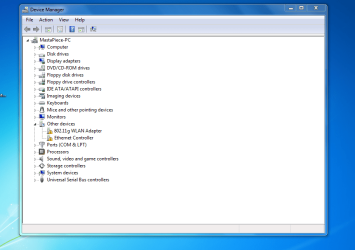
help me with my ethernet controller and dlink wireless.

analyzermike

New member
Local time
7:41 AM
Messages
3
hye all...i had installed my window 7 yesterday..but i had experience some problem with my ethernet controller and my dlink DWL-G122 driver...
i had try download new driver from realtek site for the ethernet controller but its not working....

the driver for the dlink usb wireless also not working..

i'm using abit SG-80 mobo with pentium 4 775 socket and 1gb ram ddr...

hope u guys can help me with my problems... thanks in advance...
 

My Computer My Computer

OS
Window 7
hye all...i had installed my window 7 yesterday..but i had experience some problem with my ethernet controller and my dlink DWL-G122 driver...

i had try download new driver from realtek site for the ethernet controller but its not working....

the driver for the dlink usb wireless also not working..

i'm using abit SG-80 mobo with pentium 4 775 socket and 1gb ram ddr...

hope u guys can help me with my problems... thanks in advance...

Hi mike and welcome

OK lets try this first
type cmd in search
type ipconfig /all
using the built in snipping tool (type snipping in search) take a screenshot of the ipconfig output
Upload it to us using the attachment icon (shaped like a paperclip) in the reply form

See pics for both

next type device manager. go to the netwrok tab. look for your device
Is it there? Does it have a yellow triangle on it

Let us know if you ned any help

Kenn J++
 
Last edited:

My Computer My Computer

Computer Manufacturer/Model Number
HP Pavillion dv-7 1005 Tx
OS
Win 8 Release candidate 8400
CPU
[email protected]
Memory
4 gigs
Graphics Card(s)
Nvidia 9600M
Sound Card
HD built-in
Monitor(s) Displays
17" Wxga
Screen Resolution
1440x900
Cooling
none
Internet Speed
45Mb down 5Mb up
ok..this is my screenshot of ip config and device manager...

hope u can help me...

device%20manager.PNG
 

Attachments

  • device manager.PNG
    device manager.PNG
    49.9 KB · Views: 61
  • ipconfig.PNG
    ipconfig.PNG
    95.3 KB · Views: 79

My Computer My Computer

OS
Window 7
Update the chipset (if you can find it) for your mobo first, then try reinstalling in safe mode.
 

My Computer My Computer

Computer Manufacturer/Model Number
Sony Vaio Z46GDU
OS
Windows 7 Ultimate x86-64
CPU
[email protected] 1066MHz FSB
Motherboard
Sony branded
Memory
6GB DDR3 1066MHz
Graphics Card(s)
9300M GS 256MB Dedicated (Speed) + Intel4500MHD (Stamina)
Sound Card
Realtek HD Audio
Monitor(s) Displays
13.1' WXGA
Screen Resolution
1600x900
Hard Drives
320GB 7200RPM w/ 16MB cache
Internet Speed
1MB/s
ok..this is my screenshot of ip config and device manager...

hope u can help me...

device%20manager.PNG
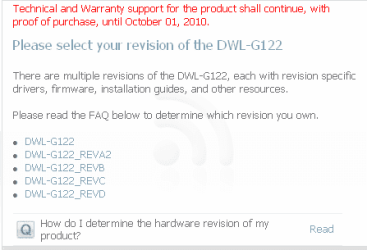
You will need to find out what version of the DWL-G122 you have:

dwl-g122.png

We also need to know if you are using the 32 bit or 64 bit version of Windows 7?

.


.
 
Last edited:

My Computer My Computer

OS
...

My Computer My Computer

OS
Window 7

My Computer My Computer

OS
...
Try it in safe mode too.
 

My Computer My Computer

Computer Manufacturer/Model Number
Sony Vaio Z46GDU
OS
Windows 7 Ultimate x86-64
CPU
[email protected] 1066MHz FSB
Motherboard
Sony branded
Memory
6GB DDR3 1066MHz
Graphics Card(s)
9300M GS 256MB Dedicated (Speed) + Intel4500MHD (Stamina)
Sound Card
Realtek HD Audio
Monitor(s) Displays
13.1' WXGA
Screen Resolution
1600x900
Hard Drives
320GB 7200RPM w/ 16MB cache
Internet Speed
1MB/s
Back
Top