J jaffacake43 New member Local time 7:42 AM Messages 5 Sep 22, 2012 #1 I am using windows7 64bit and when i click on the orb to open, the all programs list is empty how can i get it back My Computer OSwindows 7 home premium 64bit
I am using windows7 64bit and when i click on the orb to open, the all programs list is empty how can i get it back
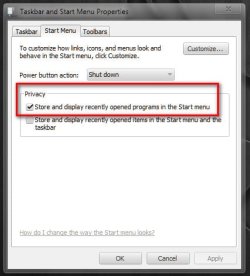
Arc New member SF Team Local time 6:12 PM Messages 35,002 Sep 22, 2012 #2 Is it still empty if you click on the "all programs"? I guess no. Some cleaners (including some advanced settings of CCleaner) wipes it out. First make it sure that it is just the cause here. http://www.sevenforums.com/tutorials/2275-recent-programs-turn-off.html Right click on Task Bar> Properties => It will open the Taskbar and Start menu properties window. Click on the "start menu" tab. Make it sure that this item is checked there. if not, check it. Now, Open a program from "all programs" list, it will sit there in start menu programs list. Last edited by a moderator: Sep 22, 2012 My Computer Computer typePC/DesktopComputer Manufacturer/Model NumberSelf AssembledOSMicrosoft Windows 10 Pro Insider Preview 64-bitCPUIntel(R) Core(TM) i3-4130 CPU @ 3.40GHzMotherboardGigabyte Technology Co., Ltd. B85M-D3HMemoryCorsair Vengence 4GB x2 (8.00GB Dual-Channel DDR3 @ 798MHz)Graphics Card(s)2047MB GeForce GTS 450 (ZOTAC International)Sound CardOnboard (Realtek High Definition Audio)Monitor(s) DisplaysLG Flatron E2040TScreen Resolution1600x900Hard DrivesWestern Digital 1 TB Seagate 500 GBPSUCorsair VS550CaseCooler Master K380CoolingCooler Master Seidon 120V PlusKeyboardLogitech MK260rMouseLogitech MK260rInternet SpeedPMPL BroadbandAntivirusWindows Defender + MBAMBrowserFirefoxOther InfoDell Studio 15" Laptop
Is it still empty if you click on the "all programs"? I guess no. Some cleaners (including some advanced settings of CCleaner) wipes it out. First make it sure that it is just the cause here. http://www.sevenforums.com/tutorials/2275-recent-programs-turn-off.html Right click on Task Bar> Properties => It will open the Taskbar and Start menu properties window. Click on the "start menu" tab. Make it sure that this item is checked there. if not, check it. Now, Open a program from "all programs" list, it will sit there in start menu programs list.
J jaffacake43 New member Thread Starter Local time 7:42 AM Messages 5 Sep 22, 2012 #3 did as suggested, but still missing all programs list My Computer OSwindows 7 home premium 64bit
Arc New member SF Team Local time 6:12 PM Messages 35,002 Sep 22, 2012 #4 A screenshot please? How to use Snipping tool http://www.sevenforums.com/tutorials/9733-screenshots-files-upload-post-seven-forums.html My Computer Computer typePC/DesktopComputer Manufacturer/Model NumberSelf AssembledOSMicrosoft Windows 10 Pro Insider Preview 64-bitCPUIntel(R) Core(TM) i3-4130 CPU @ 3.40GHzMotherboardGigabyte Technology Co., Ltd. B85M-D3HMemoryCorsair Vengence 4GB x2 (8.00GB Dual-Channel DDR3 @ 798MHz)Graphics Card(s)2047MB GeForce GTS 450 (ZOTAC International)Sound CardOnboard (Realtek High Definition Audio)Monitor(s) DisplaysLG Flatron E2040TScreen Resolution1600x900Hard DrivesWestern Digital 1 TB Seagate 500 GBPSUCorsair VS550CaseCooler Master K380CoolingCooler Master Seidon 120V PlusKeyboardLogitech MK260rMouseLogitech MK260rInternet SpeedPMPL BroadbandAntivirusWindows Defender + MBAMBrowserFirefoxOther InfoDell Studio 15" Laptop
A screenshot please? How to use Snipping tool http://www.sevenforums.com/tutorials/9733-screenshots-files-upload-post-seven-forums.html
Brink Administrator Staff member Local time 7:42 AM Messages 74,800 Location Oklahoma Sep 22, 2012 #5 Hello jaffacake, Is "All Programs" missing or just empty? If missing, then try OPTION TWO or THREE in the tutorial below to enable "All Programs" to see if that may help. Start Menu All Programs List - Enable or Disable - Vista ForumsIf empty, then you could use the tutorial below to restore the default Start Menu "All Programs" items if you do not have a restore point dated before this happened to use to do a system restore with. http://www.sevenforums.com/tutorial...rams-windows-7-restore-default-shortcuts.htmlHope this helps, Shawn My Computer Computer typePC/DesktopComputer Manufacturer/Model NumberSelf built customOS64-bit Windows 11 Pro for WorkstationsCPUIntel i7-8700K OC'd to 5 GHzMotherboardASUS ROG Maximus XI Formula Z390Memory64 GB (4x16GB) G.SKILL TridentZ RGB DDR4 3600 MHzGraphics Card(s)ASUS ROG-STRIX-GTX1080TI-O11G-GAMINGSound CardIntegratedMonitor(s) Displays2 x Samsung Odyssey G7 27"Screen Resolution2560x1440Hard Drives1TB Samsung 990 PRO M.2, 4TB Samsung 990 PRO PRO M.2, TerraMaster F8 SSD Plus NASPSUSeasonic Prime Titanium 850WCaseThermaltake Core P3CoolingCorsair Hydro H115iKeyboardLogitech wireless K800MouseLogitech MX Master 4Internet Speed2 Gb/s Download and 100 Mb/s UploadAntivirusMalwarebyte Anti-Malware PremiumBrowserGoogle ChromeOther InfoLogitech Z625 speaker system, Logitech BRIO 4K Pro webcam, HP Color LaserJet Pro MFP M477fdn, APC SMART-UPS RT 1000 XL - SURT1000XLI, Galaxy S23 Plus phone
Hello jaffacake, Is "All Programs" missing or just empty? If missing, then try OPTION TWO or THREE in the tutorial below to enable "All Programs" to see if that may help. Start Menu All Programs List - Enable or Disable - Vista ForumsIf empty, then you could use the tutorial below to restore the default Start Menu "All Programs" items if you do not have a restore point dated before this happened to use to do a system restore with. http://www.sevenforums.com/tutorial...rams-windows-7-restore-default-shortcuts.htmlHope this helps, Shawn