Help! Monitor will not go to sleep!!!!

markeedee311

New member
Local time
7:26 PM
Messages
3
Can anyone help?!?! My wife has a Gateway LX6820-01 Desktop Computer w/ Intel Core 2 Quad Q9400 2.66GHz, 8GB DDR3, 1TB HDD, NVIDIA GT230 Card, running Windows 7 64-bit SP1. We both run Hanns-G HG281D 28" monitors. We updated her GT230 driver at the beginning of April with GeForce/ION v270.51 (03/30/2011 - Beta). Not too long after, we noticed her monitor would not go to sleep when the system went to sleep. We tried various power settings, but still nothing. We then downloaded the newest update GeForce/ION v270.61 (04/18/2011 - WHQL). Still nothing. So today, I uninstalled the last driver, and went back to GeForce/ION v270.58 (01/18/2011 - WHQL). Same thing. Monitor will not sleep. The monitor driver has never been touched, last updated by Hanns-G 05/2007. Don't know what else to do besides trying a video card upgrade. Any thoughts????:confused:

MSInfo:

OS Name Microsoft Windows 7 Professional
Version 6.1.7601 Service Pack 1 Build 7601
OS Manufacturer Microsoft Corporation
System Name CHRISTINE-PC
System Manufacturer Gateway
System Model LX6820
System Type x64-based PC
Processor Intel(R) Core(TM)2 Quad CPU Q9400 @ 2.66GHz, 2670 Mhz, 4 Core(s), 4 Logical Processor(s)
BIOS Version/Date American Megatrends Inc. P01-A1, 4/2/2009
SMBIOS Version 2.6
Windows Directory C:\Windows
System Directory C:\Windows\system32
Boot Device \Device\HarddiskVolume2
Hardware Abstraction Layer Version = "6.1.7601.17514"
Installed Physical Memory (RAM) 8.00 GB
Total Physical Memory 8.00 GB
Available Physical Memory 5.92 GB
Total Virtual Memory 16.0 GB
Available Virtual Memory 13.9 GB
Page File Space 8.00 GB
 
Last edited:

My Computer My Computer

At a glance

Windows 7 64-bit
OS
Windows 7 64-bit
Just want to be sure I understand...

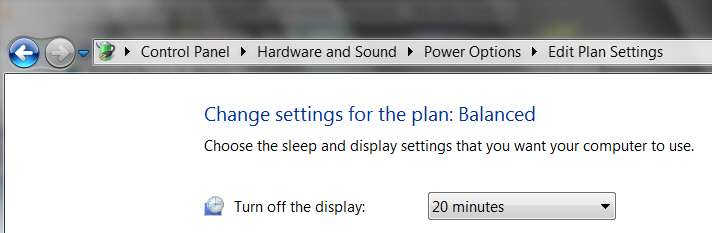
You say that you've got "sleep after n minutes" set in your power scheme, and yet this doesn't happen?? The display driver does not make this happen?

monitorsleep.jpg


Do you have a screensaver that comes on after say 5 minutes, and supposedly stays active until the sleep time arrives? No screensaver? Are you seeing your screensaver?


You're saying that this monitor used to behave properly with a previous video card, and then you upgraded to a new video card and the monitor stopped going to sleep, and then you tried going back to the old video card and the monitor STILL won't sleep?

Does your monitor go to sleep? Have you tried substituting your monitor for hers, just to see if yours goes to sleep on her PC or not?

Just some trial-and-error hardware swapping would seem like it could zero in on the culprit failing component, if your monitor and your video card induces sleep on your PC... and either works or fails when used on her PC.
 

My Computer My Computer

At a glance

Windows 7 Pro x64 (1), Win7 Pro X64 (2)i5-3350p 3.1Ghz/6MB-cache (1); E8400 3.0Ghz/6...8GB PC3-12800 DDR3 (1); 4GB PC3-10600 DDR3 (2)ATI HD7750 (1), (see TV cards); ATI R7 250 (2)
Computer type
PC/Desktop
Computer Manufacturer/Model Number
Home-built, two systems (1) and (2)
OS
Windows 7 Pro x64 (1), Win7 Pro X64 (2)
CPU
i5-3350p 3.1Ghz/6MB-cache (1); E8400 3.0Ghz/6MB-cache (2)
Motherboard
ASUS P8Z77-V Pro (1); ASUS P5Q3 (2)
Memory
8GB PC3-12800 DDR3 (1); 4GB PC3-10600 DDR3 (2)
Graphics Card(s)
ATI HD7750 (1), (see TV cards); ATI R7 250 (2)
Sound Card
Realtek ALC892 HD Audio (1); Realtek ALC1200 HD Audio (2)
Monitor(s) Displays
Eizo HD2441W LCD, Eizo S2433W (1); Eizo 24" S2433W (2)
Screen Resolution
1920x1200, 1920x1200 (1); 1920x1200 (2)
Hard Drives
(1) 1TB SATA-II (7200RPM), 2x2TB SATA-III (7200RPM), 250GB SATA-III (10000RPM) for OS; 2x2TB external USB 3.0

(2) 320GB SATA-II (7200RPM), 750GB SATA-II (7200RPM), 150GB SATA-II (10000RPM) for OS; 2TB external USB 3.0
PSU
Nesteq ECS-6001 600W (1); Nesteq ECS-5001 500W (2)
Case
Acousti-Case 360 (1) and (2)
Cooling
Noctua NH-U12P SE2 for CPU, 2x120mm case fans (1) and (2)
Keyboard
IBM PS/2 (1) and (2)
Mouse
Logitech MX Revolution wireless (1); Microsoft wired (2)
Internet Speed
100mbps down / 10mbps up
Antivirus
Microsoft Security Essentials; Malwarebyte Anti-Malware Pro
Browser
Firefox
Other Info
Ceton InfiniTV 4-tuner cablecard-enabled TV card as well as Hauppauge HVR-2250 OTA/ATSC 2-tuner TV card in (1), running under Win7 WMC
Hi,

I began the post with the specs listing the GT230 card, the "original" card that came with the machine. Also, the Hanns-G monitor has been with the machine since the beginning. The monitor went to sleep fine prior to the update around 03/30/11. If you read the post once more, you'll see that the main variable that has changed was the viseo card "driver", not the video card. We're still using the original GT230 card. It seems ever since we updated the "driver" sometime after 03/30/11, that the driver may be the culprit. We did try swapping monitors, and we did go through the power setting, but still the same issue. I also tried changing cables. What did work, was using a VGA cable, but with noticed degradation, so that is not an option. Thanks
 

My Computer My Computer

At a glance

Windows 7 64-bit
OS
Windows 7 64-bit
Have you checked the monitor's settings?

Press the menu button on your monitor and navigate to the power settings.
 

My Computer My Computer

At a glance

Windows 7 64 Bit Home Premium SP1i7-3820GSkill F3-14900CL9Q - 16GBEVGA GeForce GTX660 - Driver 352.86
Computer type
PC/Desktop
Computer Manufacturer/Model Number
Home Built - Jan 2013
OS
Windows 7 64 Bit Home Premium SP1
CPU
i7-3820
Motherboard
Asus P9X79-PRO - Bios 4608
Memory
GSkill F3-14900CL9Q - 16GB
Graphics Card(s)
EVGA GeForce GTX660 - Driver 352.86
Sound Card
On board Realtek ALC898
Monitor(s) Displays
Acer S271HL
Screen Resolution
1920 x 1080
Hard Drives
#1- Samsung 840 Pro Series
#2- Western Digital WD1002FAEX Sata3 Black
#3- Western Digital WD1002FAEX Sata3 Black
PSU
Corsair CMPSU-850TX-V2 - 850 watt (by Seasonic)
Case
Corsair Obsidian 550D
Cooling
Standard 3 120mm case fans, Cooler Master Hyper 212 EVO
Keyboard
MS KC-0405
Mouse
Intellimouse 5-button
Internet Speed
56 Mbits/Sec (on a good day)
Antivirus
Avast & Malwarebytes
Browser
Firefox
Other Info
Asus DVD - DRW-24B1ST 24X
I began the post with the specs listing the GT230 card, the "original" card that came with the machine. Also, the Hanns-G monitor has been with the machine since the beginning. The monitor went to sleep fine prior to the update around 03/30/11. If you read the post once more, you'll see that the main variable that has changed was the viseo card "driver", not the video card. We're still using the original GT230 card. It seems ever since we updated the "driver" sometime after 03/30/11, that the driver may be the culprit.
Sorry... I didn't absorb all the details in your original post, apparently. I've now re-read it and understand what you're saying.

But I'm puzzled: if you began to experience your problem right after you installed the GeForce/ION v270.51 (03/30/2011 - Beta) driver, and then you still experienced the same problem even after installing the more current and WHQL release version GeForce/ION v270.61 (04/18/2011 - WHQL) of the driver, why would you "back out the driver update" by only going back to GeForce/ION v270.58 (01/18/2011 - WHQL)? Though the driver date that you show is apparently older in the "back out" driver, the driver version number is apparently newer (i.e. 270.58 vs. 270.51).

Are there typos in your original details, is there some explanation?

Have you tried retrieving a "legacy" driver older than version 270.51, which was when your problem apparently started and has carried through for all driver versions with that version level or higher? I don't know which to believe... the driver version number or the date (assuming you've typed the values properly).

Do you know what driver version you were running before 3/30?

Do you have a "system restore point" dated before 3/30, that you could restore from? This only changes the system itself, and makes no changes to your current data.

Do you have a "system image" backup, in worst case? Is it dated before 3/30 or is it more recent, after you've already installed 270.51 of the driver when this problem started?
 

My Computer My Computer

At a glance

Windows 7 Pro x64 (1), Win7 Pro X64 (2)i5-3350p 3.1Ghz/6MB-cache (1); E8400 3.0Ghz/6...8GB PC3-12800 DDR3 (1); 4GB PC3-10600 DDR3 (2)ATI HD7750 (1), (see TV cards); ATI R7 250 (2)
Computer type
PC/Desktop
Computer Manufacturer/Model Number
Home-built, two systems (1) and (2)
OS
Windows 7 Pro x64 (1), Win7 Pro X64 (2)
CPU
i5-3350p 3.1Ghz/6MB-cache (1); E8400 3.0Ghz/6MB-cache (2)
Motherboard
ASUS P8Z77-V Pro (1); ASUS P5Q3 (2)
Memory
8GB PC3-12800 DDR3 (1); 4GB PC3-10600 DDR3 (2)
Graphics Card(s)
ATI HD7750 (1), (see TV cards); ATI R7 250 (2)
Sound Card
Realtek ALC892 HD Audio (1); Realtek ALC1200 HD Audio (2)
Monitor(s) Displays
Eizo HD2441W LCD, Eizo S2433W (1); Eizo 24" S2433W (2)
Screen Resolution
1920x1200, 1920x1200 (1); 1920x1200 (2)
Hard Drives
(1) 1TB SATA-II (7200RPM), 2x2TB SATA-III (7200RPM), 250GB SATA-III (10000RPM) for OS; 2x2TB external USB 3.0

(2) 320GB SATA-II (7200RPM), 750GB SATA-II (7200RPM), 150GB SATA-II (10000RPM) for OS; 2TB external USB 3.0
PSU
Nesteq ECS-6001 600W (1); Nesteq ECS-5001 500W (2)
Case
Acousti-Case 360 (1) and (2)
Cooling
Noctua NH-U12P SE2 for CPU, 2x120mm case fans (1) and (2)
Keyboard
IBM PS/2 (1) and (2)
Mouse
Logitech MX Revolution wireless (1); Microsoft wired (2)
Internet Speed
100mbps down / 10mbps up
Antivirus
Microsoft Security Essentials; Malwarebyte Anti-Malware Pro
Browser
Firefox
Other Info
Ceton InfiniTV 4-tuner cablecard-enabled TV card as well as Hauppauge HVR-2250 OTA/ATSC 2-tuner TV card in (1), running under Win7 WMC
Sorry , there was a typo. It was GeForce/ION Driver v266.58 from 01/18/2011. I do regular updates (WHQL), so I figured the issue started at the beginning of April, so it made sense that it may be the driver from 03/30 causing the problem, therefore, I figured I'd try the prior driver since I did update to that version in February, and everything was working fine then.

Anyway, I've done some more digging, and found a registry patch which worked. http://forums.nvidia.com/index.php?showtopic=82031 Post #7. It seems there is an issue at times with various Monitors/Video Cards using DVI to HDMI because the computer sees the monitor as an HDTV.

Thank you all for your help!
 

My Computer My Computer

At a glance

Windows 7 64-bit
OS
Windows 7 64-bit
Sorry , there was a typo. It was GeForce/ION Driver v266.58 from 01/18/2011. I do regular updates (WHQL), so I figured the issue started at the beginning of April, so it made sense that it may be the driver from 03/30 causing the problem, therefore, I figured I'd try the prior driver since I did update to that version in February, and everything was working fine then.
Of course. I suspected there must have been a typo.


Anyway, I've done some more digging, and found a registry patch which worked. http://forums.nvidia.com/index.php?showtopic=82031 Post #7. It seems there is an issue at times with various Monitors/Video Cards using DVI to HDMI because the computer sees the monitor as an HDTV.
Aha... new information. You didn't make any mention of the connection cable before now.

But still, this whole arrangement WAS working fine until April, so why would this registry patch suddenly become relevant now, to fix a problem that hadn't appeared before now? Did you always have that DVI-to-HDMI cable?

Of course the Nvidia forums are an excellent place to get Nvidia-specific help from experts there. I use the ATI forums the same way from time to time.


Thank you all for your help!
Well, I at least tried to help.

Glad you finally got your problem resolved.
 

My Computer My Computer

At a glance

Windows 7 Pro x64 (1), Win7 Pro X64 (2)i5-3350p 3.1Ghz/6MB-cache (1); E8400 3.0Ghz/6...8GB PC3-12800 DDR3 (1); 4GB PC3-10600 DDR3 (2)ATI HD7750 (1), (see TV cards); ATI R7 250 (2)
Computer type
PC/Desktop
Computer Manufacturer/Model Number
Home-built, two systems (1) and (2)
OS
Windows 7 Pro x64 (1), Win7 Pro X64 (2)
CPU
i5-3350p 3.1Ghz/6MB-cache (1); E8400 3.0Ghz/6MB-cache (2)
Motherboard
ASUS P8Z77-V Pro (1); ASUS P5Q3 (2)
Memory
8GB PC3-12800 DDR3 (1); 4GB PC3-10600 DDR3 (2)
Graphics Card(s)
ATI HD7750 (1), (see TV cards); ATI R7 250 (2)
Sound Card
Realtek ALC892 HD Audio (1); Realtek ALC1200 HD Audio (2)
Monitor(s) Displays
Eizo HD2441W LCD, Eizo S2433W (1); Eizo 24" S2433W (2)
Screen Resolution
1920x1200, 1920x1200 (1); 1920x1200 (2)
Hard Drives
(1) 1TB SATA-II (7200RPM), 2x2TB SATA-III (7200RPM), 250GB SATA-III (10000RPM) for OS; 2x2TB external USB 3.0

(2) 320GB SATA-II (7200RPM), 750GB SATA-II (7200RPM), 150GB SATA-II (10000RPM) for OS; 2TB external USB 3.0
PSU
Nesteq ECS-6001 600W (1); Nesteq ECS-5001 500W (2)
Case
Acousti-Case 360 (1) and (2)
Cooling
Noctua NH-U12P SE2 for CPU, 2x120mm case fans (1) and (2)
Keyboard
IBM PS/2 (1) and (2)
Mouse
Logitech MX Revolution wireless (1); Microsoft wired (2)
Internet Speed
100mbps down / 10mbps up
Antivirus
Microsoft Security Essentials; Malwarebyte Anti-Malware Pro
Browser
Firefox
Other Info
Ceton InfiniTV 4-tuner cablecard-enabled TV card as well as Hauppauge HVR-2250 OTA/ATSC 2-tuner TV card in (1), running under Win7 WMC
Back
Top