Help Move Boot Manager ?!?

sleepyass

New member
Local time
4:28 PM
Messages
3
Hello,

Let me tell you that i've searched the forums for a fix to my problem but i couldn't find a specific one for mine and i didn't want to use a fix and find myself at a dead end.

So if there's a guide that i missed please point me in the right direction or tell me what to do.

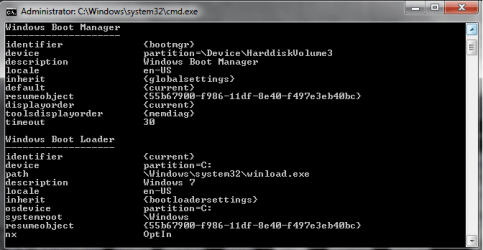
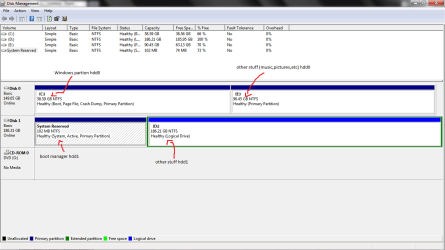
I have 2 hard drives and recently i made a fresh install of Windows 7 on one of them but later i found out that while i selected a hard drive to install it on, windows created the boot manager on the second drive and that's the issue. My question is how to move the boot manager from the second hard drive to the drive i have windows on?

I've attached some screens of disk management and the BCD. I really appreciate if you'll help me fix this.
 

Attachments
  • Untitled.png
    Untitled.png
    24.7 KB · Views: 55
  • Untitled2.png
    Untitled2.png
    13.5 KB · Views: 33

My Computer

OS
windos 7 ultimate x86
Hi I have heard of this software called Easy BCD I havent used it personally but my friend has and it worked for them.
Download EasyBCD 2.0.2 - NeoSmart Technologies
Hopefully you will understand how to use it if not look on the web for tuts.
 

My Computer

Computer type
PC/Desktop
OS
Windows 7 Ultimate X86(32 Bit)
Sounds like you might be running RAID... as RAID is my worst subject in Information Technology, I cannot help you. Good luck.
 

My Computer

Computer Manufacturer/Model Number
Custom - No OEM
OS
Windows 7 Professional x64
CPU
Intel Core i5 CPU 661 @, 3.33 GHz
Motherboard
BIOSTAR GROUP - TPower I55
Memory
16 GB
Graphics Card(s)
nVidia GeForce GTX 465 1024 MB GDDR5
Monitor(s) Displays
LG Flatron 22"
Screen Resolution
1920x1080
Hard Drives
1 TB - Hitachi
Case
ZALMAN
Keyboard
Dynex W7 Keyboard
Mouse
Logitech MX518
Internet Speed
CABLE 20 Down, 6 Up (wireless)
Sounds like you might be running RAID... as RAID is my worst subject in Information Technology, I cannot help you. Good luck.
This is not very helpful. And how do you figure he is "running Raid"?

Sleppyass, here is the tut on how to recreate the MBR ( http://www.sevenforums.com/tutorials/20864-mbr-restore-windows-7-master-boot-record.html 9. But first change the partition where it is now to "Inactive". Use Partition Wizard Home edition bootable CD ( http://www.partitionwizard.com/free-partition-manager.html ).
 

My Computer

Computer Manufacturer/Model Number
HP, Dell, Gateway, Toshiba - 4 laptops and 2 desktops
OS
Vista, Windows7, Mint Mate, Zorin, Windows 8
CPU
from 1.6GHz Duo to i7
Monitor(s) Displays
2x HP w2207
Hard Drives
5x HDD, 7x SSD, 12x Externals
Keyboard
with trackball - no mices
Mouse
Trackball mice
Internet Speed
DSL 6000

My Computer

Computer Manufacturer/Model Number
Custom - No OEM
OS
Windows 7 Professional x64
CPU
Intel Core i5 CPU 661 @, 3.33 GHz
Motherboard
BIOSTAR GROUP - TPower I55
Memory
16 GB
Graphics Card(s)
nVidia GeForce GTX 465 1024 MB GDDR5
Monitor(s) Displays
LG Flatron 22"
Screen Resolution
1920x1080
Hard Drives
1 TB - Hitachi
Case
ZALMAN
Keyboard
Dynex W7 Keyboard
Mouse
Logitech MX518
Internet Speed
CABLE 20 Down, 6 Up (wireless)
Sounds like you might be running RAID... as RAID is my worst subject in Information Technology, I cannot help you. Good luck.
This is not very helpful. And how do you figure he is "running Raid"?

Sleppyass, here is the tut on how to recreate the MBR ( http://www.sevenforums.com/tutorials/20864-mbr-restore-windows-7-master-boot-record.html 9. But first change the partition where it is now to "Inactive". Use Partition Wizard Home edition bootable CD ( BEST FREE Partition Manager Software for Windows supports all 32-bit & 64 bit Windows No-server OS. ).

I figured this because I had mis read what he stated. :confused:
 

My Computer

Computer Manufacturer/Model Number
Custom - No OEM
OS
Windows 7 Professional x64
CPU
Intel Core i5 CPU 661 @, 3.33 GHz
Motherboard
BIOSTAR GROUP - TPower I55
Memory
16 GB
Graphics Card(s)
nVidia GeForce GTX 465 1024 MB GDDR5
Monitor(s) Displays
LG Flatron 22"
Screen Resolution
1920x1080
Hard Drives
1 TB - Hitachi
Case
ZALMAN
Keyboard
Dynex W7 Keyboard
Mouse
Logitech MX518
Internet Speed
CABLE 20 Down, 6 Up (wireless)
Sounds like you might be running RAID... as RAID is my worst subject in Information Technology, I cannot help you. Good luck.
This is not very helpful. And how do you figure he is "running Raid"?

Sleppyass, here is the tut on how to recreate the MBR ( http://www.sevenforums.com/tutorials/20864-mbr-restore-windows-7-master-boot-record.html 9. But first change the partition where it is now to "Inactive". Use Partition Wizard Home edition bootable CD ( BEST FREE Partition Manager Software for Windows supports all 32-bit & 64 bit Windows No-server OS. ).

I tried using the tutorial,but the system recovery does not detect my OS,it's not listed.
Maybe i did something wrong...here are the steps i made:

- Shutdown PC
- Disconnect the 2nd drive (the one with the boot manager on) --maybe this was the wrong thing to do?
- Boot with win7 dvd
- Select repair - No OS detected

I clicked continue or next i don't remember and selected startup repair. It seemed that it was searching for issues but no success. I read the repair report and it didn't repaired anything...probably because it didn't detected any OS.

Should i try again but this time with the 2nd drive plugged in?
 

My Computer

OS
windos 7 ultimate x86
I suggest you leave the 2nd drive disconnected and then first set the C partition "Active" (with the Partition Wizard bootable CD - the setting is under Partition tab > Modify). Then try again with Win7 DVD.
 

My Computer

Computer Manufacturer/Model Number
HP, Dell, Gateway, Toshiba - 4 laptops and 2 desktops
OS
Vista, Windows7, Mint Mate, Zorin, Windows 8
CPU
from 1.6GHz Duo to i7
Monitor(s) Displays
2x HP w2207
Hard Drives
5x HDD, 7x SSD, 12x Externals
Keyboard
with trackball - no mices
Mouse
Trackball mice
Internet Speed
DSL 6000
I suggest you leave the 2nd drive disconnected and then first set the C partition "Active" (with the Partition Wizard bootable CD - the setting is under Partition tab > Modify). Then try again with Win7 DVD.

That did the trick! First time i tried to use system recovery i didn't set the C: partition active. Now after i've set it to active, system recovery detected my OS and repaired the boot manager.

Thank you for your help. Great support and fast replies.
The topic can be closed now.
 

My Computer

OS
windos 7 ultimate x86
You are welcome. Any time.
 

My Computer

Computer Manufacturer/Model Number
HP, Dell, Gateway, Toshiba - 4 laptops and 2 desktops
OS
Vista, Windows7, Mint Mate, Zorin, Windows 8
CPU
from 1.6GHz Duo to i7
Monitor(s) Displays
2x HP w2207
Hard Drives
5x HDD, 7x SSD, 12x Externals
Keyboard
with trackball - no mices
Mouse
Trackball mice
Internet Speed
DSL 6000
Back
Top