Solved Help! Msi 5

The Unofficial

New member
Power User
Local time
11:49 AM
Messages
112
Location
Oregon
Hey guys,


Bassically I my Windows Installer got corrupted somehow, and I kept getting error 2203. So I (following directions from a reliable source) Uninstalled the Installer engine, but then when I went Microsoft they wouldn't give me the MSI 5.0, because it wasn't a redistribute version. SO if some one could PLEASE upload a zip with the file in it, +the dll's or whatever, and were to put it, or a installer, that would be AWESOME because I can't install, uninstall, or update ANYTHING right now.

Thank you SO much,
The Unofficial.
 

My Computer

Computer Manufacturer/Model Number
ASUS G60JX Republic of Gamers
OS
Windows 7 Professional 64-bit
CPU
Intel i5 430m
Memory
4 GB DDR3
Graphics Card(s)
nvidia Geforce GTS 360M Cuda 1GB
Sound Card
EAX Advanced HD 4.0
Screen Resolution
1366 x 768
Hard Drives
460 GB 7200 RPM built in
Internet Speed
Too slow :-( 160kbs

My Computer

Computer type
PC/Desktop
Computer Manufacturer/Model Number
Custom Build
OS
Windows 10 Pro x64, Arch Linux
CPU
Intel Core 2 Quad Q8200 OC'd 3.08GHz
Motherboard
Asus Rampage formula LGA775
Memory
8GB DDR2 900Mhz
Graphics Card(s)
MSI GT730 2GB GDDR5 (Kepler)
Sound Card
Supreme FX2
Monitor(s) Displays
Samsung LS22F350 LED
Screen Resolution
1080P
Hard Drives
Kingston SSDNow UV400 120GB, 500GB Hitachi, 2TB Samsung, 500GB Seagate FreeAgent, 640GB Samsung, 160GB Toshiba (Arch)
PSU
AeroCool 500W Bronze
Cooling
Cooler Master V6 + 3X fans
Keyboard
Prolink keyboard
Mouse
Logitech M705
Internet Speed
1MiB/s
Browser
Chrome Beta
Thanks, great idea, didn't think about doing that. Running SFC now. Will let you know the outcome. If nothing, I will do a restore.
 

My Computer

Computer Manufacturer/Model Number
ASUS G60JX Republic of Gamers
OS
Windows 7 Professional 64-bit
CPU
Intel i5 430m
Memory
4 GB DDR3
Graphics Card(s)
nvidia Geforce GTS 360M Cuda 1GB
Sound Card
EAX Advanced HD 4.0
Screen Resolution
1366 x 768
Hard Drives
460 GB 7200 RPM built in
Internet Speed
Too slow :-( 160kbs
Alright, so I ran a SFC /scannow, and came up with nothing. am going to do a restore tomorrow. I'll keep you posted...
 

My Computer

Computer Manufacturer/Model Number
ASUS G60JX Republic of Gamers
OS
Windows 7 Professional 64-bit
CPU
Intel i5 430m
Memory
4 GB DDR3
Graphics Card(s)
nvidia Geforce GTS 360M Cuda 1GB
Sound Card
EAX Advanced HD 4.0
Screen Resolution
1366 x 768
Hard Drives
460 GB 7200 RPM built in
Internet Speed
Too slow :-( 160kbs
Thanks but I already did the restore. :-(. I am having some problems with 7 so I would like to do this repair install, but I got my computer off of craigs list (totally legal) and the guy got the computer from Best Buy, and he got a deal on it because they didn't have the 7 DVD. So aka, I don't have one either. Can I do this w/o the DVD?
 

My Computer

Computer Manufacturer/Model Number
ASUS G60JX Republic of Gamers
OS
Windows 7 Professional 64-bit
CPU
Intel i5 430m
Memory
4 GB DDR3
Graphics Card(s)
nvidia Geforce GTS 360M Cuda 1GB
Sound Card
EAX Advanced HD 4.0
Screen Resolution
1366 x 768
Hard Drives
460 GB 7200 RPM built in
Internet Speed
Too slow :-( 160kbs
Check in All Programs for Recovery. Make the disks, then run the Factory Recovery utility to see what the choices are for a full Factory Recovery. Back up your files first.

This might be your best bet if you can't find or borrow a Win7 installer to do a Repair Install or Clean Reinstall.

Here are steps for getting a perfect clean reinstall of a factory pre-install: http://www.sevenforums.com/installation-setup/125874-re-install-windows-7-a.html#post1086729
 
Don't worry about it. I fixed the installer error that I kept getting that made me uninstall it in the first place. I just hadn't given the root user full permissions to the Temp folder. Now my only problem is getting the Turn Windows Features On and Off service. I keep getting ServerManager.ink does not exist error. :-( I may be able to get a install disk, but can I download it using my key, and then burn that to a dvd?
 

My Computer

Computer Manufacturer/Model Number
ASUS G60JX Republic of Gamers
OS
Windows 7 Professional 64-bit
CPU
Intel i5 430m
Memory
4 GB DDR3
Graphics Card(s)
nvidia Geforce GTS 360M Cuda 1GB
Sound Card
EAX Advanced HD 4.0
Screen Resolution
1366 x 768
Hard Drives
460 GB 7200 RPM built in
Internet Speed
Too slow :-( 160kbs
You don't need a key to obtain the ISO to burn to DVD. You will need the key on the COA sticker attached to machine to clean reinstall only.

I gave you the link earlier to Repair Install tutorial.

If that doesn't help, look over steps here to get a purrfect reinstall: http://www.sevenforums.com/installation-setup/125874-re-install-windows-7-a.html#post1086729

You could also run Factory Recovery if you want to keep the pre-installed programs along with useless bloatware and utilities which have better versions built into Win7. I would make your Recovery Disks now if you haven't already. But running the partition is more stable and preferable unless your HD goes bad.
 
Alright thanks! I think I'll do that this weekend. Thanks again for going to such lengths to help! I REALLY appreciate it!
 

My Computer

Computer Manufacturer/Model Number
ASUS G60JX Republic of Gamers
OS
Windows 7 Professional 64-bit
CPU
Intel i5 430m
Memory
4 GB DDR3
Graphics Card(s)
nvidia Geforce GTS 360M Cuda 1GB
Sound Card
EAX Advanced HD 4.0
Screen Resolution
1366 x 768
Hard Drives
460 GB 7200 RPM built in
Internet Speed
Too slow :-( 160kbs
Alright Guys,

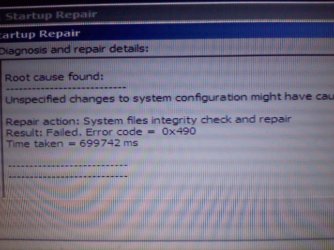
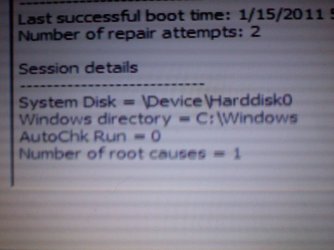
So I just did the Repair Install, but to no avail. Here are some pictures I took with my phone Sorry about the poor quality. I'm not one of those people that can't figure out how to take a screenshot, but I couldn't since it was booted from a disk. It didn't do anything except make my computer boot much faster. I also did a memory integrity scan, and that didn't help either. Its still doing that thing were it locks up for no reason at "random" things. I did let you guys know that the System Restore got my MSI installer back right?

Thanks,
The Unofficial
 

Attachments

  • 0114012318.jpg
    0114012318.jpg
    516.6 KB · Views: 1
  • 0114012316.jpg
    0114012316.jpg
    361.3 KB · Views: 0
Last edited:

My Computer

Computer Manufacturer/Model Number
ASUS G60JX Republic of Gamers
OS
Windows 7 Professional 64-bit
CPU
Intel i5 430m
Memory
4 GB DDR3
Graphics Card(s)
nvidia Geforce GTS 360M Cuda 1GB
Sound Card
EAX Advanced HD 4.0
Screen Resolution
1366 x 768
Hard Drives
460 GB 7200 RPM built in
Internet Speed
Too slow :-( 160kbs
What you did was Startup Repair. This is how to do a Repair Install: http://www.sevenforums.com/tutorials/3413-repair-install.html?ltr=R

Can you still boot into Win7? If so I would do the Repair Install as a last resort before clean reinstalling or running Factory Recovery from boot.

Are you able to locate a Win7 installation DVD for your version? You can extract the ISO from any version install DVD using ImgBurn, unlock all versions with this utility to use your licensed version after burning to DVD using ImgBurn at 4x speed: http://www.sevenforums.com/tutorials/3413-repair-install.html?ltr=R
 

My Computer

Computer Manufacturer/Model Number
ASUS G60JX Republic of Gamers
OS
Windows 7 Professional 64-bit
CPU
Intel i5 430m
Memory
4 GB DDR3
Graphics Card(s)
nvidia Geforce GTS 360M Cuda 1GB
Sound Card
EAX Advanced HD 4.0
Screen Resolution
1366 x 768
Hard Drives
460 GB 7200 RPM built in
Internet Speed
Too slow :-( 160kbs
If System Restore got your MSI back then what is the current problem? Can you go back further in Restore Points to overome it?

You'll need to find a retail copy of Win7 for your version and bit-rate to do the Repair Install. Best to borrow it from a friend - you can unlock all versions if it is another 64 bit version - follow link in the Clean Reinstall steps I first posted.

If you download it from the internet, be sure to rightclick scan ISO with your AV and Malwarebytes (after updating) to make sure it doesn't have anything added.
 
Gregrocker

The current problem is that it locks up at "random" things. I have updated all the drivers and everything was working fine. See my post about it here.

As far as restoring goes, I haven't tried it because I would loose a tremendous amount of data, and I have no way to back it up. I think I am just going to have to wait until I upgrade to Ultimate, as I have been thinking about doing that. If I downloaded the files from a Torrent or something, that would be Illegal right? If it is illegal, how common is it for people to run downloaded versions?

Thanks for your support,
The Unofficial
 
Last edited:

My Computer

Computer Manufacturer/Model Number
ASUS G60JX Republic of Gamers
OS
Windows 7 Professional 64-bit
CPU
Intel i5 430m
Memory
4 GB DDR3
Graphics Card(s)
nvidia Geforce GTS 360M Cuda 1GB
Sound Card
EAX Advanced HD 4.0
Screen Resolution
1366 x 768
Hard Drives
460 GB 7200 RPM built in
Internet Speed
Too slow :-( 160kbs
You can use the information in this tutorial to copy out the data you need to save.

How to Copy & Paste in Recovery Console on Windows 7 or Vista


Also here's some interesting info you may find useful.

After you have copied out the data you need to save, if you can find an exact Windows version that the PC shipped with you can do a clean install using the activation key on the COA sticker attached to the PC though it may require a robo-call to MS to sort the OEM batch-key.

How to Activate Windows 7 by Phone


If you can't find an exact same version, you could use the info in this tutorial to create an "all Versions" installer of any version Windows installer, to install using the same method I posted above and be sure to post back with any further questions you may have and to keep us informed.

Windows 7 Universal Installation Disc - Create


Though if there's nothing on the PC you need to save, I'd do a complete wipe (secure erase) of the entire Hard Disk Drive first.

SSD / HDD : Optimize for Windows Reinstallation
 

My Computer

Computer Manufacturer/Model Number
* BFK Customs *
OS
W 7 64-bit Ultimate
CPU
Intel Q9550 Yorkfield
Motherboard
ASUS P5Q Pro
Memory
8GB Dominator 8500C5D
Graphics Card(s)
ATI : XFX 5870
Sound Card
Realtek HD Audio 7-1
Monitor(s) Displays
1x 47" LCD HDMI & 3x 26" LCD HDMI
Screen Resolution
1920x1080P & 1920x1200
Hard Drives
1x 80GB Intel X25-M G2 SSD : 1x 500GB & 1x 640GB WD Caviar Black(s)
PSU
Corsair 620HX
Case
Cooler Master RC-690
Cooling
Tuniq Tower 120, 2x 140mm and 3x 120mm case fans
Keyboard
Microsoft 500
Mouse
Razer Diamondback 3G
Internet Speed
14 Mb/s
Other Info
1x Koutech 3Gb/s SATA HDD Hot Swap Rack
You really need to have your files backed up at all times anyway. If you can't get an external HD, or they won't fit on DVD, you can use Windows Live Essentials "Live Mesh" to synchronize up to 5gb per Live account to the Microsoft Sky Drive server. You can also transfer over your network to another computer.

Once you back up your best bet is clean reinstalling following these tips to get a purrfect reinstall: http://www.sevenforums.com/installation-setup/125874-re-install-windows-7-a.html#post1086729
 
UPDATE,

So I think that I may just wait, and buy the Ultimate disk sometime in my near-to-late future (heavy on the latter). In the meantime I have discovered that my "random" assortmant of programs that crash windows, don't crash it in Safe Mode. In fact, they even work perfectly. So I tried starting EVERY service that I could, and it still crashed. However, the fact that they work in safe mode give's me hope. It could always just be a random sequence of events to... but I seriously doubt it.

Wow, I sure am a challenge,
The Unofficial
 

My Computer

Computer Manufacturer/Model Number
ASUS G60JX Republic of Gamers
OS
Windows 7 Professional 64-bit
CPU
Intel i5 430m
Memory
4 GB DDR3
Graphics Card(s)
nvidia Geforce GTS 360M Cuda 1GB
Sound Card
EAX Advanced HD 4.0
Screen Resolution
1366 x 768
Hard Drives
460 GB 7200 RPM built in
Internet Speed
Too slow :-( 160kbs
Check optional Windows Updates for newer drivers, and enable auto-hardware driver updating by clicking on Devices and Printers in Start Menu.

Once those are done, check your drivers in Device Manager to see if any are in error or need Updating.

What is the problem with running a Repair Install using the tutorial I posted earlier? If you have a Win7 installer you can unlock all versions to Repair Install yours by running DVD or extracted ISO from Desktop.

Repair Install
Ei.cfg Removal Utility Unlock All Versions in ISO
 
Back
Top