Help! My clock doesn't work...

publicuse

New member
Local time
10:50 AM
Messages
4
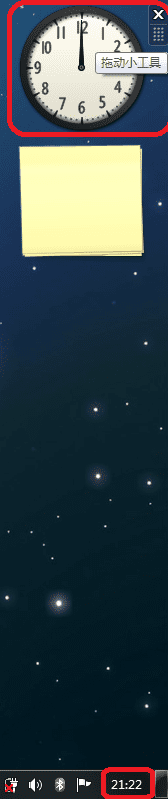
My clock refuses to work today. See the attach. What can I do? I don't want to recover my system merely for a clock... But that is really bothering me now...
PS. I've tried other types of clocks. They don't work either. However, the other gadgets works normally.
 

Attachments

  • help.png
    help.png
    21 KB · Views: 41

My Computer

OS
win7
If a gadget is getting it's time directly from the internet.. streaming it may still work but.. It used to be.. I do not know about so much anymore.. that windows clock problems happened because the battery in your pc was going bad. Used to be just change this battery and the clocks would work perfectly again...

Or you may have a setting in your Bios that sets the time and governs the windows clock.. You may want to look for this.. but do not confuse clock/Time settings with other settings you may see such as clock speed for memory.. they are two different things.

This works because Windows uses your computers hardware clock/time settings for it's clocks.. windows does not have an app that actually sits there and counts down the seconds to show the time, like a real clock does. It's the CPU on your motherboard that actually does the counting.

This may not be what is causing your problem, but it's something to consider.

 

My Computer

OS
Windows 7
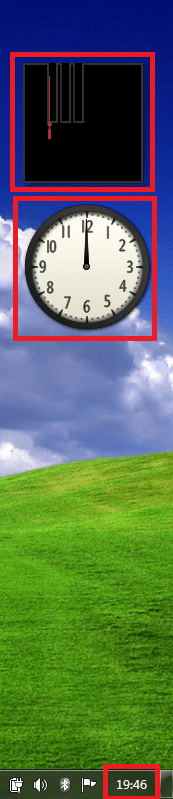
Thanks a lot! But it doesn't seem to be that problem...the setting in my Bios is correct. I guess it's more likely to be the software problem. I mean...sth wrong with the gadget...Here is the shot of another clock...It turns out to be abnormal...
 

Attachments

  • help2.png
    help2.png
    50.3 KB · Views: 58

My Computer

OS
win7
Thanks a lot! But it doesn't seem to be that problem...the setting in my Bios is correct. I guess it's more likely to be the software problem. I mean...sth wrong with the gadget...Here is the shot of another clock...It turns out to be abnormal...


Have you tried running System File Checker in case it is a corrupted windows file causing the problem?

See here: http://www.sevenforums.com/tutorials/1538-sfc-scannow-command-system-file-checker.html

If it is a windows system file causing the problem, this will fix it.
 

My Computer

OS
Windows 7
Have you tried running System File Checker in case it is a corrupted windows file causing the problem?

See here: http://www.sevenforums.com/tutorials/1538-sfc-scannow-command-system-file-checker.html

If it is a windows system file causing the problem, this will fix it.

I tried this. Though I can see no improvement in my gadget, the report points out that there is something wrong with the sidebar's files which it could not fix... Here is the report file. I'm afraid I cannot manage to deal with it...
Worst of all, I haven't set a restore point before that...Anyway, I don't want to restore my sys merely for a clock here...It's taking up too much of our time...Bothering....:confused:
BTW: Will it be a possible solution that I collect all the file in ‘C:\Program Files\Windows Sidebar’ from another win7 pc and do a simple replacement?
 

Attachments

My Computer

OS
win7
When you installed Windows 7, was it a clean install or an upgrade?

It is always best to do a clean install to avoid problems like this!!

Good Luck
 

My Computer

Computer type
PC/Desktop
Computer Manufacturer/Model Number
Self Build
OS
MS Windows 7 Professional 64-bit SP1
CPU
AMD FX(tm)-6100 Six-Core Processor Socket AM3+ (942)
Motherboard
ASUSTeK COMPUTER INC. SABERTOOTH 990FX (AM3r2)
Memory
8.00 GB Dual-Channel DDR3 @ 802MHz (11-11-11-36) 1.5Volts
Graphics Card(s)
NVIDIA GeForce GTX 560 Ti
Sound Card
Onboard Realtek HD
Monitor(s) Displays
shimian (1920x1080@60Hz)
Screen Resolution
1920*1080
Hard Drives
OCZ-AGIL ITY3 SATA Disk Device 120GB
PSU
Corsair TX 750
Case
Corsair
Cooling
WaterCooled
Keyboard
Microsoft Wired
Mouse
Logitech USB Optical TiltWheel Mouse
Internet Speed
Realtek PCIe GBE Family Controller 20MB*1MB
Antivirus
Avast
Browser
Firefox
Other Info
150GB Internal Hard Drive for Backing Up Important Files -
Hauppauge Nova-DT Dual DVB-T Tuner Device (+IR) -
USB PC Camera with Mic (SN9C105)
You can reset your gadget bar by turning it off in Features and then restart and turn back on. Good luck to you. Welcome to SF!
 

My Computer

Computer Manufacturer/Model Number
Gateway GT5692
OS
Windows 7 Ulti. x64
CPU
AMD Phenom 8450 triple-core 2.10 ghz
Memory
4GB
Graphics Card(s)
ATI Radion HD 3200
Monitor(s) Displays
Gateway FPD1775W
Screen Resolution
1280x720
Hard Drives
465.6613 Gibibytes
BTW: Will it be a possible solution that I collect all the file in ‘C:\Program Files\Windows Sidebar’ from another win7 pc and do a simple replacement?

It won't hurt to try it. I cannot say I have not done such things in the past. I once copied half my windows directory from one XP to another.

Just set a restore point first. Then if that does not help, then there is nothing wrong with the files themselves but either a setting someplace or other files like dll.s that work with those files.

I suggest you try myzr7's suggestion to reset the gadget bar first before you take such extreme measures.
 

My Computer

OS
Windows 7

My Computer

OS
win7
Wow. I'm glad you figured it out and thank you very much for taking the time to tell us how you solved the problem. Otherwise, some of us may have been unaware of how to solve the problem when others come here with the same issue.
 

My Computer

Computer type
Laptop
Computer Manufacturer/Model Number
Toshiba P775-S7100
OS
Windows 7 Professional SP1 64-bit
CPU
Intel Core i5-2450M @2.5 GHz
Memory
6 GB DDR3 1333MHz
Graphics Card(s)
Intel HD 3000
Monitor(s) Displays
Built-in 17.3" LED; 22" Insignia NS-L22Q-10A
Screen Resolution
1600x900; 1360x768
Hard Drives
750 GB Hitachi
1TB Seagate FreeAgent External
Internet Speed
Verizon DSL Speed(Down/Up): 3360 Kbps / 800 Kbps
Antivirus
MSE and MBAM Pro
Browser
IE10
Back
Top