I need help because my monitor shows up as a acer al1714 and the resolution can only go up to 1280x1024 but i have a v7 22" monitor every thing is horrible.
Right now i have to monitors both 22" and i also have 2 evga 9600 gso cards running on SLI i don't know whats wrong i just turned it on and it was all resize and this was after i updated my nvidia drivers.
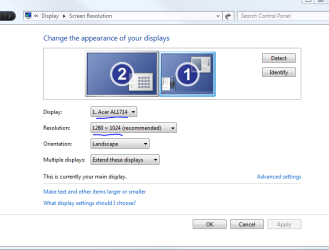
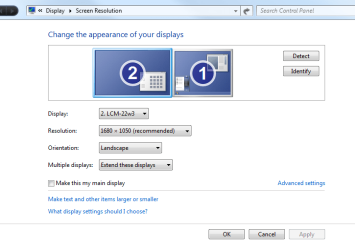
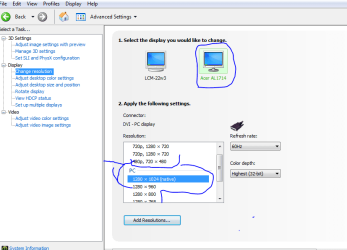
Yes i just updated to the newest driver on nvidia but now its saying that my monitor is a acer here are some pics.
both my monitors are generic pnp so they don't have drivers i already went into the device manager and uninstalled both monitors and reinstalled and tried to update but nothing and also i unpluged the monitor and pluged it back in but that didnt work.
In the run field, type msinfo32, under software environment, see if you see the acer driver, then go to the location of the driver, and remove it. Another possible solution:
Right click on desktop
select Personalize
Click change display settings
Highlight the monitor that is named incorrectly
Click advance settings
Click the monitor button
Click Properties
Click driver
Click driver details
there you will see the driver being used, you can either go to the location of the driver and remove it, or click the uninstall button to remove the driver, or simply click the udate driver, and have it install the driver from the disk. Hope this helps.
My Computer
At a glance
Windows 7 UltimateIntel Core(TM)2 Quad- Q9550, 2.83GHz4GBATI Radeon HD4600
Computer Manufacturer/Model Number
Gigabyte
OS
Windows 7 Ultimate
CPU
Intel Core(TM)2 Quad- Q9550, 2.83GHz
Motherboard
G31M-ES2L
Memory
4GB
Graphics Card(s)
ATI Radeon HD4600
Sound Card
On Board:
Monitor(s) Displays
Acer AL2223W, Acer AL1916
Screen Resolution
1680 x 1050, 1280 x 1024
Hard Drives
160GB
350GB
250GB
250GB
PSU
600W
Case
Cooler Master
Keyboard
Microsoft Laser 6000
Mouse
Logitech Optical Trackman
Internet Speed
1.5MB
Other Info
I am also running a quasar gamatron flux capacitor with twin pulse tronic phasers......jk, I have no such stuff.
I helped a friend out that had a similar issue. It was the latest drivers that were causing the problem. He switched back to the older version and it fixed it. The only way that we could get it to work properly with the latest drivers was to turn off SLI in the Nvidia control panel.
My Computer
At a glance
Windows 7 Ultimate 64bitAMD Phenom Quad core 9950 black edition16Gb2x XFX Radeon 5850
i tryed what pooman uk,zay, and jacee said nothing worked and for what pooman uk said why i open nvidia physx it says windows "cannot find NvcplUI.exe" and when i click ok it says the same thing "file not found nvcplui.exe
I think the best thing to do is remove the nvidia drivers completely from your system and then start again.
Once you have uninstalled the drivers use a program like Guru3D - Driver Sweeper just to make sure that all trace of the drivers are gone. Restart the computer then re-install the nvidia drivers.
My Computer
At a glance
Windows 7 Ultimate 64bitAMD Phenom Quad core 9950 black edition16Gb2x XFX Radeon 5850
I noticed a drop down arrow in your first pick... next to where it said you're running an acer... if you click the arrow are you given any other options?
if i click on the drop down arrow it will just show my 2nd monitor
but it is ok because it fixed it
This is how it happened
1. Me and my friend and my brother had a lan party the 17th this month
2. My brother put his computer on a table next to my table
3.he didnt feel like bring down his monitor so i gave him my v7
4. i switched the wires when i got the monitor back in the afternoon
5. i connected the v7 monitor on a vga cable with dvi-d adapter and my westington monitor on the only dvi-d cable and now it workd the v7 shows up as an CMC 22W