my notebook battery status changes to ---%
after i accidentally remove yellow sign from battery drivers from device manager
,i've look around google and look into my device manager second laptop
but i've only found two driver
xxxxxxxxxxxxxx
, what is the third drivers that controlled my notebook battery status ?
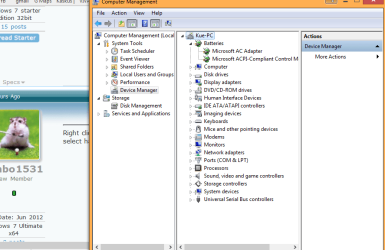
-Microsoft AC Adapter
-Microsoft ACPI-Compliant Control Method Battery
-(Third unknown driver)
*in this picture ,ive been looking from google, there are 3 driver in the batteries section, but what is the third name?
xxxxxxxxxxxxxxxxxxxxx
----------------------------------------
SOLVED in here: http://www.pchelpforum.com/xf/threads/power-icon-missing.89626/#post-511257
after i accidentally remove yellow sign from battery drivers from device manager
,i've look around google and look into my device manager second laptop
but i've only found two driver
xxxxxxxxxxxxxx
, what is the third drivers that controlled my notebook battery status ?
-Microsoft AC Adapter
-Microsoft ACPI-Compliant Control Method Battery
-(Third unknown driver)
*in this picture ,ive been looking from google, there are 3 driver in the batteries section, but what is the third name?
xxxxxxxxxxxxxxxxxxxxx
----------------------------------------
SOLVED in here: http://www.pchelpforum.com/xf/threads/power-icon-missing.89626/#post-511257
Last edited:
My Computer
- Computer Manufacturer/Model Number
- Compaq 510
- OS
- windows 7 starter Edition 32bit
- CPU
- Intel Core 2 Duo Processor T5870 (2.0 GHz, 2 MB L2 cache, 80
- Memory
- 1 GB 800 MHz DDR2 SDRAM
- Graphics Card(s)
- Mobile Intel(R) GMA X3100 256MB (shared)
- Sound Card
- Integrated
- Monitor(s) Displays
- 14″ WXGA TFT
- Hard Drives
- 250 GB Serial ATA 5400 RPM