Help Needed for RAM

Gyaneshwar

New member
Local time
12:18 AM
Messages
7
hey Pals

I need help for my RAM. My System Specs R as follows :
OS = Windows 7 Ultimate 64 bit
CPU = Intel Core i7 930 (2.8 Ghz)
RAM = Installed = 3X2 GB Sticks =6 GB (Cross-air DDR 3-1600 Mhz) but the system shows 4 GB usable. Y is this.
HDD = WD Caviar Green 500 GB
DVD RW = HP 1260 DVD Drive
GPU = Nvidia Geforce 250 1 Gb/ 256 Bit
MB = Gigabyte GA-X-58A-UD5


I have done the memory test by removing all the memory then placing 1 mem at a time on each slot. I repeated this for all the memory. On first booting of the system the specs of RAM were DDR 3 1066. When I cranked it to profile 1 to 1600 Mhz. it gave me a overclock failure. then next time it became alright. and now again its 1066 MHz clock freq. of RAM. Pl. help.

I brought this system in pieces in USA (LA) and I assembled it myself here in INDIA. Pl. help.


Y does the system Properties show that I can only use 4 GB RAM where as I have installed 6 GB. Pl. Help. I have to do a lot of Engg. Designs in AutoCAD, Solidworks & RUN Adobe premier for making movies for my presentation.. Thanks:mad::zip::eek:

Gyanesh.
 
Last edited:

My Computer

Computer Manufacturer/Model Number
Assembled
OS
Windows 7 Ultimate 64 bit & Windows XP 32 bit Dual Boot diff. Partition
CPU
Intel Core i7-930
Motherboard
Gigabyte X-58A-ud5
Memory
6 GB DDR 3 1600 Mhz
Graphics Card(s)
Nvidia Zotac geforce gts 250
Monitor(s) Displays
17 Inch CRT BenQ
Screen Resolution
1024X768
Hard Drives
1 500 GB WD Caviar green
PSU
cooler master silent pro 850 wt
Case
cooler master elite 310
Cooling
200 MM fan
Keyboard
Microsoft MM
Mouse
Microsoft
Internet Speed
25 kBps
Hi, welcome to the forums :)

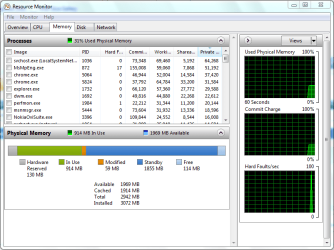
Can you get a screenshot of Resource Monitor in the Memory tab for us? (just type resmon into the Start search.

Resmon.PNG

Also, try removing all but 1 stick of memory and checking that it has been read properly. Do this for all 3 sticks, replacing 1 with another. This will determine if 1 of them is faulty. If all work then follow the process again for each of your memory slots to determine if 1 of the slots may be fault.


OS
 

My Computer

Computer Manufacturer/Model Number
Compaq Desktop
OS
Windows 7 Ultimate x64
CPU
AMD Sempron Dual Core
Memory
3GB
Graphics Card(s)
NVIDIA GeForce 6150SE nForce 430
Screen Resolution
1024x768
Hard Drives
150GB Sata
If you have onboard video it is possible that your memory is being shared with it.
 

My Computer

Computer Manufacturer/Model Number
Acer 5720z laptop
OS
win7 home premium 64bit
Your motherboard spec's show that memory specs are.

6 x 1.5V DDR3 DIMM sockets supporting up to 24 GB of system memory(Note 1)
  1. Dual/3 channel memory architecture
  2. Support for DDR3 2200/1333/1066/800 MHz memory modules
  3. Support for non-ECC memory modules
  4. Support for Extreme Memory Profile (XMP) memory modules
Looks like your memory spec's and your installed memory are not what y ou want.
at
GIGABYTE - Motherboard - Socket 1366 - GA-X58A-UD5 (rev. 2.0)

Rich
 

My Computer

Computer type
Laptop
Computer Manufacturer/Model Number
Toshiba Laptop Qosimo X870
OS
Windows 7 Pro x64 SP1
CPU
Intel Core I7
Motherboard
Toshiba Qosmio
Memory
16 Gigs
Graphics Card(s)
NVIDIA GeForce GTX 670M
Monitor(s) Displays
17.7" laptop
Screen Resolution
1600 x 900
Hard Drives
256 Gig SanDisk SSD for C
256 Gig Intel SSD for D
Internet Speed
50/25 FIOS
Antivirus
Vipre (all you can eat for 10 machines)
Browser
IE and FF
Other Info
I have dos 6.22, wfwg 3.11, win98, 2000 and xp VHD's available for testing. MS's Virtual PC works great.
Dear OS and richandrockville,
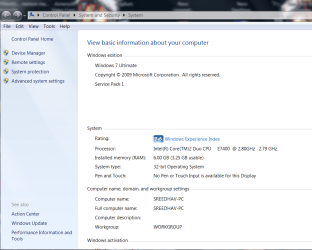
I am experiencing a very similar prob.,but my specs. will show that i am using a 32 bit version.

As in the case of @OP, the system shows the installed RAM as 6GB and usable as 3.5GB. I read in this forum a while back that the maximum a 32 bit can utilize is 4GB whereas the 64 bit can use more! I have read in many articles,just to site an example,Bob Rankin, says that that one of the less but most useful investments one can may on a PC is to increase the RAM! I am not a gamer! Any clues please! By the way, i like the signature tune of richandrockville!
Regards,
DR.Sreedhav
 

Attachments

  • System-1.png
    System-1.png
    55.2 KB · Views: 17
  • System-2.png
    System-2.png
    5.9 KB · Views: 4
  • Program Manager-1.png
    Program Manager-1.png
    12.9 KB · Views: 6

My Computer

Computer Manufacturer/Model Number
Sony Vaio C series VPCCB35FN laptop
OS
MS Windows 7 Home Premium 64-bit SP1
CPU
IntelCore [email protected]; Sandy Bridge 32nm Tech.
Motherboard
Sony Vaio Version:C609NJYJ
Memory
4096Mb RAM; Single ChannelDDR3@665MHz; DRAM Freq:662MHz
Graphics Card(s)
AMD Radeon HD 6630M; GPU:Whistler;BIOS Core&mem Clock:123.36
Sound Card
REALTEK High Definition Audio Device; INTEL Display Card
Monitor(s) Displays
Generic PnP Intel HD;Resolution:1920*1040 Pixels; BPP:32bits
Screen Resolution
Current Resolution:1920*1080 Pixels; Monitor Frequency:60Hz
Hard Drives
Internal HD:TOSHIBA MK5061GSY; Real Size:488 GB;NTFS; 3 Partitions; SATA; HEADS:16

External HDD: WD Elements 1023 PORTABLE; Estimated Size: 1TB; NTFS; 3 Partitions
Cooling
Lateral Exhaust with a Cooling Pad Placed Beneath.
Keyboard
Logitech Bluetooth+ Generic Integrated K-B
Mouse
Logitech Bluetooth
Internet Speed
2MBPS
Other Info
1)Trend Micro Titanium Maximum Security Suite Version:3
2)SAS-PRO

3)MBAM--PRO


4)WATERFOX+IE9 +WOT+LINKEXTEND+ DRWEBCUREIT LINK CHECKER

5)SPYWAREBLASTER

6) WINPATROL PLUS

7) SANDBOXIE and
8) A BIT OF COMMON SENSE.
Dear OS and richandrockville,
I am experiencing a very similar prob.,but my specs. will show that i am using a 32 bit version.

As in the case of @OP, the system shows the installed RAM as 6GB and usable as 3.5GB. I read in this forum a while back that the maximum a 32 bit can utilize is 4GB whereas the 64 bit can use more! I have read in many articles,just to site an example,Bob Rankin, says that that one of the less but most useful investments one can may on a PC is to increase the RAM! I am not a gamer! Any clues please! By the way, i like the signature tune of richandrockville!
Regards,
DR.Sreedhav


Hi,

While increasing RAM is 1 of the best ways to increase performance, installing anything over 4GB on a 32Bit system will have no enhancing effects as the 32Bit OS will only use upto 4GB (normally 3.5). If you wish to utilize ALL available RAM then you will have to upgrade to the 64Bit version of Windows 7.


OS
 

My Computer

Computer Manufacturer/Model Number
Compaq Desktop
OS
Windows 7 Ultimate x64
CPU
AMD Sempron Dual Core
Memory
3GB
Graphics Card(s)
NVIDIA GeForce 6150SE nForce 430
Screen Resolution
1024x768
Hard Drives
150GB Sata
@Gyaneshwar: How much memory is showing up in the BIOS when you boot up? For 6GB, the figure should be 6144MB .

@sreedhav: Yes, that is the one of the easiest ways to boost a computer's performance. However, there is no point in increasing it beyond what is supported by your motherboard or OS (if using 32-bit, I would stick with 4GB as an absolute maximum, bearing in mind that you will not be able to access the full amount but only between 3.25GB and 3.75GB depending on your hardware).
 

My Computer

Computer type
PC/Desktop
Computer Manufacturer/Model Number
Dwarf Dwf/11/2012 r09/2013
OS
Windows 8.1 Pro RTM x64
CPU
Intel Core-i5-3570K 4-core @ 3.4GHz (Ivy Bridge) (OC 4.4GHz)
Motherboard
ASRock Z77 Extreme4-M
Memory
4 x 4GB DDR3-1600 Corsair Vengeance CMZ8GX3M2A1600C9B (16GB)
Graphics Card(s)
MSI GeForce GTX770 Gaming OC 2GB
Sound Card
Realtek High Definition on board solution (ALC 898)
Monitor(s) Displays
ViewSonic VA1912w Widescreen (VGA)
Screen Resolution
1440x900
Hard Drives
OCZ Agility 3 SSD 120GB SATA III x2 (RAID 0)
Samsung HD501LJ 500GB SATA II x2
Hitachi HDS721010CLA332 1TB SATA II
Iomega 1.5TB Ext USB 2.0
WD 2.0TB Ext USB 3.0
PSU
XFX Pro Series 850W Semi-Modular
Case
Gigabyte IF233
Cooling
1 x 120mm Front Inlet 1 x 120mm Rear Exhaust
Keyboard
Microsoft Comfort Curve Keyboard 3000 (USB)
Mouse
Microsoft Comfort Mouse 3000 for Business (USB)
Internet Speed
NetGear DG834Gv3 ADSL Modem/Router (Ethernet) ~4.0 Mb/s (O2)
Antivirus
Avast! 8.0.1497
Browser
IE 11
Other Info
Optical Drive: HL-DT-ST BD-RE BH10LS30 SATA Bluray
Lexmark S305 Printer/Scanner/Copier (USB)
WEI Score: 8.1/8.1/8.5/8.5/8.25
Asus Eee PC 1011PX Netbook (Windows 7 x86 Starter)
Dear OS,
Thanks for the reply! I will gift one of the 3*2 GB RAMs to my nephew at the end of his exams! He's a gamer and he'll surely benefit and enjoy the additional RAM.

Regards,
Sreedhav
 

My Computer

Computer Manufacturer/Model Number
Sony Vaio C series VPCCB35FN laptop
OS
MS Windows 7 Home Premium 64-bit SP1
CPU
IntelCore [email protected]; Sandy Bridge 32nm Tech.
Motherboard
Sony Vaio Version:C609NJYJ
Memory
4096Mb RAM; Single ChannelDDR3@665MHz; DRAM Freq:662MHz
Graphics Card(s)
AMD Radeon HD 6630M; GPU:Whistler;BIOS Core&mem Clock:123.36
Sound Card
REALTEK High Definition Audio Device; INTEL Display Card
Monitor(s) Displays
Generic PnP Intel HD;Resolution:1920*1040 Pixels; BPP:32bits
Screen Resolution
Current Resolution:1920*1080 Pixels; Monitor Frequency:60Hz
Hard Drives
Internal HD:TOSHIBA MK5061GSY; Real Size:488 GB;NTFS; 3 Partitions; SATA; HEADS:16

External HDD: WD Elements 1023 PORTABLE; Estimated Size: 1TB; NTFS; 3 Partitions
Cooling
Lateral Exhaust with a Cooling Pad Placed Beneath.
Keyboard
Logitech Bluetooth+ Generic Integrated K-B
Mouse
Logitech Bluetooth
Internet Speed
2MBPS
Other Info
1)Trend Micro Titanium Maximum Security Suite Version:3
2)SAS-PRO

3)MBAM--PRO


4)WATERFOX+IE9 +WOT+LINKEXTEND+ DRWEBCUREIT LINK CHECKER

5)SPYWAREBLASTER

6) WINPATROL PLUS

7) SANDBOXIE and
8) A BIT OF COMMON SENSE.
I'm sure he'd be very greatfull. I know I would be ;)
 

My Computer

Computer Manufacturer/Model Number
Compaq Desktop
OS
Windows 7 Ultimate x64
CPU
AMD Sempron Dual Core
Memory
3GB
Graphics Card(s)
NVIDIA GeForce 6150SE nForce 430
Screen Resolution
1024x768
Hard Drives
150GB Sata
@Gyaneshwar: How much memory is showing up in the BIOS when you boot up? For 6GB, the figure should be 6144MB .

@sreedhav: Yes, that is the one of the easiest ways to boost a computer's performance. However, there is no point in increasing it beyond what is supported by your motherboard or OS (if using 32-bit, I would stick with 4GB as an absolute maximum, bearing in mind that you will not be able to access the full amount but only between 3.25GB and 3.75GB depending on your hardware).


Sir
The System on Boot Up shows about 4 Gb i.e. 4122*** MB
 

My Computer

Computer Manufacturer/Model Number
Assembled
OS
Windows 7 Ultimate 64 bit & Windows XP 32 bit Dual Boot diff. Partition
CPU
Intel Core i7-930
Motherboard
Gigabyte X-58A-ud5
Memory
6 GB DDR 3 1600 Mhz
Graphics Card(s)
Nvidia Zotac geforce gts 250
Monitor(s) Displays
17 Inch CRT BenQ
Screen Resolution
1024X768
Hard Drives
1 500 GB WD Caviar green
PSU
cooler master silent pro 850 wt
Case
cooler master elite 310
Cooling
200 MM fan
Keyboard
Microsoft MM
Mouse
Microsoft
Internet Speed
25 kBps
Hi Gyanesh

Welcome to Seven Forums :)

Have you tried reseating the RAM modules?

If you have, you could try basic RAM troubleshooting:


  1. Try one module at a time and then progressively populating the applicable slots - this could isolate faulty RAM modules and/or RAM slots
  2. Alternatively, you could try Slots 1, 3 and 5
Recommend that, for now, you stay away from BIOS flashing and or memory testing software until you have at least done the above.

Hope this helps and regards
 

My Computer

Computer Manufacturer/Model Number
Custom
OS
Win7 HP (x64)/Win7 Ultimate (x64)
CPU
Core i7 920
Motherboard
Intel X58
Memory
6 x 2GB Corsair XMS3
Graphics Card(s)
CF HD4890
Sound Card
Asus Xonar
Monitor(s) Displays
Dell 2408WFP
Screen Resolution
1920 x 1200
Hard Drives
2 x 150GB WDC Velociraptors (Raid 0)
1 x 1TB Seagate
1 x 1.5TB Seagate
PSU
Corsair HX1000W
Case
Antec 1200
Keyboard
Razer Lycosa/N52te
Mouse
Razer Lachesis
Back
Top