Solved help needed to create Hard Disk Partition

nikeshkm

New member
Local time
12:52 AM
Messages
7
i have lenovo laptop with windows 7 ultimate already installed.
it has 500 gb hard disk.
Now the thing is the hard disk has 2 partition: C- drive (420 gb) & d - drive (30 gb)
But i want to create 4 equal partitions so as to streamline my data.

How should i do it?
Please help

-regards
nikesh
 

My Computer

OS
Windows 7 ultimate
Hello nikeshkm, welcome to Seven Forums!


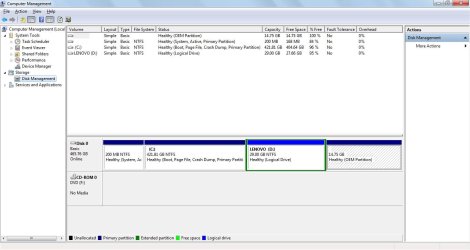
Before we make any specific recommendations will you please post a snip/screen-shot of the entire disk management drive map with a full description as to which drive/partition is which, so we can see what you have going on.

In the Windows start menu right click computer and click manage, in the left pane of the "Computer Management" window that opens click disk management and post a snip of that.


How to Upload and Post a Screenshot and File in Seven Forums
 

My Computer

Computer Manufacturer/Model Number
* BFK Customs *
OS
W 7 64-bit Ultimate
CPU
Intel Q9550 Yorkfield
Motherboard
ASUS P5Q Pro
Memory
8GB Dominator 8500C5D
Graphics Card(s)
ATI : XFX 5870
Sound Card
Realtek HD Audio 7-1
Monitor(s) Displays
1x 47" LCD HDMI & 3x 26" LCD HDMI
Screen Resolution
1920x1080P & 1920x1200
Hard Drives
1x 80GB Intel X25-M G2 SSD : 1x 500GB & 1x 640GB WD Caviar Black(s)
PSU
Corsair 620HX
Case
Cooler Master RC-690
Cooling
Tuniq Tower 120, 2x 140mm and 3x 120mm case fans
Keyboard
Microsoft 500
Mouse
Razer Diamondback 3G
Internet Speed
14 Mb/s
Other Info
1x Koutech 3Gb/s SATA HDD Hot Swap Rack
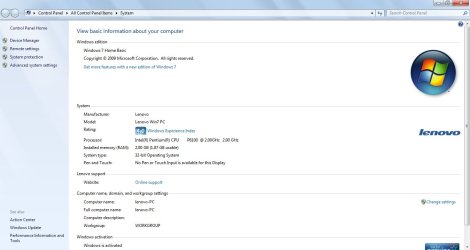
I have attached 2 screenshots
one is of disk management & another one is of laptop configuration.
I hope this helps.
 

Attachments

  • cmp mgmt.jpg
    cmp mgmt.jpg
    80.3 KB · Views: 158
  • prop.jpg
    prop.jpg
    61.6 KB · Views: 80

My Computer

OS
Windows 7 ultimate
A couple of points to consider...
You can have a total of four primary partitions, this being an OEM install, you have one up front for the boot files. I am guessing the D volume is a Lenova recovery partition. The last empty partition, I don't have a clue. You would have to format the drive and reinstall windows on the clean drive to start with a main partition without the boot files partition up front. Then a process of shrinking the C drive to create the other partitions you want...short of a clean install, you can format the D drive, getting rid of the recovery and programs from Lenova, and extend the two drives on the end, for three partitions of equal size.
 

My Computer

Computer type
Laptop
Computer Manufacturer/Model Number
HP 17-ak0xx, dv7 3173nr
OS
Win7 Home Premium x64 W10Pro&Home
CPU
A12 9720p 4+8 TurionII M520
Motherboard
HP 3839
Memory
6GB 8GB
Graphics Card(s)
R7
Monitor(s) Displays
24" sa550
Screen Resolution
1600x900 1920x1080
Mouse
Logitechx2
Internet Speed
120Mb/s down 12up
HI thanks for the reply...

I am willing to do a clean install..
But when i start the installation how do i re-partition the hard disk?
I want to know that...because i think when installing Windows vista/7 we dont get the option for partitioning.
 

My Computer

OS
Windows 7 ultimate
nikeshkm:
Download Partition Wizard and use that.
No re-install, no muss, no fuss.
 

My Computer

Computer Manufacturer/Model Number
OEM - Me
OS
Windows 7 Home Premium x64
CPU
AMD Phenom II X6 1600T
Motherboard
GigaByte GZ-990FXA-UD3
Memory
16GB PC3-10700 (1342MHz)
Graphics Card(s)
ATI Radeon 5770 HD (x2) CrossFire
Sound Card
On-board RealTek chipset
Monitor(s) Displays
3x Hanns-G 1920x1080 Monitors
Screen Resolution
3x Hanns-G 1920x1080 Monitors
Hard Drives
Intel 25-V SSD 40GB: 218 MB/s AT: 0.1ms
Intel X-25M SSD 80GB: 230MB/s AT: 0.1ms
Seagate 750GB: 133 MB/s AT: 13ms (perpendicular storage)
Buffalo HD-PCTU3 1TB External drive
PSU
OCZ Stealth X Stream 750W
Case
Cheap (unknown)
Cooling
Stock
Keyboard
HP USB
Mouse
LogiTech USB
Internet Speed
1.5 Mbps - Slow - At the tail-end of a rural network
Other Info
Printer: Epson Stylus C-84
Scanner: HP 3500C Flatbed
DVD-RW: Plextor
DVD-ROM: Unknown
WEI: 7.4
Hello again.


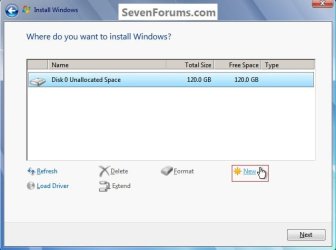
There is an option to create partitions during the clean install process.

click to enlarge
NewPartition1.jpg
NewPartition2.jpg


My Computer

Computer Manufacturer/Model Number
* BFK Customs *
OS
W 7 64-bit Ultimate
CPU
Intel Q9550 Yorkfield
Motherboard
ASUS P5Q Pro
Memory
8GB Dominator 8500C5D
Graphics Card(s)
ATI : XFX 5870
Sound Card
Realtek HD Audio 7-1
Monitor(s) Displays
1x 47" LCD HDMI & 3x 26" LCD HDMI
Screen Resolution
1920x1080P & 1920x1200
Hard Drives
1x 80GB Intel X25-M G2 SSD : 1x 500GB & 1x 640GB WD Caviar Black(s)
PSU
Corsair 620HX
Case
Cooler Master RC-690
Cooling
Tuniq Tower 120, 2x 140mm and 3x 120mm case fans
Keyboard
Microsoft 500
Mouse
Razer Diamondback 3G
Internet Speed
14 Mb/s
Other Info
1x Koutech 3Gb/s SATA HDD Hot Swap Rack
Many tech enthusiasts find a clean-copy DVD of their OS version and reinstall using the OEM Product Key on the COA sticker on machine. Any installer can also have all versions unlocked using the ei.cfg removal tool. http://www.sevenforums.com/tutorials/85813-windows-7-universal-installation-disc-create.html

Make your Recovery DIsks or save a Win7 backup image of the entire HD first so you have a path back to factory condition. Then wipe the HD of all code: http://www.sevenforums.com/tutorials/91339-ssd-hdd-optimize-windows-reinstallation.html

The installer is mostly driver-complete, with newer arriving quickly via optional Windows Updates. Any drivers then missing in Device Manager can be found on the Support Downloads webpage for your model computer or device. http://www.sevenforums.com/tutorials/1649-clean-install-windows-7-a.html

Install updates and then programs slowly over time to gauge performance after each. Don't let any programs write themselves into msconfig>Startup as they become freeloaders on your RAM/CPU and can spy on you. I only allow AV and gadgets. http://www.sevenforums.com/crashes-debugging/70248-troubleshooting-msconfig.html

Use a lightweight free AV like MS Security Essentials which works perfectly with Windows 7 Firewall. http://www.microsoft.com/security_essentials/

When it is finished, clean and order the HD perfectly using state-of-the-art free CCleaner then Auslogics Disk and Registry defraggers monthly. CCleaner - Free software downloads and software reviews - CNET Download.com
Auslogics Disk Defrag - Reviews and free Auslogics Disk Defrag downloads at Download.com
Auslogics Registry Defrag - Free software downloads and software reviews - CNET Download.com

Then save a Win7 Backup image externally so you never have to reinstall again, just reimage the HD or replacement using DVD or Repair CD. http://www.sevenforums.com/tutorials/663-backup-complete-computer-create-image-backup.html
 
Your OEM partition is your OS recovery safety net. Until you feel very comfortable doing what your doing I suggest you leave it alone. Never try to resize it.

However, I can't see any harm in using Partition wizard(PW) to move your current logical partition into the left. 200GB for C: should be fine.
Given you only have a 500GB HDD I'd be tempted using PW to make D: a primary.
Window disk management will not let you set it to primary, PW will.
Many OEM machines come with 4 primary partitions to begin with.

If it all goes haywire - clean install.

No matter what you do make sure you have made your Factory Recovery Disks.
These essentially duplicate your OEM recovery partition if that gets damaged.
 

My Computer

Computer type
PC/Desktop
Computer Manufacturer/Model Number
Own build
OS
Windows 7x64 Home Premium SP1
CPU
Intel i7 2600k
Motherboard
ASUS P8Z68 Deluxe
Memory
G.Skill Ripjaws (DDR3-1600) 2x4GB
Graphics Card(s)
Nvidia GeForce GTS 450; Intel HD Graphics 3000(GT2+)
Monitor(s) Displays
Dell Ultrasharp IPS panel U2311H, Samsung SyncMaster P2350
Screen Resolution
1920x1080
Hard Drives
Samsung 850 Pro SSD 256GB, Samsung SSD 840 120GB, Seagates 1TB Barracuda ST31000528AS x2
PSU
Seasonic M12II 520W
Case
Lian Li Lancool PC-K60
Cooling
Case: 1x120mm, 3x140mm CPU: Hyper 212+
Keyboard
Logitech MK520 (wireless)
Mouse
Logitech MK520
Internet Speed
6-7 Mbps
Antivirus
Norton Security Premium, Malwarebytes on 2 (MSE on 3rd PC)
Browser
FireFox
Other Info
Audio: Logitech Z523 2.1
Good to see you got it sorted and thanks for the update.
 

My Computer

Computer Manufacturer/Model Number
* BFK Customs *
OS
W 7 64-bit Ultimate
CPU
Intel Q9550 Yorkfield
Motherboard
ASUS P5Q Pro
Memory
8GB Dominator 8500C5D
Graphics Card(s)
ATI : XFX 5870
Sound Card
Realtek HD Audio 7-1
Monitor(s) Displays
1x 47" LCD HDMI & 3x 26" LCD HDMI
Screen Resolution
1920x1080P & 1920x1200
Hard Drives
1x 80GB Intel X25-M G2 SSD : 1x 500GB & 1x 640GB WD Caviar Black(s)
PSU
Corsair 620HX
Case
Cooler Master RC-690
Cooling
Tuniq Tower 120, 2x 140mm and 3x 120mm case fans
Keyboard
Microsoft 500
Mouse
Razer Diamondback 3G
Internet Speed
14 Mb/s
Other Info
1x Koutech 3Gb/s SATA HDD Hot Swap Rack
Back
Top