Solved Help needed to lower overclock

Ghebbis

New member
Local time
10:20 PM
Messages
14
Hello Windows Seven Forum community!

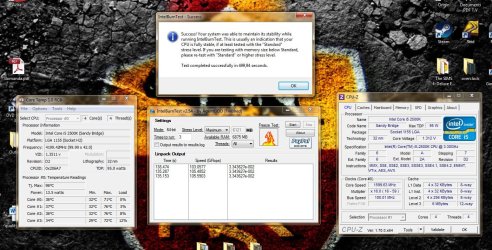
As I state in the title, I need help lowering my overclock. The reason being I'm afraid my temperatures get too high while gaming. While playing Dragon Age Inquisition, CoreTemp showed 65° or higher as max temperature for all cores, and I read somewhere on the Internet that it's not safe.

I'd like to do it myself, but I'm really not competent enough and I'm afraid I might do more harm than good (I actually overclocked following instructions on Tom'shardware forum).

I'll attach my overclocking results after testing them the first time.

Let me know if bios screens are needed.

Thanks a lot,

Ghebbis
 

Attachments
  • temps2.jpg
    temps2.jpg
    274.7 KB · Views: 11

My Computer

Computer type
PC/Desktop
OS
windows 7 Home Premium 64 bit
CPU
intel i5 2500k
Motherboard
P8Z68-V LX
Memory
2x4 GB kingston kvr1333d3n9/4g
Graphics Card(s)
GTX 770 Msi TwinFrozr Edition
Screen Resolution
1920x1080
PSU
Cooler Master B700
Case
cooler master elite 331
Cooling
Macho Rev. A
Internet Speed
7 mb
Antivirus
Avire Free Antivirus
Browser
Google Chrome/window explorer
Hello "Ghebbis" You shouldn't have to much trouble lowering your clocks of your CPU, restart your PC, hit the applicable key to enter your bios before windows boots up, lookup your multiplier (in your attachment it's the 99.99 x 42.0) and simply enter and number below your current 42, then hit the save and restart, enter the bios again to verify changes and temps.

If You have proper thermal grease applied to your CPU, with stock fan you could have a nice stable 37 multiplier with maximum temp under load comfortably @ 40°C.

Good luck, and don't change more than one bios setting at a time each restart or anything other in the bios before internet investigating what it affects first.
 

My Computer

OS
[Genuine Custom DOS 5.0] & [Genuine Custom Windows 7 Home Premium 64Bit SP1]
Thank you very much iTRiP, I think that did it! I'll keep your advice in mind next time :)

Btw, what temperatures do you think I shouldn't exceed while gaming? 'Cause I'd like to keep mu cpu at 4.0 Ghz, in order to justify my Macho Rev. A purchase :D

Thanks in advance
 

My Computer

Computer type
PC/Desktop
OS
windows 7 Home Premium 64 bit
CPU
intel i5 2500k
Motherboard
P8Z68-V LX
Memory
2x4 GB kingston kvr1333d3n9/4g
Graphics Card(s)
GTX 770 Msi TwinFrozr Edition
Screen Resolution
1920x1080
PSU
Cooler Master B700
Case
cooler master elite 331
Cooling
Macho Rev. A
Internet Speed
7 mb
Antivirus
Avire Free Antivirus
Browser
Google Chrome/window explorer
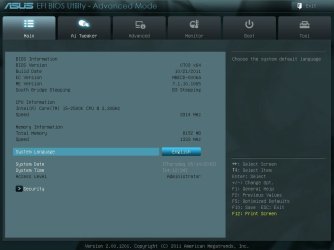
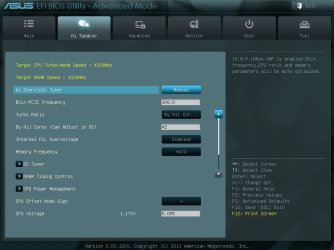
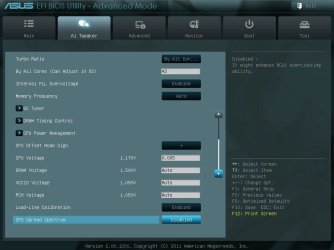
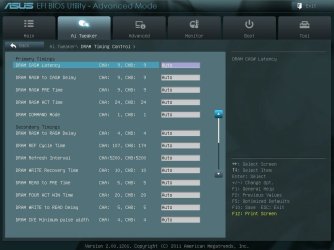
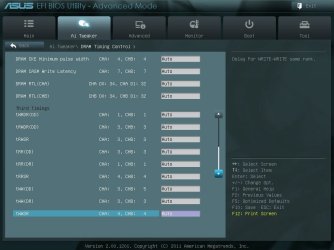
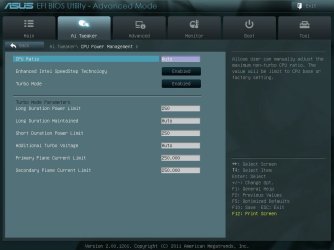
I think I spoke too soon.. I opened coretemp right after restarting my pc and the core loads were roller-coasting like crazy.. Max temperatures never exceeded 55° but I'm worried something isn't right. I'll attach some screens from my bios prior to the changes, so you can take a better look and tell me if you think everything is ok.

P.S: furthermore, minimum temperatures registered were all around 40°..
 

Attachments

  • 1.jpg
    1.jpg
    119.4 KB · Views: 2
  • 2.jpg
    2.jpg
    129.9 KB · Views: 2
  • 3.jpg
    3.jpg
    128.5 KB · Views: 2
  • 4.jpg
    4.jpg
    149.9 KB · Views: 1
  • 5.jpg
    5.jpg
    139.4 KB · Views: 1
  • 6.jpg
    6.jpg
    128.3 KB · Views: 1

My Computer

Computer type
PC/Desktop
OS
windows 7 Home Premium 64 bit
CPU
intel i5 2500k
Motherboard
P8Z68-V LX
Memory
2x4 GB kingston kvr1333d3n9/4g
Graphics Card(s)
GTX 770 Msi TwinFrozr Edition
Screen Resolution
1920x1080
PSU
Cooler Master B700
Case
cooler master elite 331
Cooling
Macho Rev. A
Internet Speed
7 mb
Antivirus
Avire Free Antivirus
Browser
Google Chrome/window explorer
Your pictures seem odd indeed since Im pretty sure 1.3 volts is a lot for that chip, and it shows your stressing at 1.5ghz (noticed that it was showing pic after stressing, can you take one with it stressing?) and not 4.2 you set. At the top of the bios tweaker area I would set manual to dcop(will set your ram to what its XMP profile is if it has one). What does cpu-z think your v-core is at when your stressing?
 

My Computer

Computer type
PC/Desktop
Computer Manufacturer/Model Number
Custom
OS
10 Pro x64
CPU
Ryzen 9 3900X
Motherboard
Asrock x370 Tachi
Memory
64GB(4x16GB) DDR4
Graphics Card(s)
EVGA 1080ti FTW3
Sound Card
ASUS Xonar Essence STX (V4 Bursons), ODAC rev B, NFB-11, O2
Monitor(s) Displays
3xASUS PB278Q/R, Optoma HD142X
Screen Resolution
3x1440p, 1080p
Hard Drives
512GB 850 EVO(OS, Programs)
4TB (Movies)
3TB (Downloads)
3TB (Programs)
1TB HDD (Games)
2x6TB R1 (videos)
PSU
AX760
Case
Fractal Define R5
Cooling
NH-D15S
Keyboard
Massdrop Ctrl with Box Navy's
Mouse
G903, Alioth XXL Mat
Internet Speed
280/40
Antivirus
MBAM, ESET
Browser
Canary 64 Bit
Other Info
I also own a Thinkpad P50 Xeon 4K, X220T, X1C5
If You have proper thermal grease applied to your CPU, with stock fan you could have a nice stable 37 multiplier with maximum temp under load comfortably @ 40°C


Edit: Maximum temp under heavy load @ 40°C, maximum temp under normal system running and gaming conditions @ 30°C For an i5 2500K Sandy bridge, both of these temperature figures are 10~20°C above ambient.

If your temps don't correspond with the recommendations, your damaging your CPU witch will cause you to have to replace it much sooner than normal & extended operational time frame.

Double check: Thermal crease applied properly & reapply when you do so.

Triple check: CPU fan secured properly by removing all case covers and looking from the underneath side of the motherboard and verifying all pins protrude correctly.

Bios CPU fan setting: Auto _ normal.
 
Last edited:

My Computer

OS
[Genuine Custom DOS 5.0] & [Genuine Custom Windows 7 Home Premium 64Bit SP1]
Ghebbis, I'd like to do the same thing you're doing, I can't see well enough to recognize which program or utility you're using that gives you the core clocks. Is it from System Internals or Windows or from a 3rd party?
 

My Computer

Computer type
PC/Desktop
Computer Manufacturer/Model Number
Antec desktop; Acer Aspire laptops
OS
Windows 7 Professional 64-bit
CPU
Desktop i5; Acers i5 & i7
Memory
desktop 16GB; 1 Acer 8GB & 1 Acer 16GB
Hard Drives
1TB split into 2 equal partitions [OS and data] usable by RJS
Internet Speed
AT&T DSL
Browser
FF, GChrome, msIE
Other Info
Windows 7 Firewall, Emsisoft AM/AV, MSE [scan-only], SpywareBlaster, Ruiware/BillP combine
Guys I found out today that I'm waaaay too uninformed to keep my system overclocked. I decided to switch everything back to default and put oc off 'till I am more knowladgeable. Thanks for your help anyways, I really appreciated it.
Take care everyone,
Ghebbis
 

My Computer

Computer type
PC/Desktop
OS
windows 7 Home Premium 64 bit
CPU
intel i5 2500k
Motherboard
P8Z68-V LX
Memory
2x4 GB kingston kvr1333d3n9/4g
Graphics Card(s)
GTX 770 Msi TwinFrozr Edition
Screen Resolution
1920x1080
PSU
Cooler Master B700
Case
cooler master elite 331
Cooling
Macho Rev. A
Internet Speed
7 mb
Antivirus
Avire Free Antivirus
Browser
Google Chrome/window explorer
Ghebbis, I'd like to do the same thing you're doing, I can't see well enough to recognize which program or utility you're using that gives you the core clocks. Is it from System Internals or Windows or from a 3rd party?

Hey Roland, if you're referring to CPU-Z, I downloaded it from here : CPU-Z - Download

Otherwise I used CoreTemp to register temperatures and Intel Burn Test to run a stress test. Hope I was able to help

Forgive me, that's in Italian. You might want to downlaod it from here: CPU-Z | Softwares | CPUID
 

My Computer

Computer type
PC/Desktop
OS
windows 7 Home Premium 64 bit
CPU
intel i5 2500k
Motherboard
P8Z68-V LX
Memory
2x4 GB kingston kvr1333d3n9/4g
Graphics Card(s)
GTX 770 Msi TwinFrozr Edition
Screen Resolution
1920x1080
PSU
Cooler Master B700
Case
cooler master elite 331
Cooling
Macho Rev. A
Internet Speed
7 mb
Antivirus
Avire Free Antivirus
Browser
Google Chrome/window explorer
Back
Top