Help needed with Biometric device

andrewm1

New member
Member
Local time
11:20 PM
Messages
84
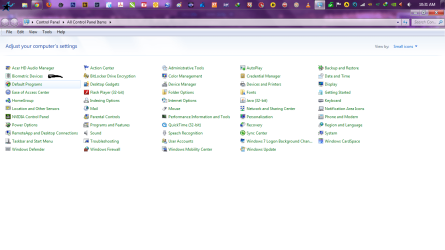
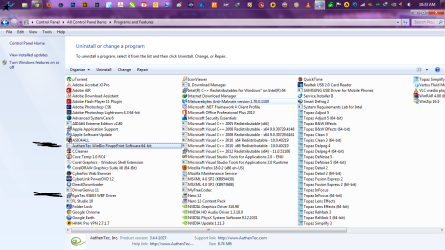
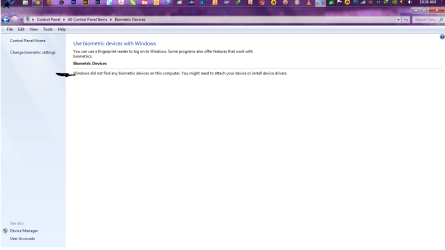
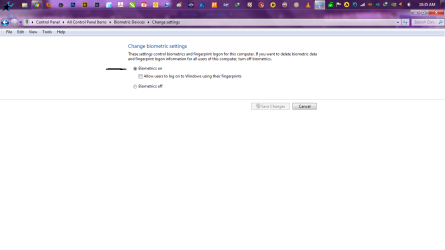
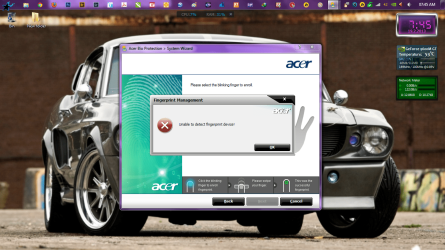
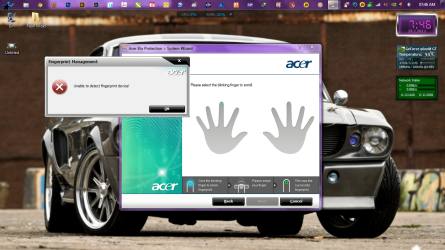
Hi does anybody know how i can get this to work :confused:?? I have tried installing and uninstalling also i have been on the acer site and downloaded drivers
 

Attachments

  • Untitled.png
    Untitled.png
    68.5 KB · Views: 6
  • 2.png
    2.png
    99.1 KB · Views: 12
  • 3.png
    3.png
    55.8 KB · Views: 8
  • 4.png
    4.png
    47.3 KB · Views: 5
  • 5.png
    5.png
    69.1 KB · Views: 7
Last edited by a moderator:

My Computer

Computer type
Laptop
Computer Manufacturer/Model Number
Acer Aspire 6930G
OS
windows 7 ultimate x 64bit
CPU
T9600 @ 2.80GHz
Memory
4Gig
Graphics Card(s)
Nvidia GeForce 9600M GT
Hard Drives
1 X 250 Gig
1 x 750 Gig
Other Info
Cd/Blue-ray drive
Look for the Acer Bio Protection System Wizard...
 

My Computer

Computer type
Laptop
Computer Manufacturer/Model Number
HP 17-ak0xx, dv7 3173nr
OS
Win7 Home Premium x64 W10Pro&Home
CPU
A12 9720p 4+8 TurionII M520
Motherboard
HP 3839
Memory
6GB 8GB
Graphics Card(s)
R7
Monitor(s) Displays
24" sa550
Screen Resolution
1600x900 1920x1080
Mouse
Logitechx2
Internet Speed
120Mb/s down 12up
Thanks but i have done that as well
 

My Computer

Computer type
Laptop
Computer Manufacturer/Model Number
Acer Aspire 6930G
OS
windows 7 ultimate x 64bit
CPU
T9600 @ 2.80GHz
Memory
4Gig
Graphics Card(s)
Nvidia GeForce 9600M GT
Hard Drives
1 X 250 Gig
1 x 750 Gig
Other Info
Cd/Blue-ray drive
Still struggling with this ??:mad:
 

Attachments

  • Untitled.png
    Untitled.png
    335.7 KB · Views: 8
  • 1.png
    1.png
    312.8 KB · Views: 2
  • 2.png
    2.png
    55.1 KB · Views: 3

My Computer

Computer type
Laptop
Computer Manufacturer/Model Number
Acer Aspire 6930G
OS
windows 7 ultimate x 64bit
CPU
T9600 @ 2.80GHz
Memory
4Gig
Graphics Card(s)
Nvidia GeForce 9600M GT
Hard Drives
1 X 250 Gig
1 x 750 Gig
Other Info
Cd/Blue-ray drive
Who's computer is it. Has it ever worked before for you? Does it work for anybody else.
 

My Computer

Computer type
PC/Desktop
Computer Manufacturer/Model Number
Home made Desktop
OS
Windows 10 Pro. 64/ version 1709 Windows 7 Pro/64
CPU
Intel i7-6800K @ 4.3
Motherboard
ASUS X-99 Deluxe II
Memory
Corsair Platinum 16 gig @2400
Graphics Card(s)
EVGA GTX 1070 OC
Monitor(s) Displays
Asus 27" LED LCD/VE278Q
Screen Resolution
1920-1080 or 1280-720 HDMI
Hard Drives
INTEL SSD 730-240 Gb Sata 3.0/
PSU
EVGA Platium 1200W
Case
Phanteks Luxe Tempered Glass 8 fans/ one radiator
Cooling
XSPC/ Water Cooled CPU
Keyboard
Das 4 Professional
Mouse
Logitech M705/MX Anywhere 2-S
Internet Speed
100 mbits
Antivirus
Microsoft Security Essentials/ Malwarebytes Premium 3.0/ SAS
Browser
I.E. 11 default/Firefox/ ISP Time Warner Cable/Spectrum
Other Info
LG BluRay Burner/
Sound system-KLipsch-THX/
Icy Dock ssd Hot Swap bays.

My Computer

Computer type
Laptop
Computer Manufacturer/Model Number
Acer Aspire 6930G
OS
windows 7 ultimate x 64bit
CPU
T9600 @ 2.80GHz
Memory
4Gig
Graphics Card(s)
Nvidia GeForce 9600M GT
Hard Drives
1 X 250 Gig
1 x 750 Gig
Other Info
Cd/Blue-ray drive
I looked in several 5315 manuals and couldn't find any reference to biometrics, but that doesn't mean yours doesn't have it.
Are you sure its an Acer 5315? Is that the full model#? There are several different sub-models for the 5315.

I appreciate you listing what make/model of machine we're talking about or I couldn't have gotten this far. Do you have the manual, that still bugs me that I couldn't find biometrics.

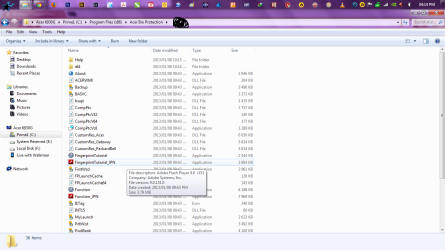
While I was looking I came across a reference that biometrics needed Adobe active X in order to run and I noticed in your screenshots that you have the plug-in installed but not the active x.

I'm guessing you don't like to run IE, and that's probably why you don't have it installed.
Adobe Community: How Flash Player installed on various browsers differ?

The easiest way to install it is to use your IE browser and go to this page: https://get.adobe.com/flashplayer/ Adobe recognizes what OS, language, and browser you have and automatically serves up the right version. Chrome has its flashplayer built-in and it updates automatically.

After your install of active x, reboot your machine and if those other biometric drivers are okay it should work for you.

If not we'll have to figure out why. The first thing I'd do is once you have the active x, remove all programs/drivers relating to biometrics, and start from scratch.
It could be like printers if you mess up you have to go back to step one.

Hi i sold the acer 5315 and have now got a Acer 6930G i dont think i have updated my profile
 

My Computer

Computer type
Laptop
Computer Manufacturer/Model Number
Acer Aspire 6930G
OS
windows 7 ultimate x 64bit
CPU
T9600 @ 2.80GHz
Memory
4Gig
Graphics Card(s)
Nvidia GeForce 9600M GT
Hard Drives
1 X 250 Gig
1 x 750 Gig
Other Info
Cd/Blue-ray drive
Looks like a clear case of missing device driver. Have you installed drivers for fingerprint reader? Installing the software is not enough.

Kari
 

My Computer

Computer type
Laptop
Computer Manufacturer/Model Number
HP ENVY 17-1150eg
OS
Windows 10 Pro x64 EN-GB
CPU
1.6 GHz Intel Core i7-720QM Processor
Memory
6 GB
Graphics Card(s)
ATI Mobility Radeon HD 5850 Graphics
Sound Card
Beats sound system with integrated subwoofer
Monitor(s) Displays
17" laptop display, 22" LED and 32" Full HD TV through HDMI
Screen Resolution
1600*900 (1), 1920*1080 (2&3)
Hard Drives
Internal: 2 x 500 GB SATA Hard Disk Drive 7200 rpm
External: 2TB for backups, 3TB USB3 network drive for media
Cooling
As Envy runs a bit warm, I have it on a Cooler Master pad
Keyboard
Logitech diNovo Media Desktop Laser (bluetooth)
Mouse
Logitech Performance Mouse MX
Internet Speed
50/10 Mbps VDSL
Antivirus
Windows Defender 4.3.9431.0
Browser
Maxthon 3.5.2., IE11
Looks like a clear case of missing device driver. Have you installed drivers for fingerprint reader? Installing the software is not enough.

Kari

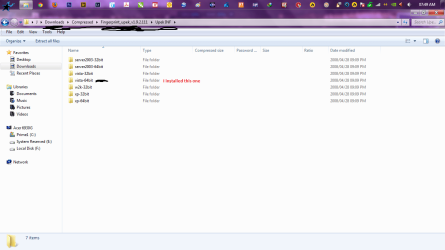
It was installed and/or has been deleted by my error as it used to work on one hdd but not the 2nd one ?. How can i get the driver for it? i have searched the web but i don't really know what to install
 

My Computer

Computer type
Laptop
Computer Manufacturer/Model Number
Acer Aspire 6930G
OS
windows 7 ultimate x 64bit
CPU
T9600 @ 2.80GHz
Memory
4Gig
Graphics Card(s)
Nvidia GeForce 9600M GT
Hard Drives
1 X 250 Gig
1 x 750 Gig
Other Info
Cd/Blue-ray drive

My Computer

Computer type
PC/Desktop
Computer Manufacturer/Model Number
Gateway DX4831-01e (Mid-Tower Desktop)
OS
Originally Win 7 Hm Prem x64 Ver 6.1.7600 Build 7601-SP1 | Upgraded to Windows 10 December 14, 2019
CPU
Intel i3 530 2.93GHz, 2933MHz 2 Cores 4 Logical Processors
Motherboard
Gateway H57M01 133 megahertz
Memory
6GB of 1,333MHz DDR3 SDRAM
Graphics Card(s)
32MB Intel Graphics Media Accelerator HD IGChip
Sound Card
Realtek High Definition Audio
Monitor(s) Displays
Gateway HX2000 20inch TFT active matrix TN
Screen Resolution
1600 x 900 x 59 hertz
Hard Drives
WDC WD10EADS-00M2B0 [HDD] (1000.20 GB) -- drive 0,
HL-DT-ST DVDRAM GH41N [CD-ROM dr]
Four card readers, and Four USB 2.0
PSU
300watts.
Case
Mid-Tower Desktop
Cooling
Stock from Gateway
Keyboard
Natural Ergonomic Keyboard 4000, see Other Info
Mouse
Orig. Gateway wore out now using Insignia USB wired optical
Internet Speed
Vz FIOS 10ms png 57.64Mbps down 65.53Mbps up Speedtest.org
Antivirus
Zamana Anti-logger with Anti-malware, MSE, Windows Firewall,
Browser
IE11.0.9600.19399-Upd ver11.0.135, Firefox 68.0.1 x64
Other Info
System Specs by Belarc.

BIOS: American Megatrends Inc. P01-A0 11/17/2009

Replaced the MS 'Natural' Standard PS/2 Enhanced 101-102 Keyboard with a new Natural Ergonomic Keyboard 4000 on August 1st 2014.

Canon Pixma MG3222 Printer.

Updated to IE11 on 12102015 | Fios Quantum Router g1100

Additional AV: SpywareBlaster, manual Mbam, SAS
Back
Top