Solved Help needed with Saving Pictures

vickielyn

New member
Local time
11:20 PM
Messages
13
Location
Western Pa.
Hi, I'm new here..

What I am wanting to do is to save pictures like I did in XP.. is that possible?

Can you tell me the easiest way to do this?

I have a Kodak Z760

With XP I used Infraview.

Vickie
 

My Computer

Computer Manufacturer/Model Number
Dell Studio
OS
Windows7 IE8
CPU
Core 2 Quad 2.5 ?
Memory
6GB
Graphics Card(s)
Intel
Monitor(s) Displays
20in
Hard Drives
640GB
hi vickielyn,

i welcomed you in the 'welcome' thread, but welcome again to sevenforums, :)

do you mean irfanview?

infarnview should still work with 7 - have you tried it?
 

My Computer

Computer Manufacturer/Model Number
mickey megabyte 1234
OS
ultimate 64 sp1
CPU
i5 2500K [email protected]
Motherboard
MSI P67A-GD53
Memory
8 gigs GSkill Ripjaws 1600
Graphics Card(s)
amd hd6950
Sound Card
creative x-fi gamer
Monitor(s) Displays
samsung 24"
Screen Resolution
1920x1080
Hard Drives
ocz vertex 2e 60 gig, samsung f3 1tb, buffalo 2tb ext
PSU
antec 550
Case
antec three hundred
Cooling
i'm a cooling fan
Keyboard
saitek eclipse ii
Mouse
logitech g3
Internet Speed
about 4 Mbps
Other Info
i love win7
Pliug the camera into a USB port. In computer the camera will apear as a drive. Just like your HD or DVD drive.

Simply click on the new Icon which will prbably be labled Kodak Z760. You will see all your pictures or a folder with all your pictures inside.

Highlight all the photos and right click and select cut.

Then go back to your start menu and open you pictures folder. Right click and select paste.

Now all your photos are removed from your camera and stored on your PC.

Done.
 

My Computer

Computer Manufacturer/Model Number
I trust nobody!
OS
Windows 7 Ultimate x64/x86 Windows 7 Pro x64/x86 Windows 7 Home Premium x64/x86
CPU
Intel C2Q 9650
Motherboard
Intel
Memory
8GB DDR2800 Corsair
Graphics Card(s)
NVIDIA 260 GTX
Sound Card
Onboard
Monitor(s) Displays
Dell 2409w
Screen Resolution
1920x1080
Hard Drives
10 of em!
PSU
600 Watt FSP Group
Case
Antec
Cooling
Fresh Air
Keyboard
Microsoft
Mouse
Razer
Internet Speed
Fast enough
hi vickielyn,

i welcomed you in the 'welcome' thread, but welcome again to sevenforums, :)

do you mean irfanview?

infarnview should still work with 7 - have you tried it?

Irfanview works fine in Win 7. I use it.
 

My Computer

Computer Manufacturer/Model Number
Home built
OS
Windows 7 Ultimate 32 bit
CPU
Intel(R) Pentium(R) 4 CPU 3.00GHz
Motherboard
ASUS P4P800-VM Motherboard Chipset: Intel 865G + ICH5
Memory
2.50 GB RAM
Graphics Card(s)
NVIDIA GeForce 7600 GS
Sound Card
SoundMax Integrated Digital Audio (Chip)
Monitor(s) Displays
ViewSonic VX 1962 wm
Screen Resolution
1680 X 1050
Hard Drives
Seagate Barracuda 7200.10 80 GB
ST380215A ATA Device 18.6 GB
Western Digital "My Book" external hard drive 750 GB
Cooling
Fan based
Keyboard
Microsoft Comfort Curve Keyboard 2000 v10 USB
Mouse
Logitec optic USB
Internet Speed
3.01 Mb/s download 0.64 Mb/s upload
Thanks!
Yes, irfanview is what I meant.

Joel406...I will try what you have suggested.

I usually use the camera dock that takes me to the Kodak software.

Thanks again
 

My Computer

Computer Manufacturer/Model Number
Dell Studio
OS
Windows7 IE8
CPU
Core 2 Quad 2.5 ?
Memory
6GB
Graphics Card(s)
Intel
Monitor(s) Displays
20in
Hard Drives
640GB
All cameras and other imaging devices come with software for editing, creating albums etc. I never install the software. I also use Irfanview, probably the fastest opening and easiet to learn image editor ever created. Joel is absolutely correct about how to quickly cut images from the camera which saves you from having to delete them manually from the camera later. You could even say it saves on battery life. When I plug in my digital camera and Auto Play appears, I simply choose to open the folder, navigate to the images, cut them all and paste them into a New Folder on my desktop. After I edit, resize, crop etc. all the images and give them seperate labels (file names) I rename the New Folder, cut and paste it into the Pictures Folder. When it comes to standard image editing, www.irfanview.com gets two thumbs up from me. I think it's the best thing since sliced bread! :D
 

My Computer

Computer Manufacturer/Model Number
My own Custom Build: Asus, Corsair, Transcend, AMD, PNY, Ultra
OS
W7 64 Bit
CPU
AMD Phenom x4 4000Mhz
Memory
8 GB DDR-2
Graphics Card(s)
PNY-NVIDIA GeForce GTX 460 1GB GDDR5 PCI-e
Monitor(s) Displays
Dual: Flatron L1942T
Hard Drives
C: Drive (Agility 2 Solid State Drive 60 GB)
D: Drive (HDD Internal Western Digital 640 GB)
PSU
650 Watt
Cooling
Corsair Hydro H6 Liquid Cooler
Internet Speed
25 mbps down - 3 mbps up
Thanks!
Yes, irfanview is what I meant.

Thanks again

You are very welcome. :)

All cameras and other imaging devices come with software for editing, creating albums etc. I never install the software. I also use Irfanview, probably the fastest opening and easiet to learn image editor ever created. Joel is absolutely correct about how to quickly cut images from the camera which saves you from having to delete them manually from the camera later. You could even say it saves on battery life. When I plug in my digital camera and Auto Play appears, I simply choose to open the folder, navigate to the images, cut them all and paste them into a New Folder on my desktop. After I edit, resize, crop etc. all the images and give them seperate labels (file names) I rename the New Folder, cut and paste it into the Pictures Folder. When it comes to standard image editing, www.irfanview.com gets two thumbs up from me. I think it's the best thing since sliced bread! :D

Niceget is right. I did not install the Nikon photo downloading and managing stuff when I installed Win 7. I use the same method he does. It is faster and does not clutter up my hard drive needlessly.
 

My Computer

Computer Manufacturer/Model Number
Home built
OS
Windows 7 Ultimate 32 bit
CPU
Intel(R) Pentium(R) 4 CPU 3.00GHz
Motherboard
ASUS P4P800-VM Motherboard Chipset: Intel 865G + ICH5
Memory
2.50 GB RAM
Graphics Card(s)
NVIDIA GeForce 7600 GS
Sound Card
SoundMax Integrated Digital Audio (Chip)
Monitor(s) Displays
ViewSonic VX 1962 wm
Screen Resolution
1680 X 1050
Hard Drives
Seagate Barracuda 7200.10 80 GB
ST380215A ATA Device 18.6 GB
Western Digital "My Book" external hard drive 750 GB
Cooling
Fan based
Keyboard
Microsoft Comfort Curve Keyboard 2000 v10 USB
Mouse
Logitec optic USB
Internet Speed
3.01 Mb/s download 0.64 Mb/s upload
Thanks!

But I don't want to delete the pics from my camera. Can I do that without deleting the pics from the camera?
 

My Computer

Computer Manufacturer/Model Number
Dell Studio
OS
Windows7 IE8
CPU
Core 2 Quad 2.5 ?
Memory
6GB
Graphics Card(s)
Intel
Monitor(s) Displays
20in
Hard Drives
640GB
Thanks!

But I don't want to delete the pics from my camera. Can I do that without deleting the pics from the camera?

Instead of selecting "cut", select "copy".
 

My Computer

OS
Windows 7
Ctrl + A, and then Ctrl + C :)
 

My Computer

OS
window's 7
CPU
core 2 quad
Motherboard
gigabyte
Memory
2gb corsair
Graphics Card(s)
ati hd4850
Monitor(s) Displays
lg
Screen Resolution
1600 X 900
Case
power logic
Other Info
none of the spec above is accurate
I'm also a fan of Irfanview. :)

As an alternative, you can use Picasa. It can do the operation automatically, can do basic fixes, can maintain the photo library and upload them for web sharing.
 

My Computer

OS
Windows 7 Professional x64
CPU
Core i5 520M
Graphics Card(s)
ATI HD 5650
picassa sometimes having problem loading image
 

My Computer

OS
window's 7
CPU
core 2 quad
Motherboard
gigabyte
Memory
2gb corsair
Graphics Card(s)
ati hd4850
Monitor(s) Displays
lg
Screen Resolution
1600 X 900
Case
power logic
Other Info
none of the spec above is accurate
Thank you!!
 

My Computer

Computer Manufacturer/Model Number
Dell Studio
OS
Windows7 IE8
CPU
Core 2 Quad 2.5 ?
Memory
6GB
Graphics Card(s)
Intel
Monitor(s) Displays
20in
Hard Drives
640GB
I have a Kodak camera too ... I don't use the dock or any of the things that are on the CD.

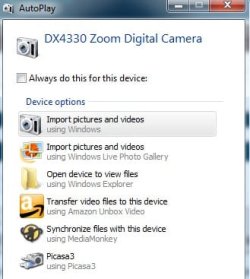
Just use the proper USB cable from you camera to your computer. Once you have it plugged into both, turn the camera on... don't turn it on before plugging it in.
You wil get a menu pop-up as to how and where you want to import your pictures.
 

Attachments

  • Kodak menu.jpg
    Kodak menu.jpg
    19.7 KB · Views: 0

My Computer

Computer type
PC/Desktop
Computer Manufacturer/Model Number
Bruce ... somewhere in his 40's
OS
Windows 7 Ultimate 32bit SP1
CPU
Intel(R) Core(TM)2 Quad CPU @ 2.40GHz, 2400 MHz
Motherboard
INTEL/D975XBX2
Memory
4 GB
Graphics Card(s)
ATI Radeon HD 2600 Pro
Monitor(s) Displays
Samsung SyncMaster 914v
Screen Resolution
1280 x 1024
Hard Drives
2/500GB each ... ST3500630AS ATA Device.
One is not connected
PSU
Rocketfish 700 W
Case
G.Skill Gigabyte Chassis
Keyboard
Standard PS/2 Keyboard
Mouse
Microsoft PS/2 Mouse
Internet Speed
DSL
Antivirus
Avira Internet Security
Browser
IE 11
Other Info
ATI HDMI Audio
Back
Top