Help needed with USB hard drive please

spooked1

New member
Local time
1:40 PM
Messages
14
Hi everyone

I have been trying to solve a problem with my Verbatim USB drive for about a month now and have been trying to solve the issue myself:cry:

So I gave up today and called Verbatim support who quickly sent me the solution by mail (they said this is an issue present in windows 7)


Dear Customer,

Thank you for your phone call. Your reference number is HMA100412-026.
Please quote this reference on all future correspondence with us.

Windows 7 uses its own built-in drivers
and it manages the installation of external USB devices by it's own.

Please verify that you are logged as an administrator on your laptop/computer.

Please disconnect all external devices from your computer (except mouse, monitor and keyboard) and go to c:\windows\system32\drivestore.
Please rename “infcache1” to “infcache.1OLD”.

You might need to give the user account file write and read permissions for this file. You can change this settings via the file's Properties/Security/Advanced.

Now reboot your computer (with still no USB device connected) and connect the HDD as the only USB device to an USB port on the back of your computer if WINDOWS has started.


Best Regards,
Verbatim Euro Support
Dutec Limited
Company Registered in Ireland No: 307480

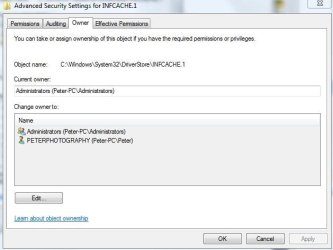
Ok, very nice I hear you say:D However my issue now is that I can not the name of the infcache file as per instructions. I have been playing with ownership of the file in accordance with windows inbuilt help but no luck. Please see (capture 1) for current owners.

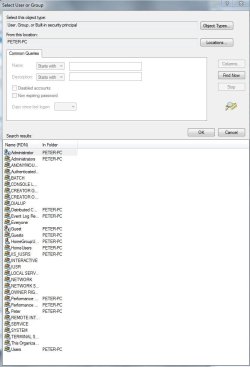
My problem is (and this probably sounds daft) but who should I give ownership to from this long list of possabilities, please see (capture 2) I am the owner and only user of my pc and yet I dont know who to give permission to:o:o:o:o:o

Hope you can help

Peter
 

Attachments

  • Capture1.JPG
    Capture1.JPG
    34.7 KB · Views: 10
  • Capture2.JPG
    Capture2.JPG
    60.2 KB · Views: 17

My Computer

Computer Manufacturer/Model Number
home build
OS
windows 7
CPU
phenom x2 550be
Case
sonata 3

My Computer

Computer Manufacturer/Model Number
Custom
OS
Windows 7 Professional x64
CPU
Intel i7 2600K OC'd @ 4620 MHz
Motherboard
Asus P8Z68-V Pro
Memory
16GB GSkill Sniper 2133 Mhz (4x4GB)
Graphics Card(s)
EVGA GeForce GTX 480 SuperClocked+
Sound Card
Realtek High Definition Audio
Monitor(s) Displays
2x Acer S273HLbmii 27"
Screen Resolution
2 x 1920x1080
Hard Drives
64GB Crucial M4 SSD

Storage: Hitachi 1TB 5400RPM, Samsung 1.5TB 5400RPM
PSU
Corsair HW Series 750w (modular)
Case
Cooler Master HAF 932 Advanced Blue Edition
Cooling
CM Hyper 212+ CPU cooler, 3x 230mm + 1x 140mm case fans
Keyboard
Logitech MK320 (wireless)
Mouse
Logitech MK320 (wireless)
Internet Speed
30 Mb/s : 2 Mb/s
Hi Johnathan

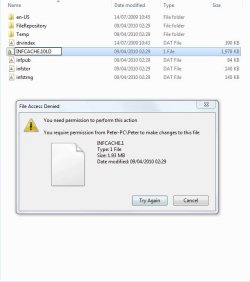
Thanks, I tried the directions you pointed to but still no joy, please see attached screenshot.

I am reall stumped as to why 7 wont give me the permission I want:cry:


Peter
 

Attachments

  • Capture3.JPG
    Capture3.JPG
    39.2 KB · Views: 11

My Computer

Computer Manufacturer/Model Number
home build
OS
windows 7
CPU
phenom x2 550be
Case
sonata 3
You were on the right track. See this starting at step #6.
 

My Computer

Computer Manufacturer/Model Number
HP, Dell, Gateway, Toshiba - 4 laptops and 2 desktops
OS
Vista, Windows7, Mint Mate, Zorin, Windows 8
CPU
from 1.6GHz Duo to i7
Monitor(s) Displays
2x HP w2207
Hard Drives
5x HDD, 7x SSD, 12x Externals
Keyboard
with trackball - no mices
Mouse
Trackball mice
Internet Speed
DSL 6000
Thanks, I tried the directions you pointed to but still no joy, please see attached screenshot.
I am reall stumped as to why 7 wont give me the permission I want:cry:
Peter

Hi Peter, If WHS method does not work for you, make sure you are logged on as administrator and retry.

If still not ...
Go to this Tutorial: How to Reinstate Windows Mail on Windows 7 [http://www.sevenforums.com/tutorials/5481-windows-mail.html]

Go to Step #3. "In Windows Mail folder, take full control of the file "msoe.dll" as follows."
A) Download the attachment: Take Ownership.zip.
And download the 2nd file attached: Remove Take Ownership.zip. (do not run until finished)

After download, run (double-click) the attachment: Take Ownership.zip as per instructions.

Go to: c:\windows\system32\drivestore\infcache1

==> Right click: "infcache1" file ==> In drop down menu click: Take Ownership.

Continue w/Verbatim instructions.

When finished run the 2nd file attached: Remove Take Ownership.zip

Note: Only use Take Ownership.zip on a file you are positive will not bork your system. The file is clean, any mess you make with it is at your own risk. The Safe & Best practice is to remove it as soon as you are done with the vendor's instructions.

Hope this helps, 2CR LZW
 

My Computer

Computer Manufacturer/Model Number
Dell M6400 Mobile Workstation
OS
Win7 Ult-x64
Memory
8GB Ram
Graphics Card(s)
Nvidia Quadro Fx 3700M 1GB
Sound Card
Creative Sound Blaster X-Fi Xtreme Audio Notebook
Monitor(s) Displays
EIZO CE240W
Hard Drives
Seagate 250GB & 500GB 7200rpm Hard Drives w/Short Stroked Partitions for both: Swap Space (aka Page File) & 3ds Max Composite Media Cache (aka Scratch Disk).
Hi 2CR

Thanks for the reply and help. I have followed your instructions, downloaded and ran the file. However there still seems to be a problem. All that has changed is the infcache icon has changed but I am still unable to rename the file, please see the attatched screenshot.


It seems as though noithing is going to work for this one:confused:


Peter
 

Attachments

  • Capture4.JPG
    Capture4.JPG
    42.1 KB · Views: 3

My Computer

Computer Manufacturer/Model Number
home build
OS
windows 7
CPU
phenom x2 550be
Case
sonata 3
Hi WHS

You were on the right track. See this starting at step #6.


I tried this also WHS but no joy again. I just cannot understand this!!!!!!

Its drivin me nuts:mad:


Peter
 

My Computer

Computer Manufacturer/Model Number
home build
OS
windows 7
CPU
phenom x2 550be
Case
sonata 3
Maybe that file is owned by the Trusted Installer. Here is a procedure for aquiring ownership when you want to delete such a file - but I would think it is valid for a rename too. maybe worth a try.
 

My Computer

Computer Manufacturer/Model Number
HP, Dell, Gateway, Toshiba - 4 laptops and 2 desktops
OS
Vista, Windows7, Mint Mate, Zorin, Windows 8
CPU
from 1.6GHz Duo to i7
Monitor(s) Displays
2x HP w2207
Hard Drives
5x HDD, 7x SSD, 12x Externals
Keyboard
with trackball - no mices
Mouse
Trackball mice
Internet Speed
DSL 6000
Hi Whs

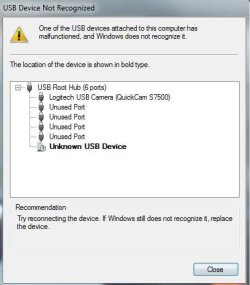
I managed to take control of the entire folder using the file provided by 2CR. However, even the file is now renamed the problem persists:mad:

Well, back to verbatim to see if they can fix this problem.


Thanks for all your help

Peter
 

Attachments

  • Capture.JPG
    Capture.JPG
    29.2 KB · Views: 1

My Computer

Computer Manufacturer/Model Number
home build
OS
windows 7
CPU
phenom x2 550be
Case
sonata 3
Well, at least you got that far. Lots of luck with Verbatim.
 

My Computer

Computer Manufacturer/Model Number
HP, Dell, Gateway, Toshiba - 4 laptops and 2 desktops
OS
Vista, Windows7, Mint Mate, Zorin, Windows 8
CPU
from 1.6GHz Duo to i7
Monitor(s) Displays
2x HP w2207
Hard Drives
5x HDD, 7x SSD, 12x Externals
Keyboard
with trackball - no mices
Mouse
Trackball mice
Internet Speed
DSL 6000
You were on the right track. See this starting at step #6.
I tried this also WHS but no joy again. I just cannot understand this!!!!!!
Its drivin me nuts:mad:
Peter

Hi Peter, For some reason the computer does not think you are you. I can change permissions for that file even w/o takeown or takeownership.reg. --Don't even need to have administrator rights.

You should be able to Go to: c:\windows\system32\drivestore\infcache1
==> Right click: "infcache1" file ==> In drop down menu click: Properties
On the Security tab => Highlight your User name
Click Edit => Highlight your User name
Check Box => Full Control
Click OK, OK

Continue w/Verbatim instructions.

Note: When done Reset User back to Read, you don't want software running on a Standard User Account to have Full Control of this file.

If that does not work check If you are using UAC:
Start\Control Panel\All Control Panel Items\User Accounts\
Click on: User Account Control Settings
Move the slider down to: Never Notify (*Note original Slider position)

Reboot computer to take effect.

Then Repeat above.

Note: When done Reset User back to Read, Then, Reset the User Account Control Settings Slider to its original position & Reboot computer to take effect.

If it still does not work it may be your security software.
Disconnect from the Internet
Set All Security Software to pause or off

Then Repeat above.

Note: When done Reset User back to Read; Then Reset All Security Software to Enable or On; Then Reset the UAC Settings Slider, to its original position & Reboot computer to take effect.
Hope this helps, 2CR LZW
 

My Computer

Computer Manufacturer/Model Number
Dell M6400 Mobile Workstation
OS
Win7 Ult-x64
Memory
8GB Ram
Graphics Card(s)
Nvidia Quadro Fx 3700M 1GB
Sound Card
Creative Sound Blaster X-Fi Xtreme Audio Notebook
Monitor(s) Displays
EIZO CE240W
Hard Drives
Seagate 250GB & 500GB 7200rpm Hard Drives w/Short Stroked Partitions for both: Swap Space (aka Page File) & 3ds Max Composite Media Cache (aka Scratch Disk).
Back
Top