
Help. open file type with is broken

realflow100

New member
Member
VIP
Local time
3:19 AM
Messages
252
When i try to right click ANY FILE I CLICK ON it says "This file does not have a program associated with it for performing this action. Please install a program, or if one is already installed, create an association in the Default Programs control panel"
I dont want to have to do that every time. I want to just right click. open with. Choose program. and click ok. but it gives me this error instead. Why is my windows 7 broken??
 

My Computer

Computer type
PC/Desktop
Computer Manufacturer/Model Number
HP Elite 8300 compaq SFF
OS
Windows 7 Pro x64
CPU
i7 3770k 3.5ghz up to 3.9ghz turbo boost 4 core 8 thread CPU
Motherboard
HP Elite 8300 compaq SFF OEM board
Memory
32GB 4x8GB DDR3 1600mhz CL9 patriot viper gaming ram
Graphics Card(s)
ZOTAC GTX 1650 low profile overclocked GPU
Sound Card
realtek integrated HD audio
Monitor(s) Displays
23" acer gaming 144hz 1ms monitor
Screen Resolution
1920x1080 @120hz/144hz
Hard Drives
ADATA 128GB SSD
ADAtA 256GB SSD
x1 Seagate 250GB 7200 RPM drive
x1 Seagate 500GB 7200 RPM drive
PSU
430w thermaltake smart
Case
HP Elite 8300 compaq SFF
Cooling
Stock + new thermal paste
Keyboard
REDRAGON mechanical blue switch
Mouse
ZELOTES wired T-90 mouse
Internet Speed
10MB/s (80mbps) download good internet
Antivirus
in-use/other
Browser
IE11 + firefox + Google Chrome randomly switches between
Other Info
Info updated

power supply doesnt fit but still works with adapter its just sitting on the desk behind the computer wires going into the case where the old power supply was.
Hi Realflow, Try following the tutorial mentioned below and see if you may able to resolve it: [Fix] Do let us know for further help!!
 

My Computer

Computer type
PC/Desktop
Computer Manufacturer/Model Number
Dell
OS
Windows 7 Home X86
CPU
ThunderStorm
Motherboard
Gigabyte
Memory
DDR 2 4 GB
Graphics Card(s)
Intel
Hard Drives
Seagate 4 TB

My Computer

Computer type
PC/Desktop
Computer Manufacturer/Model Number
Home made Desktop
OS
Windows 10 Pro. 64/ version 1709 Windows 7 Pro/64
CPU
Intel i7-6800K @ 4.3
Motherboard
ASUS X-99 Deluxe II
Memory
Corsair Platinum 16 gig @2400
Graphics Card(s)
EVGA GTX 1070 OC
Monitor(s) Displays
Asus 27" LED LCD/VE278Q
Screen Resolution
1920-1080 or 1280-720 HDMI
Hard Drives
INTEL SSD 730-240 Gb Sata 3.0/
PSU
EVGA Platium 1200W
Case
Phanteks Luxe Tempered Glass 8 fans/ one radiator
Cooling
XSPC/ Water Cooled CPU
Keyboard
Das 4 Professional
Mouse
Logitech M705/MX Anywhere 2-S
Internet Speed
100 mbits
Antivirus
Microsoft Security Essentials/ Malwarebytes Premium 3.0/ SAS
Browser
I.E. 11 default/Firefox/ ISP Time Warner Cable/Spectrum
Other Info
LG BluRay Burner/
Sound system-KLipsch-THX/
Icy Dock ssd Hot Swap bays.
This happens with not just .lnk files. It happens with every file that has or doesnt have an extension. So extension or not. it still returns this error. I can't apply the fix to every possible combination of 1-4 letters/numbers thats just not possible!
It happens regardless of file type or extension. Needs to be fixed!

And i already have that registry key so that doesn't help. (It's already there when i attempt to add it so i can't add it twice.)

And thats not the problem. to the 2nd reply.

The problem is. When i attempt to "Open with" And click Choose other program. It gives the error and i can not proceed to choose another program

Only way to do so is to drag the file on top of the .exe itself which is EXTREMELY ANNOYING
 

My Computer

Computer type
PC/Desktop
Computer Manufacturer/Model Number
HP Elite 8300 compaq SFF
OS
Windows 7 Pro x64
CPU
i7 3770k 3.5ghz up to 3.9ghz turbo boost 4 core 8 thread CPU
Motherboard
HP Elite 8300 compaq SFF OEM board
Memory
32GB 4x8GB DDR3 1600mhz CL9 patriot viper gaming ram
Graphics Card(s)
ZOTAC GTX 1650 low profile overclocked GPU
Sound Card
realtek integrated HD audio
Monitor(s) Displays
23" acer gaming 144hz 1ms monitor
Screen Resolution
1920x1080 @120hz/144hz
Hard Drives
ADATA 128GB SSD
ADAtA 256GB SSD
x1 Seagate 250GB 7200 RPM drive
x1 Seagate 500GB 7200 RPM drive
PSU
430w thermaltake smart
Case
HP Elite 8300 compaq SFF
Cooling
Stock + new thermal paste
Keyboard
REDRAGON mechanical blue switch
Mouse
ZELOTES wired T-90 mouse
Internet Speed
10MB/s (80mbps) download good internet
Antivirus
in-use/other
Browser
IE11 + firefox + Google Chrome randomly switches between
Other Info
Info updated

power supply doesnt fit but still works with adapter its just sitting on the desk behind the computer wires going into the case where the old power supply was.
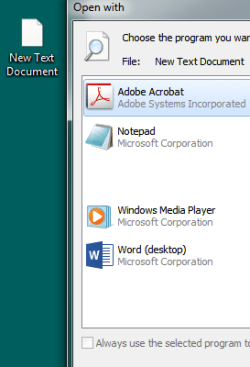
Exactly what files are you trying to open?
Exactly what programs are you trying to open them with?
 

My Computer

Computer type
PC/Desktop
Computer Manufacturer/Model Number
Home made Desktop
OS
Windows 10 Pro. 64/ version 1709 Windows 7 Pro/64
CPU
Intel i7-6800K @ 4.3
Motherboard
ASUS X-99 Deluxe II
Memory
Corsair Platinum 16 gig @2400
Graphics Card(s)
EVGA GTX 1070 OC
Monitor(s) Displays
Asus 27" LED LCD/VE278Q
Screen Resolution
1920-1080 or 1280-720 HDMI
Hard Drives
INTEL SSD 730-240 Gb Sata 3.0/
PSU
EVGA Platium 1200W
Case
Phanteks Luxe Tempered Glass 8 fans/ one radiator
Cooling
XSPC/ Water Cooled CPU
Keyboard
Das 4 Professional
Mouse
Logitech M705/MX Anywhere 2-S
Internet Speed
100 mbits
Antivirus
Microsoft Security Essentials/ Malwarebytes Premium 3.0/ SAS
Browser
I.E. 11 default/Firefox/ ISP Time Warner Cable/Spectrum
Other Info
LG BluRay Burner/
Sound system-KLipsch-THX/
Icy Dock ssd Hot Swap bays.
sounds like the files you are opening do not have a extension (like some system files) - you cannot set a default program for files with no extension
 

Attachments

  • text dock with no ext.PNG
    text dock with no ext.PNG
    9.3 KB · Views: 16

My Computer

Computer type
PC/Desktop
Computer Manufacturer/Model Number
custom build
OS
w7 ultimate 64-bit sp1
CPU
i5 2500K @4.5
Motherboard
MSI P67A-GD65 rev2
Memory
2x4GB G.Skill Ripjaws-X 2,133 CL9
Graphics Card(s)
GTX 560Ti
Sound Card
on board
Monitor(s) Displays
BenQ G2410HD
Screen Resolution
1920x1080
Hard Drives
Samsung 2.5-Inch 250 GB 850 EVO
PSU
BeQuiet 600W
Keyboard
K65
Mouse
Razer Deathadder Ergonomic Gaming Mouse
Internet Speed
35Mbps
It doesn't matter if it has an extension OR NOT
.exe .mp3 .axc .dll or no extension DOESNT MATTER it still gives the error and i can't choose what i want to open it with manually
it's extremely annoying because i can't open some files with the program i want unless i DRAG the file on-top-of the said program

it happens with any file extension that does or could exist. and even files that dont have an extension.

therefore i can not open a file with a program i choose manually because of that error screen
i do not want to go through setting program defaults and control panel manually for every single file
That would be extremely repetitive and annoying and pretty well pointless when i could do it the easy way of right clicking the said file and clicking open with > other program > and choosing a program but i cant because i get said error.
 

My Computer

Computer type
PC/Desktop
Computer Manufacturer/Model Number
HP Elite 8300 compaq SFF
OS
Windows 7 Pro x64
CPU
i7 3770k 3.5ghz up to 3.9ghz turbo boost 4 core 8 thread CPU
Motherboard
HP Elite 8300 compaq SFF OEM board
Memory
32GB 4x8GB DDR3 1600mhz CL9 patriot viper gaming ram
Graphics Card(s)
ZOTAC GTX 1650 low profile overclocked GPU
Sound Card
realtek integrated HD audio
Monitor(s) Displays
23" acer gaming 144hz 1ms monitor
Screen Resolution
1920x1080 @120hz/144hz
Hard Drives
ADATA 128GB SSD
ADAtA 256GB SSD
x1 Seagate 250GB 7200 RPM drive
x1 Seagate 500GB 7200 RPM drive
PSU
430w thermaltake smart
Case
HP Elite 8300 compaq SFF
Cooling
Stock + new thermal paste
Keyboard
REDRAGON mechanical blue switch
Mouse
ZELOTES wired T-90 mouse
Internet Speed
10MB/s (80mbps) download good internet
Antivirus
in-use/other
Browser
IE11 + firefox + Google Chrome randomly switches between
Other Info
Info updated

power supply doesnt fit but still works with adapter its just sitting on the desk behind the computer wires going into the case where the old power supply was.
have you tried creating new user account to see if it will affect it also?
 

My Computer

Computer type
PC/Desktop
Computer Manufacturer/Model Number
custom build
OS
w7 ultimate 64-bit sp1
CPU
i5 2500K @4.5
Motherboard
MSI P67A-GD65 rev2
Memory
2x4GB G.Skill Ripjaws-X 2,133 CL9
Graphics Card(s)
GTX 560Ti
Sound Card
on board
Monitor(s) Displays
BenQ G2410HD
Screen Resolution
1920x1080
Hard Drives
Samsung 2.5-Inch 250 GB 850 EVO
PSU
BeQuiet 600W
Keyboard
K65
Mouse
Razer Deathadder Ergonomic Gaming Mouse
Internet Speed
35Mbps
can't create a new user account. Have too much stuff don't want to risk losing 100's of songs and photo's I am the ONLY user on this PC. No one else has even layed eyes on it besides my mother when she first bought it for me. And i tried your suggestion. But no help sadly. Still errors when trying to open with a different program.
 

My Computer

Computer type
PC/Desktop
Computer Manufacturer/Model Number
HP Elite 8300 compaq SFF
OS
Windows 7 Pro x64
CPU
i7 3770k 3.5ghz up to 3.9ghz turbo boost 4 core 8 thread CPU
Motherboard
HP Elite 8300 compaq SFF OEM board
Memory
32GB 4x8GB DDR3 1600mhz CL9 patriot viper gaming ram
Graphics Card(s)
ZOTAC GTX 1650 low profile overclocked GPU
Sound Card
realtek integrated HD audio
Monitor(s) Displays
23" acer gaming 144hz 1ms monitor
Screen Resolution
1920x1080 @120hz/144hz
Hard Drives
ADATA 128GB SSD
ADAtA 256GB SSD
x1 Seagate 250GB 7200 RPM drive
x1 Seagate 500GB 7200 RPM drive
PSU
430w thermaltake smart
Case
HP Elite 8300 compaq SFF
Cooling
Stock + new thermal paste
Keyboard
REDRAGON mechanical blue switch
Mouse
ZELOTES wired T-90 mouse
Internet Speed
10MB/s (80mbps) download good internet
Antivirus
in-use/other
Browser
IE11 + firefox + Google Chrome randomly switches between
Other Info
Info updated

power supply doesnt fit but still works with adapter its just sitting on the desk behind the computer wires going into the case where the old power supply was.
Back
Top