
Solved Help organizing files

noclueblue

New member
Local time
5:57 PM
Messages
80
Location
Missouri
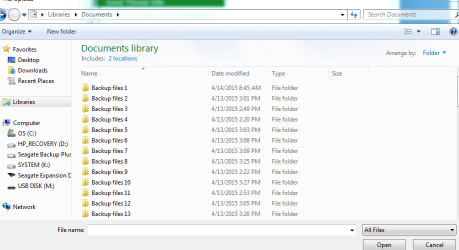
Brain dead and angry here again. I just restored a bunch of back up and went to try to organize them and got intimidated because I no longer know what I'm doing. Tried to open a new docs window. I messed up big time when I did a fresh install on this beast.
 

Attachments
  • Capture.PNG
    Capture.PNG
    26.4 KB · Views: 1

My Computer

Computer type
PC/Desktop
Computer Manufacturer/Model Number
hp
OS
Win7 Home Premium 64-bit
Hard Drives
internal, seagate, seagate expansion
Antivirus
vipre
Browser
firefox
What are you restoring? I see Backup Files folders 1 through 13, what is inside of those folders?
 

My Computer

Computer type
PC/Desktop
Computer Manufacturer/Model Number
Antec desktop; Acer Aspire laptops
OS
Windows 7 Professional 64-bit
CPU
Desktop i5; Acers i5 & i7
Memory
desktop 16GB; 1 Acer 8GB & 1 Acer 16GB
Hard Drives
1TB split into 2 equal partitions [OS and data] usable by RJS
Internet Speed
AT&T DSL
Browser
FF, GChrome, msIE
Other Info
Windows 7 Firewall, Emsisoft AM/AV, MSE [scan-only], SpywareBlaster, Ruiware/BillP combine
Docs and images.
 

My Computer

Computer type
PC/Desktop
Computer Manufacturer/Model Number
hp
OS
Win7 Home Premium 64-bit
Hard Drives
internal, seagate, seagate expansion
Antivirus
vipre
Browser
firefox
I don't care anymore. I need to get these things organized. I've dealt in paper my whole life, my hobby deals in paper but I'm buried in the stuff. Expense? No matter. I need to get organized quickly. I'll buy any program that will do this (free is better). I'm tired and old. I need to get together and fast. :o
 

My Computer

Computer type
PC/Desktop
Computer Manufacturer/Model Number
hp
OS
Win7 Home Premium 64-bit
Hard Drives
internal, seagate, seagate expansion
Antivirus
vipre
Browser
firefox
Still trying to arrange a move but this is taking all my time.
 

My Computer

Computer type
PC/Desktop
Computer Manufacturer/Model Number
hp
OS
Win7 Home Premium 64-bit
Hard Drives
internal, seagate, seagate expansion
Antivirus
vipre
Browser
firefox
What backup program did you use exactly? You may need to use that program to open those files and redistribute them, or they may be accessible when you open each backup folder.

It explains the best way to backup and copy back in your backup in Clean Reinstall Windows 7. Basically you want to open the backup, from the Organize tab on Explorer browser choose Select All, then drag them to the corresponding folder on the left hand Explorer bar. Do not release the left click you're holding for the drag operation until the bar unfolds and you confirm it's going into the correct folder.

I would read through it completely because if you didn't come close to those steps then you might want to do it over, or at least complete the setup using the tools and methods that work best for Win7, and have been used by over 1.3 million consumers without a single complaint.
 
Back
Top