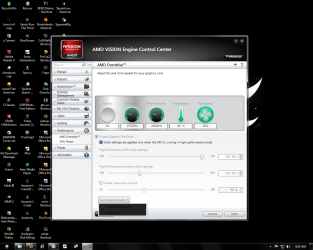
Help overclocking my 6970

Thornton

New member
Power User
Local time
6:47 AM
Messages
597
Location
Orlando Florida
i have verry good air flow in my case, the only problem, i dont know what a sefe, core clock, memore clock, and gpu voltage are. im using TriXX and have the current default settings of 880 core, 1375 memory, and 1175 gpu voltage. what is the absolute MAX i could get away with, what is the absolute MAX i could SAFELY get away with, what is the most recomended, and what should i start off with as a beginner to graphics cards overclocking
 

My Computer

Computer type
PC/Desktop
Computer Manufacturer/Model Number
Custom Build
OS
windows 7 Professional
CPU
Intel I7 4790k
Motherboard
ASUS Hero VII
Memory
16gb DDR3 1600mhz
Graphics Card(s)
Dual GTX 780 ASUS
Monitor(s) Displays
2x HP 2331
Screen Resolution
1080p
Hard Drives
750gb Hitachi 7200rpm
500gb Crucial SSD
PSU
Corsair 800g
Case
NZXT Phantom
Cooling
fan
Keyboard
Razer Deathstalker
Mouse
Razer Ouroboros
Internet Speed
70mbps
Antivirus
MSE + M-Bam
Browser
Chrome
i have verry good air flow in my case, the only problem, i dont know what a sefe, core clock, memore clock, and gpu voltage are. im using TriXX and have the current default settings of 880 core, 1375 memory, and 1175 gpu voltage. what is the absolute MAX i could get away with, what is the absolute MAX i could SAFELY get away with, what is the most recomended, and what should i start off with as a beginner to graphics cards overclocking

oh ya, forgot to mention, it is all air cooled! no water cooling
 

My Computer

Computer type
PC/Desktop
Computer Manufacturer/Model Number
Custom Build
OS
windows 7 Professional
CPU
Intel I7 4790k
Motherboard
ASUS Hero VII
Memory
16gb DDR3 1600mhz
Graphics Card(s)
Dual GTX 780 ASUS
Monitor(s) Displays
2x HP 2331
Screen Resolution
1080p
Hard Drives
750gb Hitachi 7200rpm
500gb Crucial SSD
PSU
Corsair 800g
Case
NZXT Phantom
Cooling
fan
Keyboard
Razer Deathstalker
Mouse
Razer Ouroboros
Internet Speed
70mbps
Antivirus
MSE + M-Bam
Browser
Chrome
well, there's no actually absolute figures in getting away in Ocing, but an absolute safe should come on priority unless you lose a lifespam of stuff as it should be. In general speaking ocing, one amongst, is a matter of voltage which then affects directly to heat. So oc gpu is just like we do for CPU, only the resistance towards heat make them different.

From what i've read, the gpu could stand heat more than that of cpu. 60C gpu temp is catagorized warm while cpu is a bit hot, below 85C of gpu is still normal / safe zone, >85C to 100C hot and >100C very hot .

First to do is up the clock by 25 mhz and keep the voltage default, stress it with i,e furmark in a certain period. if ok, then up more 2nd 25 mhz and so on till you find it unstable. and if you want to push more clock, up the voltage per one increament till you find it stable. Always remember the temp which you can read while gpu's being stressed.

Have a good OC
 

My Computer

OS
Win7 Ult x64 SP1
CPU
i7 920 / i5 2500K
Motherboard
eVGA Classified / As Rock Z68 X3 G3
Memory
Corsair 6 gb Triple Channel / Corsair 8 GB Dual Channel
Graphics Card(s)
Nvidia DA GTX 295 / MSI HD 5850 TF II
Sound Card
X-Fi Xtreme Fatality Gamer
Monitor(s) Displays
2 x 22 inch Samsung / LG
Screen Resolution
1680 * 1050
PSU
Silverstone 1500 Watt / Antec NeoPower 650 Watt
Case
Lian Li / CM Scout
Cooling
WC / Corsair Hydro H60
Keyboard
Razer Lycosa Mirror
Mouse
Razer DA Blue
Other Info
Mousepad:

Razer Destructor White Edition
Mionix Propuse 380
i dont know what a sefe, core clock, memore clock,

Whatever is stable and for longevities sake of the card, try to keep it under 85c.


and gpu voltage are.

1.3v is the BIOS limit for these cards.

On air (stock cooling), 1.2v-1.25v (temps permitting) is about the max you'd want to go.

And follow peaceful's method of slow increments during stability testing.
 

My Computer

Computer type
PC/Desktop
Computer Manufacturer/Model Number
Systems by SmartEyeball
OS
8 Pro x64
CPU
i7 3770K 4.6GHz
Motherboard
ASUS P8Z77 WS
Memory
16GB G.Skill Trident X 2666mhz
Graphics Card(s)
x2 EVGA 780 Ti Superclocked SLI
Sound Card
SB X-FI Surround 5.1 PRO USB / ATH-AD900 Headphones
Monitor(s) Displays
x3 Dell U2410 / 58" Samsung
Screen Resolution
5760*1200/ 1920*1200
Hard Drives
2x Intel 520 240GB (RAID 0) * 2x WD Caviar Blacks 2TB (RAID 0) * 2TB WD Caviar Black * Sony Optirac DVD
PSU
Silverstone Strider Evolution 1200W
Case
Thermaltake Level 10 GT Snow Edition
Cooling
Noctua NH-D14
Keyboard
Topre Realforce // Ducky Shine MX Black // Filco Ninja TKL
Mouse
Thermaltake Theron (Highly Recommended) + Razer Imperator
Antivirus
MSE
Browser
IE, FF, WaterFox
Other Info
GT Extreme V2 Sim Racing Cockpit + 40" LCD and K/B Mouse stand ▼
Fanatec CSR Elite Wheel + Clubsport V1 Pedals + CSR shifter/7G-H ▼Saitek X52 Pro ▼ TrackIR 5 Pro
Buttkicker v2 Seat Rumbler with Dedicated 5.1 and Sub Woofer attached to frame ▼
=
Bloody Big Grin
well, there's no actually absolute figures in getting away in Ocing, but an absolute safe should come on priority unless you lose a lifespam of stuff as it should be. In general speaking ocing, one amongst, is a matter of voltage which then affects directly to heat. So oc gpu is just like we do for CPU, only the resistance towards heat make them different.

From what i've read, the gpu could stand heat more than that of cpu. 60C gpu temp is catagorized warm while cpu is a bit hot, below 85C of gpu is still normal / safe zone, >85C to 100C hot and >100C very hot .

First to do is up the clock by 25 mhz and keep the voltage default, stress it with i,e furmark in a certain period. if ok, then up more 2nd 25 mhz and so on till you find it unstable. and if you want to push more clock, up the voltage per one increament till you find it stable. Always remember the temp which you can read while gpu's being stressed.

Have a good OC

thank you very much. thanks to trixx, whether or not its the best program to use, i dont know, but they provide me with them and fan controll, when i play bf3 i never let it go above 70 degrees and thats with my case fans down and gpu fan t 43%. i know for most thats still a bit cold, but i like consistancy to tell me if somthing is wrong.
Seeing as how i am new to this, what are the ratios? of core/memory/Voltage.

thats another thing, i didnt really see you post anything about the memory clock from what i see, just the core clock. if you could help ansewer my questions as best you can, id greatly appreciate it
 

My Computer

Computer type
PC/Desktop
Computer Manufacturer/Model Number
Custom Build
OS
windows 7 Professional
CPU
Intel I7 4790k
Motherboard
ASUS Hero VII
Memory
16gb DDR3 1600mhz
Graphics Card(s)
Dual GTX 780 ASUS
Monitor(s) Displays
2x HP 2331
Screen Resolution
1080p
Hard Drives
750gb Hitachi 7200rpm
500gb Crucial SSD
PSU
Corsair 800g
Case
NZXT Phantom
Cooling
fan
Keyboard
Razer Deathstalker
Mouse
Razer Ouroboros
Internet Speed
70mbps
Antivirus
MSE + M-Bam
Browser
Chrome
Use CCC, the safest overclocker imo and its by amd you can have it test the clocks before setting them to see if they are safe and if you don't want to set clocks, CCC can automatically test your system and give you settings the program thinks are most stable for you card
 

Attachments

  • showpci.png
    showpci.png
    96.6 KB · Views: 198

My Computer

Computer type
PC/Desktop
Computer Manufacturer/Model Number
custom build
OS
Windows 10 64bit
CPU
AMD Phenom II X4 925 (Deneb)(2.8GHz) OC 3.4GHz
Motherboard
M5A78L-MLX Plus
Memory
Corsair Vengeance DDR3 4GBX2 (8192MB)
Graphics Card(s)
XFX HD 6870 1GB (OC)- 940MHz core, mem 1150MHz
Monitor(s) Displays
Vizio 26' 1920x1080 / Acer 1336x768
Screen Resolution
1920x1080 60Hz /1336x768
Hard Drives
Kingston Digital 60GB SSDNow V300/500gb HDD Western Digital 7200rpm (/WD 160GB HDD 7200rpm
PSU
CORSAIR CX600 600w
Case
AZZA Orion 202 EVO
Cooling
cooler master hyper TX3 cpu cooler
Keyboard
Razer DeathStalker
Mouse
Logitech Optical Gaming Mouse G400
Antivirus
Defualt on win 10
Browser
Firefox
Other Info
cpu is overclocked in bios
Use CCC, the safest overclocker imo and its by amd you can have it test the clocks before setting them to see if they are safe and if you don't want to set clocks, CCC can automatically test your system and give you settings the program thinks are most stable for you card

my CCC does not have overdrive built in, i had to download it 3d party, but i dont trust it with my gpu, i have used it with my cpu before though. meany people say that it gives them the wrong performance settings at an unsafe level, id rather take some advice on how i can do it myself and see what the safe levels are my self or from people more experienced. arguably, amd is more experienced, but if its killed other peoples cards i dont exactly trust it myself iether
 

My Computer

Computer type
PC/Desktop
Computer Manufacturer/Model Number
Custom Build
OS
windows 7 Professional
CPU
Intel I7 4790k
Motherboard
ASUS Hero VII
Memory
16gb DDR3 1600mhz
Graphics Card(s)
Dual GTX 780 ASUS
Monitor(s) Displays
2x HP 2331
Screen Resolution
1080p
Hard Drives
750gb Hitachi 7200rpm
500gb Crucial SSD
PSU
Corsair 800g
Case
NZXT Phantom
Cooling
fan
Keyboard
Razer Deathstalker
Mouse
Razer Ouroboros
Internet Speed
70mbps
Antivirus
MSE + M-Bam
Browser
Chrome
erm.. might i ask why you want to? up until a few weeks ago your card was one of the fastest single Gpu's around, only beaten by the 580gtx and the new 7970 (or what varients out now).

It would be a pointless achievement at best, you wont see improvements in game play as your already getting more than enough frames to spare. just my 2 cents well pence.. being a brit lol
 

My Computer

Computer type
PC/Desktop
Computer Manufacturer/Model Number
Built by badgers!!!
OS
Windows 7 Ultimate x64, & Mac OS X 10.9.2
CPU
Intel Core i5 2500k
Motherboard
Asus P8z68 LE
Memory
Corsair Vengence 8gb 1866mhz
Graphics Card(s)
Nvidia GTX 770 OC
Monitor(s) Displays
2x ASUS LED 22" IPS
Screen Resolution
3840x1080
Hard Drives
240GB Crucial M500 SSD
120gb Corsair Force 3 SSD
1TB Western Digital
PSU
Corsair HX650w Modular
Case
Corsair Air 540
Cooling
Corsair H60 Push/Pull
Keyboard
Corsair K70/ Logitech G27 wheel
Mouse
Saitek R.A.T 9
Internet Speed
Too slow!
Other Info
AMD fusion E350N Home server-Windows Home Server 2011 (also made by badgers!)
2011 Macbook 2.4ghz Core2Duo, 4gb ddr3, 120gb Ocz Vertex SSD
my CCC does not have overdrive built in,

It should. It's called AMD overdrive - you have to 'unlock' it.

i had to download it 3d party, but i dont trust it with my gpu,

If you're going to use 3rd party, use MSI Afterburner

As for clock speeds - each card is different. That's why you raise the core/mem clocks in increments.

Keep raising the core and mem speeds on stock volts until it fails, then you can up the volts. It's trial and error.

It would be a pointless achievement at best, you wont see improvements in game play as your already getting more than enough frames to spare.

BS :sarc:

By that 'reckoning' I wouldn't need to OC my 580, nor would I notice any difference by doing so - but I do OC it and I do notice a difference.
 

My Computer

Computer type
PC/Desktop
Computer Manufacturer/Model Number
Systems by SmartEyeball
OS
8 Pro x64
CPU
i7 3770K 4.6GHz
Motherboard
ASUS P8Z77 WS
Memory
16GB G.Skill Trident X 2666mhz
Graphics Card(s)
x2 EVGA 780 Ti Superclocked SLI
Sound Card
SB X-FI Surround 5.1 PRO USB / ATH-AD900 Headphones
Monitor(s) Displays
x3 Dell U2410 / 58" Samsung
Screen Resolution
5760*1200/ 1920*1200
Hard Drives
2x Intel 520 240GB (RAID 0) * 2x WD Caviar Blacks 2TB (RAID 0) * 2TB WD Caviar Black * Sony Optirac DVD
PSU
Silverstone Strider Evolution 1200W
Case
Thermaltake Level 10 GT Snow Edition
Cooling
Noctua NH-D14
Keyboard
Topre Realforce // Ducky Shine MX Black // Filco Ninja TKL
Mouse
Thermaltake Theron (Highly Recommended) + Razer Imperator
Antivirus
MSE
Browser
IE, FF, WaterFox
Other Info
GT Extreme V2 Sim Racing Cockpit + 40" LCD and K/B Mouse stand ▼
Fanatec CSR Elite Wheel + Clubsport V1 Pedals + CSR shifter/7G-H ▼Saitek X52 Pro ▼ TrackIR 5 Pro
Buttkicker v2 Seat Rumbler with Dedicated 5.1 and Sub Woofer attached to frame ▼
=
Bloody Big Grin
...
 
Last edited:

My Computer

OS
[Genuine Custom DOS 5.0] & [Genuine Custom Windows 7 Home Premium 64Bit SP1]
CCC should be built in and i trust it because it's made by AMD who else knows there amd cards better then amd does. Ye kind of agree with the others you won't notice any performance gains since it's so high end kind of pointless to OC unless your doing it for benchmarks and bragging rights i guess. I would just leave it but it's your card so do w/e you want to it
 

My Computer

Computer type
PC/Desktop
Computer Manufacturer/Model Number
custom build
OS
Windows 10 64bit
CPU
AMD Phenom II X4 925 (Deneb)(2.8GHz) OC 3.4GHz
Motherboard
M5A78L-MLX Plus
Memory
Corsair Vengeance DDR3 4GBX2 (8192MB)
Graphics Card(s)
XFX HD 6870 1GB (OC)- 940MHz core, mem 1150MHz
Monitor(s) Displays
Vizio 26' 1920x1080 / Acer 1336x768
Screen Resolution
1920x1080 60Hz /1336x768
Hard Drives
Kingston Digital 60GB SSDNow V300/500gb HDD Western Digital 7200rpm (/WD 160GB HDD 7200rpm
PSU
CORSAIR CX600 600w
Case
AZZA Orion 202 EVO
Cooling
cooler master hyper TX3 cpu cooler
Keyboard
Razer DeathStalker
Mouse
Logitech Optical Gaming Mouse G400
Antivirus
Defualt on win 10
Browser
Firefox
Other Info
cpu is overclocked in bios
well, there's no actually absolute figures in getting away in Ocing, but an absolute safe should come on priority unless you lose a lifespam of stuff as it should be. In general speaking ocing, one amongst, is a matter of voltage which then affects directly to heat. So oc gpu is just like we do for CPU, only the resistance towards heat make them different.

From what i've read, the gpu could stand heat more than that of cpu. 60C gpu temp is catagorized warm while cpu is a bit hot, below 85C of gpu is still normal / safe zone, >85C to 100C hot and >100C very hot .

First to do is up the clock by 25 mhz and keep the voltage default, stress it with i,e furmark in a certain period. if ok, then up more 2nd 25 mhz and so on till you find it unstable. and if you want to push more clock, up the voltage per one increament till you find it stable. Always remember the temp which you can read while gpu's being stressed.

Have a good OC

thank you very much. thanks to trixx, whether or not its the best program to use, i dont know, but they provide me with them and fan controll, when i play bf3 i never let it go above 70 degrees and thats with my case fans down and gpu fan t 43%. i know for most thats still a bit cold, but i like consistancy to tell me if somthing is wrong.
Seeing as how i am new to this, what are the ratios? of core/memory/Voltage.

thats another thing, i didnt really see you post anything about the memory clock from what i see, just the core clock. if you could help ansewer my questions as best you can, id greatly appreciate it

hai... Thorton may i ask you this :
what do u mean by "my CCC does not have overdrive built in"?
is it that "overdrive built in" which unlocks/bypasses CCC limit? if so, then you have to do some bios mod ( as i did with my hd5850 TF II - ccc overdrive limits to 775 core and 1125 mem - default 725/1000 ).

as with memory oc, do it just you oc the corelock. AFAIK there's no absolute ratios of core/memory and voltage. Besides memory increase has no significant affects to fps bump as that of core.
 

My Computer

OS
Win7 Ult x64 SP1
CPU
i7 920 / i5 2500K
Motherboard
eVGA Classified / As Rock Z68 X3 G3
Memory
Corsair 6 gb Triple Channel / Corsair 8 GB Dual Channel
Graphics Card(s)
Nvidia DA GTX 295 / MSI HD 5850 TF II
Sound Card
X-Fi Xtreme Fatality Gamer
Monitor(s) Displays
2 x 22 inch Samsung / LG
Screen Resolution
1680 * 1050
PSU
Silverstone 1500 Watt / Antec NeoPower 650 Watt
Case
Lian Li / CM Scout
Cooling
WC / Corsair Hydro H60
Keyboard
Razer Lycosa Mirror
Mouse
Razer DA Blue
Other Info
Mousepad:

Razer Destructor White Edition
Mionix Propuse 380
Ye kind of agree with the others you won't notice any performance gains since it's so high end kind of pointless to OC unless your doing it for benchmarks and bragging rights i guess.

Once again - no.

Depending on the game and overclock, it can be the difference between a smooth and solid 60FPS with no framerate dips, or a higher min framerate when it does drop.

There's no denying that some do it just for benches/e-peen but stating there are no noticeable performance gains is simply erroneous as there are some games that do benefit from a GPU overclock, 'high end card' or not.
 

My Computer

Computer type
PC/Desktop
Computer Manufacturer/Model Number
Systems by SmartEyeball
OS
8 Pro x64
CPU
i7 3770K 4.6GHz
Motherboard
ASUS P8Z77 WS
Memory
16GB G.Skill Trident X 2666mhz
Graphics Card(s)
x2 EVGA 780 Ti Superclocked SLI
Sound Card
SB X-FI Surround 5.1 PRO USB / ATH-AD900 Headphones
Monitor(s) Displays
x3 Dell U2410 / 58" Samsung
Screen Resolution
5760*1200/ 1920*1200
Hard Drives
2x Intel 520 240GB (RAID 0) * 2x WD Caviar Blacks 2TB (RAID 0) * 2TB WD Caviar Black * Sony Optirac DVD
PSU
Silverstone Strider Evolution 1200W
Case
Thermaltake Level 10 GT Snow Edition
Cooling
Noctua NH-D14
Keyboard
Topre Realforce // Ducky Shine MX Black // Filco Ninja TKL
Mouse
Thermaltake Theron (Highly Recommended) + Razer Imperator
Antivirus
MSE
Browser
IE, FF, WaterFox
Other Info
GT Extreme V2 Sim Racing Cockpit + 40" LCD and K/B Mouse stand ▼
Fanatec CSR Elite Wheel + Clubsport V1 Pedals + CSR shifter/7G-H ▼Saitek X52 Pro ▼ TrackIR 5 Pro
Buttkicker v2 Seat Rumbler with Dedicated 5.1 and Sub Woofer attached to frame ▼
=
Bloody Big Grin
well, there's no actually absolute figures in getting away in Ocing, but an absolute safe should come on priority unless you lose a lifespam of stuff as it should be. In general speaking ocing, one amongst, is a matter of voltage which then affects directly to heat. So oc gpu is just like we do for CPU, only the resistance towards heat make them different.

From what i've read, the gpu could stand heat more than that of cpu. 60C gpu temp is catagorized warm while cpu is a bit hot, below 85C of gpu is still normal / safe zone, >85C to 100C hot and >100C very hot .

First to do is up the clock by 25 mhz and keep the voltage default, stress it with i,e furmark in a certain period. if ok, then up more 2nd 25 mhz and so on till you find it unstable. and if you want to push more clock, up the voltage per one increament till you find it stable. Always remember the temp which you can read while gpu's being stressed.

Have a good OC

thank you very much. thanks to trixx, whether or not its the best program to use, i dont know, but they provide me with them and fan controll, when i play bf3 i never let it go above 70 degrees and thats with my case fans down and gpu fan t 43%. i know for most thats still a bit cold, but i like consistancy to tell me if somthing is wrong.
Seeing as how i am new to this, what are the ratios? of core/memory/Voltage.

thats another thing, i didnt really see you post anything about the memory clock from what i see, just the core clock. if you could help ansewer my questions as best you can, id greatly appreciate it

hai... Thorton may i ask you this :
what do u mean by "my CCC does not have overdrive built in"?
is it that "overdrive built in" which unlocks/bypasses CCC limit? if so, then you have to do some bios mod ( as i did with my hd5850 TF II - ccc overdrive limits to 775 core and 1125 mem - default 725/1000 ).

as with memory oc, do it just you oc the corelock. AFAIK there's no absolute ratios of core/memory and voltage. Besides memory increase has no significant affects to fps bump as that of core.

no VCC has amd overdrive, but does not give me ANY options to wotk with my gpu, only my cpu, same with the application amd overdrive, only my cpu. i certainly do trust amd because they built it, but people who have done this claim otherwise. as for it not being much of a performance benifit, i run at around 50-55 fps when playing bf3, if i scale the window down to half size it runs at over 60 fps. and yes, it is VERRY noticeable. also, i am a 3d developer, and my card takes BEYOND allot of abuse from the open cl/open gl drivers. to be honest for the 3d stuff im probably gunna see more benifit in OCd ram, but of course the gpu is still rather important. anyways, if that gives you some better information to go on, thank you for helping me
 

My Computer

Computer type
PC/Desktop
Computer Manufacturer/Model Number
Custom Build
OS
windows 7 Professional
CPU
Intel I7 4790k
Motherboard
ASUS Hero VII
Memory
16gb DDR3 1600mhz
Graphics Card(s)
Dual GTX 780 ASUS
Monitor(s) Displays
2x HP 2331
Screen Resolution
1080p
Hard Drives
750gb Hitachi 7200rpm
500gb Crucial SSD
PSU
Corsair 800g
Case
NZXT Phantom
Cooling
fan
Keyboard
Razer Deathstalker
Mouse
Razer Ouroboros
Internet Speed
70mbps
Antivirus
MSE + M-Bam
Browser
Chrome
erm.. might i ask why you want to? up until a few weeks ago your card was one of the fastest single Gpu's around, only beaten by the 580gtx and the new 7970 (or what varients out now).

It would be a pointless achievement at best, you wont see improvements in game play as your already getting more than enough frames to spare. just my 2 cents well pence.. being a brit lol

1 word "BF3" it K.I.L.Ls my frame rate, sweet 60-65 down to 47-55
 

My Computer

Computer type
PC/Desktop
Computer Manufacturer/Model Number
Custom Build
OS
windows 7 Professional
CPU
Intel I7 4790k
Motherboard
ASUS Hero VII
Memory
16gb DDR3 1600mhz
Graphics Card(s)
Dual GTX 780 ASUS
Monitor(s) Displays
2x HP 2331
Screen Resolution
1080p
Hard Drives
750gb Hitachi 7200rpm
500gb Crucial SSD
PSU
Corsair 800g
Case
NZXT Phantom
Cooling
fan
Keyboard
Razer Deathstalker
Mouse
Razer Ouroboros
Internet Speed
70mbps
Antivirus
MSE + M-Bam
Browser
Chrome
my CCC does not have overdrive built in,

It should. It's called AMD overdrive - you have to 'unlock' it.

i had to download it 3d party, but i dont trust it with my gpu,

If you're going to use 3rd party, use MSI Afterburner

As for clock speeds - each card is different. That's why you raise the core/mem clocks in increments.

Keep raising the core and mem speeds on stock volts until it fails, then you can up the volts. It's trial and error.

It would be a pointless achievement at best, you wont see improvements in game play as your already getting more than enough frames to spare.

BS :sarc:

By that 'reckoning' I wouldn't need to OC my 580, nor would I notice any difference by doing so - but I do OC it and I do notice a difference.

if i may ask... what does msi afterburner that trixx doesnt have, not to say i dont agree or that youre wrong... but this application too requires me to download the version for my card, so it really is individualized like your stating with afterburner. just curious, i am going to download it and try it out to see for my self, but from experience you may be able to tell me more than i can visually see right off the bat
 

My Computer

Computer type
PC/Desktop
Computer Manufacturer/Model Number
Custom Build
OS
windows 7 Professional
CPU
Intel I7 4790k
Motherboard
ASUS Hero VII
Memory
16gb DDR3 1600mhz
Graphics Card(s)
Dual GTX 780 ASUS
Monitor(s) Displays
2x HP 2331
Screen Resolution
1080p
Hard Drives
750gb Hitachi 7200rpm
500gb Crucial SSD
PSU
Corsair 800g
Case
NZXT Phantom
Cooling
fan
Keyboard
Razer Deathstalker
Mouse
Razer Ouroboros
Internet Speed
70mbps
Antivirus
MSE + M-Bam
Browser
Chrome
thank you very much. thanks to trixx, whether or not its the best program to use, i dont know, but they provide me with them and fan controll, when i play bf3 i never let it go above 70 degrees and thats with my case fans down and gpu fan t 43%. i know for most thats still a bit cold, but i like consistancy to tell me if somthing is wrong.
Seeing as how i am new to this, what are the ratios? of core/memory/Voltage.

thats another thing, i didnt really see you post anything about the memory clock from what i see, just the core clock. if you could help ansewer my questions as best you can, id greatly appreciate it

hai... Thorton may i ask you this :
what do u mean by "my CCC does not have overdrive built in"?
is it that "overdrive built in" which unlocks/bypasses CCC limit? if so, then you have to do some bios mod ( as i did with my hd5850 TF II - ccc overdrive limits to 775 core and 1125 mem - default 725/1000 ).

as with memory oc, do it just you oc the corelock. AFAIK there's no absolute ratios of core/memory and voltage. Besides memory increase has no significant affects to fps bump as that of core.

no VCC has amd overdrive, but does not give me ANY options to wotk with my gpu, only my cpu, same with the application amd overdrive, only my cpu. i certainly do trust amd because they built it, but people who have done this claim otherwise. as for it not being much of a performance benifit, i run at around 50-55 fps when playing bf3, if i scale the window down to half size it runs at over 60 fps. and yes, it is VERRY noticeable. also, i am a 3d developer, and my card takes BEYOND allot of abuse from the open cl/open gl drivers. to be honest for the 3d stuff im probably gunna see more benifit in OCd ram, but of course the gpu is still rather important. anyways, if that gives you some better information to go on, thank you for helping me

btw, what 3rd party gpu tweak you have in? reading from your system specs that u play bf3 with that high res, so i just guess that fps more than enogh. it might be helpful to bump your cpu clock to 4 to 4,2 ghz for at least 5 fps more than you got it now.

edit: sorry "TriXX" Sapphire
 

My Computer

OS
Win7 Ult x64 SP1
CPU
i7 920 / i5 2500K
Motherboard
eVGA Classified / As Rock Z68 X3 G3
Memory
Corsair 6 gb Triple Channel / Corsair 8 GB Dual Channel
Graphics Card(s)
Nvidia DA GTX 295 / MSI HD 5850 TF II
Sound Card
X-Fi Xtreme Fatality Gamer
Monitor(s) Displays
2 x 22 inch Samsung / LG
Screen Resolution
1680 * 1050
PSU
Silverstone 1500 Watt / Antec NeoPower 650 Watt
Case
Lian Li / CM Scout
Cooling
WC / Corsair Hydro H60
Keyboard
Razer Lycosa Mirror
Mouse
Razer DA Blue
Other Info
Mousepad:

Razer Destructor White Edition
Mionix Propuse 380
hai... Thorton may i ask you this :
what do u mean by "my CCC does not have overdrive built in"?
is it that "overdrive built in" which unlocks/bypasses CCC limit? if so, then you have to do some bios mod ( as i did with my hd5850 TF II - ccc overdrive limits to 775 core and 1125 mem - default 725/1000 ).

as with memory oc, do it just you oc the corelock. AFAIK there's no absolute ratios of core/memory and voltage. Besides memory increase has no significant affects to fps bump as that of core.

no VCC has amd overdrive, but does not give me ANY options to wotk with my gpu, only my cpu, same with the application amd overdrive, only my cpu. i certainly do trust amd because they built it, but people who have done this claim otherwise. as for it not being much of a performance benifit, i run at around 50-55 fps when playing bf3, if i scale the window down to half size it runs at over 60 fps. and yes, it is VERRY noticeable. also, i am a 3d developer, and my card takes BEYOND allot of abuse from the open cl/open gl drivers. to be honest for the 3d stuff im probably gunna see more benifit in OCd ram, but of course the gpu is still rather important. anyways, if that gives you some better information to go on, thank you for helping me

btw, what 3rd party gpu tweak you have in? reading from your system specs that u play bf3 with that high res, so i just guess that fps more than enogh. it might be helpful to bump your cpu clock to 4 to 4,2 ghz for at least 5 fps more than you got it now.

i mean a 3d party application, im actually using amd overdrive, not an add on to VCC, and im only playing bf3 at 1920x1080, at full screen it only runs around 30 fps and the bf3 gui cant handle it but i only use overdrive for cpu
 

My Computer

Computer type
PC/Desktop
Computer Manufacturer/Model Number
Custom Build
OS
windows 7 Professional
CPU
Intel I7 4790k
Motherboard
ASUS Hero VII
Memory
16gb DDR3 1600mhz
Graphics Card(s)
Dual GTX 780 ASUS
Monitor(s) Displays
2x HP 2331
Screen Resolution
1080p
Hard Drives
750gb Hitachi 7200rpm
500gb Crucial SSD
PSU
Corsair 800g
Case
NZXT Phantom
Cooling
fan
Keyboard
Razer Deathstalker
Mouse
Razer Ouroboros
Internet Speed
70mbps
Antivirus
MSE + M-Bam
Browser
Chrome
no VCC has amd overdrive, but does not give me ANY options to wotk with my gpu, only my cpu, same with the application amd overdrive, only my cpu. i certainly do trust amd because they built it, but people who have done this claim otherwise. as for it not being much of a performance benifit, i run at around 50-55 fps when playing bf3, if i scale the window down to half size it runs at over 60 fps. and yes, it is VERRY noticeable. also, i am a 3d developer, and my card takes BEYOND allot of abuse from the open cl/open gl drivers. to be honest for the 3d stuff im probably gunna see more benifit in OCd ram, but of course the gpu is still rather important. anyways, if that gives you some better information to go on, thank you for helping me

btw, what 3rd party gpu tweak you have in? reading from your system specs that u play bf3 with that high res, so i just guess that fps more than enogh. it might be helpful to bump your cpu clock to 4 to 4,2 ghz for at least 5 fps more than you got it now.

i mean a 3d party application, im actually using amd overdrive, not an add on to VCC, and im only playing bf3 at 1920x1080, at full screen it only runs around 30 fps and the bf3 gui cant handle it

a noob question, now what coreclock & memclock your gpu in now? what's the max core & mem that amd overdriver provide for OC?
 

My Computer

OS
Win7 Ult x64 SP1
CPU
i7 920 / i5 2500K
Motherboard
eVGA Classified / As Rock Z68 X3 G3
Memory
Corsair 6 gb Triple Channel / Corsair 8 GB Dual Channel
Graphics Card(s)
Nvidia DA GTX 295 / MSI HD 5850 TF II
Sound Card
X-Fi Xtreme Fatality Gamer
Monitor(s) Displays
2 x 22 inch Samsung / LG
Screen Resolution
1680 * 1050
PSU
Silverstone 1500 Watt / Antec NeoPower 650 Watt
Case
Lian Li / CM Scout
Cooling
WC / Corsair Hydro H60
Keyboard
Razer Lycosa Mirror
Mouse
Razer DA Blue
Other Info
Mousepad:

Razer Destructor White Edition
Mionix Propuse 380
btw, what 3rd party gpu tweak you have in? reading from your system specs that u play bf3 with that high res, so i just guess that fps more than enogh. it might be helpful to bump your cpu clock to 4 to 4,2 ghz for at least 5 fps more than you got it now.

i mean a 3d party application, im actually using amd overdrive, not an add on to VCC, and im only playing bf3 at 1920x1080, at full screen it only runs around 30 fps and the bf3 gui cant handle it

a noob question, now what coreclock & memclock your gpu in now? what's the max core & mem that amd overdriver provide for OC?

well ill say again, i use overdrive for cpu and trixx for gpu, but the defaults are, cor 880, memory 1375, and voltage 1175
 

My Computer

Computer type
PC/Desktop
Computer Manufacturer/Model Number
Custom Build
OS
windows 7 Professional
CPU
Intel I7 4790k
Motherboard
ASUS Hero VII
Memory
16gb DDR3 1600mhz
Graphics Card(s)
Dual GTX 780 ASUS
Monitor(s) Displays
2x HP 2331
Screen Resolution
1080p
Hard Drives
750gb Hitachi 7200rpm
500gb Crucial SSD
PSU
Corsair 800g
Case
NZXT Phantom
Cooling
fan
Keyboard
Razer Deathstalker
Mouse
Razer Ouroboros
Internet Speed
70mbps
Antivirus
MSE + M-Bam
Browser
Chrome
Back
Top