[help] partitions and windows 7

dknight178

New member
Local time
6:01 AM
Messages
13
Hello guys...

I want to install windows 7 into my Acer Aspire 4937G laptop (currently running in Windows Vista Home Premium; actually I want to be able to dual boot vista with win 7). I have made disk images and recovery disks (using Acer's Erecovery management) to back up my previous files.

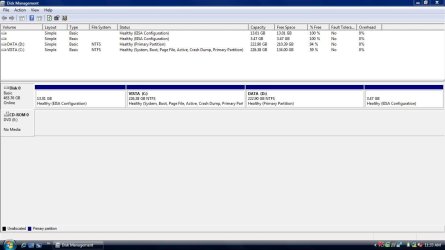
However, my problem is that my laptop already has 4 primary partitions, as seen in the attached file. The first two partitions seem to be related to recover files (one is called PQSERVICE if I'm not mistaken) and the only one I could use is Drive D (DATA) where I put some of my files (although I can delete them if I wanted to). However, I've read somewhere that Windows 7 would install at least two primary partitions. Furthermore I intend to retain my Vista OS.

Is there a way for me to install Windows 7 using just my Drive D (even if Win 7 requires 2 primary partitions)? Or could I just shrink my Drive D and make logical partitions where I'd put Windows 7? Thanks in advance :)
 

Attachments

  • cpuz.txt
    cpuz.txt
    45.5 KB · Views: 32
  • disk mgmt.jpg
    disk mgmt.jpg
    69.3 KB · Views: 53

My Computer

Computer Manufacturer/Model Number
Acer Aspire 4937G
OS
Vista Home Premium
Welcome!

Go ahead and install in the D partition. If you run into any problems, we will assist you.

~Jonathan
 

My Computer

Computer Manufacturer/Model Number
Custom
OS
Windows 7 Professional x64
CPU
Intel i7 2600K OC'd @ 4620 MHz
Motherboard
Asus P8Z68-V Pro
Memory
16GB GSkill Sniper 2133 Mhz (4x4GB)
Graphics Card(s)
EVGA GeForce GTX 480 SuperClocked+
Sound Card
Realtek High Definition Audio
Monitor(s) Displays
2x Acer S273HLbmii 27"
Screen Resolution
2 x 1920x1080
Hard Drives
64GB Crucial M4 SSD

Storage: Hitachi 1TB 5400RPM, Samsung 1.5TB 5400RPM
PSU
Corsair HW Series 750w (modular)
Case
Cooler Master HAF 932 Advanced Blue Edition
Cooling
CM Hyper 212+ CPU cooler, 3x 230mm + 1x 140mm case fans
Keyboard
Logitech MK320 (wireless)
Mouse
Logitech MK320 (wireless)
Internet Speed
30 Mb/s : 2 Mb/s
I've read somewhere that logical partitions are not bootable. Does that mean I can't install win 7 in a logical partition?

If I forming another partition from drive D, would one of them be a primary partition? Will installing win 7 in the primary partition from those 2 drives work? Thanks
 

My Computer

Computer Manufacturer/Model Number
Acer Aspire 4937G
OS
Vista Home Premium
It is true that logical partitions cannot boot. Theoretically, you could still install into a logical partition, but the boot loader would have to be on a primary partition. It is much easier if everything is on a Primary partition.

Unfortunately, you can only have 4 primary partition per hard drive. If I were you, I would install in the D partition. You can later shrink/expand/create new partitions as necessary to make a data partition.

Man, do I wish Greg was here. He is the master of partition/formatting issues.
 

My Computer

Computer Manufacturer/Model Number
Custom
OS
Windows 7 Professional x64
CPU
Intel i7 2600K OC'd @ 4620 MHz
Motherboard
Asus P8Z68-V Pro
Memory
16GB GSkill Sniper 2133 Mhz (4x4GB)
Graphics Card(s)
EVGA GeForce GTX 480 SuperClocked+
Sound Card
Realtek High Definition Audio
Monitor(s) Displays
2x Acer S273HLbmii 27"
Screen Resolution
2 x 1920x1080
Hard Drives
64GB Crucial M4 SSD

Storage: Hitachi 1TB 5400RPM, Samsung 1.5TB 5400RPM
PSU
Corsair HW Series 750w (modular)
Case
Cooler Master HAF 932 Advanced Blue Edition
Cooling
CM Hyper 212+ CPU cooler, 3x 230mm + 1x 140mm case fans
Keyboard
Logitech MK320 (wireless)
Mouse
Logitech MK320 (wireless)
Internet Speed
30 Mb/s : 2 Mb/s
You're on the button so far Johnathan.

You can install 7 to D without any problem .

7 will not create a 100mb system reserved partition.

7 will automatically set up a dual boot menu for you.
 

My Computers

System One System Two

  • Computer type
    PC/Desktop
    OS
    7 X64
    CPU
    i5 8400
    Motherboard
    gigabyte b365m ds3h
    Memory
    2x8gb 3200mhz
    Hard Drives
    various
    PSU
    pure power 11 400w cm
    Case
    Coolermaster
    Cooling
    cryorig m9i
  • Computer type
    PC/Desktop
    OS
    7x64
    CPU
    g5400
    Motherboard
    ga b365m ds3h
    Memory
    8gb ddr4 2400
    PSU
    xfx pro 450w
Thanks for the replies :)

How much space would be ideal for the partition where I'd put windows 7?

And also, is it possible to access my personal files in drive C even if Vista is installed on it?

Thanks in advance
 

My Computer

Computer Manufacturer/Model Number
Acer Aspire 4937G
OS
Vista Home Premium
Windows 7 needs at least 16GB to be installed, but in practice, you will want more. Maybe 30-50GB? Remember, not all programs allow you to install them in other places.
 

My Computer

Computer Manufacturer/Model Number
Custom
OS
Windows 7 Professional x64
CPU
Intel i7 2600K OC'd @ 4620 MHz
Motherboard
Asus P8Z68-V Pro
Memory
16GB GSkill Sniper 2133 Mhz (4x4GB)
Graphics Card(s)
EVGA GeForce GTX 480 SuperClocked+
Sound Card
Realtek High Definition Audio
Monitor(s) Displays
2x Acer S273HLbmii 27"
Screen Resolution
2 x 1920x1080
Hard Drives
64GB Crucial M4 SSD

Storage: Hitachi 1TB 5400RPM, Samsung 1.5TB 5400RPM
PSU
Corsair HW Series 750w (modular)
Case
Cooler Master HAF 932 Advanced Blue Edition
Cooling
CM Hyper 212+ CPU cooler, 3x 230mm + 1x 140mm case fans
Keyboard
Logitech MK320 (wireless)
Mouse
Logitech MK320 (wireless)
Internet Speed
30 Mb/s : 2 Mb/s
And also, is it possible to access my personal files in drive C even if Vista is installed on it?

Yes.
 

My Computers

System One System Two

  • Computer type
    PC/Desktop
    OS
    7 X64
    CPU
    i5 8400
    Motherboard
    gigabyte b365m ds3h
    Memory
    2x8gb 3200mhz
    Hard Drives
    various
    PSU
    pure power 11 400w cm
    Case
    Coolermaster
    Cooling
    cryorig m9i
  • Computer type
    PC/Desktop
    OS
    7x64
    CPU
    g5400
    Motherboard
    ga b365m ds3h
    Memory
    8gb ddr4 2400
    PSU
    xfx pro 450w
I shrank my drive D coz I was planning to put backup files in another partition.

However, when I was about to format the unallocated space, there was a warning that popped up, saying that to format the space my disk would be converted into a dynamic disk, and it also mentioned that dynamic disks would prevent me from loading OS from a different volume.

Should I convert my disk into dynamic or not?

And how could I create another partition without my disk being converted into dynamic?

Many thanks :)
 

My Computer

Computer Manufacturer/Model Number
Acer Aspire 4937G
OS
Vista Home Premium
DO NOT convert your disk to dynamic. Way too risky. If you ever need to use the hard drive outside of Windows, or recover data from it, you will regret it.
 

My Computer

Computer Manufacturer/Model Number
Custom
OS
Windows 7 Professional x64
CPU
Intel i7 2600K OC'd @ 4620 MHz
Motherboard
Asus P8Z68-V Pro
Memory
16GB GSkill Sniper 2133 Mhz (4x4GB)
Graphics Card(s)
EVGA GeForce GTX 480 SuperClocked+
Sound Card
Realtek High Definition Audio
Monitor(s) Displays
2x Acer S273HLbmii 27"
Screen Resolution
2 x 1920x1080
Hard Drives
64GB Crucial M4 SSD

Storage: Hitachi 1TB 5400RPM, Samsung 1.5TB 5400RPM
PSU
Corsair HW Series 750w (modular)
Case
Cooler Master HAF 932 Advanced Blue Edition
Cooling
CM Hyper 212+ CPU cooler, 3x 230mm + 1x 140mm case fans
Keyboard
Logitech MK320 (wireless)
Mouse
Logitech MK320 (wireless)
Internet Speed
30 Mb/s : 2 Mb/s
Super thanks to all your replies, now I'm able to dual boot vista and win7 :)

however there are several questions I'd like to ask (not sure if these are still suitable in this section):

1. In Vista, my Windows Experience Index score is 4.0 (due to graphics). But in Windows 7, it is 1.0 (due to graphics and gaming graphics). How could I fix this?

2. How will I know if my drivers are okay? Do I have to go to Acer's website to install all drivers?

3. Is it possible for the documents, pictures, music, etc. in my start bar to be linked to my files in Drive C (VISTA)?

4. Is it really normal that the drive C (where my Vista is) in Vista becomes drive D in Windows 7, while drive D in Vista becomes drive C in Windows 7 (where my Windows 7 is)?

5. Could I create another partition without my disk becoming a dynamic disk?

6. Do I need to reinstall all my programs? Couldn't I just browse for a program then run it in Windows 7?

7. I'm using Kaspersky Internet Security in Vista. Will using another antivirus (say AVG or Norton) in Windows 7 cause conflict?

Sorry for the many questions.... Thanks again :)
 

My Computer

Computer Manufacturer/Model Number
Acer Aspire 4937G
OS
Vista Home Premium
1. Don't worry about your score. Performance is what matters.

2. If you have problems, update your drivers. If not, you're okay.

3. Yes, although I am not the one to ask how to do it.

4.Yes, that is perfectly normal. Inevitable.

5. Yes. Delete one of your primary partitions, and move stuff around until you can create a logical partition.

6. Nope. Sorry, they will need to be reinstalled. Unless they are portable apps, of course.

7. Very likely, not recommended. Many of the users here (including myself) recommend Microsoft Security Essentials instead of Kapersky or AVG. Very fast, lightweight, and does a great job of picking up threats. I have not seen one problem arise from MSE.
 

My Computer

Computer Manufacturer/Model Number
Custom
OS
Windows 7 Professional x64
CPU
Intel i7 2600K OC'd @ 4620 MHz
Motherboard
Asus P8Z68-V Pro
Memory
16GB GSkill Sniper 2133 Mhz (4x4GB)
Graphics Card(s)
EVGA GeForce GTX 480 SuperClocked+
Sound Card
Realtek High Definition Audio
Monitor(s) Displays
2x Acer S273HLbmii 27"
Screen Resolution
2 x 1920x1080
Hard Drives
64GB Crucial M4 SSD

Storage: Hitachi 1TB 5400RPM, Samsung 1.5TB 5400RPM
PSU
Corsair HW Series 750w (modular)
Case
Cooler Master HAF 932 Advanced Blue Edition
Cooling
CM Hyper 212+ CPU cooler, 3x 230mm + 1x 140mm case fans
Keyboard
Logitech MK320 (wireless)
Mouse
Logitech MK320 (wireless)
Internet Speed
30 Mb/s : 2 Mb/s
3. Yes, although I am not the one to ask how to do it.

then who should I ask regarding this?

5. Yes. Delete one of your primary partitions, and move stuff around until you can create a logical partition.

I'm not sure I can delete a partition coz my other two partitions aside from Vista and Win7 are Acer partitions which seem to contain recovery files. Are there other methods aside from deleting one?

Thanks :)
 

My Computer

Computer Manufacturer/Model Number
Acer Aspire 4937G
OS
Vista Home Premium
No. Sorry, but a logical partition counts as one of your Primary partitions.

As for your first question, you can create a new thread in the General Discussion forum. Do a search first, perhaps your question has already been answered.

~Jonathan
 

My Computer

Computer Manufacturer/Model Number
Custom
OS
Windows 7 Professional x64
CPU
Intel i7 2600K OC'd @ 4620 MHz
Motherboard
Asus P8Z68-V Pro
Memory
16GB GSkill Sniper 2133 Mhz (4x4GB)
Graphics Card(s)
EVGA GeForce GTX 480 SuperClocked+
Sound Card
Realtek High Definition Audio
Monitor(s) Displays
2x Acer S273HLbmii 27"
Screen Resolution
2 x 1920x1080
Hard Drives
64GB Crucial M4 SSD

Storage: Hitachi 1TB 5400RPM, Samsung 1.5TB 5400RPM
PSU
Corsair HW Series 750w (modular)
Case
Cooler Master HAF 932 Advanced Blue Edition
Cooling
CM Hyper 212+ CPU cooler, 3x 230mm + 1x 140mm case fans
Keyboard
Logitech MK320 (wireless)
Mouse
Logitech MK320 (wireless)
Internet Speed
30 Mb/s : 2 Mb/s
okay then, thanks a lot :)
 

My Computer

Computer Manufacturer/Model Number
Acer Aspire 4937G
OS
Vista Home Premium
You're welcome, feel free to ask as many questions as you want. Glad I could help.
 

My Computer

Computer Manufacturer/Model Number
Custom
OS
Windows 7 Professional x64
CPU
Intel i7 2600K OC'd @ 4620 MHz
Motherboard
Asus P8Z68-V Pro
Memory
16GB GSkill Sniper 2133 Mhz (4x4GB)
Graphics Card(s)
EVGA GeForce GTX 480 SuperClocked+
Sound Card
Realtek High Definition Audio
Monitor(s) Displays
2x Acer S273HLbmii 27"
Screen Resolution
2 x 1920x1080
Hard Drives
64GB Crucial M4 SSD

Storage: Hitachi 1TB 5400RPM, Samsung 1.5TB 5400RPM
PSU
Corsair HW Series 750w (modular)
Case
Cooler Master HAF 932 Advanced Blue Edition
Cooling
CM Hyper 212+ CPU cooler, 3x 230mm + 1x 140mm case fans
Keyboard
Logitech MK320 (wireless)
Mouse
Logitech MK320 (wireless)
Internet Speed
30 Mb/s : 2 Mb/s
#3. Rt. click on these folders in 7/properties. Select location tab. Hit move and navigate to the folder on the Vista drive. Advisable to move all files to new location otherwise you might end up with two folders.

#4. According to "Windows 7 Inside Out"

If you begin the installation process by running the setup program from within your current version of Windows and use the Custom (Advanced) option to perform a clean installation on a partition that currently has a drive letter assigned to it, the new installation uses that drive letter. Other volumes maintain their original drive letters when you start your newly installed copy of Windows 7. Thus, if you run setup from within Windows and choose to install a clean copy of Windows on drive E, the system drive for the new installation will be E as well.
 

My Computer

Computer Manufacturer/Model Number
Dell XPS420
OS
Vista Ult 64 bit Seven Ult RTM x64
CPU
Intel Core2 Quad Q6600 2.40 gigahertz
Memory
Crucial Ballistix 4x2GB PC2 6400
Graphics Card(s)
NVIDIA GeForce 8600 GTS 256 MB
Sound Card
Creative SB X-Fi audio
Monitor(s) Displays
HP w2207 + HPvs15
Screen Resolution
1680x1050 + 1024x768
Hard Drives
2-WD5000AAKS-500 GB
WD5000AAV-500 GB external
Keyboard
Microsoft Comfort Curve
Mouse
MX Revolution
Other Info
Wacom Intuos 2 Graphics Tablet
Experience Index=5.5
#3. Rt. click on these folders in 7/properties. Select location tab. Hit move and navigate to the folder on the Vista drive. Advisable to move all files to new location otherwise you might end up with two folders.


What do you mean by "Advisable to move all files to new location otherwise you might end up with two folders."? Would I need a third partition? Thanks
 

My Computer

Computer Manufacturer/Model Number
Acer Aspire 4937G
OS
Vista Home Premium
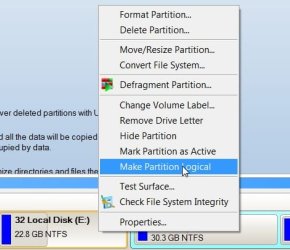
You can convert one of the existing Primary partitions into an Extended partition - then convert the adjacent Primary into a logical drive - both will then be in the Extended partition. This can be done without data loss.

You can then make one additional partition.

Paragon PM10 Personal was being given away yesterday - did you get it?
Make-par-log-2010-01-12_163857.jpg


3. Yes, although I am not the one to ask how to do it.

then who should I ask regarding this?

5. Yes. Delete one of your primary partitions, and move stuff around until you can create a logical partition.

I'm not sure I can delete a partition coz my other two partitions aside from Vista and Win7 are Acer partitions which seem to contain recovery files. Are there other methods aside from deleting one?

Thanks :)
 

My Computers

System One System Two

  • Computer type
    PC/Desktop
    OS
    7 X64
    CPU
    i5 8400
    Motherboard
    gigabyte b365m ds3h
    Memory
    2x8gb 3200mhz
    Hard Drives
    various
    PSU
    pure power 11 400w cm
    Case
    Coolermaster
    Cooling
    cryorig m9i
  • Computer type
    PC/Desktop
    OS
    7x64
    CPU
    g5400
    Motherboard
    ga b365m ds3h
    Memory
    8gb ddr4 2400
    PSU
    xfx pro 450w
When you move one of these folders through the location tab, you press the apply button and a dialog will come up asking if you want to move all the files in the present folder to the new location. Click yes. Then any files in the present location will be moved to the new location.
 

My Computer

Computer Manufacturer/Model Number
Dell XPS420
OS
Vista Ult 64 bit Seven Ult RTM x64
CPU
Intel Core2 Quad Q6600 2.40 gigahertz
Memory
Crucial Ballistix 4x2GB PC2 6400
Graphics Card(s)
NVIDIA GeForce 8600 GTS 256 MB
Sound Card
Creative SB X-Fi audio
Monitor(s) Displays
HP w2207 + HPvs15
Screen Resolution
1680x1050 + 1024x768
Hard Drives
2-WD5000AAKS-500 GB
WD5000AAV-500 GB external
Keyboard
Microsoft Comfort Curve
Mouse
MX Revolution
Other Info
Wacom Intuos 2 Graphics Tablet
Experience Index=5.5
Back
Top