help please anyone

F17ZY

New member
Local time
10:27 PM
Messages
101
well guys i recently had win 7 ult and liunx ubuntu 9.10 installed dual booting with grub loader, but then i removed linux and did a fresh install of win 7 to the same drive it was on with the same stuff that was installed and installed the same apps i had but now the thing is it runs fine for about an hour, am geting slow download speeds no matter were i download from and if i end an app like wmp it will end but the processcs will stay in task manager using about 45% cpu and it will not let me end it so i have to reboot but then it just gose to the shuting down screen and stays ther for as long as it like untill i have to hold the power button in and restart it that way, and then it will be nice and smoth once again but after an hour. So i ask if anyone can help me then please anything welcome i will try anything right now apart from a repair install as i have already done that two times thanks.
 

My Computer

Computer Manufacturer/Model Number
custom build
OS
windows 7 hp 64bit
CPU
intel 3.00 ghz @ 3.31
Motherboard
gigabyte P43-ES3G
Memory
6GB OCZ DDR2 800mhz
Graphics Card(s)
ati hd pro 2400 1gb
Sound Card
on board
Monitor(s) Displays
19 inch
Hard Drives
2x 80gb sata and 2x500gb sata
PSU
600w
Case
galaxy 3 gaming case
Cooling
everest water cooling
Internet Speed
7mb down/1.2mb up
Well guys I recently had win 7 ult and liunx ubuntu 9.10 installed, dual booting with grub loader. Then I removed linux and did a fresh install of win 7 to the same drive. It was on with the same stuff that was installed and installed the same apps I had, but now the thing is that it runs fine for about an hour, then I get slow download speeds no matter were I download from. If I close an app like Windows Media Player, it will close, but the process will stay in task manager using about 45% cpu. It will not let me end this process, so I have to reboot. Then it just goes to the shut down screen and stays there for as long as it likes, until I hold the power button and restart it that way. Then it will be nice and smooth once again, but after an hour(?). So I ask if anyone can help me. Anything welcome, and I will try anything. Apart from a repair install (I have already done that two times), thanks.
Much better.

Ok, so it sounds like you just have a bad install. Try NOT a repair install, but another clean install. Format the drive first, then do a new install.

~Lordbob
 

My Computer

Computer Manufacturer/Model Number
Hera
OS
Windows 7 Ultimate x64, Mint 9
CPU
Intel i5-2500k
Motherboard
ASUS P8P67 Pro
Memory
2x 4Gb Corsair VENGEANCE DDR3-1600
Graphics Card(s)
NVidia GeForce N260GTX Twin Frozr
Sound Card
Realtek HD OnBoard Audio
Monitor(s) Displays
ASUS 24" Monitor
Screen Resolution
1920x1080
Hard Drives
G.SKILL Phoenix Series 60GB SATA II MLC Internal Solid State Drive (SSD)
SAMSUNG Spinpoint F3R 1TB 7200 RPM 32MB Cache SATA II
PSU
Cooler Master Real Power Pro 750W
Case
Cooler Master Haf 932
Cooling
Fans
Keyboard
Razer Tarantula
Mouse
Razer Lachesis
Internet Speed
not fast enough
hey i just got back online after trying a new clean install, but sadly still the same what can it be ? all the hardware is the same still along with apps,files and drives.
 

My Computer

Computer Manufacturer/Model Number
custom build
OS
windows 7 hp 64bit
CPU
intel 3.00 ghz @ 3.31
Motherboard
gigabyte P43-ES3G
Memory
6GB OCZ DDR2 800mhz
Graphics Card(s)
ati hd pro 2400 1gb
Sound Card
on board
Monitor(s) Displays
19 inch
Hard Drives
2x 80gb sata and 2x500gb sata
PSU
600w
Case
galaxy 3 gaming case
Cooling
everest water cooling
Internet Speed
7mb down/1.2mb up
It is evident that either it is a bad install, or an appl. is slowing down the system. You reinstalled and that did not solve the problem. Next time you have the problem check the event viewer see if there were any problems.

If you start off ok but then as time progresses you begin to slow down, something is using too much memory.

Try uninstalling your programs one at a time and try, if you still have the problem, uninstall the next program so on and so on. This may work.

Once you solve the problem, make a system image of the OS without any programs installed. A little more work now, but it will save you a lot of hassles if the problem returns in the future.

Good Luck
 

My Computer

Computer type
PC/Desktop
Computer Manufacturer/Model Number
Dell XPS 420
OS
Windows 10, Home Clean Install
CPU
Intel Core2 processsor Q8200(2.33Ghz 1333FSB) Quad Core Tech
Motherboard
Dell
Memory
6 gb
Graphics Card(s)
ATI Radeon 256MB HD3650
Sound Card
Intergrated 7.1 Channel Audio
Monitor(s) Displays
Dell SP2009W 20"
Hard Drives
640 GB Serial ATA Hard drive
Cooling
Fan
Keyboard
Dell USB Keyboard
Mouse
Dell Premium Optical USB
Internet Speed
DSL 2.85
well i have just had a look in the event viewer and ther is alot or errors, but they all are driver ones from the fresh install, now the drivers are ther and working, no more errors but it mainly happpens when i run wmp coz all my music is on my F: drive, so i have link wmp to that drive. and thanks for help guys
 

My Computer

Computer Manufacturer/Model Number
custom build
OS
windows 7 hp 64bit
CPU
intel 3.00 ghz @ 3.31
Motherboard
gigabyte P43-ES3G
Memory
6GB OCZ DDR2 800mhz
Graphics Card(s)
ati hd pro 2400 1gb
Sound Card
on board
Monitor(s) Displays
19 inch
Hard Drives
2x 80gb sata and 2x500gb sata
PSU
600w
Case
galaxy 3 gaming case
Cooling
everest water cooling
Internet Speed
7mb down/1.2mb up
hey i just got back online after trying a new clean install, but sadly still the same what can it be ? all the hardware is the same still along with apps,files and drives.
Is this with or without your apps installed?

~Lordbob
 

My Computer

Computer Manufacturer/Model Number
Hera
OS
Windows 7 Ultimate x64, Mint 9
CPU
Intel i5-2500k
Motherboard
ASUS P8P67 Pro
Memory
2x 4Gb Corsair VENGEANCE DDR3-1600
Graphics Card(s)
NVidia GeForce N260GTX Twin Frozr
Sound Card
Realtek HD OnBoard Audio
Monitor(s) Displays
ASUS 24" Monitor
Screen Resolution
1920x1080
Hard Drives
G.SKILL Phoenix Series 60GB SATA II MLC Internal Solid State Drive (SSD)
SAMSUNG Spinpoint F3R 1TB 7200 RPM 32MB Cache SATA II
PSU
Cooler Master Real Power Pro 750W
Case
Cooler Master Haf 932
Cooling
Fans
Keyboard
Razer Tarantula
Mouse
Razer Lachesis
Internet Speed
not fast enough
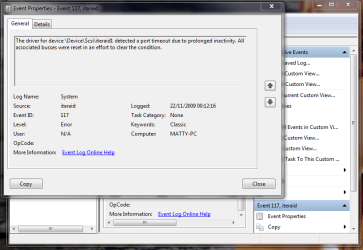
with out apps and here is a snip of my last error to a drive that is installed, from my motherboard website now last time i installed that very same drive i used drivers disk, full of drivers so i dont no but i can't find that disk so i have got it from my motherboards,website
 

Attachments

  • Capture.PNG
    Capture.PNG
    31.4 KB · Views: 10

My Computer

Computer Manufacturer/Model Number
custom build
OS
windows 7 hp 64bit
CPU
intel 3.00 ghz @ 3.31
Motherboard
gigabyte P43-ES3G
Memory
6GB OCZ DDR2 800mhz
Graphics Card(s)
ati hd pro 2400 1gb
Sound Card
on board
Monitor(s) Displays
19 inch
Hard Drives
2x 80gb sata and 2x500gb sata
PSU
600w
Case
galaxy 3 gaming case
Cooling
everest water cooling
Internet Speed
7mb down/1.2mb up
hey i just got back online after trying a new clean install, but sadly still the same what can it be ? all the hardware is the same still along with apps,files and drives.

If you have done a clean install, have you also gone to Microsoft Update to pick up patches and drivers?

Each install I have done has found an updated or necessary driver for critical elements. In your situation, there may be a driver for your network card.

Let us know.
 

My Computer

OS
WinXP, Win7, PCLinuxOS
Seems that you are using an SCSI HDD...
Do you have a Sata or IDE one you can try?

~Lordbob
 

My Computer

Computer Manufacturer/Model Number
Hera
OS
Windows 7 Ultimate x64, Mint 9
CPU
Intel i5-2500k
Motherboard
ASUS P8P67 Pro
Memory
2x 4Gb Corsair VENGEANCE DDR3-1600
Graphics Card(s)
NVidia GeForce N260GTX Twin Frozr
Sound Card
Realtek HD OnBoard Audio
Monitor(s) Displays
ASUS 24" Monitor
Screen Resolution
1920x1080
Hard Drives
G.SKILL Phoenix Series 60GB SATA II MLC Internal Solid State Drive (SSD)
SAMSUNG Spinpoint F3R 1TB 7200 RPM 32MB Cache SATA II
PSU
Cooler Master Real Power Pro 750W
Case
Cooler Master Haf 932
Cooling
Fans
Keyboard
Razer Tarantula
Mouse
Razer Lachesis
Internet Speed
not fast enough
yes i have them all i have just uninstalled,my storage driver for ide hdd's now seems ok no slow down yet and i have over 30 firefox windows open, as that is the only app i have right now, i have both sata as my main drive with windows on, and ide as my date drive with my files on, and my network card it upto date from windows update.
 

My Computer

Computer Manufacturer/Model Number
custom build
OS
windows 7 hp 64bit
CPU
intel 3.00 ghz @ 3.31
Motherboard
gigabyte P43-ES3G
Memory
6GB OCZ DDR2 800mhz
Graphics Card(s)
ati hd pro 2400 1gb
Sound Card
on board
Monitor(s) Displays
19 inch
Hard Drives
2x 80gb sata and 2x500gb sata
PSU
600w
Case
galaxy 3 gaming case
Cooling
everest water cooling
Internet Speed
7mb down/1.2mb up
Upon re-reading your observations, some further thoughts.

In Firefox, under Tools > Options > Tabs, there is a checkbox to warn you if opening more tabs will cause Firefox to slow down. Is that box checked?

Take a look at Task Manager > Performance to see how you're doing on CPU and memory utilization. If CPU utilization is high, check Processes to see what is grabbing cycles.

Is the power mangement on your system slowing the CPU because of overheating? If so, maybe a little vacuuming will help. Maybe someone forgot the thermal paste on the CPU-cooler interface.
 

My Computer

OS
WinXP, Win7, PCLinuxOS
hey sorry guys but i have fixed it now, it was down to having win xp drivers for my ata hdd it was not leting things work, as they should i have the drivers if any body wants them and it was notthing to do with heat or dust as my pc gets cleaned, every week and heat well if my 7 fans aint doing ther jobs then i don't think anything will lol, but thanks for the help.
 

My Computer

Computer Manufacturer/Model Number
custom build
OS
windows 7 hp 64bit
CPU
intel 3.00 ghz @ 3.31
Motherboard
gigabyte P43-ES3G
Memory
6GB OCZ DDR2 800mhz
Graphics Card(s)
ati hd pro 2400 1gb
Sound Card
on board
Monitor(s) Displays
19 inch
Hard Drives
2x 80gb sata and 2x500gb sata
PSU
600w
Case
galaxy 3 gaming case
Cooling
everest water cooling
Internet Speed
7mb down/1.2mb up
Back
Top