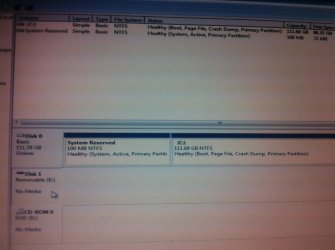
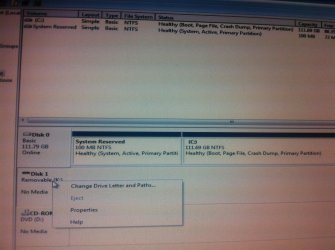
Help please.disk manager showing a drive as removable no media

artinusa

New member
Member
VIP
Local time
11:46 PM
Messages
229
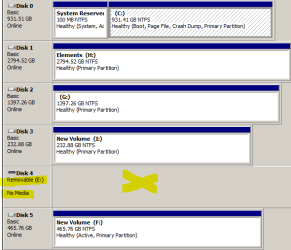
Windows 7 Prof- disk manager showing letter E disk as removable and no media and when I click on the drive E in explorer it asks me to- insert a disk into removable drive E ..I am not sure ho this happened. I have USB and a hard drive that I could use ..how can I either get rid of or remove the slot-/ message or use the slot..with theses drives:mad:
TIA

Compaq Presario DesktopCQ521DF PC
 

Attachments
  • Disk Mnaager Capture.PNG
    Disk Mnaager Capture.PNG
    11.1 KB · Views: 54
Last edited:

My Computer My Computer

At a glance

Windows 7 64 bit
Computer type
PC/Desktop
Computer Manufacturer/Model Number
Compaq Presario
OS
Windows 7 64 bit
Post a snapshot of a fullscreen Disk Management:

To open Disk Management, press Windows key+r, type diskmgmt.msc and press Enter or click GO. Make it full screen.

Vista and Windows 7: How to Use the Snipping Tool in Vista - Vista Forums (says it's for Vista but also works with Win 7/8).

Once you have the image saved, click on the Paperclip Icon next to the Smiley Icon. In the Manage Attachments window, click Browse and navigate to where you saved the image and select it.
Click the Upload button.
Close the Manage Attachments window.
Click on the Paperclip Icon again and select the image you uploaded. It will be placed in your post.

Also tell us what the make and full model number of the computer is.
 

My Computer My Computer

At a glance

Windows 10 Pro X64Intel Quad Core i7-4770 @ 3.4Ghz16.0GB PC3-12800 DDR3 SDRAM 1600 MHzIntel Integrated HD Graphics
Computer type
PC/Desktop
Computer Manufacturer/Model Number
Lenovo IdeaCenter 450
OS
Windows 10 Pro X64
CPU
Intel Quad Core i7-4770 @ 3.4Ghz
Memory
16.0GB PC3-12800 DDR3 SDRAM 1600 MHz
Graphics Card(s)
Intel Integrated HD Graphics
Sound Card
Realtek HD Audio
Monitor(s) Displays
HP 22" LCD
Screen Resolution
1680 x 1050
Hard Drives
250GB Samsung EVO SATA-3 SSD
2TB Seagate ST2000DM001 SATA-2
1.5TB Seagate ST3150041AS SATA
Keyboard
Dell USB
Mouse
Lenovo USB
Internet Speed
Cable via Road Runner 3MB Upload, 30MB Download
Antivirus
Windows Defender, MBAM Pro, MBAE
Browser
Seamonkey
Other Info
UEFI/GPT
PLDS DVD-RW DH16AERSH
Disk 4 could be a card reader, do you have one? Under "View" check "Disk List" and see how it's listed.
 

My Computer My Computer

At a glance

Win8/8.1,Win7-U64, Vista U64, uncounted Linux...AMD and Intell, 9590, 8350, i5 3570kCorsair G SkillCrossfired Sapphire HD 7950 Vapor-X, ASUS R9 ...
Computer type
PC/Desktop
Computer Manufacturer/Model Number
Custom, Dell and Lenono LT's
OS
Win8/8.1,Win7-U64, Vista U64, uncounted Linux distor's
CPU
AMD and Intell, 9590, 8350, i5 3570k
Motherboard
CFVFZ, GA990FXA, Z77e-itx
Memory
Corsair G Skill
Graphics Card(s)
Crossfired Sapphire HD 7950 Vapor-X, ASUS R9 280X TOP
Sound Card
Realtek ALC889
Monitor(s) Displays
ViewSonic VX2770SMH 27" / ViewSonic VX2433 LCD 24"
Screen Resolution
1080i HD
Hard Drives
Samsung SSD 840 Pro
OCZ Agility 3's
OCZ Vector's
WD's Blue, red, green, Velociraptors
Seagate USB3 & Hybrid's
ASUS Blu-Ray
ASUS DVD
PSU
Corsair AX1200i, Seasonice 850 Gold
Case
Cooler Master HAF 922 & HAF 932, Lian Li Train case.
Cooling
Air, Glacer 240L expanded, custom EK loop with duel D5's
Keyboard
Microsoft SideWinder X4 USB Keyboard / Logitech 250 PS2
Mouse
Logitech G500 / MS wireless 5000
Internet Speed
Best of 5ms / 75+ dn / 12+ up More or less.
Antivirus
MS esentials-MalwareBytes
Browser
Firefox Chromebook
removable media disk problem

The identified E is an old internal hard drive but being used via a USB I do not have any card readers or any other devices..is there any way I can read this drive and what must I do..the data on it is not needed
 

My Computer My Computer

At a glance

Windows 7 64 bit
Computer type
PC/Desktop
Computer Manufacturer/Model Number
Compaq Presario
OS
Windows 7 64 bit
The identified E is an old internal hard drive but being used via a USB

The USB connection is why it's listed as removable. If you can't read it with the USB 3 connection then I would check the USB drivers in Devise Manager, make sure all needed usb3 drivers are installed.
 

My Computer My Computer

At a glance

Win8/8.1,Win7-U64, Vista U64, uncounted Linux...AMD and Intell, 9590, 8350, i5 3570kCorsair G SkillCrossfired Sapphire HD 7950 Vapor-X, ASUS R9 ...
Computer type
PC/Desktop
Computer Manufacturer/Model Number
Custom, Dell and Lenono LT's
OS
Win8/8.1,Win7-U64, Vista U64, uncounted Linux distor's
CPU
AMD and Intell, 9590, 8350, i5 3570k
Motherboard
CFVFZ, GA990FXA, Z77e-itx
Memory
Corsair G Skill
Graphics Card(s)
Crossfired Sapphire HD 7950 Vapor-X, ASUS R9 280X TOP
Sound Card
Realtek ALC889
Monitor(s) Displays
ViewSonic VX2770SMH 27" / ViewSonic VX2433 LCD 24"
Screen Resolution
1080i HD
Hard Drives
Samsung SSD 840 Pro
OCZ Agility 3's
OCZ Vector's
WD's Blue, red, green, Velociraptors
Seagate USB3 & Hybrid's
ASUS Blu-Ray
ASUS DVD
PSU
Corsair AX1200i, Seasonice 850 Gold
Case
Cooler Master HAF 922 & HAF 932, Lian Li Train case.
Cooling
Air, Glacer 240L expanded, custom EK loop with duel D5's
Keyboard
Microsoft SideWinder X4 USB Keyboard / Logitech 250 PS2
Mouse
Logitech G500 / MS wireless 5000
Internet Speed
Best of 5ms / 75+ dn / 12+ up More or less.
Antivirus
MS esentials-MalwareBytes
Browser
Firefox Chromebook
How can I check out the needed USB3 drives mine is USB2 If i click on the hubs I see stuff I do not understand with power settings..etc... can anyone help explain what I should look for and then make happen TIA
 

My Computer My Computer

At a glance

Windows 7 64 bit
Computer type
PC/Desktop
Computer Manufacturer/Model Number
Compaq Presario
OS
Windows 7 64 bit
Removable disk no media

An Apology: I have just realised that it is in fact E is a card reader slot from my Brother printer..I did not know that..amd missed reading the screen..info..sorry This means that although I can hear andfeel the old drive connected via USB spin etc, they are not seen by windows...is there and way to resolve this - no appearance in disk manager By the way do I remove the jumpers (tried another part of this forum) if not what position shpoud they be in Should I be able to see them in the BIOS set up ?
 

My Computer My Computer

At a glance

Windows 7 64 bit
Computer type
PC/Desktop
Computer Manufacturer/Model Number
Compaq Presario
OS
Windows 7 64 bit
Removable disk no media

An Apology: I have just realised that it is in fact E is a card reader slot from my Brother printer..I did not know that..amd missed reading the screen..info..sorry This means that although I can hear andfeel the old drive connected via USB spin etc, they are not seen by windows...is there and way to resolve this - no appearance in disk manager By the way do I remove the jumpers (tried another part of this forum) if not what position shpoud they be in Should I be able to see them in the BIOS set up ?
 

My Computer My Computer

At a glance

Windows 7 64 bit
Computer type
PC/Desktop
Computer Manufacturer/Model Number
Compaq Presario
OS
Windows 7 64 bit
I have a similar issue

i have an issue with a internal desk top hard drive i purchased off eBay item isn't new it is used
its a seagate barracuda 7200.12 160GB
was trying to hook up on desktop but i gave up and brought a different hard drive.
now i would like to use it on my laptop
i have it connected through a 3.0 usb connection and in disk management it comes up in there but says no media and will not let me format it or do anything to it please help???!!
 

Attachments

  • IMG_0108.jpg
    IMG_0108.jpg
    493.8 KB · Views: 0
  • IMG_0109.jpg
    IMG_0109.jpg
    575.8 KB · Views: 0

My Computer My Computer

At a glance

windows 7 ultimate 32 bitnot sure4.00GBati radeon x1600
Computer type
Laptop
Computer Manufacturer/Model Number
acer
OS
windows 7 ultimate 32 bit
CPU
not sure
Motherboard
not sure
Memory
4.00GB
Graphics Card(s)
ati radeon x1600
Hard Drives
usb 3.0 internal desk top hard drive connection ( is the issue )
seagate barracuda 7200.12 160GB
Antivirus
kings
Browser
firefox
Hi Dear Experts.
I have the same issue as expressed above in the screenshots, but i have the exact problem with my flash drive , Kingston 8gb, it shows like hidden when i open home or computer , i can't format it, i used low level formatting tool and now i m getting this message "Please insert a disk into Removable Disk (I)" I think may be the MBR thing has been disturbed by me. KINDLY HELP because i am feeling hopeless in this matter.
Apologies in advance for any kind of mistake.
thanks.
 

My Computer My Computer

At a glance

windows 7 ultimate 32bit
Computer type
PC/Desktop
Computer Manufacturer/Model Number
dell, hp
OS
windows 7 ultimate 32bit
Back
Top