Help please with backup!!

Andyonline

New member
Member
Local time
10:54 PM
Messages
85
Hi Everyone, i am trying to configure Paragon backup 2010 special edition and cant seem to sort it out.
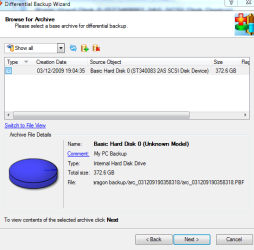
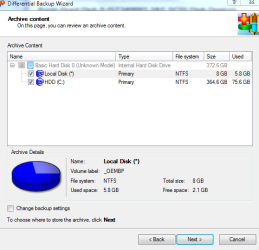
I have performed an entire backup and then scheduled a differencial backup. The wizard showed two pre-checked partitions to back up - c drive and local which i accepted being none the wiser however the results seemed to only display contents for the local drive.

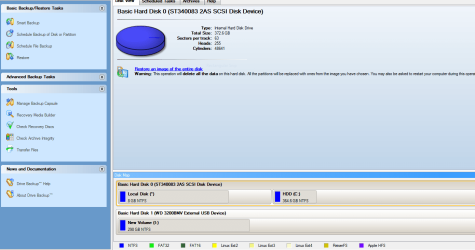
Please refer to screenshots showing my hard drive setup, and screenshots of 2 of the steps in the differencial wizard interface.

At the end of the day, i want to schedule differencial backups from the base backup and then at some point merge the backups and repeat the set up again over and over.

If anyone can offer any help in configuring the above backup or provide a better configuration this would be appreciated.

Thanks in advance


Kind Regards


Andy
 

Attachments
  • Capture.PNG
    Capture.PNG
    41.2 KB · Views: 14
  • Capture2.PNG
    Capture2.PNG
    19.4 KB · Views: 12
  • Capture3.PNG
    Capture3.PNG
    18.7 KB · Views: 9

My Computer

Computer Manufacturer/Model Number
LENOVO 330
OS
MS Windows 7 Home Premium 64-bit SP1
CPU
Intel Core i3 2120
Motherboard
LENOVO
Memory
DDR3 Size 8192 MBytes
Graphics Card(s)
Intel(R) HD Graphics
Monitor(s) Displays
Samsung SMS22A100
Screen Resolution
Current Resolution 1920x1080 pixels
Hard Drives
Seagate ST31000524AS ATA Device
Internet Speed
Download 4.8mb, Upload 1.1mb
I use WIndows 7 backup center: choose my folders I want backed up, select Create an Image and plug in the external. It backs it all up. So I check that what I want is there, and that the backup image will cue up when I boot the Win7 DVD>Repair>Restore Using an Image.

Then it prompts me to schedule the backup so I tell it weekly when my computer is idle.

Just set it and forget it. Nothing complicated like in those screenies.
 
I have only begun using this Paragon program, so there are a lot of questions that I can't answer. Your's seems straight forward enough, except in two aspects...what are the two C: drives, is one a network drive? As far as merging, I accepted the default backup location that it offered, and that was in the folder of the original backup. This may be wrong, but I'm assuming that what is created during an incremental backup is just another file within the original series, thus effectively merging all into one.

I may be very wrong, I just posted my thoughts for your consideration.
 

My Computer

Computer Manufacturer/Model Number
DIY
OS
W7x64 Pro, SuSe 12.1/** W7 x64 Pro, XP MCE
CPU
Phenom II 1090T w/Noctua NH-D14 /**4400+ X2 w/CM Hyper TX 3
Motherboard
ASRock 890FX Deluxe 4/**A8N-SLI
Memory
2 x 2GB Patriot PGS34g1600LLKA/**4x1GB Corsair VS
Graphics Card(s)
EVGA GTX460 SC/**EVGA 8800GTS
Sound Card
Asus Xonar D2X/**Xonar D1
Monitor(s) Displays
Acer X233H, Dell E152FPc /**LG M237-WD
Screen Resolution
1920x1080 & 1024x768/**1980x1080
Hard Drives
WDC 2TB, 1.5TB, 1TB, 500GB,Seagate 500GB , Maxtor 80GB /**500GB Seagate & WDC 1TB Black
PSU
CM RS600 w/ APC BX1000G/**Antec 500 TP w/ APC BX1000
Case
HAF922/**Antec 1040IIB
Cooling
3x200mm, 1x140 and 1x120mm/**5x80mm fans
Keyboard
Logitech Media USB/**Saitek Eclipse
Mouse
Cordless Trackman Wheel/**Ditto
Internet Speed
3.3Mbps
Other Info
SB 560 5.1 w/ Sennheiser RS140/**Creative T20 speakers, Dvico FusionHDTV7 Gold RT, Cisco E3000, HP 5510V AIO, Linksys E3000, Belkin F5U237 hub and **F5D8055 adapter
(** = 2nd rig)
I agree with gregrocker, Win 7 backup works perfect and easy to use. I dl'd Acronis and tried it once, checked a check box i wasn't supp;osed to and wahla i had an unusable comp for a day.

Smitty
 

My Computer

Computer Manufacturer/Model Number
Dell XPS 730
OS
Windows 7 Home Premium 64 bit
CPU
Intel Core 2 quad Extreme Q9770 @ 3.2 GHz
Memory
4x2 GB Muskin 1600 MHz ram
Graphics Card(s)
NVidia GTX 250
Sound Card
Soundblaster X-Fi Fatality Champion
Monitor(s) Displays
2 Dell 2007WFP Ultrascans
Screen Resolution
3360 x 1050
Hard Drives
WD Black 1TB sata, 2-WD Black 500 sata, 2-Seagate 500 Go external
PSU
1000 Watt
Cooling
air
Keyboard
MS Natrual Keyboard Pro
Mouse
Logitech Wireless Trackball
Internet Speed
DSL Elite
Hi, thanks for your responses. One of the disc partitions is the Cdrive and ime not sure but i think the other is something to do with the operating system which may have been created during upgrade to windows 7.

I wasnt sure how reliable the windows backup and restore was so i havent used that. If it seems ok i will give it a go ?

Responses eagerly awaited !!

Thanks

Andy
 

My Computer

Computer Manufacturer/Model Number
LENOVO 330
OS
MS Windows 7 Home Premium 64-bit SP1
CPU
Intel Core i3 2120
Motherboard
LENOVO
Memory
DDR3 Size 8192 MBytes
Graphics Card(s)
Intel(R) HD Graphics
Monitor(s) Displays
Samsung SMS22A100
Screen Resolution
Current Resolution 1920x1080 pixels
Hard Drives
Seagate ST31000524AS ATA Device
Internet Speed
Download 4.8mb, Upload 1.1mb
Back
Top