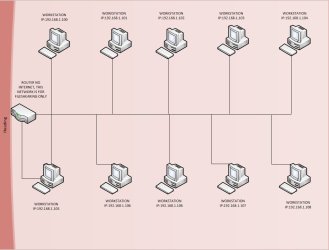
HELLO EVERYONE I NEED SOME HELP WITH THIS NETWORK I HAVE SETUP
I HAVE ABOUT 10 WORKSTATIONS AND A ROUTER. I HAVE CONNECT THEM ALL TO THE ROUTER AND ASSIGNED AND IP ADD TO EACH COMPUTER STARTING WITH 192.168.1.101 & SUBNET M: 255.255.255.0. AND I ALSO HAVE SHEARED A DRIVER IN EACH WORKSTATION WITH FULL PERMISSION TO EVERYONE. AND TURNED ON NETWORK DISCOVERY & FILE SHARING ON ALL OF THEM, AND ALSO ASSIGNED A WORK-GROUP NAME, BUT MY PROBLEM IS THAT I DON'T SEE ALL THE COMPUTERS. SOME TIMES I SEE ALL AND SOME TIMES I SEE ONLY 3 OR 4,,,,,,,
I APOLOGIZE IF THERE IS ANY CONFUSIONS. MY ENGLISH IS NOT PERFECT
It might be a DNS related issue. If memory serves me correct I believe Windows WORKGROUP file sharing will use multi-cast DNS to advertise computer names out to populate the network tab when there is no DNS configured. Depending on when Windows sends out the advertisements will depend on how many shares can be viewed via the Network tab.
Does access via IP address instead of computer name work? E.g \\192.168.1.100\{ShareName}
If someone can correct me then please do
Josh
My Computer
Computer type
PC/Desktop
Computer Manufacturer/Model Number
Custom Built
OS
Windows 7 Professional x64 SP1 ; Windows Server 2012 R2 Standard
If it is a DNS issue then you have 2 possible solutions, set the DNS server as the IP address of your router or manually configure the computer to IP address names in the HOSTS file on every single machine.
Josh
My Computer
Computer type
PC/Desktop
Computer Manufacturer/Model Number
Custom Built
OS
Windows 7 Professional x64 SP1 ; Windows Server 2012 R2 Standard