Help Please!

MJ Dawg

Banned
Local time
6:06 PM
Messages
9
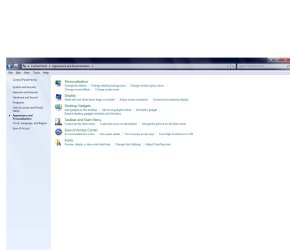
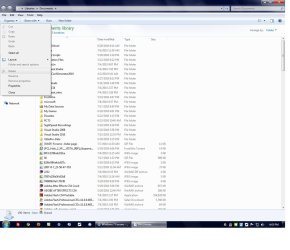
Hi! I am trying to access this folder named "Show Hidden Files or Folders" but when I go to control panel>appearance and personalization that folder isn't there, and whenever I try doing windows explorer> organize > folder and search options, the "Folder and Search options" label is grey! Could someone help me! It's not a virus and looked on other sites to check my registry settings and they're okay. So could some one PLEASE help?!? :cry:
 

Attachments

  • pic#1.jpg
    pic#1.jpg
    61.2 KB · Views: 7
  • pic#2.jpg
    pic#2.jpg
    110.4 KB · Views: 11

My Computer

Computer Manufacturer/Model Number
Dell
OS
Windows 7 Ultimate (x64) 64 Bit
CPU
Dell Inspiron
Memory
3 TB (Advanced User)
Hi MJ Dawg welcome to the forums :)

To show Hidden Files and Folders:
Open Windows Explorer
Press the Alt Key
Click Tools at the Top, followed by Folder Options
Click the View tab
then its in that list of options :)
 

My Computer

Computer type
PC/Desktop
Computer Manufacturer/Model Number
Medion Erazer (note to self: insert model number) - with custom additions
OS
Windows 10 Pro x64
CPU
Intel Core i5 7400 @ 3.00GHz
Motherboard
OEM supllied with PC
Memory
8GB 2133Mhz DDR4 (OEM supplied)
Graphics Card(s)
Gygabyte Windforce GTX 1050Ti (Factory Overclocked)
Sound Card
Realtek
Monitor(s) Displays
Acer Al1980 + HKC
Screen Resolution
1360*768(HKC) / 1280*1024(Acer)
Hard Drives
1TB Toshiba
1TB WD Caviar Green
120GB Samsung Evo 840
PSU
OEM supplied (no power rating on case)
Case
OEM Supplied
Cooling
Stock
Keyboard
Logitech Wireless
Mouse
Logitect Wireless
Internet Speed
40Mb/s Down 10Mb/s Up
Antivirus
Defender
Browser
Firefox

My Computer

Computer type
PC/Desktop
Computer Manufacturer/Model Number
Dell XPS 420
OS
Windows 10, Home Clean Install
CPU
Intel Core2 processsor Q8200(2.33Ghz 1333FSB) Quad Core Tech
Motherboard
Dell
Memory
6 gb
Graphics Card(s)
ATI Radeon 256MB HD3650
Sound Card
Intergrated 7.1 Channel Audio
Monitor(s) Displays
Dell SP2009W 20"
Hard Drives
640 GB Serial ATA Hard drive
Cooling
Fan
Keyboard
Dell USB Keyboard
Mouse
Dell Premium Optical USB
Internet Speed
DSL 2.85
Hi MJ Dawg welcome to the forums :)

To show Hidden Files and Folders:
Open Windows Explorer
Press the Alt Key
Click Tools at the Top, followed by Folder Options
Click the View tab
then its in that list of options :)

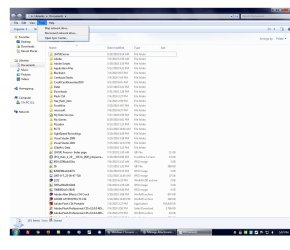
Umm... for some reason when I went to tools the folder options label wasn't there either... :cry:
 

Attachments

  • pic#3.jpg
    pic#3.jpg
    120.2 KB · Views: 6

My Computer

Computer Manufacturer/Model Number
Dell
OS
Windows 7 Ultimate (x64) 64 Bit
CPU
Dell Inspiron
Memory
3 TB (Advanced User)
Take a look at the Tutorial Rich posted, there is an alternative fix.
 

My Computer

Computer type
PC/Desktop
Computer Manufacturer/Model Number
Medion Erazer (note to self: insert model number) - with custom additions
OS
Windows 10 Pro x64
CPU
Intel Core i5 7400 @ 3.00GHz
Motherboard
OEM supllied with PC
Memory
8GB 2133Mhz DDR4 (OEM supplied)
Graphics Card(s)
Gygabyte Windforce GTX 1050Ti (Factory Overclocked)
Sound Card
Realtek
Monitor(s) Displays
Acer Al1980 + HKC
Screen Resolution
1360*768(HKC) / 1280*1024(Acer)
Hard Drives
1TB Toshiba
1TB WD Caviar Green
120GB Samsung Evo 840
PSU
OEM supplied (no power rating on case)
Case
OEM Supplied
Cooling
Stock
Keyboard
Logitech Wireless
Mouse
Logitect Wireless
Internet Speed
40Mb/s Down 10Mb/s Up
Antivirus
Defender
Browser
Firefox

My Computer

Computer Manufacturer/Model Number
Dell
OS
Windows 7 Ultimate (x64) 64 Bit
CPU
Dell Inspiron
Memory
3 TB (Advanced User)
Do you have an administrative account or a limited account on your computer? If your account is not an admin account, you might not be able to do it. Right click your documents folder, click properties, and make sure you are allowed to make changes. If not, and you have an admin account, give yourself permission.
 

My Computer

Computer type
Laptop
Computer Manufacturer/Model Number
Toshiba P775-S7100
OS
Windows 7 Professional SP1 64-bit
CPU
Intel Core i5-2450M @2.5 GHz
Memory
6 GB DDR3 1333MHz
Graphics Card(s)
Intel HD 3000
Monitor(s) Displays
Built-in 17.3" LED; 22" Insignia NS-L22Q-10A
Screen Resolution
1600x900; 1360x768
Hard Drives
750 GB Hitachi
1TB Seagate FreeAgent External
Internet Speed
Verizon DSL Speed(Down/Up): 3360 Kbps / 800 Kbps
Antivirus
MSE and MBAM Pro
Browser
IE10
Do you have an administrative account or a limited account on your computer? If your account is not an admin account, you might not be able to do it. Right click your documents folder, click properties, and make sure you are allowed to make changes. If not, and you have an admin account, give yourself permission.

Ill try that... :confused:
 

My Computer

Computer Manufacturer/Model Number
Dell
OS
Windows 7 Ultimate (x64) 64 Bit
CPU
Dell Inspiron
Memory
3 TB (Advanced User)
Do you have an administrative account or a limited account on your computer? If your account is not an admin account, you might not be able to do it. Right click your documents folder, click properties, and make sure you are allowed to make changes. If not, and you have an admin account, give yourself permission.

How do I do that, I mean I changed owner to my account and for my account I put full control but i still cant access Folder Options?
 

My Computer

Computer Manufacturer/Model Number
Dell
OS
Windows 7 Ultimate (x64) 64 Bit
CPU
Dell Inspiron
Memory
3 TB (Advanced User)

My Computer

Computer type
PC/Desktop
Computer Manufacturer/Model Number
Self built custom
OS
64-bit Windows 11 Pro for Workstations
CPU
Intel i7-8700K OC'd to 5 GHz
Motherboard
ASUS ROG Maximus XI Formula Z390
Memory
64 GB (4x16GB) G.SKILL TridentZ RGB DDR4 3600 MHz
Graphics Card(s)
ASUS ROG-STRIX-GTX1080TI-O11G-GAMING
Sound Card
Integrated
Monitor(s) Displays
2 x Samsung Odyssey G7 27"
Screen Resolution
2560x1440
Hard Drives
1TB Samsung 990 PRO M.2,
4TB Samsung 990 PRO PRO M.2,
TerraMaster F8 SSD Plus NAS
PSU
Seasonic Prime Titanium 850W
Case
Thermaltake Core P3
Cooling
Corsair Hydro H115i
Keyboard
Logitech wireless K800
Mouse
Logitech MX Master 4
Internet Speed
2 Gb/s Download and 100 Mb/s Upload
Antivirus
Malwarebyte Anti-Malware Premium
Browser
Google Chrome
Other Info
Logitech Z625 speaker system,
Logitech BRIO 4K Pro webcam,
HP Color LaserJet Pro MFP M477fdn,
APC SMART-UPS RT 1000 XL - SURT1000XLI,
Galaxy S23 Plus phone

My Computer

Computer Manufacturer/Model Number
Dell
OS
Windows 7 Ultimate (x64) 64 Bit
CPU
Dell Inspiron
Memory
3 TB (Advanced User)
Case Closed Further Replies Denied!
 

My Computer

Computer Manufacturer/Model Number
Dell
OS
Windows 7 Ultimate (x64) 64 Bit
CPU
Dell Inspiron
Memory
3 TB (Advanced User)
Back
Top