HELP! Problems with my StoreJet Transcend 3.5'' External Hard Drive.

LOBIZZY

New member
Local time
9:40 AM
Messages
3
Hello.

Here's the thing...
I was using my StoreJet fine, when finished using I removed safetly and everything.
But when I go to use again, it starts making a beep with the LED indicator off, the beep stops after a few seconds and the LED indicator turns on. It's working but doesn't appear in My Computer so I can use it. How can I fix it without lose the data in it (I got some important data that I need asap!)

I tried to be clear as possible, I'm desperate!!!

Thanks for any help.
 

My Computer My Computer

At a glance

Windows 7 Pro 64-Bit
Computer type
PC/Desktop
Computer Manufacturer/Model Number
HP
OS
Windows 7 Pro 64-Bit
Hi LOBIZZY,

Welcome to Seven Forums.

1. Check and tell us whether it shows up in Windows Disk Management. Post a screenshot.

2. If the external does not have a drive letter, give it a drive letter.

3. Plug it into other ports and check.

4. Change the cable and see whether it makes a difference.

5. Plug it into another PC and check what happens.
 

My Computer My Computer

At a glance

Windows 7 Home Premium 32 bit
OS
Windows 7 Home Premium 32 bit
Hi jumanji,

1. It shows up in Windows Disk Management as unallocated, when I try to initialize it comes Data Error (cyclic redundancy check). - I'm at work right now, I'll post a screenshot as soon as possible.

2. Don't know how to give a drive letter, sorry.

3. I've plug it in every port possible, is the same thing.

4. I changed the cable and didn't make any difference. It's USB 3.0, (sorry if I didn't mentioned before) should I try with a 2.0?

5. Did in other PC's and Laptop's and is the same thing too.


Thanks for the help.
 

My Computer My Computer

At a glance

Windows 7 Pro 64-Bit
Computer type
PC/Desktop
Computer Manufacturer/Model Number
HP
OS
Windows 7 Pro 64-Bit
OK, Post the screenshot when you can.

You may also run check disk from the Command prompt as illustrated in this article and see whether lady luck smiles on you. How to Fix a Cyclic Redundancy Check Error: 9 Steps - wikiHow

I am also taking a break now to do some shopping and may not be back for atleast another six hours.
 

My Computer My Computer

At a glance

Windows 7 Home Premium 32 bit
OS
Windows 7 Home Premium 32 bit
jumanji,
sorry for being this quiet, my internet connection is shit!
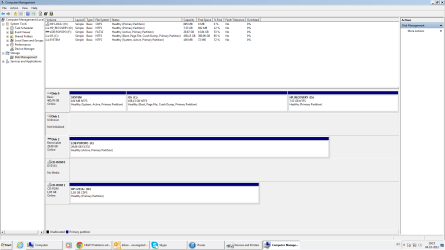
Here's the screenshot you asked for. I can't initialize it like I told you before.
I'll tried the Cyclic Redundancy Check fixing, but i need a drive letter and I don't how to do that, and all the methods I find doesn't help.
Untitled.png
Waitin for a reply.
I appreciate your help, bro. Thanks.
 

My Computer My Computer

At a glance

Windows 7 Pro 64-Bit
Computer type
PC/Desktop
Computer Manufacturer/Model Number
HP
OS
Windows 7 Pro 64-Bit
The disk is shown as as unknown and not initialised. No capacity, and also no "unallocated" as you said earlier. That does not augur well. ( When you put out a screenshot please remove all other drives except the problem drive, so that there is no confusion. I see another pen drive perhaps in the screenshot and so your PC is able to read other drives. To that extent you can be excused.:) )

I am out for the weekend 9 hours from now. So I leave it for others to help you during my absence.

At the moment and before I retire for the day - almost one hour past midnight now - I would suggest

1. Try your external drive on any other working PC and tell us what happens.

2. Also try another cable. Try it on other ports.

3. Download and install Partition Wizard Home edition 8.1.1 from Free download Magic Partition Manager Software, partition magic alternative, free partition magic, partition magic Windows 7 and server partition software - Partition Wizard Online Run it with only your problem drive connected and post a screenshot. Let us see what it finds of your external drive.
 

My Computer My Computer

At a glance

Windows 7 Home Premium 32 bit
OS
Windows 7 Home Premium 32 bit
Back
Top