[HELP] Programming in Excel 2013

synth

New member
Member
VIP
Local time
3:16 AM
Messages
100
Hi Guys,

Let me start off by stating that I'm still trying to learn all the juicy functions you can do with Excel, and I've just gotten myself a little project where I think I can learn but I need some kind of help from you guys.

Basically what I'm trying to do is somehow automate a creation of a report via excel, first method I thought of was to use macros, but since the data that'll be included in the report will be on a different cell each time, macro might not work as I imagined it to be, then I thought of the IF function, I have not yet tried doing that, but would that work? Can you please share your thoughts? Ask me any additional info and i'll try to explain it as simple as I can.

Cheers.
 

My Computer

OS
Windows 7 Ultimate x64
Your description is entirely too vague in order for anyone to offer any kind of help. Can you be more specific as to what kind of a report you want to generate and what data you will be using?

Perhaps you could post a sample of the worksheet with the data and a sample of what you want the report to look like.
 

My Computer

Computer type
PC/Desktop
Computer Manufacturer/Model Number
Home Built desktop, Dell G15 5511 Gaming laptop,MS Surface Pro 7 tablet
OS
W10 Pro desktop, W11 laptop, W11 Pro tablet (all 64-bit)
CPU
3.7Ghz 8700K i7, i7-11800H, i7-1065G7
Motherboard
ASUS TUF Z370-Pro Gaming in desktop
Memory
16G desktop, 16G laptop, 4G tablet
Graphics Card(s)
AMD Radeon RX580, RTX 3060, Intel Iris Plus
Sound Card
High Definition Audio (Built-in to mobo)
Monitor(s) Displays
Samsung U32J59 32" (2x), 15.6", 12"
Screen Resolution
3840x2160, 3840x2160, 1920x1080, 2160x1440
Hard Drives
500G SSD for OS; 2T, 10T & 15T HDDs for Data on Desktop, 1TB SSD laptop, 128G SSD tablet.
PSU
Corsair CX 750M
Case
Antec 100
Cooling
CM 212+
Keyboard
IBM Model M - used continuously since 1986
Mouse
Microsoft Pro IntelliMouse
Internet Speed
400M down 8M up
Antivirus
Windows Defender
Browser
FireFox
Other Info
Built my first computer (8Mhz 8088cpu, 640K RAM, 20MB HDD, 2 360K floppy drives) in 1985 and have been building them for myself, relatives and friends ever since.
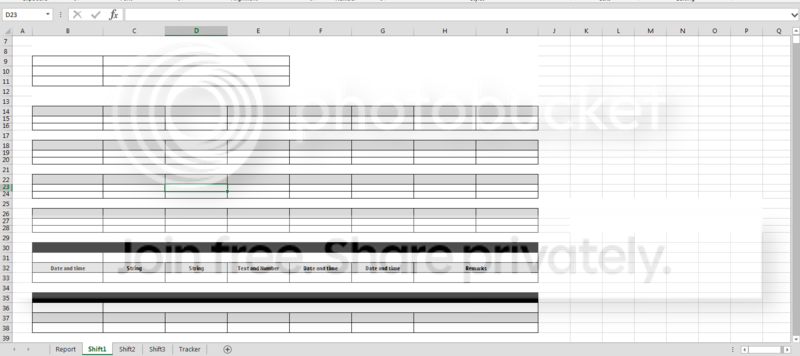
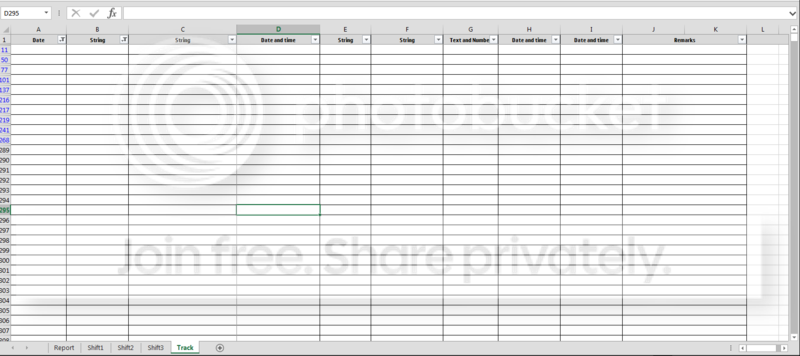
I understand, I'll be posting some screenshots below of how our current table for reports looks like and i'll try my best to explain what our current process is and what I want it to be.

First of all I've edited the excel file and for security reasons, for the titles in the first columns of the tables, i've placed what will be the data type of the contents of the cells below it. Please refer to the screenshots below.

Report1.png


Report2.png


Report3.png


Ok, so basically here's what I'm planning on doing, I want to create a macro that will copy certain data on the Track worksheet and transfer it either to the Shift1, Shift2, or Shift 3 worksheets. Also, if possible, I'd like to group them in the tables found in the Shift1 or Shift2, or Shift3 worksheets. They will be grouped by a certain identifier which is a string.

Additional info, if you'll notice the screenshot of the Track worksheet, there are some hidden rows in it, that's because all the data placed in there are for the whole month. So everyday we put different data in there, and everyday we need to filter them to create the daily reports. So I was thinking of using the If Then statement for VBA, and use the dates as the identifier if wether they should be copied from the Track worksheet to the Shift worksheets.

If you guys need more info, please let me know. I've played around with VBA today, and I was able to achieve what I wanted to do when I declared specific cells to copy to another specific cell in the Shift worksheet.

Thanks.
 

My Computer

OS
Windows 7 Ultimate x64
Back
Top