
A few months ago I put a new SSD drive in my wife's laptop. The HDD had 3 partitions divided as C: with Win7, D: with Data and a 25GB System Reserved partition. I cloned the C: partition to the SSD using Macrium Reflect. I then changed the old partition drive letter to F: and labeled it as Old OS. I kept the everything the as is for a while as a "Just In Case" measure even though I made an image and saved it to a removable drive prior to doing anything. Time has passed and I (my wife)no longer needs that saved partition.
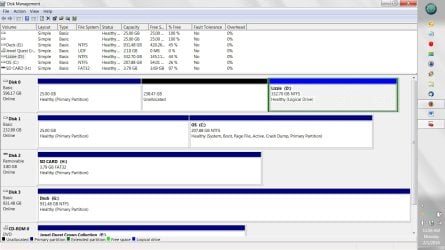
I have now marked that partition as "unallocated" using diskmgmt.msc in an effort to make that drive all one drive labeled D: Data. I was going to use the Extend Volume function to do this, but am confused. The D: partition is listed as Logical. Also, it is to the right of the other 2 partitions. I am not sure what to do. I have attached an image of the current drive layout.
All I want on HDD is D: for the whole drive except the 25GB System Reserved. Of course, I do not want to lose what is on it. If necessary I CAN make a new image of D:, reformat entire HDD and then restore that image. Is there an easier way using Macrium Reflect 6.1 or diskmgmt.msc ?
Thank you in advance for the help.
Michael
I have now marked that partition as "unallocated" using diskmgmt.msc in an effort to make that drive all one drive labeled D: Data. I was going to use the Extend Volume function to do this, but am confused. The D: partition is listed as Logical. Also, it is to the right of the other 2 partitions. I am not sure what to do. I have attached an image of the current drive layout.
All I want on HDD is D: for the whole drive except the 25GB System Reserved. Of course, I do not want to lose what is on it. If necessary I CAN make a new image of D:, reformat entire HDD and then restore that image. Is there an easier way using Macrium Reflect 6.1 or diskmgmt.msc ?
Thank you in advance for the help.
Michael
Attachments
My Computers
-
At a glance
Win 7 Pro 64 biti5-3570K16GB Corsair Vengeance 1866MhznVidia GeForce 220- Computer type
- PC/Desktop
- Computer Manufacturer/Model Number
- Custom build
- OS
- Win 7 Pro 64 bit
- CPU
- i5-3570K
- Motherboard
- Asus P8Z77-V
- Memory
- 16GB Corsair Vengeance 1866Mhz
- Graphics Card(s)
- nVidia GeForce 220
- Monitor(s) Displays
- 20 " Acer
- Hard Drives
- 500 GB WD D: Data
160 GB WD:Hackintosh OSx Mountain Lion
128 GB Samsung 840 EVO Win 7 Pro 64bit
- PSU
- Corsair CX600
- Cooling
- Cooler Master Hyper 212 EVO
- Keyboard
- Logitech usb
- Mouse
- Logitech usb
- Internet Speed
- 100Mbps Roadrunner Ultimate
- Antivirus
- Malwarebutes Pro, SAS,MSE
- Browser
- Firefox
-
- Antivirus
- Malwarebytes Lifetime, SAS Lifetime, MSE
