Help recover deleted volume

goldenboy

New member
Local time
5:03 AM
Messages
6
I accidentally deleted my portable hard drive volume when messing around with Disk Management on Windows 7. :( The hard drive is formatted using FAT32 and is about 120GB. Is there any way to recover it? I have all media and some important documents in there. Any help would be really appreciated.

Thank you.
 

My Computer

OS
Windows 7
Hi,

You can use the undelete option in a 3rd party partition manager. As long as you haven't attempted to change that partition in any way other than delete it, should work fine.

If you have a partition Manager - see if it has that option. Post back and let me know.

SIW2
 

My Computers

System One System Two

  • Computer type
    PC/Desktop
    OS
    7 X64
    CPU
    i5 8400
    Motherboard
    gigabyte b365m ds3h
    Memory
    2x8gb 3200mhz
    Hard Drives
    various
    PSU
    pure power 11 400w cm
    Case
    Coolermaster
    Cooling
    cryorig m9i
  • Computer type
    PC/Desktop
    OS
    7x64
    CPU
    g5400
    Motherboard
    ga b365m ds3h
    Memory
    8gb ddr4 2400
    PSU
    xfx pro 450w
The partition is not changed I believe. It wasn't really a partition, it was more of the whole volume on the hard drive. >.> I created a new volume on it but didn't format it or anything, so the volume is currently raw. Should I deleted this volume before I run a third party manager?

I fond out MS has a tool called Dmdiag.exe to do this, however I don't know if it's safe to run it on Windows 7. Does anyone know any good ones out there that have a high probability of recovering my deleted volume? Thanks.
 

My Computer

OS
Windows 7
Hi Goldenboy,

Not sure what effect having created a new volume would have - normally you would undelete as the first operation after accidental deletion.

If the new volume was identical in size and not formatted, it may still work.

I believe dmdiag.exe only gives information about the drive, it is not a partition manager itself - no idea if it would even do that on 7 as it from 2000/xp days, as far as I know. I have never used it so can't say for sure.

I use the Paragon partition Manager - which only undeletes unallocated space, obviously.

You would need to open the partition manager and right click the volume to see if it offers undelete as an option , if not, you may need to delete it again.

May be able to help you with something that will do the job - are you using 32bit, or 64bit?

SIW2
 

My Computers

System One System Two

  • Computer type
    PC/Desktop
    OS
    7 X64
    CPU
    i5 8400
    Motherboard
    gigabyte b365m ds3h
    Memory
    2x8gb 3200mhz
    Hard Drives
    various
    PSU
    pure power 11 400w cm
    Case
    Coolermaster
    Cooling
    cryorig m9i
  • Computer type
    PC/Desktop
    OS
    7x64
    CPU
    g5400
    Motherboard
    ga b365m ds3h
    Memory
    8gb ddr4 2400
    PSU
    xfx pro 450w
Ok I'll try something better like Partition Manager. I'm currently running 32bit. I'll let you know what happens. Thank you for the help.
 

My Computer

OS
Windows 7
May be able to help you with something that will do the job - are you using 32bit, or 64bit?

SIW2


Hello goldenboy, welcome to Se7en Forums!


Were I you, I'd wait for SIW2's response regarding this; he knows disk options and software.


Later ;) Ted
 

My Computer

Computer Manufacturer/Model Number
* BFK Customs *
OS
W 7 64-bit Ultimate
CPU
Intel Q9550 Yorkfield
Motherboard
ASUS P5Q Pro
Memory
8GB Dominator 8500C5D
Graphics Card(s)
ATI : XFX 5870
Sound Card
Realtek HD Audio 7-1
Monitor(s) Displays
1x 47" LCD HDMI & 3x 26" LCD HDMI
Screen Resolution
1920x1080P & 1920x1200
Hard Drives
1x 80GB Intel X25-M G2 SSD : 1x 500GB & 1x 640GB WD Caviar Black(s)
PSU
Corsair 620HX
Case
Cooler Master RC-690
Cooling
Tuniq Tower 120, 2x 140mm and 3x 120mm case fans
Keyboard
Microsoft 500
Mouse
Razer Diamondback 3G
Internet Speed
14 Mb/s
Other Info
1x Koutech 3Gb/s SATA HDD Hot Swap Rack
Hello goldenboy, welcome to Se7en Forums!


Were I you, I'd wait for SIW2's response regarding this; he knows disk options and software.


Later ;) Ted

Oops I missed that part. I'll wait for his advice. :P
 

My Computer

OS
Windows 7
http://www.glarysoft.com/gu.html

http://www.recuva.com/download

The problem may be you have rewritten the partition table by creating a new partition - even tho. you have not formatted it.

If you rt click it and don't get the Undelete option , you will need to delete it again , then Undelete.

It may only only reconstruct the last partition you just created - if that is the case , then nothing will be able to do it. Worth a try.

Otherwise there is something else you could try. Unless you are going to send it to a specialist recovery firm , you could remake the partition , do a quick format and see what these two can recover after a quick format - can't guarantee what you will get back tho.

Hope it helps

SIW2
 

My Computers

System One System Two

  • Computer type
    PC/Desktop
    OS
    7 X64
    CPU
    i5 8400
    Motherboard
    gigabyte b365m ds3h
    Memory
    2x8gb 3200mhz
    Hard Drives
    various
    PSU
    pure power 11 400w cm
    Case
    Coolermaster
    Cooling
    cryorig m9i
  • Computer type
    PC/Desktop
    OS
    7x64
    CPU
    g5400
    Motherboard
    ga b365m ds3h
    Memory
    8gb ddr4 2400
    PSU
    xfx pro 450w
Woot! The FATty is finally restored. MS has a pretty good guide on doing this. I had to use Dmdiag.exe to reverse what I had done by calling a reserved sector on my hard drive. The only problem was that Dmdiag.exe doesn't work on Windows 7 so I had to rely on machine running XP. Problem took less than 5 mins to solve.

SIW2 I tried the program you linked me to via pm. It didn't seem to want to run on Windows 7 so I tried it on a machine running XP. The only problem was that it would take 3+ hours to go through every sector on the hard drive, time I couldn't afford on that machine running XP.

Thanks for all the support though. I appreciate it. :)
 

My Computer

OS
Windows 7
Hi goldenboy,

Didn't realise you could link to an Xp machine.

Dmdiag.exe must be pretty capable, but sadly seems to only run on legacy systems.

Glad you got it sorted out.:D

SIW2
 
Last edited:

My Computers

System One System Two

  • Computer type
    PC/Desktop
    OS
    7 X64
    CPU
    i5 8400
    Motherboard
    gigabyte b365m ds3h
    Memory
    2x8gb 3200mhz
    Hard Drives
    various
    PSU
    pure power 11 400w cm
    Case
    Coolermaster
    Cooling
    cryorig m9i
  • Computer type
    PC/Desktop
    OS
    7x64
    CPU
    g5400
    Motherboard
    ga b365m ds3h
    Memory
    8gb ddr4 2400
    PSU
    xfx pro 450w
Haha thanks.

Dmdiag.exe seems very capable for what it does. Luckily the partition I deleted was the full hard drive volume so I didn't need to remember the size in detail, otherwise this little tool would have been good for nothing.

I couldn't link to an XP machine before. I managed to use a friend's. I tried installing the software you pm'd me twice, once as normally and another using the proper comparability method given in a tutorial here, but none worked. I'm running the x64 version, could it be because of it?
 

My Computer

OS
Windows 7
Ok I'll try something better like Partition Manager. I'm currently running 32bit. I'll let you know what happens. Thank you for the help.

You said you were using 32bit - mystery solved.:geek:

SIW2
 

My Computers

System One System Two

  • Computer type
    PC/Desktop
    OS
    7 X64
    CPU
    i5 8400
    Motherboard
    gigabyte b365m ds3h
    Memory
    2x8gb 3200mhz
    Hard Drives
    various
    PSU
    pure power 11 400w cm
    Case
    Coolermaster
    Cooling
    cryorig m9i
  • Computer type
    PC/Desktop
    OS
    7x64
    CPU
    g5400
    Motherboard
    ga b365m ds3h
    Memory
    8gb ddr4 2400
    PSU
    xfx pro 450w
Hi there,

I don't know how long ago this was posted but from what im reading here im in a very similar issue.
I did a BIOS update recently on my motherboard but had to go back to the previous BIOS revision because i started getting BSOD's before getting into windows to the effect of "unmountable boot" crap etc.
Well what it has done, it has taken my e drive and set it to offline.

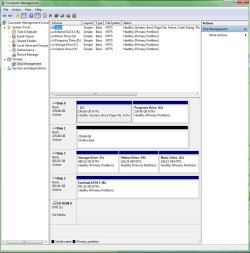
When i went into Manage in Windows 7 to see what has happened to the drive, it split evenly to 2 seperate partitions and set them offline, when before it was one whole drive.

I set those to online but to no avail, it says no data in the drives.
I then found this post and read what SIW2 said about deleting the volume again, upon doing that it reset it to a complete drive instead of 2 split paritions.

I have not deleted/formatted the drive in any way, ive simply just left it as is.
I'll include a screen shot so you can see.
I tried right clicking on it but i cant undelete.. no option is available.

I'm in real dire straights with this as this drive was my games drive and has files on it that dates back pretty far, im virtually to the point of tears with this as it will be a massive loss if i cannot get it back.

Can someone please help!
I cannot find any details to help me understand what the dmdiag.exe is.

The drive that is the "E" Drive is an actual hard drive.
 

Attachments

  • partition.jpg
    partition.jpg
    98.8 KB · Views: 185

My Computer

Computer type
PC/Desktop
OS
Windows 7 Ultimate 64-bit (6.1 build 7600)
CPU
Intel i7 840 Quad Core 3.20Ghz
Motherboard
Gigabyte P55A-UD3R
Memory
4 x Corsair XMS3 2GB DDR3 1333Mhz
Graphics Card(s)
Asus GeForce 580GTX DirectCUII
Sound Card
Auzentech X-Fi Forte
Monitor(s) Displays
Samsung S27B370
Screen Resolution
1920x1080
Hard Drives
2 x Samsung 1TB HD's
1 x External WD 1TB HD
PSU
Antech TruePower 650W
Case
Sniper
Cooling
4 x 120mm Side, Rear, Front & Top.
Keyboard
Logitech G19
Mouse
Logitech G700s
Internet Speed
9mb ADSL2+
Antivirus
Advanced System Care, Microsoft Security Ess & Spybot S&D.
Browser
Chrome

My Computers

System One System Two

  • Computer type
    PC/Desktop
    OS
    7 X64
    CPU
    i5 8400
    Motherboard
    gigabyte b365m ds3h
    Memory
    2x8gb 3200mhz
    Hard Drives
    various
    PSU
    pure power 11 400w cm
    Case
    Coolermaster
    Cooling
    cryorig m9i
  • Computer type
    PC/Desktop
    OS
    7x64
    CPU
    g5400
    Motherboard
    ga b365m ds3h
    Memory
    8gb ddr4 2400
    PSU
    xfx pro 450w
Back
Top