
Hi Guys,
So I was moving around some of my library folders (downloads/music/etc) to help free up space and better accommodate the way I want things located. When I went to move "My Music" I relocated it to C:\Users\username, and after frantically trying to relocate it for over an hour i've yielded no results.
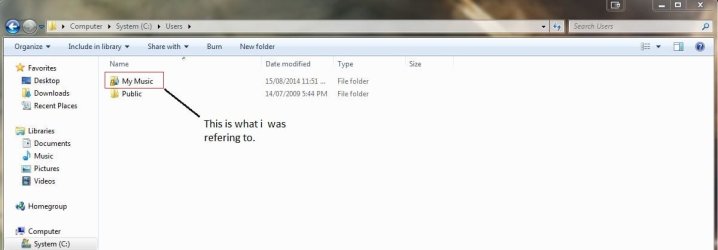
Having relocated the my music folder through regedit (which did work) the issue is now that the user folder remains as the "My Music" icon and name and while i'm sure i can simply change the icon to something generic in settings, i'm yet to find a way to successfully change the name back to what it was.
Thanks in advance for any help,
Chris
Edit: After getting some sleep and re-reading my post I can see how little sense it sorta makes. Please refer to attachment to see what im talking about
So I was moving around some of my library folders (downloads/music/etc) to help free up space and better accommodate the way I want things located. When I went to move "My Music" I relocated it to C:\Users\username, and after frantically trying to relocate it for over an hour i've yielded no results.
Having relocated the my music folder through regedit (which did work) the issue is now that the user folder remains as the "My Music" icon and name and while i'm sure i can simply change the icon to something generic in settings, i'm yet to find a way to successfully change the name back to what it was.
Thanks in advance for any help,
Chris
Edit: After getting some sleep and re-reading my post I can see how little sense it sorta makes. Please refer to attachment to see what im talking about
Attachments
Last edited:
My Computer
At a glance
Windows 7 Home Premium 64bit
- Computer type
- PC/Desktop
- OS
- Windows 7 Home Premium 64bit


