
Help removing the shortcut virus

RaviR

New member
Member
VIP
Local time
6:24 PM
Messages
229
Location
Trinidad
Hello all,


Can anyone give me a working solution for removing the shortcut virus, you know the one that creates shortcuts of all the files in any external device that is plugged in.

I know you can just run CMD and use attrib -h -r -s /s /d f:\*.* to get the files shown again, but MSE , Avast, Malwarebytes doesn't seem to pick up and remove the virus itself. Any methods?


Regards
 

My Computer

Computer type
PC/Desktop
Computer Manufacturer/Model Number
Custom Build
OS
Microsoft Windows 7 Ultimate 64-bit 7601 Multiprocessor Free Service Pack 1
CPU
Intel(R) Core(TM) i5-3570K CPU @ 3.40GHz
Motherboard
ASUSTeK COMPUTER INC. P8Z77-V
Memory
8.00 GB
Graphics Card(s)
NVIDIA GeForce GTX 660
Sound Card
(1) USB Audio Device (2) High Definition Audio Device (3
Screen Resolution
1360 x 768 x 32 bits (4294967296 colors) @ 60 Hz
Hard Drives
(1) M4-CT128M4SSD2 ATA Device (2) WDC WD1002FAEX-00Z3A0 ATA Device (3) WDC WD10EZEX-22BN5A0 ATA Device
PSU
Corsair Enthusiast Series TX650M
Case
NZXT Phantom 410
Cooling
Cooler Master Hyper 212 EVO
Keyboard
Logitech HID-Compliant Keyboard
Mouse
Logitech HID-compliant MX320 Laser Mouse
Let's do the following...

:info: Please click on the Windows 7 Start button and then on Control Panel
In Control Panel, select the Folder Options link.
Click on the View tab in the Folder Options window.
In the Advanced settings: area, locate the Hidden files and folders category.
Check: Show hidden files, folders, and drives
Uncheck: Hide protected operating system files (Recommended)
Click Apply and OK at the bottom of the Folder Options window.


:info: Next, download UsbFix:
http://www.en.usbfix.net
Save to the Desktop.

In the next step, a window requesting the connection of removable drives appears. Please connect the problem USB drive when requested!

Right-click the downloaded USBFix file and select: Run as Administrator
Press: Research

This option scans the connected drives, and reports its infected Files and Folders
When done, the program closes on its own, and a report appears.
(The report file is also found at C:\UsbFix.txt)
:ar: Please post the UsbFix.txt (Research) report in your reply.

:info: Once again, run USBFix as Administrator, but, this time, press:Listing
It creates a report of all the Folders and Files found at the root of every hard drive, partition, or removable drive connected.

:ar: Also post the UsbFix.txt (Listing) report in your reply.


Note 1: If USBFix does not run in normal Windows, please run in Safe Mode:
Restart your computer.
When the computer starts, tap the F8 key on the keyboard repeatedly until presented with the Advanced Boot Options menu
Using the arrow keys, select: Safe Mode
Press the Enter key on your keyboard to boot into the selected mode.


Note 2: If your AntiVirus program detects USB as malware, either let the AV program allow USBFix to run, or, temporarily disable your AntiVirus program:
Info -http://www.bleepingcomputer.com/forums/t/114351/how-to-temporarily-disable-your-anti-virus-firewall-and-anti-malware-programs/
When done with USBFix, re-enable your AV!


:info: Last, please download the Farbar Recovery Scan Tool
Download:http://www.bleepingcomputer.com/download/farbar-recovery-scan-tool/
Select the version that applies to your system.
Save it to your Desktop.

Double-click the downloaded file to run it.
When the tool opens click Yes to the disclaimer.

Press theScan button.

The tool makes a log (FRST.txt) in the same directory from which the tool is run (Desktop).

:ar: Please provide the FRST.txt in your reply.


The first time the tool is run, it also makes another log: Addition.txt
:ar: Also post the Addition.txt in your reply.
 

My Computer

Computer type
PC/Desktop
Computer Manufacturer/Model Number
An ol' eMachines
OS
Windows 7 Home Premium
Internet Speed
Fine for me...I'm retired!
Hello,


Thank you for the reply i will post the results as soon as i get my hands on that infected laptop. Removing the infected vbs files from the removable device is no problem once i get out the file causing it that would be awesome.

I read somewhere that 'wscript.exe' would be the cause. Any information about that?


Regards
 

My Computer

Computer type
PC/Desktop
Computer Manufacturer/Model Number
Custom Build
OS
Microsoft Windows 7 Ultimate 64-bit 7601 Multiprocessor Free Service Pack 1
CPU
Intel(R) Core(TM) i5-3570K CPU @ 3.40GHz
Motherboard
ASUSTeK COMPUTER INC. P8Z77-V
Memory
8.00 GB
Graphics Card(s)
NVIDIA GeForce GTX 660
Sound Card
(1) USB Audio Device (2) High Definition Audio Device (3
Screen Resolution
1360 x 768 x 32 bits (4294967296 colors) @ 60 Hz
Hard Drives
(1) M4-CT128M4SSD2 ATA Device (2) WDC WD1002FAEX-00Z3A0 ATA Device (3) WDC WD10EZEX-22BN5A0 ATA Device
PSU
Corsair Enthusiast Series TX650M
Case
NZXT Phantom 410
Cooling
Cooler Master Hyper 212 EVO
Keyboard
Logitech HID-Compliant Keyboard
Mouse
Logitech HID-compliant MX320 Laser Mouse
RaviR,

Need to see the reports requested above to see what is the probable cause.
 

My Computer

Computer type
PC/Desktop
Computer Manufacturer/Model Number
An ol' eMachines
OS
Windows 7 Home Premium
Internet Speed
Fine for me...I'm retired!
Hello,

Sorry for taking so long to reply. I was not able to get hold of a flash drive that is infected as the children are out of school for exams. I have narrowed it down to 5 computers for which the students are complaining are infecting their flash drives in the library for which i have done the scans you had requested. They are all attached, would this work?

Any other information required please let me know.


Kind regards.
 

Attachments

My Computer

Computer type
PC/Desktop
Computer Manufacturer/Model Number
Custom Build
OS
Microsoft Windows 7 Ultimate 64-bit 7601 Multiprocessor Free Service Pack 1
CPU
Intel(R) Core(TM) i5-3570K CPU @ 3.40GHz
Motherboard
ASUSTeK COMPUTER INC. P8Z77-V
Memory
8.00 GB
Graphics Card(s)
NVIDIA GeForce GTX 660
Sound Card
(1) USB Audio Device (2) High Definition Audio Device (3
Screen Resolution
1360 x 768 x 32 bits (4294967296 colors) @ 60 Hz
Hard Drives
(1) M4-CT128M4SSD2 ATA Device (2) WDC WD1002FAEX-00Z3A0 ATA Device (3) WDC WD10EZEX-22BN5A0 ATA Device
PSU
Corsair Enthusiast Series TX650M
Case
NZXT Phantom 410
Cooling
Cooler Master Hyper 212 EVO
Keyboard
Logitech HID-Compliant Keyboard
Mouse
Logitech HID-compliant MX320 Laser Mouse
RaviR,

This is highly unusual.
Does this library know that you ran these programs on their computers???

My assistance at this forum is not intended for computers in a school, organization, or business environment.

It is not possible to anticipate any alterations or configurations made to these machines, or how they will interact with the tools commonly used in the removal of malware.

In addition, many of the tools used have specific instructions from their authors that they not be used in these types of environments.

Your circumstances are regrettable, but, it is not possible for me to help you with the Library computers.

Now, if your children have USB pen drives which are infected, that is a different story. Assistance for a home computer or infected media used at home is gladly provided.
 

My Computer

Computer type
PC/Desktop
Computer Manufacturer/Model Number
An ol' eMachines
OS
Windows 7 Home Premium
Internet Speed
Fine for me...I'm retired!
Thank you for the response, yes the librarians know I ran the programs as I am the school's I.T Technician. The only reason i requested help was because my method (MSE and Usb Disk Security) does not seem to be fixing the problem.

I can tell you the computers are not configured in any special way, they are just connected to a server for DHCP.

I am sorry if i broke any rules in posting this, but thank you for the assistance.

Kind Regards
 

My Computer

Computer type
PC/Desktop
Computer Manufacturer/Model Number
Custom Build
OS
Microsoft Windows 7 Ultimate 64-bit 7601 Multiprocessor Free Service Pack 1
CPU
Intel(R) Core(TM) i5-3570K CPU @ 3.40GHz
Motherboard
ASUSTeK COMPUTER INC. P8Z77-V
Memory
8.00 GB
Graphics Card(s)
NVIDIA GeForce GTX 660
Sound Card
(1) USB Audio Device (2) High Definition Audio Device (3
Screen Resolution
1360 x 768 x 32 bits (4294967296 colors) @ 60 Hz
Hard Drives
(1) M4-CT128M4SSD2 ATA Device (2) WDC WD1002FAEX-00Z3A0 ATA Device (3) WDC WD10EZEX-22BN5A0 ATA Device
PSU
Corsair Enthusiast Series TX650M
Case
NZXT Phantom 410
Cooling
Cooler Master Hyper 212 EVO
Keyboard
Logitech HID-Compliant Keyboard
Mouse
Logitech HID-compliant MX320 Laser Mouse
Shortcut Virus Remover

I have faced the this problem many times. And I tried many solutions. Finally I found this. Shortcut Virus Remover. A simple and free application to remover Shortcut Virus. Download it from this link for free. Shortcut Virus Remover
 

My Computer

Computer type
Laptop
Computer Manufacturer/Model Number
HP
OS
Windows 7 Ultimate 32bit
After 10 months since the last post the problem most likely has been fixed.
 

My Computer

Computer type
PC/Desktop
Computer Manufacturer/Model Number
Customs, Dell, Gateway, HP, Toshiba, Acer, ASUS
OS
Windows 7 Ultimate 64-bit, Windows 8.1 64-bit, Mac OS X 10.10, Linux Mint 17, Windows 10 Pro TP
Keyboard
Microsoft
Mouse
Microsoft
I have faced the this problem many times. And I tried many solutions. Finally I found this. Shortcut Virus Remover. A simple and free application to remover Shortcut Virus. Download it from this link for free. Shortcut Virus Remover

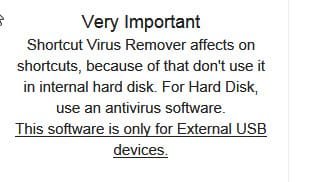
Shortcut Virus Remover only works on the USB devices. It does not remove the root cause that is hidden on your PC's system drive. So one also needs to cleanse the PC to get rid of the virus to prevent the USB devices getting infected repeatedly. You might have failed to read the following in the Shortcut Virus Remover link you had given.

23-09-2014 00-52-56.jpg

USBFix is currently recognised as the complete antidote for annihilating the Shortcut virus, cleaning both the internal HDD and the USB device/s.

From the author's mouth: ( English is not the native language of the author of USBFix.)

"He doesn’t content with cleaning your USB keys, cards SDs …
He will also clean your PC if the infection is active on the system.
He clean the famous ” shortcut virus USB “.."


UsbFix - Official Website


My Computer

OS
Windows 7 Home Premium 32 bit
Back
Top