help required for Partitioning

Kamranashraf2

New member
Local time
8:24 AM
Messages
18
Hi,
my hard-disk has 4 basic volumns, C (primary), d (recovery) and E.
i want the primary volumn C (142 GB) to split into two volumns(about 70 GB each).
but when i try to shrink C in disk management it says it can shrink into 141.8GB and 0.2 GB. is there any way that i can split the C volumn into two halves? i dont want C volumn of size more than 70 GB.

thanks
 

My Computer

Computer Manufacturer/Model Number
HP Pavillion DV-6 2150US
OS
Windows 7 Home Premium 64-bit
CPU
Corei3 2.13GHz
Memory
4096MB
Post a full picture of your Disk Management. Chances are that you have 4 primary partitions where you cannot create an additional partition without some extra action. But the picture will tell us.
 

My Computer

Computer Manufacturer/Model Number
HP, Dell, Gateway, Toshiba - 4 laptops and 2 desktops
OS
Vista, Windows7, Mint Mate, Zorin, Windows 8
CPU
from 1.6GHz Duo to i7
Monitor(s) Displays
2x HP w2207
Hard Drives
5x HDD, 7x SSD, 12x Externals
Keyboard
with trackball - no mices
Mouse
Trackball mice
Internet Speed
DSL 6000
It's not recommended to play partition chef when you have more than one partition already set up. The BEST way to do it is with a blank, un-partitioned disk using any variety of tools like PartedMagic (www.partedmagic.com) for example. If you REALLY can't do it that way, defragment your drive and try again.
 

My Computer

OS
Windows 7 Ultimate 64-bit
CPU
AMD Phenom II X6 1090T 3.2GHZ
Motherboard
MSI 890FXA-GD70
Memory
G.SKILL RipJaw 3x2GB DDR3-1066
Graphics Card(s)
2x HIS Radeon HD 6850 1 GB
Sound Card
VIA 8-channel
Monitor(s) Displays
2x 20 inch Acer LCDs, 1x 32" Sony LCD TV
Screen Resolution
4480x900
Hard Drives
1x Crucial 64GB SSD
3x 1TB HDDs (WD, Seagate, Hitatchi)
1x 500GB Seagate External
PSU
Kingwin 1000W Modular
Case
Coolermaster HAF 932
Cooling
1x 120mm, 3x 200mm, CoolerMaster Hyper 212+
Keyboard
Microsoft Wireless Keyboard 1000
Mouse
Microsoft Wiresless Mouse 5000
Internet Speed
20mbps
Other Info
Samsung BD-ROM/DVD-RW
It's not recommended to play partition chef when you have more than one partition already set up. The BEST way to do it is with a blank, un-partitioned disk using any variety of tools like PartedMagic (www.partedmagic.com) for example. If you REALLY can't do it that way, defragment your drive and try again.
It is not a good idea to do anything before we do not know how the disk looks - especially not with OEM programs.
 

My Computer

Computer Manufacturer/Model Number
HP, Dell, Gateway, Toshiba - 4 laptops and 2 desktops
OS
Vista, Windows7, Mint Mate, Zorin, Windows 8
CPU
from 1.6GHz Duo to i7
Monitor(s) Displays
2x HP w2207
Hard Drives
5x HDD, 7x SSD, 12x Externals
Keyboard
with trackball - no mices
Mouse
Trackball mice
Internet Speed
DSL 6000
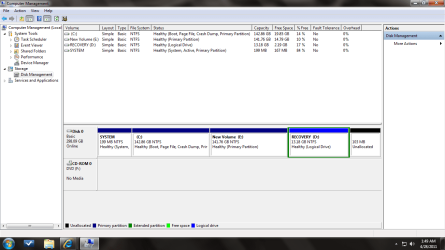
here is the screen shot of disk management
 

Attachments

  • disk.png
    disk.png
    40.9 KB · Views: 31

My Computer

Computer Manufacturer/Model Number
HP Pavillion DV-6 2150US
OS
Windows 7 Home Premium 64-bit
CPU
Corei3 2.13GHz
Memory
4096MB
You are OK, only 3 primaries and one extended (logical). You are not not able to shrink as much as you want because the MFT is in the way. There are ways to get past the MFT, but that is tricky and will require that you first make an image of C - in case you loose it or it gets damaged. Do you know how to make an image?
 

My Computer

Computer Manufacturer/Model Number
HP, Dell, Gateway, Toshiba - 4 laptops and 2 desktops
OS
Vista, Windows7, Mint Mate, Zorin, Windows 8
CPU
from 1.6GHz Duo to i7
Monitor(s) Displays
2x HP w2207
Hard Drives
5x HDD, 7x SSD, 12x Externals
Keyboard
with trackball - no mices
Mouse
Trackball mice
Internet Speed
DSL 6000
You have about 120gb of data on C.

Good luck shrinking it to 70gb
 

My Computers

System One System Two

  • Computer type
    PC/Desktop
    OS
    7 X64
    CPU
    i5 8400
    Motherboard
    gigabyte b365m ds3h
    Memory
    2x8gb 3200mhz
    Hard Drives
    various
    PSU
    pure power 11 400w cm
    Case
    Coolermaster
    Cooling
    cryorig m9i
  • Computer type
    PC/Desktop
    OS
    7x64
    CPU
    g5400
    Motherboard
    ga b365m ds3h
    Memory
    8gb ddr4 2400
    PSU
    xfx pro 450w
You have about 120gb of data on C.

Good luck shrinking it to 70gb
This is a good one. I did not even notice that. Thanks SIW.
roflmao21.gif
 

My Computer

Computer Manufacturer/Model Number
HP, Dell, Gateway, Toshiba - 4 laptops and 2 desktops
OS
Vista, Windows7, Mint Mate, Zorin, Windows 8
CPU
from 1.6GHz Duo to i7
Monitor(s) Displays
2x HP w2207
Hard Drives
5x HDD, 7x SSD, 12x Externals
Keyboard
with trackball - no mices
Mouse
Trackball mice
Internet Speed
DSL 6000

My Computer

OS
Windows 7 Ultimate 64-bit
CPU
AMD Phenom II X6 1090T 3.2GHZ
Motherboard
MSI 890FXA-GD70
Memory
G.SKILL RipJaw 3x2GB DDR3-1066
Graphics Card(s)
2x HIS Radeon HD 6850 1 GB
Sound Card
VIA 8-channel
Monitor(s) Displays
2x 20 inch Acer LCDs, 1x 32" Sony LCD TV
Screen Resolution
4480x900
Hard Drives
1x Crucial 64GB SSD
3x 1TB HDDs (WD, Seagate, Hitatchi)
1x 500GB Seagate External
PSU
Kingwin 1000W Modular
Case
Coolermaster HAF 932
Cooling
1x 120mm, 3x 200mm, CoolerMaster Hyper 212+
Keyboard
Microsoft Wireless Keyboard 1000
Mouse
Microsoft Wiresless Mouse 5000
Internet Speed
20mbps
Other Info
Samsung BD-ROM/DVD-RW
You are OK, only 3 primaries and one extended (logical). You are not not able to shrink as much as you want because the MFT is in the way. There are ways to get past the MFT, but that is tricky and will require that you first make an image of C - in case you loose it or it gets damaged. Do you know how to make an image?

i can make back'up on my other computer, but u said damaged what could get damaged data or the volumn it self???
 

My Computer

Computer Manufacturer/Model Number
HP Pavillion DV-6 2150US
OS
Windows 7 Home Premium 64-bit
CPU
Corei3 2.13GHz
Memory
4096MB
MFT = Master File Table.

If that gets damaged, all your data is suddenly non-existent. It's there, but it's not there. It's like a library full of books with no catalog and blank covers on the books.
 

My Computer

OS
Windows 7 Ultimate 64-bit
CPU
AMD Phenom II X6 1090T 3.2GHZ
Motherboard
MSI 890FXA-GD70
Memory
G.SKILL RipJaw 3x2GB DDR3-1066
Graphics Card(s)
2x HIS Radeon HD 6850 1 GB
Sound Card
VIA 8-channel
Monitor(s) Displays
2x 20 inch Acer LCDs, 1x 32" Sony LCD TV
Screen Resolution
4480x900
Hard Drives
1x Crucial 64GB SSD
3x 1TB HDDs (WD, Seagate, Hitatchi)
1x 500GB Seagate External
PSU
Kingwin 1000W Modular
Case
Coolermaster HAF 932
Cooling
1x 120mm, 3x 200mm, CoolerMaster Hyper 212+
Keyboard
Microsoft Wireless Keyboard 1000
Mouse
Microsoft Wiresless Mouse 5000
Internet Speed
20mbps
Other Info
Samsung BD-ROM/DVD-RW
I think we are beyond creating another partition on C. Your C is quasi full (as SIW discovered). You have no space on C for any new partition.
 

My Computer

Computer Manufacturer/Model Number
HP, Dell, Gateway, Toshiba - 4 laptops and 2 desktops
OS
Vista, Windows7, Mint Mate, Zorin, Windows 8
CPU
from 1.6GHz Duo to i7
Monitor(s) Displays
2x HP w2207
Hard Drives
5x HDD, 7x SSD, 12x Externals
Keyboard
with trackball - no mices
Mouse
Trackball mice
Internet Speed
DSL 6000
Back
Top