Solved Help - Sony Vaio re-install MS Home premium after SSD HD replacement.

mbones57

New member
Local time
2:21 PM
Messages
16
Location
Los Angeles, Ca USA
Hi folks,

My dear old reliable Sony Vaio Hard disc is on it's way out. I bought a new 500 gig SSD from Best Buy and I need to replace the HD asap. I do have a 3 disc Sony Vaio recovery disc set that I made when I bought the Laptop originally. I just wanted to ask someone here if they would be so kind to give me some help on doing this job. My system is Windows 7 home premium 64bit. Intel I5 2.40GHz 4gb RAM. This laptop has been a champ for many years but I am now getting a warning that the HD is going to fail soon. I have copied all of my data to a external hard drive already. I would really appreciate if someone would list a step by step process for me that I can print out before I begin the hard drive replacement. My common sense tells me that I just need to shut down the PC, replace the HD and then boot from the 3 disc set that I labeled "Vaio Recovery Windows 7 64bit". I assume that the recovery disc's will format the new HD and do a fresh install of the original system but I really wanted to make sure.
P.S.
Since Sony Vaio's are no longer on the market I believe.... is it possible to just install Windows 7 Home premium without all of the additional Vaio software? I just thought I would toss this out there. I do have the product key on a sticker on the bottom of the laptop. The Vaio software only had one utility that I used which was the disc/registry defrag. As far as the other stuff it seems that the Vaio software really slows down the startup time. The original system also came with Norton but I just used the Norton removal tool and then installed Avast which I am very happy with. I paid for Avast premium with also their system cleanup utility and I have always loved it.

Sincerely,

Mike
 

My Computer My Computer

At a glance

Windows 7 Home Premium 64bitIntel core I5 2430M cpu @ 2.40GHz8gig
Computer type
Laptop
Computer Manufacturer/Model Number
Sony Vaio VPC EJ28FX
OS
Windows 7 Home Premium 64bit
CPU
Intel core I5 2430M cpu @ 2.40GHz
Memory
8gig
Hard Drives
Samsung 860 EVO SSD
Internet Speed
100 mbs
Antivirus
Avast
Browser
Chrome/Mozilla
Welcome to the forum. is the key a OEM or retail? Using the disk is the safest as it will have all the drivers a clean dvdmay not have drivers the only problem is that it will way behind with updates and you may get 1,000 updates. If the original was a standard hd you may need to change some settings if 7 doesnt detect the fact its an ssd
 

My Computer My Computer

At a glance

win 8 32 bit
Computer type
PC/Desktop
OS
win 8 32 bit
replace the HD and then boot from the 3 disc set that I labeled "Vaio Recovery Windows 7 64bit". I assume that the recovery disc's will format the new HD and do a fresh install of the original system

In theory.

is it possible to just install Windows 7 Home premium without all of the additional Vaio software?

That is what an enthusiast would do.

1. You need installation media that already includes SP1 - enable Private Messaging in your UserCP.

2. You need to activate it after installation - use either the coa key from your machine or 7oeminstaller.
7oeminstaller

3. You might want specific drivers - available from the manufacturers site

4.You need to update it -
Simplix is the preferred method

It is also possible to update and integrate drivers into the installation media before installing, if you wish
 
Last edited:

My Computers My Computers

  • At a glance

    7 X64i5 84002x8gb 3200mhz
    Computer type
    PC/Desktop
    OS
    7 X64
    CPU
    i5 8400
    Motherboard
    gigabyte b365m ds3h
    Memory
    2x8gb 3200mhz
    Hard Drives
    various
    PSU
    pure power 11 400w cm
    Case
    Coolermaster
    Cooling
    cryorig m9i
  • At a glance

    7x64g54008gb ddr4 2400
    Computer type
    PC/Desktop
    OS
    7x64
    CPU
    g5400
    Motherboard
    ga b365m ds3h
    Memory
    8gb ddr4 2400
    PSU
    xfx pro 450w
A little more specific....

I'm not sure if the key is OEM or retail. If I look in the system it is listed there and the key on the sticker that is stuck to the bottom of the laptop matches the one within the specifications of the system itself. To elaborate a little ... when I first was notified of soon to be doom I began moving everything important off of the laptop to a external hard drive. The laptop itself has had many crashes in the past that a simple re-start has fixed short term. Then about two weeks ago there was a driver update by Microsoft itself which I didn't give second thought to. That being said ... On my restart windows said the disc needed to be checked for consistency but when disc check began to run it warned that a recent update caused a problem and disc check could not complete. It suggested a system restore but when I tried that system restore could not find any restore points before the update. I pretty much thought at that time that my disc was completely doomed. I could only get windows to start in safe mode after that. So I said what the hell ... let's use the three disc rescue approach and see what happens. When I put the first disc in it right out of the gate reformatted the HD and then went through a fresh install of windows 7 home premium. It took hours for windows to download all of the updates from MS but it all went well.To be honest I'm using the laptop right now to explore this forum and the laptop is working fine but on every restart it still warns me of a HD issue so I think it is just a matter of time before the disc fails. This is why I went out and bought a new SDD. I don't want to start installing all of my .exe programs that I have saved on my external hard drive until I know that I am doing so on a new HD with a fresh install. I also made a system image but who knows if it is not corrupt in some way because of the HD issue. I'm not a super tech guy folks. I just love windows 7 because I am so used to it and I don't use the laptop for much other than MS office, web browsing, editing my videos with filmora screen and watching netfilx when I'm on the road. I just don't want to give up the laptop because it cost me $1400.00 about 6 years ago. Yeah I know ..... It's about time but I really can't afford another one right now because I just lost my job after 34 years at the same company. So I have the Vaio recovery disc set and a new SSD. I don't care how long windows updates take I have the time. I can download any utilities you guys may suggest. I have about 6 or so blank DVD's still.
Oh...btw.... When I go to the sony site they say they don't offer any more support since they no longer make laptops. Isn't that just wonderful :(
 

My Computer My Computer

At a glance

Windows 7 Home Premium 64bitIntel core I5 2430M cpu @ 2.40GHz8gig
Computer type
Laptop
Computer Manufacturer/Model Number
Sony Vaio VPC EJ28FX
OS
Windows 7 Home Premium 64bit
CPU
Intel core I5 2430M cpu @ 2.40GHz
Memory
8gig
Hard Drives
Samsung 860 EVO SSD
Internet Speed
100 mbs
Antivirus
Avast
Browser
Chrome/Mozilla
We need to be clear there are 2 type of disk errors one is the file system which chkdsk can fix in that case the disk is fine its just the file system . The second is the bad sectors that is a disk starting to die and cant be fixed.
So if your drive is only getting chkdsk errors the disk is ok. Goto the disk maker website and they normally have a test program which will tel you if the disk is ok or has bad sectors so you know what type of error you have.
An SSD will speed up you system and specially Filmora a 480 gig SSD is now £50 .What version of Filmora are you running old 8 or the new 9 or pro which is like Adobe
 

My Computer My Computer

At a glance

win 8 32 bit
Computer type
PC/Desktop
OS
win 8 32 bit

My Computers My Computers

  • At a glance

    7 X64i5 84002x8gb 3200mhz
    Computer type
    PC/Desktop
    OS
    7 X64
    CPU
    i5 8400
    Motherboard
    gigabyte b365m ds3h
    Memory
    2x8gb 3200mhz
    Hard Drives
    various
    PSU
    pure power 11 400w cm
    Case
    Coolermaster
    Cooling
    cryorig m9i
  • At a glance

    7x64g54008gb ddr4 2400
    Computer type
    PC/Desktop
    OS
    7x64
    CPU
    g5400
    Motherboard
    ga b365m ds3h
    Memory
    8gb ddr4 2400
    PSU
    xfx pro 450w
We need to be clear there are 2 type of disk errors one is the file system which chkdsk can fix in that case the disk is fine its just the file system . The second is the bad sectors that is a disk starting to die and cant be fixed.
So if your drive is only getting chkdsk errors the disk is ok. Goto the disk maker website and they normally have a test program which will tel you if the disk is ok or has bad sectors so you know what type of error you have.
An SSD will speed up you system and specially Filmora a 480 gig SSD is now £50 .What version of Filmora are you running old 8 or the new 9 or pro which is like Adobe

At the moment Filmora is no longer installed. After I used the Vaio recovery disc set the first thing the set did was re-format my HD. It warned me that the HD would be wiped clean and the operating system would be installed to its original factory setup. I have not went to the filmora site to re-download the program. After I finished with the whole deal I decided to run chkdsk for the hell of it and there were file system errors that were fixed. I was thinking about running the "scan for and attempt recovery of bad sectors" option as well but have not done this. Do you think this is a smart thing to do? Will it tell me if there is something wrong with my HD? I went to the Toshiba website and could not find any HD utility to test my HD. Right now every time I restart my system I get a warning by "Intel rapid storage Technology" That just tells me to reset the disc to normal. I promptly do this.Then it says my system is functioning normally. Then a few minutes later it goes back to the same warning. Another odd thing that keeps happening during a re-start is that the system hangs with the first screen as the "Vaio" software is loading. Windows will not start up completely until I hit "ESC" once. Then the system starts just fine. This is why I asked if it is possible to re-install windows 7 without all of the Sony Vaio" Software. There is a lot of Sony crap that really slows down my start up time.
 
Last edited:

My Computer My Computer

At a glance

Windows 7 Home Premium 64bitIntel core I5 2430M cpu @ 2.40GHz8gig
Computer type
Laptop
Computer Manufacturer/Model Number
Sony Vaio VPC EJ28FX
OS
Windows 7 Home Premium 64bit
CPU
Intel core I5 2430M cpu @ 2.40GHz
Memory
8gig
Hard Drives
Samsung 860 EVO SSD
Internet Speed
100 mbs
Antivirus
Avast
Browser
Chrome/Mozilla
Update. CHKDSK found 8 bad clusters.
 

My Computer My Computer

At a glance

Windows 7 Home Premium 64bitIntel core I5 2430M cpu @ 2.40GHz8gig
Computer type
Laptop
Computer Manufacturer/Model Number
Sony Vaio VPC EJ28FX
OS
Windows 7 Home Premium 64bit
CPU
Intel core I5 2430M cpu @ 2.40GHz
Memory
8gig
Hard Drives
Samsung 860 EVO SSD
Internet Speed
100 mbs
Antivirus
Avast
Browser
Chrome/Mozilla
Its the disk makers website which has the test is Seagate
 

My Computer My Computer

At a glance

win 8 32 bit
Computer type
PC/Desktop
OS
win 8 32 bit
My suggestion is not to use the Sony recovery disks. It has a lot of useless software that will slow down your computer.

M$ link to download Win 7 HP SP1 64
Link valid for 24 hours from time of creation.
Link expire: 9/30/2019 2:07:07 PM UTC
Download it NOW to your external disk, not to your dying disk.

What is your Sony Vaio model?

A month ago I've got a Sony Vaio (VPCCB290X) from my nephew. It had Win 8.1 and there was no recovery partition.
I did a Win 7 clean install on a SSD using a USB flash disk, installed the drivers from Drivers and Software updates for VPCCB290X | Sony USA.
For the offline activation I've used 7oeminstaller (I've used nº3 Raymond.cc’s Windows 7 OEM License Installer, but as you still have a original license, backup your current license by using nº1 ABR)

For the updates my suggestion is to set Services - Windows Update - Manual and on WU page set it to Never check.
Then run UpdatePack7R2
Simplix is a single file (750MB) that contain all updates since Win 7 released up to date. It has all security and non security updates without the trash (telemetry and tracking). Very good.
Then run WU manually to find updates for Office etc and decide witch one to install.

To uninstall the telemetry, run cmd file to uninstall those KB files.
kb_spy.cmd.txt
Rename it as KB_Spy.cmd and run it.
 
Last edited:

My Computers My Computers

  • At a glance

    Windows 7 HP 64i5 6600K - 800MHz to 4200MHz4+4G GSkill DDR4 3000IG - Intel 530
    Computer type
    PC/Desktop
    Computer Manufacturer/Model Number
    custom build
    OS
    Windows 7 HP 64
    CPU
    i5 6600K - 800MHz to 4200MHz
    Motherboard
    GA-Z170-HD3P
    Memory
    4+4G GSkill DDR4 3000
    Graphics Card(s)
    IG - Intel 530
    Monitor(s) Displays
    Samsung 226BW
    Screen Resolution
    1680x1050
    Hard Drives
    (1) -1 SM951 – 128GB M.2 AHCI PCIe SSD drive for Windows 7 and Lubuntu
    (2) -1 WD SATA 3 - 1T for Data
    (3) -1 WD SATA 3 - 1T for backup
    PSU
    Thermaltake 450W TR2 gold
    Keyboard
    Old and good Chicony mechanical keyboard
    Mouse
    Logitech mX performance - 9 buttons (had to disable some)
    Internet Speed
    500Mb/s
    Browser
    Firefox 64
    Other Info
    TinyWall firewall
  • At a glance

    Windows 7 Proi7-4500U 800MHz to 3.0GHz(4+4)G DDR3 1600IG intel 4400 + NVIDIA GeForce GT 745M
    Computer type
    Laptop
    System Manufacturer/Model Number
    Asus Q550LF
    OS
    Windows 7 Pro
    CPU
    i7-4500U 800MHz to 3.0GHz
    Motherboard
    Asus Q550LF
    Memory
    (4+4)G DDR3 1600
    Graphics Card(s)
    IG intel 4400 + NVIDIA GeForce GT 745M
    Sound Card
    Realtek
    Monitor(s) Displays
    LG Display LP156WF4-SPH1
    Screen Resolution
    1920 x 1080
    Hard Drives
    BX500 120G SSD for Windows and programs +
    1T HDD for data
    Internet Speed
    500 Mb/s
    Browser
    Firefox
    Other Info
    TinyWall firewall
Megahertz07,

Thank you. I tried to download the first link though and it said it was forbidden. I looked at the exp time and I was within the window. I did copy the other links and d/l what I could though. I really appreciate the help. My Vaio model# is VPCEJ288FX. I am not a super computer wiz like everyone here on this forum. Novice at best but I still do really appreciate the help. I'm at work right now but I will check back on this thread when I get home tonight. I would really like to install Windows 7 without all of the Vaio software just like you did. The replacement 500gb SSD I purchased is a 2.5 Samsung V-Nand SSD 860 EVO SATA 6Gb/s
Do you think it will do the job?
 

My Computer My Computer

At a glance

Windows 7 Home Premium 64bitIntel core I5 2430M cpu @ 2.40GHz8gig
Computer type
Laptop
Computer Manufacturer/Model Number
Sony Vaio VPC EJ28FX
OS
Windows 7 Home Premium 64bit
CPU
Intel core I5 2430M cpu @ 2.40GHz
Memory
8gig
Hard Drives
Samsung 860 EVO SSD
Internet Speed
100 mbs
Antivirus
Avast
Browser
Chrome/Mozilla
A new link for Win 7 HP SP1
Links expire: 10/1/2019 6:42:28 PM UTC GMT = London time

I bought a small SSD (120G ~US$25) for Windows and programs and bought a HDD caddy to install the HDD in place of the CD / DVD drive. Works very well. I have the speed of a SSD and the space of a HDD at low cost.

As your HDD is dying, you did the best choice.
The 2.5 Samsung V-Nand SSD 860 EVO SATA 6Gb/s is first class. You will be surprised how it will improve your laptop.

The drivers for Sony Vaio vpcej28fx
After the Win 7 clean install and before you install the updates, run Intel® Driver & Support Assistant
Then open Device manager and look for the yellow alerts of missing drivers.
 

My Computers My Computers

  • At a glance

    Windows 7 HP 64i5 6600K - 800MHz to 4200MHz4+4G GSkill DDR4 3000IG - Intel 530
    Computer type
    PC/Desktop
    Computer Manufacturer/Model Number
    custom build
    OS
    Windows 7 HP 64
    CPU
    i5 6600K - 800MHz to 4200MHz
    Motherboard
    GA-Z170-HD3P
    Memory
    4+4G GSkill DDR4 3000
    Graphics Card(s)
    IG - Intel 530
    Monitor(s) Displays
    Samsung 226BW
    Screen Resolution
    1680x1050
    Hard Drives
    (1) -1 SM951 – 128GB M.2 AHCI PCIe SSD drive for Windows 7 and Lubuntu
    (2) -1 WD SATA 3 - 1T for Data
    (3) -1 WD SATA 3 - 1T for backup
    PSU
    Thermaltake 450W TR2 gold
    Keyboard
    Old and good Chicony mechanical keyboard
    Mouse
    Logitech mX performance - 9 buttons (had to disable some)
    Internet Speed
    500Mb/s
    Browser
    Firefox 64
    Other Info
    TinyWall firewall
  • At a glance

    Windows 7 Proi7-4500U 800MHz to 3.0GHz(4+4)G DDR3 1600IG intel 4400 + NVIDIA GeForce GT 745M
    Computer type
    Laptop
    System Manufacturer/Model Number
    Asus Q550LF
    OS
    Windows 7 Pro
    CPU
    i7-4500U 800MHz to 3.0GHz
    Motherboard
    Asus Q550LF
    Memory
    (4+4)G DDR3 1600
    Graphics Card(s)
    IG intel 4400 + NVIDIA GeForce GT 745M
    Sound Card
    Realtek
    Monitor(s) Displays
    LG Display LP156WF4-SPH1
    Screen Resolution
    1920 x 1080
    Hard Drives
    BX500 120G SSD for Windows and programs +
    1T HDD for data
    Internet Speed
    500 Mb/s
    Browser
    Firefox
    Other Info
    TinyWall firewall
Thank you Megahertz07,
I have now placed the Win 7 HP SP1 , The Driver & Support assistant and the The updatepack 7R2 all on a external hard drive that I had about 200gb of space left on. That being said ... I have a few questions.

Once I remove my old HDD and replace it with my SDD and restart my PC what can I expect. I know this sounds silly but this is my first time replacing any type of hard drive. Every PC I have had in the past has come with a pre-installed OS. I'm assuming that the system bios will detect no operating system on the new SDD. Can you walk me through the steps on this board so I can print them out and then stop bothering you please. I do have access to this forum via my phone as well but since you have experience with the Sony Vaio setup I also wanted to ask you about the page with all of the drivers for my model. Which drivers on that page would you suggest? Is the Vaio care repair tool essential? Looking at the listed drivers it seems that they are all essential but it was the Vaio Care repair tool that I really want to know about. On this model the "Vaio Gate" takes forever to start up and that is one of the Vaio systems that has been really slowing down my start up. What I'm trying to avoid is installing a bunch of stuff that will slow down my system obviously. If you would be so kind to list the steps one by one as to what I will expect I would really appreciate it. How long do you think it will take to get the system up and running again? I can set aside the time to tackle it all so everything is seamless (I hope). I'm very excited about this project right now and looking forward to my old VAIO working like new.
One more quick question. I want to replace the CPU fan on this laptop as well. I can tell it is barely working after cleaning the intake/outlet ports. Do you know of a reliable place to buy a replacement? Everywhere I look online gets pretty damn confusing. I have watched a few youtube videos on the subject and it doesn't look difficult. The reason why I'm being such a pain in the butt is because this laptop is my only PC right now and I'm actually searching for a new job now so I need to do this project as rapidly as possible so I'm not down for a long time.
 

My Computer My Computer

At a glance

Windows 7 Home Premium 64bitIntel core I5 2430M cpu @ 2.40GHz8gig
Computer type
Laptop
Computer Manufacturer/Model Number
Sony Vaio VPC EJ28FX
OS
Windows 7 Home Premium 64bit
CPU
Intel core I5 2430M cpu @ 2.40GHz
Memory
8gig
Hard Drives
Samsung 860 EVO SSD
Internet Speed
100 mbs
Antivirus
Avast
Browser
Chrome/Mozilla
What did you do with the Win 7 HP SP1 iso that you have downloaded? Did you burned a DVD or you intent to use a USB flash disk?


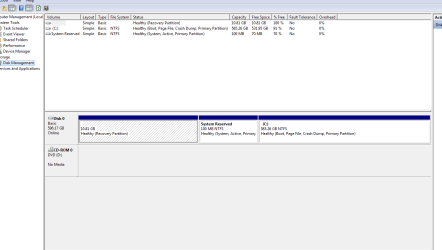
Post a Disk management image Disk Management - Post a Screen Capture Image
I want to see if your disk is Legacy-MBR or UEFI-GPT
 

My Computers My Computers

  • At a glance

    Windows 7 HP 64i5 6600K - 800MHz to 4200MHz4+4G GSkill DDR4 3000IG - Intel 530
    Computer type
    PC/Desktop
    Computer Manufacturer/Model Number
    custom build
    OS
    Windows 7 HP 64
    CPU
    i5 6600K - 800MHz to 4200MHz
    Motherboard
    GA-Z170-HD3P
    Memory
    4+4G GSkill DDR4 3000
    Graphics Card(s)
    IG - Intel 530
    Monitor(s) Displays
    Samsung 226BW
    Screen Resolution
    1680x1050
    Hard Drives
    (1) -1 SM951 – 128GB M.2 AHCI PCIe SSD drive for Windows 7 and Lubuntu
    (2) -1 WD SATA 3 - 1T for Data
    (3) -1 WD SATA 3 - 1T for backup
    PSU
    Thermaltake 450W TR2 gold
    Keyboard
    Old and good Chicony mechanical keyboard
    Mouse
    Logitech mX performance - 9 buttons (had to disable some)
    Internet Speed
    500Mb/s
    Browser
    Firefox 64
    Other Info
    TinyWall firewall
  • At a glance

    Windows 7 Proi7-4500U 800MHz to 3.0GHz(4+4)G DDR3 1600IG intel 4400 + NVIDIA GeForce GT 745M
    Computer type
    Laptop
    System Manufacturer/Model Number
    Asus Q550LF
    OS
    Windows 7 Pro
    CPU
    i7-4500U 800MHz to 3.0GHz
    Motherboard
    Asus Q550LF
    Memory
    (4+4)G DDR3 1600
    Graphics Card(s)
    IG intel 4400 + NVIDIA GeForce GT 745M
    Sound Card
    Realtek
    Monitor(s) Displays
    LG Display LP156WF4-SPH1
    Screen Resolution
    1920 x 1080
    Hard Drives
    BX500 120G SSD for Windows and programs +
    1T HDD for data
    Internet Speed
    500 Mb/s
    Browser
    Firefox
    Other Info
    TinyWall firewall
What did you do with the Win 7 HP SP1 iso that you have downloaded? Did you burned a DVD or you intent to use a USB flash disk?


Post a Disk management image Disk Management - Post a Screen Capture Image
I want to see if your disk is Legacy-MBR or UEFI-GPT

The Win 7 HP SP1 iso is saved on an external HD. I downloaded it directly to the external HD and not to my failing HDD via free download manager. I can either burn it to a DVD or go buy a usb flash drive. I already have many 4.7gb blank DVD's here but I was looking at 256gb flash drives at best buy today for $30.00 as well. What ever you think would be best.
 

My Computer My Computer

At a glance

Windows 7 Home Premium 64bitIntel core I5 2430M cpu @ 2.40GHz8gig
Computer type
Laptop
Computer Manufacturer/Model Number
Sony Vaio VPC EJ28FX
OS
Windows 7 Home Premium 64bit
CPU
Intel core I5 2430M cpu @ 2.40GHz
Memory
8gig
Hard Drives
Samsung 860 EVO SSD
Internet Speed
100 mbs
Antivirus
Avast
Browser
Chrome/Mozilla
Here is the snip

Capture 2.PNG


I don't understand what you mean by ... "I want to see if your disk is Legacy-MBR or UEFI-GPT"
 
Last edited:

My Computer My Computer

At a glance

Windows 7 Home Premium 64bitIntel core I5 2430M cpu @ 2.40GHz8gig
Computer type
Laptop
Computer Manufacturer/Model Number
Sony Vaio VPC EJ28FX
OS
Windows 7 Home Premium 64bit
CPU
Intel core I5 2430M cpu @ 2.40GHz
Memory
8gig
Hard Drives
Samsung 860 EVO SSD
Internet Speed
100 mbs
Antivirus
Avast
Browser
Chrome/Mozilla
gpt and mbr are partitioning styles. Yours is mbr.
 

My Computers My Computers

  • At a glance

    7 X64i5 84002x8gb 3200mhz
    Computer type
    PC/Desktop
    OS
    7 X64
    CPU
    i5 8400
    Motherboard
    gigabyte b365m ds3h
    Memory
    2x8gb 3200mhz
    Hard Drives
    various
    PSU
    pure power 11 400w cm
    Case
    Coolermaster
    Cooling
    cryorig m9i
  • At a glance

    7x64g54008gb ddr4 2400
    Computer type
    PC/Desktop
    OS
    7x64
    CPU
    g5400
    Motherboard
    ga b365m ds3h
    Memory
    8gb ddr4 2400
    PSU
    xfx pro 450w
The Win 7 HP SP1 iso is saved on an external HD. I downloaded it directly to the external HD and not to my failing HDD via free download manager. I can either burn it to a DVD or go buy a usb flash drive. I already have many 4.7gb blank DVD's here but I was looking at 256gb flash drives at best buy today for $30.00 as well. What ever you think would be best.

You can use a 4G USB flash disk or a DVD.
As you have the blank DVD, burn a DVD.
 

My Computers My Computers

  • At a glance

    Windows 7 HP 64i5 6600K - 800MHz to 4200MHz4+4G GSkill DDR4 3000IG - Intel 530
    Computer type
    PC/Desktop
    Computer Manufacturer/Model Number
    custom build
    OS
    Windows 7 HP 64
    CPU
    i5 6600K - 800MHz to 4200MHz
    Motherboard
    GA-Z170-HD3P
    Memory
    4+4G GSkill DDR4 3000
    Graphics Card(s)
    IG - Intel 530
    Monitor(s) Displays
    Samsung 226BW
    Screen Resolution
    1680x1050
    Hard Drives
    (1) -1 SM951 – 128GB M.2 AHCI PCIe SSD drive for Windows 7 and Lubuntu
    (2) -1 WD SATA 3 - 1T for Data
    (3) -1 WD SATA 3 - 1T for backup
    PSU
    Thermaltake 450W TR2 gold
    Keyboard
    Old and good Chicony mechanical keyboard
    Mouse
    Logitech mX performance - 9 buttons (had to disable some)
    Internet Speed
    500Mb/s
    Browser
    Firefox 64
    Other Info
    TinyWall firewall
  • At a glance

    Windows 7 Proi7-4500U 800MHz to 3.0GHz(4+4)G DDR3 1600IG intel 4400 + NVIDIA GeForce GT 745M
    Computer type
    Laptop
    System Manufacturer/Model Number
    Asus Q550LF
    OS
    Windows 7 Pro
    CPU
    i7-4500U 800MHz to 3.0GHz
    Motherboard
    Asus Q550LF
    Memory
    (4+4)G DDR3 1600
    Graphics Card(s)
    IG intel 4400 + NVIDIA GeForce GT 745M
    Sound Card
    Realtek
    Monitor(s) Displays
    LG Display LP156WF4-SPH1
    Screen Resolution
    1920 x 1080
    Hard Drives
    BX500 120G SSD for Windows and programs +
    1T HDD for data
    Internet Speed
    500 Mb/s
    Browser
    Firefox
    Other Info
    TinyWall firewall
You can use a 4G USB flash disk or a DVD.
As you have the blank DVD, burn a DVD.

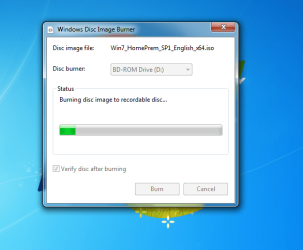
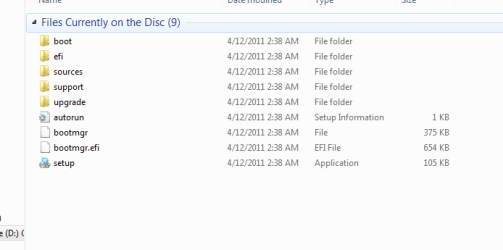
Luiz .... To verify that I did this correctly see the attached.


Capture.PNG

Capture2.PNG
 

My Computer My Computer

At a glance

Windows 7 Home Premium 64bitIntel core I5 2430M cpu @ 2.40GHz8gig
Computer type
Laptop
Computer Manufacturer/Model Number
Sony Vaio VPC EJ28FX
OS
Windows 7 Home Premium 64bit
CPU
Intel core I5 2430M cpu @ 2.40GHz
Memory
8gig
Hard Drives
Samsung 860 EVO SSD
Internet Speed
100 mbs
Antivirus
Avast
Browser
Chrome/Mozilla
Luiz,

Would you be so kind as to give me a step by step process on how to back up my current license and where/how to save it to as well. My product key on the bottom sticker is still in very good shape. I have taken a picture of it with my phone.
 

My Computer My Computer

At a glance

Windows 7 Home Premium 64bitIntel core I5 2430M cpu @ 2.40GHz8gig
Computer type
Laptop
Computer Manufacturer/Model Number
Sony Vaio VPC EJ28FX
OS
Windows 7 Home Premium 64bit
CPU
Intel core I5 2430M cpu @ 2.40GHz
Memory
8gig
Hard Drives
Samsung 860 EVO SSD
Internet Speed
100 mbs
Antivirus
Avast
Browser
Chrome/Mozilla
Back
Top