Help speeding up Atheros AR9485 laptop WIFI, Please.

zapp22

New member
Power User
VIP
Local time
1:42 PM
Messages
730
Location
Tejas, northern Mexico
Friends I have a A10-4600m equipped HP M6-1035dx notebook that works really well in some respects.
The WIFI is the above mentioned Atheros AR9485. its reach is pretty good, on par with the best things I have laying around, but its throughput for some reason is 30%-50% slower than other notebooks, consistently. I don't know why this is.

if any of you have worked through the settings/drivers/etc on this common device would you pls fill me in?
thx
z
 

My Computer My Computer

At a glance

Windows XP Pro SP3, Windows 7 Pro 32-bit, Win...Pentium 4 3.2GHz, Pentium 4 3.4GHz 64bit, Atom,4GB matched, 1GB, 2.5GB, 4.0 GBGeforce 8400 GS and others
Computer Manufacturer/Model Number
HP DC7600, HP DC7600[2], HP DC7100, Samsung NC10
OS
Windows XP Pro SP3, Windows 7 Pro 32-bit, Windows 7 Ultimate 64bit, Windows XP Home SP3
CPU
Pentium 4 3.2GHz, Pentium 4 3.4GHz 64bit, Atom,
Motherboard
Dunno
Memory
4GB matched, 1GB, 2.5GB, 4.0 GB
Graphics Card(s)
Geforce 8400 GS and others
Sound Card
RealteK ALC260 and others
Monitor(s) Displays
Asus HD
Screen Resolution
1920x1080
Hard Drives
WD Caviar 640gb SATA
Cooling
We Be Cool
Hi zapp22,

When you've mentioned speeding up Atheros device, meaning to make your internet run faster?
I found the specs for your Wi-Fi device, and it supports N mode. Have you tried changing the mode from your Atheros device from Mixed to 'N' or 'G/N' then see if it makes a difference. You may also fiddle with the wireless mode settings from the router.
Highly integrated single chip PCI Express solution MAC/baseband processor and 2.4 GHz radio
Supports up to 150 Mbps Data Rate
Backward-compatible to 802.11g; forward–compatible to multi-stream 802.11n
Supports all mandatory IEEE 802.11n features, including several optional features such as HT40, half-guard interval in HT40 and Rx Space Time Block Coding (STBC)
Compliant with IEEE 802.11b, 802.11d, 802.11e, 802.11g standards and 802.11i specification
 

My Computer My Computer

At a glance

Win7 & Win8 64bitIntel i5
Computer Manufacturer/Model Number
Lenovo Desktop/Samsung Laptop
OS
Win7 & Win8 64bit
CPU
Intel i5
Internet Speed
Charter-20 Mbps
Antivirus
Avast
Browser
FF, IE9 and Chrome
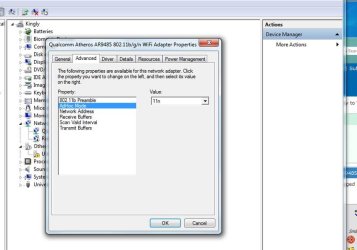
That's something that is puzzling to me; a lot of the options/settings I expected to see I don't see.
there is only "ad hoc 'mode'" in the details per se, which I will try as "11n" per your suggestion. my routers are N all the way [150]. see image.

again, I can set the HP and my little thinkpad side by side and run the same test and get +50% on the thinkpad which uses some Lenovo rebranded half-mini - not sure what the chipset is. ipad mini gets about 30% faster and its not the greatest wifi device going.
 

Attachments

  • atheros.jpg
    atheros.jpg
    50.9 KB · Views: 1

My Computer My Computer

At a glance

Windows XP Pro SP3, Windows 7 Pro 32-bit, Win...Pentium 4 3.2GHz, Pentium 4 3.4GHz 64bit, Atom,4GB matched, 1GB, 2.5GB, 4.0 GBGeforce 8400 GS and others
Computer Manufacturer/Model Number
HP DC7600, HP DC7600[2], HP DC7100, Samsung NC10
OS
Windows XP Pro SP3, Windows 7 Pro 32-bit, Windows 7 Ultimate 64bit, Windows XP Home SP3
CPU
Pentium 4 3.2GHz, Pentium 4 3.4GHz 64bit, Atom,
Motherboard
Dunno
Memory
4GB matched, 1GB, 2.5GB, 4.0 GB
Graphics Card(s)
Geforce 8400 GS and others
Sound Card
RealteK ALC260 and others
Monitor(s) Displays
Asus HD
Screen Resolution
1920x1080
Hard Drives
WD Caviar 640gb SATA
Cooling
We Be Cool
Back
Top