
HELP: Task Manager!!!!!

niic

New member
Local time
6:05 PM
Messages
10
Hi all,

I have been doing allot of research on Win7's Task Manager, in particular the Performance Tab because I am getting issues I am not understanding. I read an older thread on here explaining the Manager

(user:Brink - 18/01/09)

  • Total is the amount of RAM installed on your computer, listed in megabytes (MB).
  • Cached refers to the amount of physical memory used recently for system resources.
  • Available is the total of standby and free memory from the Resource Monitor.
  • Free is the amount of memory that is currently unused or doesn't contain useful information (unlike cached files, which do contain useful information).

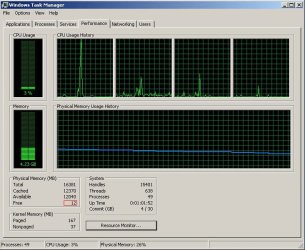
What I don't understand is how is it possible to have almost NO 'Free' memory but have loads of 'Available' memory. I have attached a screen shot below. We are running Win7 on a Dell Precision 690.

Can anyone explain in more detail or suggest a link about these values I would be most grateful. Much appreciated.

Many thanks,
Nick.
 

Attachments
  • TM_sysCrash.jpg
    TM_sysCrash.jpg
    79.6 KB · Views: 57

My Computer

OS
Win7 & Linux FC8
What I don't understand is how is it possible to have almost NO 'Free' memory but have loads of 'Available' memory. I have attached a screen shot below. We are running Win7 on a Dell Precision 690.

Can anyone explain in more detail or suggest a link about these values I would be most grateful. Much appreciated.

Many thanks,
Nick.

Hi Nick... It's possible because of the ultra silly "Superfecth" service. What this does is pre-load a mess of stuff trying to predict what you will need next as a means of improving apparent performance. All it really does is thrash heck out of your disk drive. The memory is considered "releasable" in that loaded modules not currently in use can be over-written (released) on demand.

If you go into Control Panel / Admin Tools / Services, find the Superfetch service... Right click on it, select properties and set it to "Disabled" then restart your computer you'll find most of your "available" memory will be shifted to "free" memory. You will also find your hard disk is considerably less active and, as a result, your system will run a little smoother.

(It's one of those "What WERE they thinking??" kinda things....)
 

My Computer

Computer Manufacturer/Model Number
Homebrew
OS
XP Pro SP3 X86 / Win7 Pro X86
CPU
Amd 64 x2 4200 (2.4ghz)
Motherboard
Asus M2N-MX SE Plus
Memory
Kingston DDR2 800 2gb
Graphics Card(s)
Nvidia GF-8400
Sound Card
Realtek on Motherboard
Monitor(s) Displays
Acer x-193bw
Screen Resolution
1440 x 900
Hard Drives
Western Digital 500g
PSU
350watt In-Win
Case
In-Win
Cooling
Air
Keyboard
yes
Mouse
yes
Internet Speed
5mpbs
Other Info
Also ASRock ION 330 as HTPC (on XP).
Acer Aspire as GP netbook (on XP).
Hi,

I see so 'Available' also deals with SuperFetch? I thought Cache was what SuperFetch dealt with?? Confused!

I read a few forums with people saying that Available = Standby + Free? They are not directly related?

What is the difference between 'Cache' and 'Standby' then?

Thanks for the help, much appreciated.

Cheers
Nick.
 

My Computer

OS
Win7 & Linux FC8
Hi,

I see so 'Available' also deals with SuperFetch? I thought Cache was what SuperFetch dealt with?? Confused!

I read a few forums with people saying that Available = Standby + Free? They are not directly related?

What is the difference between 'Cache' and 'Standby' then?

Thanks for the help, much appreciated.

Cheers
Nick.


To be honest, I'm not entirely sure... Perhaps one of the local gurus can jump in and give us both some good information....
 

My Computer

Computer Manufacturer/Model Number
Homebrew
OS
XP Pro SP3 X86 / Win7 Pro X86
CPU
Amd 64 x2 4200 (2.4ghz)
Motherboard
Asus M2N-MX SE Plus
Memory
Kingston DDR2 800 2gb
Graphics Card(s)
Nvidia GF-8400
Sound Card
Realtek on Motherboard
Monitor(s) Displays
Acer x-193bw
Screen Resolution
1440 x 900
Hard Drives
Western Digital 500g
PSU
350watt In-Win
Case
In-Win
Cooling
Air
Keyboard
yes
Mouse
yes
Internet Speed
5mpbs
Other Info
Also ASRock ION 330 as HTPC (on XP).
Acer Aspire as GP netbook (on XP).
...your system will run a little smoother.
How will it run smoother?

Standby == Memory that contains cached data and code that is not actively in use.
 

My Computer

Computer type
PC/Desktop
Computer Manufacturer/Model Number
Alienware Aurora ALX R4
OS
Windows 10 Pro (x64)
CPU
Intel Core i7-3930K (3.2GHz - 4.5GHz)
Motherboard
Alienware Aurora-R4 x79
Memory
4x Samsung 4GB PC3-12800 DDR3 (16GB 1600MHz)
Graphics Card(s)
Nvidia Geforce GTX 690
Sound Card
SteelSeries Siberia Elite
Monitor(s) Displays
Dell UltraSharp U3011
Screen Resolution
2560x1600
Hard Drives
Samsung 850 Pro 256 GB, Seagate 1TB Desktop Hybrid HDD, 2x Western Digital 4TB Green HDD
PSU
875W Some Dell PSU <.<
Case
Alienware Aurora ALX
Cooling
Custom Liquid Cooling (EK CPU & GPU blocks) dual EK 480RAD
Keyboard
Logitech G710+ Mechanical
Mouse
Logitech G700s
Internet Speed
Verizon Fios (50 mbps average)
Other Info
Server: Intel NUC D54250WYK: i5-4250U, 16GB, 256 GB mSATA, Windows Server 2012 R2

My Computer

Computer Manufacturer/Model Number
Homebrew
OS
XP Pro SP3 X86 / Win7 Pro X86
CPU
Amd 64 x2 4200 (2.4ghz)
Motherboard
Asus M2N-MX SE Plus
Memory
Kingston DDR2 800 2gb
Graphics Card(s)
Nvidia GF-8400
Sound Card
Realtek on Motherboard
Monitor(s) Displays
Acer x-193bw
Screen Resolution
1440 x 900
Hard Drives
Western Digital 500g
PSU
350watt In-Win
Case
In-Win
Cooling
Air
Keyboard
yes
Mouse
yes
Internet Speed
5mpbs
Other Info
Also ASRock ION 330 as HTPC (on XP).
Acer Aspire as GP netbook (on XP).

My Computer

Computer type
PC/Desktop
Computer Manufacturer/Model Number
Alienware Aurora ALX R4
OS
Windows 10 Pro (x64)
CPU
Intel Core i7-3930K (3.2GHz - 4.5GHz)
Motherboard
Alienware Aurora-R4 x79
Memory
4x Samsung 4GB PC3-12800 DDR3 (16GB 1600MHz)
Graphics Card(s)
Nvidia Geforce GTX 690
Sound Card
SteelSeries Siberia Elite
Monitor(s) Displays
Dell UltraSharp U3011
Screen Resolution
2560x1600
Hard Drives
Samsung 850 Pro 256 GB, Seagate 1TB Desktop Hybrid HDD, 2x Western Digital 4TB Green HDD
PSU
875W Some Dell PSU <.<
Case
Alienware Aurora ALX
Cooling
Custom Liquid Cooling (EK CPU & GPU blocks) dual EK 480RAD
Keyboard
Logitech G710+ Mechanical
Mouse
Logitech G700s
Internet Speed
Verizon Fios (50 mbps average)
Other Info
Server: Intel NUC D54250WYK: i5-4250U, 16GB, 256 GB mSATA, Windows Server 2012 R2
Uh huh...

Ummmm... I'm here for two reasons... To share what I might know and to learn some of what I don't. If you can explain to me why I am wrong, please do so (Politely, of course) otherwise I'll just go right on assuming I'm right...
 

My Computer

Computer Manufacturer/Model Number
Homebrew
OS
XP Pro SP3 X86 / Win7 Pro X86
CPU
Amd 64 x2 4200 (2.4ghz)
Motherboard
Asus M2N-MX SE Plus
Memory
Kingston DDR2 800 2gb
Graphics Card(s)
Nvidia GF-8400
Sound Card
Realtek on Motherboard
Monitor(s) Displays
Acer x-193bw
Screen Resolution
1440 x 900
Hard Drives
Western Digital 500g
PSU
350watt In-Win
Case
In-Win
Cooling
Air
Keyboard
yes
Mouse
yes
Internet Speed
5mpbs
Other Info
Also ASRock ION 330 as HTPC (on XP).
Acer Aspire as GP netbook (on XP).
The disk trashing you are referring to. This is caused by the initial loading of the system, while you are installing your various application and others. After a while when the system is no longer in such a high level of flux any disk trashing will subside. However, this disk trashing should not have an impact on the system if it is SuperFetch that is trashing the disk. Any I/O operation that SuperFetch preforms is done so at a low I/O priority, meaning it will only use I/O resources when it will not effect the performance of the system.

Second the data cached in RAM is never paged out of RAM. If an application requires the space occupied by the cache it is simply overwriting with zero overhead. There is no speed-up or getting a smoother system when you turn off SuperFetch, all you get is wasted RAM.

http://technet.microsoft.com/en-us/magazine/2007.03.vistakernel.aspx
Whenever memory becomes free-for example, when an application exits or releases memory-SuperFetch asks the Memory Manager to fetch data and code that was recently evicted. This is done at a rate of a few pages per second with Very Low priority I/Os so that the preloading does not impact the user or other active applications.
 

My Computer

Computer type
PC/Desktop
Computer Manufacturer/Model Number
Alienware Aurora ALX R4
OS
Windows 10 Pro (x64)
CPU
Intel Core i7-3930K (3.2GHz - 4.5GHz)
Motherboard
Alienware Aurora-R4 x79
Memory
4x Samsung 4GB PC3-12800 DDR3 (16GB 1600MHz)
Graphics Card(s)
Nvidia Geforce GTX 690
Sound Card
SteelSeries Siberia Elite
Monitor(s) Displays
Dell UltraSharp U3011
Screen Resolution
2560x1600
Hard Drives
Samsung 850 Pro 256 GB, Seagate 1TB Desktop Hybrid HDD, 2x Western Digital 4TB Green HDD
PSU
875W Some Dell PSU <.<
Case
Alienware Aurora ALX
Cooling
Custom Liquid Cooling (EK CPU & GPU blocks) dual EK 480RAD
Keyboard
Logitech G710+ Mechanical
Mouse
Logitech G700s
Internet Speed
Verizon Fios (50 mbps average)
Other Info
Server: Intel NUC D54250WYK: i5-4250U, 16GB, 256 GB mSATA, Windows Server 2012 R2
Uh huh...

Ummmm... I'm here for two reasons... To share what I might know and to learn some of what I don't. If you can explain to me why I am wrong, please do so (Politely, of course) otherwise I'll just go right on assuming I'm right...

You are actually wrong - I think. Cached memory is available memory. Before you would get any hard page fault, the system would first have to populate all free and cached memory (the light and dark blue in Process Monitor). In a 3 or 4GB system with normal duties this will practically never happen - and I said "normal duties". If you throw some CAD at it, that is another story.

It is also a big mistake to disable superfetch (unless you operate on an SSD - and even then). The time to fetch an instance from RAM is many thousand times faster than getting it off the disk (even the SSD). And if your LOR (location of reference) is very narrow (meaning that you are using more or less the same applications all the time), then superfetch does a good service. It must be a weird operating environment where superfetch would be counterproductive.
 

My Computer

Computer Manufacturer/Model Number
HP, Dell, Gateway, Toshiba - 4 laptops and 2 desktops
OS
Vista, Windows7, Mint Mate, Zorin, Windows 8
CPU
from 1.6GHz Duo to i7
Monitor(s) Displays
2x HP w2207
Hard Drives
5x HDD, 7x SSD, 12x Externals
Keyboard
with trackball - no mices
Mouse
Trackball mice
Internet Speed
DSL 6000
I agree,, turning off superfetch is not going to improve anything.
 

My Computer

Computer Manufacturer/Model Number
Self Built
OS
Win 7 Ultimate 32bit
CPU
C2D E6600 2.4Ghz
Motherboard
Intel D965WH
Memory
4G Kingston KHX5400D2
Graphics Card(s)
EVGA GTX 570 HD SC (012-P3-1573-KR)
Sound Card
On-Board
Monitor(s) Displays
Samsung 226BW
Screen Resolution
1680 x 1050
Hard Drives
2 x 250 Seagate Barracuda
2 x 500 Seagate Barracuda (Raid1)
PSU
Corsair TX750W
Case
In-Win C589
Cooling
Stock Intel Cooling
The disk trashing you are referring to. This is caused by the initial loading of the system, while you are installing your various application and others. After a while when the system is no longer in such a high level of flux any disk trashing will subside. However, this disk trashing should not have an impact on the system if it is SuperFetch that is trashing the disk. Any I/O operation that SuperFetch preforms is done so at a low I/O priority, meaning it will only use I/O resources when it will not effect the performance of the system.

Actually I was more worried about the increased load on the hard disk than anything else. I've been using this for a couple of weeks now and it's still pretty busy... although (if you read my other big thread) I'm slowly getting it figured out and quieting things down... At least the main system is going into standby now.

Second the data cached in RAM is never paged out of RAM. If an application requires the space occupied by the cache it is simply overwriting with zero overhead. There is no speed-up or getting a smoother system when you turn off SuperFetch, all you get is wasted RAM.

Windows Administration: Inside the Windows Vista Kernel: Part 2
Whenever memory becomes free-for example, when an application exits or releases memory-SuperFetch asks the Memory Manager to fetch data and code that was recently evicted. This is done at a rate of a few pages per second with Very Low priority I/Os so that the preloading does not impact the user or other active applications.

It may not impact me or my active programs... but is it really necessary?

If it's like predictive disk caching (a la win95) I'm betting the number of misses renders it pointless.

But thanks to you and Whs for the extra info... As I said I'm still learning about Win 7, so your info does not fall on deaf ears.
 

My Computer

Computer Manufacturer/Model Number
Homebrew
OS
XP Pro SP3 X86 / Win7 Pro X86
CPU
Amd 64 x2 4200 (2.4ghz)
Motherboard
Asus M2N-MX SE Plus
Memory
Kingston DDR2 800 2gb
Graphics Card(s)
Nvidia GF-8400
Sound Card
Realtek on Motherboard
Monitor(s) Displays
Acer x-193bw
Screen Resolution
1440 x 900
Hard Drives
Western Digital 500g
PSU
350watt In-Win
Case
In-Win
Cooling
Air
Keyboard
yes
Mouse
yes
Internet Speed
5mpbs
Other Info
Also ASRock ION 330 as HTPC (on XP).
Acer Aspire as GP netbook (on XP).
Hi all,

Thanks so much for all this useful info. Really helps.

However I'm still lost as to the 'Free' mem being very low while 'Available' very high.

If I was to load another heavy application like a CAD/3D package would I see Win7 crash given Free is only at 12mb? I'm still a bit confused as the Free/Available relationship.

Again, thanks to everyone who is posting in this thread. Very helpful!

Nick.
 

My Computer

OS
Win7 & Linux FC8
If I was to load another heavy application like a CAD/3D package would I see Win7 crash given Free is only at 12mb? I'm still a bit confused as the Free/Available relationship.

No Windows 7 would not crash. Lets put it like this. Available equals Free. So forget about the independent Free value. That should make it easier.
 

My Computer

Computer type
PC/Desktop
Computer Manufacturer/Model Number
Alienware Aurora ALX R4
OS
Windows 10 Pro (x64)
CPU
Intel Core i7-3930K (3.2GHz - 4.5GHz)
Motherboard
Alienware Aurora-R4 x79
Memory
4x Samsung 4GB PC3-12800 DDR3 (16GB 1600MHz)
Graphics Card(s)
Nvidia Geforce GTX 690
Sound Card
SteelSeries Siberia Elite
Monitor(s) Displays
Dell UltraSharp U3011
Screen Resolution
2560x1600
Hard Drives
Samsung 850 Pro 256 GB, Seagate 1TB Desktop Hybrid HDD, 2x Western Digital 4TB Green HDD
PSU
875W Some Dell PSU <.<
Case
Alienware Aurora ALX
Cooling
Custom Liquid Cooling (EK CPU & GPU blocks) dual EK 480RAD
Keyboard
Logitech G710+ Mechanical
Mouse
Logitech G700s
Internet Speed
Verizon Fios (50 mbps average)
Other Info
Server: Intel NUC D54250WYK: i5-4250U, 16GB, 256 GB mSATA, Windows Server 2012 R2
Hi all,

Thanks so much for all this useful info. Really helps.

However I'm still lost as to the 'Free' mem being very low while 'Available' very high.

If I was to load another heavy application like a CAD/3D package would I see Win7 crash given Free is only at 12mb? I'm still a bit confused as the Free/Available relationship.

Again, thanks to everyone who is posting in this thread. Very helpful!

Nick.

Have the Resource Monitor on screen while you load an ap... you'll see the memory profile change... The cached stuff is dumped right away, to make room.
 

My Computer

Computer Manufacturer/Model Number
Homebrew
OS
XP Pro SP3 X86 / Win7 Pro X86
CPU
Amd 64 x2 4200 (2.4ghz)
Motherboard
Asus M2N-MX SE Plus
Memory
Kingston DDR2 800 2gb
Graphics Card(s)
Nvidia GF-8400
Sound Card
Realtek on Motherboard
Monitor(s) Displays
Acer x-193bw
Screen Resolution
1440 x 900
Hard Drives
Western Digital 500g
PSU
350watt In-Win
Case
In-Win
Cooling
Air
Keyboard
yes
Mouse
yes
Internet Speed
5mpbs
Other Info
Also ASRock ION 330 as HTPC (on XP).
Acer Aspire as GP netbook (on XP).
Yeah I just dide some tests and have been watching the values. I found some good articles on it as well...

Windows Administration: Inside the Windows Vista Kernel: Part 2

The best I can understand this now is it displays physical mem that hasn't been assigned to anything.

Available = Standby (SuperFetch) + the Free
Cached = Standby + Modified

Thank you all for your info. Very helpful! cheers
 

My Computer

OS
Win7 & Linux FC8
Back
Top