
Help! "The Parameter is Incorrect" error

kennydied23

New member
Local time
11:20 AM
Messages
5
Location
Cincinnati, OH
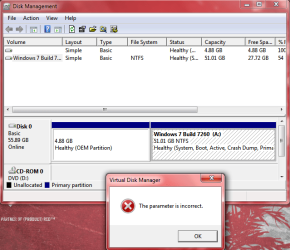
I have an error when trying to change the disk drive letter of my hard drive. Is there anything I can do, like download a hotfix or change some setting or something...?
 

Attachments

  • Capture.PNG
    Capture.PNG
    46.3 KB · Views: 698

My Computer

Computer Manufacturer/Model Number
Barebones
OS
Windows 7 Ultimate x64
CPU
Intel Core 2 Quad Q9550
Motherboard
Asus P5QC
Memory
6.0GB
Graphics Card(s)
Nvidia Geforce GTX 260
Sound Card
Realtek Onboard
Monitor(s) Displays
Acer CrystalBrite LCD
Screen Resolution
1440 x 900
Hard Drives
640GB
PSU
No Idea Lol
Case
Cooler Master
Cooling
Thermaltake
Keyboard
Wireless
Mouse
Wireless
Internet Speed
2.5Mbit
Hi, welcome to the forums.

What drive are you trying to change?

If it's the un-labeled drive then you won't be able to change it as it looks to be a protected OEM-Restore drive. These drives act as a 'factory reset' image which when invoked (usually from the boot menu) will revert your system back to exactly how it was when you got it out of the box.

If you no longer need the OEM-Restore partition you could try deleting through the Windows 7 install. Boot from the Se7en DVD and play through the install up untill the 'Drive Selection' point and click 'Drive Options'. You should then be able to delete the partition & add a new 1. This will give it a drive letter & make it visible in Windows.
   Warning
Make sure that you do not need this partition before deleting it. You will not be able to undo this action afterwards


Hope this helps :)


OS
 

My Computer

Computer Manufacturer/Model Number
Compaq Desktop
OS
Windows 7 Ultimate x64
CPU
AMD Sempron Dual Core
Memory
3GB
Graphics Card(s)
NVIDIA GeForce 6150SE nForce 430
Screen Resolution
1024x768
Hard Drives
150GB Sata
If that is the case then the OP may be able to
  • Shrink the A: volume and create a new partition
  • install to that partition and once booted, change the A: to C:
  • reboot into the old OS and wipe the newly created partition.
Seems a bit over the top but it's the only way I can think of preserving his apps :p
Try the following tutorials
http://www.sevenforums.com/tutorials/2672-partition-volume-shrink.html
http://www.sevenforums.com/tutorials/2674-partition-volume-create-new.html
http://www.sevenforums.com/tutorials/2668-partition-volume-delete.html
http://www.sevenforums.com/tutorials/2670-partition-volume-extend.html

Hope these help :)


OS
 

My Computer

Computer Manufacturer/Model Number
Compaq Desktop
OS
Windows 7 Ultimate x64
CPU
AMD Sempron Dual Core
Memory
3GB
Graphics Card(s)
NVIDIA GeForce 6150SE nForce 430
Screen Resolution
1024x768
Hard Drives
150GB Sata
If that is the case then the OP may be able to
  • Shrink the A: volume and create a new partition
  • install to that partition and once booted, change the A: to C:
  • reboot into the old OS and wipe the newly created partition.
Seems a bit over the top but it's the only way I can think of preserving his apps :p
Try the following tutorials
http://www.sevenforums.com/tutorials/2672-partition-volume-shrink.html
http://www.sevenforums.com/tutorials/2674-partition-volume-create-new.html
http://www.sevenforums.com/tutorials/2668-partition-volume-delete.html
http://www.sevenforums.com/tutorials/2670-partition-volume-extend.html

Hope these help :)


OS

It's worth a shot
 

My Computer

Computer Manufacturer/Model Number
Barebones
OS
Windows 7 Ultimate x64
CPU
Intel Core 2 Quad Q9550
Motherboard
Asus P5QC
Memory
6.0GB
Graphics Card(s)
Nvidia Geforce GTX 260
Sound Card
Realtek Onboard
Monitor(s) Displays
Acer CrystalBrite LCD
Screen Resolution
1440 x 900
Hard Drives
640GB
PSU
No Idea Lol
Case
Cooler Master
Cooling
Thermaltake
Keyboard
Wireless
Mouse
Wireless
Internet Speed
2.5Mbit
Back
Top