Solved Help to create a regular LAN to share drives/folders - not Home

ozstar

New member
Local time
1:39 AM
Messages
52
Location
Sydney Oz
Hello,

Firstly I apologise because I know there is so much written about this subject. However at the same time, when one cannot find the solution after literally hours, one must get help! I have thrown the towel in as they say, put the white flag up and here I am..

I have 4 PC's all with Win 7 Pro. I have access to web via cable via a CG3000 router.

All boxes belong to same named 'Workgroup'

Under Explorer/Network tree all boxes and drives can be seen.

All drives on all boxes are already Shared with small shared icons showing on drive's name in tree and all passwords are off.

All permissions are set for full use as I am the only one here who uses them.

Problem.

Whene evr I go to a drive on any box from any box, I get the dreaded ..

'Windows cannot access etc..

I have turned off, router, boxes and left and re created and joined a Homegroup but this only got me to the Public etc folders. I need to get to all boxes and all drives/folders.

It was hard in Dos and got easier thru 3.1 etc until it was a piece of cake in XP

Now it is a nightmare.

I was advided to not have a Homegroup so had all the PC's leave the Home Network. It does not exists anymore.

I have Googled and read all day but am still not clearer.

I still see all the folders in each box from every box but as soon as I click to see the files in the folders get the NO Access panel.

I can see and access all the Public User folders but not the drives and other folders.

I need to access many folders on many drives across all boxes every day

I hope I can get help here as I am exhausted spending 3 days at this.

Thanks in anticipation.
 

My Computer My Computer

At a glance

Win 7 Pro 32 and 64 versions2.5 up4 to 8Nividia and AMD
Computer type
PC/Desktop
Computer Manufacturer/Model Number
Custom Builds but also Surface Pro 3, Dells Desk and HP laptop
OS
Win 7 Pro 32 and 64 versions
CPU
2.5 up
Motherboard
Different types
Memory
4 to 8
Graphics Card(s)
Nividia and AMD
Hard Drives
From 60GB to 2 TB
Antivirus
Avast Free
Browser
Firefox latest
Are all PCs are set to the same location (Home/Work)?

(This is not the best approach but usually fixes things :p) Go into the properties of the shared folder and switch to security tab. Add Everyone to the list with Full Control permission.

Note: Having a password protected network is better though, and you can make the PCs remember the credentials.
 

My Computer My Computer

At a glance

Windows 7 Ultimate x64 SP1AMD Phenom 2 1090T2x8GB Kingston HyperX Fury Black 1600Mhz Unga...MSI GTX 970 Gaming 4G
Computer type
PC/Desktop
Computer Manufacturer/Model Number
Custom Build
OS
Windows 7 Ultimate x64 SP1
CPU
AMD Phenom 2 1090T
Motherboard
Gigabyte GA-890FXA-UD5
Memory
2x8GB Kingston HyperX Fury Black 1600Mhz Unganged
Graphics Card(s)
MSI GTX 970 Gaming 4G
Sound Card
Realtek On-Board HD 7.1 Audio / Logitech G35
Monitor(s) Displays
3xAcer GD245HQ
Screen Resolution
1920x1080
Hard Drives
Samsung 850 Pro 512GB SSD - OS /
WD Caviar Black SATA 3 - 1 TBx2 - Dynamic RAID 0 /
WD Caviar Green SATA 2 - 640GBx2 - Dynamic RAID 0 /
WD Caviar Green SATA 2 - 640GB - Internal Backup /
Seagate Barracude SATA 3 - 3TB - External Backup/ Sync
PSU
HighPower 1000W
Case
Cooler Master HAF 932
Cooling
Noctua NH-D14
Keyboard
Logitech G19
Mouse
Logitech G500
Internet Speed
100/4 Mbit Cable (100GB quota)
Antivirus
ZoneAlarm Extreme Security / MBAM Pro / MBAE Free / SAS Free
Browser
IE 11 - Firefox - Chrome
Other Info
Logitech F710/ G27/ G940/ Z5500 // TrackIR 5 // Nvidia 3D Surround Vision
Hi,

Firstly many thanks for the help.

I checked the drives and they are all Shared have Full control for Everyone (There is only me so not threats)

They all have no Home but Location is Work and Network is Work Network

Any suggestions ?

Thanks again
 

My Computer My Computer

At a glance

Win 7 Pro 32 and 64 versions2.5 up4 to 8Nividia and AMD
Computer type
PC/Desktop
Computer Manufacturer/Model Number
Custom Builds but also Surface Pro 3, Dells Desk and HP laptop
OS
Win 7 Pro 32 and 64 versions
CPU
2.5 up
Motherboard
Different types
Memory
4 to 8
Graphics Card(s)
Nividia and AMD
Hard Drives
From 60GB to 2 TB
Antivirus
Avast Free
Browser
Firefox latest
Checked Security tab (NTFS permissions) as well? It is different than Share permissions. Since you are not using a password, system thinks you are a guest and if everyone doesn't have permission will deny access. Are you getting asked username/password while trying to access at all?

Also check your Avast and/or Windows Firewall settings. Temp disable them to see if you can access.
In Network and Sharing Center - Change Advanced Sharing Settings - check:
- Turn on File and Printer Sharing (I guess this is on already due to Public folders)
- Password protected sharing (on or off?) If off perhaps turn it on.
 

My Computer My Computer

At a glance

Windows 7 Ultimate x64 SP1AMD Phenom 2 1090T2x8GB Kingston HyperX Fury Black 1600Mhz Unga...MSI GTX 970 Gaming 4G
Computer type
PC/Desktop
Computer Manufacturer/Model Number
Custom Build
OS
Windows 7 Ultimate x64 SP1
CPU
AMD Phenom 2 1090T
Motherboard
Gigabyte GA-890FXA-UD5
Memory
2x8GB Kingston HyperX Fury Black 1600Mhz Unganged
Graphics Card(s)
MSI GTX 970 Gaming 4G
Sound Card
Realtek On-Board HD 7.1 Audio / Logitech G35
Monitor(s) Displays
3xAcer GD245HQ
Screen Resolution
1920x1080
Hard Drives
Samsung 850 Pro 512GB SSD - OS /
WD Caviar Black SATA 3 - 1 TBx2 - Dynamic RAID 0 /
WD Caviar Green SATA 2 - 640GBx2 - Dynamic RAID 0 /
WD Caviar Green SATA 2 - 640GB - Internal Backup /
Seagate Barracude SATA 3 - 3TB - External Backup/ Sync
PSU
HighPower 1000W
Case
Cooler Master HAF 932
Cooling
Noctua NH-D14
Keyboard
Logitech G19
Mouse
Logitech G500
Internet Speed
100/4 Mbit Cable (100GB quota)
Antivirus
ZoneAlarm Extreme Security / MBAM Pro / MBAE Free / SAS Free
Browser
IE 11 - Firefox - Chrome
Other Info
Logitech F710/ G27/ G940/ Z5500 // TrackIR 5 // Nvidia 3D Surround Vision
Hi,

Yes I checked all drives and the right click Security tab permissions are Full and Share tab is everyone full.

I turned the Password on and off on both Public and Regular on two boxes, but still no glee.

No I don't get asked for any passwords whether I have Passwords on or off.

I was wondering is it a big job to go from scratch on all boxes., down to no network.. no shares etc. Would that be worth it?

Thanks again for the time and help

oz
 
Last edited:

My Computer My Computer

At a glance

Win 7 Pro 32 and 64 versions2.5 up4 to 8Nividia and AMD
Computer type
PC/Desktop
Computer Manufacturer/Model Number
Custom Builds but also Surface Pro 3, Dells Desk and HP laptop
OS
Win 7 Pro 32 and 64 versions
CPU
2.5 up
Motherboard
Different types
Memory
4 to 8
Graphics Card(s)
Nividia and AMD
Hard Drives
From 60GB to 2 TB
Antivirus
Avast Free
Browser
Firefox latest
I believe a security software (most likely firewall) is interfering since you can see the shared folders/drives. Did you try disabling them yet? Can you access the share of the same PC you are using from Network?
 

My Computer My Computer

At a glance

Windows 7 Ultimate x64 SP1AMD Phenom 2 1090T2x8GB Kingston HyperX Fury Black 1600Mhz Unga...MSI GTX 970 Gaming 4G
Computer type
PC/Desktop
Computer Manufacturer/Model Number
Custom Build
OS
Windows 7 Ultimate x64 SP1
CPU
AMD Phenom 2 1090T
Motherboard
Gigabyte GA-890FXA-UD5
Memory
2x8GB Kingston HyperX Fury Black 1600Mhz Unganged
Graphics Card(s)
MSI GTX 970 Gaming 4G
Sound Card
Realtek On-Board HD 7.1 Audio / Logitech G35
Monitor(s) Displays
3xAcer GD245HQ
Screen Resolution
1920x1080
Hard Drives
Samsung 850 Pro 512GB SSD - OS /
WD Caviar Black SATA 3 - 1 TBx2 - Dynamic RAID 0 /
WD Caviar Green SATA 2 - 640GBx2 - Dynamic RAID 0 /
WD Caviar Green SATA 2 - 640GB - Internal Backup /
Seagate Barracude SATA 3 - 3TB - External Backup/ Sync
PSU
HighPower 1000W
Case
Cooler Master HAF 932
Cooling
Noctua NH-D14
Keyboard
Logitech G19
Mouse
Logitech G500
Internet Speed
100/4 Mbit Cable (100GB quota)
Antivirus
ZoneAlarm Extreme Security / MBAM Pro / MBAE Free / SAS Free
Browser
IE 11 - Firefox - Chrome
Other Info
Logitech F710/ G27/ G940/ Z5500 // TrackIR 5 // Nvidia 3D Surround Vision
Hi

Tomorrow when on my main machine I will try to disable Avast and check the firewalls and see if that helps.

Do you mean try to access my main computer from another one on the network ?

I just did that from another computer and found that I still got the No ACCESS panel to all drives, except I could access the 2 ext USB drives okay.

Not sure what this means.

oz
 

My Computer My Computer

At a glance

Win 7 Pro 32 and 64 versions2.5 up4 to 8Nividia and AMD
Computer type
PC/Desktop
Computer Manufacturer/Model Number
Custom Builds but also Surface Pro 3, Dells Desk and HP laptop
OS
Win 7 Pro 32 and 64 versions
CPU
2.5 up
Motherboard
Different types
Memory
4 to 8
Graphics Card(s)
Nividia and AMD
Hard Drives
From 60GB to 2 TB
Antivirus
Avast Free
Browser
Firefox latest
Try accessing Main from Main's Network folder in Explorer for example. You should only be able to see shared folders/drives not others when browsing through Network.
 

My Computer My Computer

At a glance

Windows 7 Ultimate x64 SP1AMD Phenom 2 1090T2x8GB Kingston HyperX Fury Black 1600Mhz Unga...MSI GTX 970 Gaming 4G
Computer type
PC/Desktop
Computer Manufacturer/Model Number
Custom Build
OS
Windows 7 Ultimate x64 SP1
CPU
AMD Phenom 2 1090T
Motherboard
Gigabyte GA-890FXA-UD5
Memory
2x8GB Kingston HyperX Fury Black 1600Mhz Unganged
Graphics Card(s)
MSI GTX 970 Gaming 4G
Sound Card
Realtek On-Board HD 7.1 Audio / Logitech G35
Monitor(s) Displays
3xAcer GD245HQ
Screen Resolution
1920x1080
Hard Drives
Samsung 850 Pro 512GB SSD - OS /
WD Caviar Black SATA 3 - 1 TBx2 - Dynamic RAID 0 /
WD Caviar Green SATA 2 - 640GBx2 - Dynamic RAID 0 /
WD Caviar Green SATA 2 - 640GB - Internal Backup /
Seagate Barracude SATA 3 - 3TB - External Backup/ Sync
PSU
HighPower 1000W
Case
Cooler Master HAF 932
Cooling
Noctua NH-D14
Keyboard
Logitech G19
Mouse
Logitech G500
Internet Speed
100/4 Mbit Cable (100GB quota)
Antivirus
ZoneAlarm Extreme Security / MBAM Pro / MBAE Free / SAS Free
Browser
IE 11 - Firefox - Chrome
Other Info
Logitech F710/ G27/ G940/ Z5500 // TrackIR 5 // Nvidia 3D Surround Vision
Yes in Explorer on the main box under Network in the tree, I see all the boxes which are still on at this time of night, but once again can't access the drives/folders.

When I click on the Main computer listed there I can access all the drives and folders on it including Public andf Users. I have 8 drives in the box and 2 external usb drives.

They are all shared so I have access to them from all boxes up until this problem that is.

I don't know why it happened, but we did have a power blackout so maybe that was it but can't say for sure.
 

My Computer My Computer

At a glance

Win 7 Pro 32 and 64 versions2.5 up4 to 8Nividia and AMD
Computer type
PC/Desktop
Computer Manufacturer/Model Number
Custom Builds but also Surface Pro 3, Dells Desk and HP laptop
OS
Win 7 Pro 32 and 64 versions
CPU
2.5 up
Motherboard
Different types
Memory
4 to 8
Graphics Card(s)
Nividia and AMD
Hard Drives
From 60GB to 2 TB
Antivirus
Avast Free
Browser
Firefox latest
Try resetting the router again in case. Since the network was working and all stopped working same time, I can only think of the router.

If you have 2 PCs with gigabit ethernets, connect them with a cable directly. Then try connecting with the IP addresses (enter \\IP-Address in Explorer address bar .i.e.169.254.X.Y). Run cmd and enter ipconfig to get the IP address, it will be in the form of 169.254.X.Y (called APIPA - Automatic Private IP Addressing). I am not sure if they can see each other in APIPA, maybe it will. If not IP address will be enough to reach other PC.
 

My Computer My Computer

At a glance

Windows 7 Ultimate x64 SP1AMD Phenom 2 1090T2x8GB Kingston HyperX Fury Black 1600Mhz Unga...MSI GTX 970 Gaming 4G
Computer type
PC/Desktop
Computer Manufacturer/Model Number
Custom Build
OS
Windows 7 Ultimate x64 SP1
CPU
AMD Phenom 2 1090T
Motherboard
Gigabyte GA-890FXA-UD5
Memory
2x8GB Kingston HyperX Fury Black 1600Mhz Unganged
Graphics Card(s)
MSI GTX 970 Gaming 4G
Sound Card
Realtek On-Board HD 7.1 Audio / Logitech G35
Monitor(s) Displays
3xAcer GD245HQ
Screen Resolution
1920x1080
Hard Drives
Samsung 850 Pro 512GB SSD - OS /
WD Caviar Black SATA 3 - 1 TBx2 - Dynamic RAID 0 /
WD Caviar Green SATA 2 - 640GBx2 - Dynamic RAID 0 /
WD Caviar Green SATA 2 - 640GB - Internal Backup /
Seagate Barracude SATA 3 - 3TB - External Backup/ Sync
PSU
HighPower 1000W
Case
Cooler Master HAF 932
Cooling
Noctua NH-D14
Keyboard
Logitech G19
Mouse
Logitech G500
Internet Speed
100/4 Mbit Cable (100GB quota)
Antivirus
ZoneAlarm Extreme Security / MBAM Pro / MBAE Free / SAS Free
Browser
IE 11 - Firefox - Chrome
Other Info
Logitech F710/ G27/ G940/ Z5500 // TrackIR 5 // Nvidia 3D Surround Vision
HI,

Yes I connected two boxes and rebooted them. IP was 169.254.118.129 on my Main Desktop and the laptop also with Win 7 Pro was 192.168.1.75. I rebooted this one to see if I would get a 169 too, but kept on with the 1.75.

This is what I have been using on this laptop on another network I have here which has nothing to do with my troubled one. Gate is 192.168.1.1 not 192.168.0.1 for the problem one.

My boxes are..
Main 192.168.0.13 (Preferred)
Graphics 192.168.0.12 (Preferred)
Video 192.168.0.60 (Preferred)
Admin 192.168.0.10 (Preferred)
HP Laptop (XP dual) 192.168.0.15 ( checked in Linux Mint with same results)
Surface 192.168.0.16 (Preferred)

Anyway still had the same share problems as befrore. Nothing changed.

I turned all boxes, router, switcher off for 5 mins then on again..outer, switch, main box then others one at a time.

Unfortunatley it is all the same as before.

Really strange..
 

My Computer My Computer

At a glance

Win 7 Pro 32 and 64 versions2.5 up4 to 8Nividia and AMD
Computer type
PC/Desktop
Computer Manufacturer/Model Number
Custom Builds but also Surface Pro 3, Dells Desk and HP laptop
OS
Win 7 Pro 32 and 64 versions
CPU
2.5 up
Motherboard
Different types
Memory
4 to 8
Graphics Card(s)
Nividia and AMD
Hard Drives
From 60GB to 2 TB
Antivirus
Avast Free
Browser
Firefox latest
Hmm, if your gateway is 192.168.1.1 then all PCs should be in 192.168.1.0 network.
Are you using automatic IP and DNS configurations or static? From what you tell it is static. Is there anything set in the Alternate tab of TCP/IPv4 of network connection property?

Do you have a second device in the network that hands out IP address?

Since this is getting confusing (easy as hell if I had access to the PCs :))
First open router interface, check DHCP settings and LAN IP address of the router. Should be both in the same network id (192.168.0.0 or 192.168.1.0). Then configure each PC to automatic IP and DNS addressing.

Perhaps your laptop was connected to a wireless access point or router so it had 192.168.1.75 or it was already set as static.
 

My Computer My Computer

At a glance

Windows 7 Ultimate x64 SP1AMD Phenom 2 1090T2x8GB Kingston HyperX Fury Black 1600Mhz Unga...MSI GTX 970 Gaming 4G
Computer type
PC/Desktop
Computer Manufacturer/Model Number
Custom Build
OS
Windows 7 Ultimate x64 SP1
CPU
AMD Phenom 2 1090T
Motherboard
Gigabyte GA-890FXA-UD5
Memory
2x8GB Kingston HyperX Fury Black 1600Mhz Unganged
Graphics Card(s)
MSI GTX 970 Gaming 4G
Sound Card
Realtek On-Board HD 7.1 Audio / Logitech G35
Monitor(s) Displays
3xAcer GD245HQ
Screen Resolution
1920x1080
Hard Drives
Samsung 850 Pro 512GB SSD - OS /
WD Caviar Black SATA 3 - 1 TBx2 - Dynamic RAID 0 /
WD Caviar Green SATA 2 - 640GBx2 - Dynamic RAID 0 /
WD Caviar Green SATA 2 - 640GB - Internal Backup /
Seagate Barracude SATA 3 - 3TB - External Backup/ Sync
PSU
HighPower 1000W
Case
Cooler Master HAF 932
Cooling
Noctua NH-D14
Keyboard
Logitech G19
Mouse
Logitech G500
Internet Speed
100/4 Mbit Cable (100GB quota)
Antivirus
ZoneAlarm Extreme Security / MBAM Pro / MBAE Free / SAS Free
Browser
IE 11 - Firefox - Chrome
Other Info
Logitech F710/ G27/ G940/ Z5500 // TrackIR 5 // Nvidia 3D Surround Vision
Hi guys,

Are bad permissions still a suspect?

It's probably a good time to check that your Share and NTFS permissions are not the culprit to your inability to access your shares, Ozstar. Unfortunately Windows 7 does not come with PowerShell 3.0 by default, so for us to see the relevant permissions, I'll need you to run a batch file that collects some information about your shares for us so that we can examine your permissions first hand and not just take your work for it.

Run the below batch script on the machine that's hosting the Share you are having difficulties accessing remotely. The batch script will create a txt file on your desktop. Upload that file or copy-paste it's contents here for us to peruse.


GetShareInfo.bat
Code:
@echo off
setlocal EnableDelayedExpansion

:: Source: http://www.sevenforums.com/network-sharing/380833-help-create-regular-lan-share-drives-folders-not-home-2.html#post3145446
REM This batch file collects the following information: 
REM 	The current machine's OS and version 
REM 	Share information and permissions 
REM 	Share path permissions 
REM 
REM Limitations: 
REM 	Share details will not be retrieved for Share names that exceed 45 characters. 

set "output_file=C:\Users\%USERNAME%\Desktop\ShareDetails.txt"
goto :main

:trim_leading_spaces VariableName
setlocal EnableDelayedExpansion
	set "_=!%~1!"
	set _=%_:"=%
	:trim_leading_spaces__while
	if "%_:~0,1%"==" " ( set "_=%_:~1%"& goto :trim_leading_spaces__while)
endlocal & set "%~1=%_%"
goto :eof

:trim_trailing_spaces VariableName
setlocal EnableDelayedExpansion
	REM Uses delayed expansion, however, may be slightly quicker than the verion without. 
	REM Don't use this if the string may contain an exclaimation mark! 
	set "_=!%~1!"
	set _=%_:"=%
	:trim_trailing_spaces__while
	if "%_:~-1%"==" " ( set "_=%_:~0,-1%"& goto :trim_trailing_spaces__while)
endlocal & set "%~1=%_%"
goto :eof

:PromptUacAndFocus ScriptFullPath
setlocal
	set "temp1="%TEMP%\%~nx0_1_%RANDOM%.vbs""
	set "temp2="%TEMP%\%~nx0_2_%RANDOM%.vbs""
	net sess>NUL 2>&1||goto 2>NUL||(
		( echo CreateObject^("Shell.Application"^).ShellExecute "%~1",,,"RunAs",1) > %TEMP1%
		(
			echo strTmpFile_1 = %TEMP1%
			echo strTmpFile_2 = %TEMP2%& echo.
			echo Function CountWindowInstance^(strProcessName^)
			echo 	CountWindowInstance = GetObject^("winmgmts:\\.\root\cimv2"^).ExecQuery^("Select * from Win32_Process Where Name = '" ^& strProcessName ^& "'"^).Count
			echo End Function& echo.
			echo Set WshShell = CreateObject^("WScript.Shell"^)& echo.
			echo For I = 0 To 1
			echo 	If CountWindowInstance^("consent.exe"^) ^> 1 Then WScript.Sleep 200 Else WScript.Sleep 75
			echo 	WshShell.AppActivate^("User Account Control"^)
			echo Next& echo.
			echo On Error Resume Next& echo.
			echo With CreateObject^("Scripting.FileSystemObject"^)
			echo 	If .FileExists^(strTmpFile_1^) Then .DeleteFile^(strTmpFile_1^)
			echo 	If .FileExists^(strTmpFile_2^) Then .DeleteFile^(strTmpFile_2^)
			echo End With
		) > %TEMP2%
		for /l %%_ in (1,1,2) do ping >NUL
		start WScript %TEMP1%
		for /l %%_ in (1,1,2) do ping >NUL
		start WScript %TEMP2%
		for /l %%_ in (1,1,2) do ping >NUL
		exit
	)
endlocal
goto :eof

:main
call :PromptUacAndFocus %0
(
	echo.& echo ################## Machine info ##################
	set/p=Collecting machine info...<NUL >NUL >&2
	ver
	rem set/p=Computer name: <NUL
	rem for /f "skip=1 delims=" %%I in ('wmic os get CSName') do for %%J in (%%I) do ( echo %%J )
	reg query "HKLM\SOFTWARE\Microsoft\Windows NT\CurrentVersion" /v ProductName | find "ProductName"
	echo Done >NUL >&2
	
	echo.& echo ################## Share overview ##################
	net share
	
	echo.& echo ################## Individual Share details ##################& echo.
	set/p=Collecting Share info...<NUL >NUL >&2
	for /f "skip=4 delims=" %%I in ('net share') do (
		if not "%%~I"=="The command completed successfully." (
			echo.%%~I| find ":" >NUL && (
				for /f "tokens=1 delims=:" %%J in ("%%~I") do ( set "share=%%~J" )
				set "share=:!SHARE:~0,-1!"
				call :trim_trailing_spaces share
				echo !SHARE!| findstr /v "^:$" >NUL && (
					net share "!SHARE:~1!"
					echo ~~~~~~~~~
				)
				type NUL
			) || (
				set "share=%%~I"
				set "share=:!SHARE:~0,45!"
				call :trim_trailing_spaces share
				echo !SHARE!| findstr /v "^:$" >NUL && ( net share "!SHARE:~1!"& echo ~~~~~~~~~)
			)
		)
	)
	echo Done >NUL >&2
	
	echo.& echo ################## Local Share path NTFS permissions ##################& echo.
	set/p=Collecting Share NTFS permissions info...<NUL >NUL >&2
	for /f "skip=4 delims=" %%I in ('net share') do (
		if not "%%~I"=="The command completed successfully." (
			echo.%%~I| find ":" >NUL && (
				for /f "tokens=1 delims=:" %%J in ("%%~I") do ( set "share=%%~J" )
				set "share=:!SHARE:~0,-1!"
				call :trim_trailing_spaces share
				echo !SHARE!| findstr /v "^:$" >NUL && (
					for /f "delims=" %%J in ('net share "!SHARE:~1!"') do (
						echo.%%~J| findstr "^Path" >NUL && (
							set "share_path=%%J"
							set "share_path=!SHARE_PATH:~4!"
							call :trim_leading_spaces share_path
							echo NTFS permissions of '!SHARE_PATH!' of Share '!SHARE:~1!':& echo.
							if "!SHARE_PATH:~-1!"=="\" set share_path=!SHARE_PATH:~0,-1!
							icacls "!SHARE_PATH!"
							echo ~~~~~~~~~
						)
					)
				)
				type NUL
			) || (
				set "share=%%~I"
				set "share=:!SHARE:~0,45!"
				call :trim_trailing_spaces share
				echo !SHARE!| findstr /v "^:$" >NUL && (
					for /f "delims=" %%J in ('net share "!SHARE:~1!"') do (
						echo.%%~J| findstr "^Path" >NUL && (
							set "share_path=%%J"
							set "share_path=:!SHARE_PATH:~4!"
							call :trim_trailing_spaces share_path
							set "share_path=!SHARE_PATH:~1!:"
							call :trim_leading_spaces share_path
							echo !SHARE_PATH!| findstr /v "^:$" >NUL && (
								set "share_path=!SHARE_PATH:~0,-1!"
								echo NTFS permissions of '!SHARE_PATH!' of Share '!SHARE:~1!':& echo.
								if "!SHARE_PATH:~-1!"=="\" set share_path=!SHARE_PATH:~0,-1!
								icacls "!SHARE_PATH!"
								type NUL
							) || (
								echo The path of Share '!SHARE:~1!' could not be resolved. 
							)
							echo ~~~~~~~~~
						)
					)
				)
			)
		)
	)
	echo.& echo EOF
) > "%OUTPUT_FILE:"=%"
echo Done >NUL >&2
echo Complete. >NUL >&2
echo.& echo Saved share details to "%OUTPUT_FILE:"=%"
timeout 4

And along with this information, Ozstar, would you be able to answer the following:
  • What share are you trying to access and on what machine?
  • What user on what machine are you attempting to access the share with?
  • And what groups is this user in?
 
Last edited:

My Computer My Computer

At a glance

Windows 10, Windows 8.1 Pro, Windows 7 Profes...
Computer type
PC/Desktop
OS
Windows 10, Windows 8.1 Pro, Windows 7 Professional, OS X El Capitan
Oh, looks tasty :) may I use this for other threads when needed?

I am not sure whether it is permission at the moment though. Still would be a good idea to check. This is because all PCs stopped getting access although they can see the shares. We need to test direct connection between 2 PCs without router in between.
 

My Computer My Computer

At a glance

Windows 7 Ultimate x64 SP1AMD Phenom 2 1090T2x8GB Kingston HyperX Fury Black 1600Mhz Unga...MSI GTX 970 Gaming 4G
Computer type
PC/Desktop
Computer Manufacturer/Model Number
Custom Build
OS
Windows 7 Ultimate x64 SP1
CPU
AMD Phenom 2 1090T
Motherboard
Gigabyte GA-890FXA-UD5
Memory
2x8GB Kingston HyperX Fury Black 1600Mhz Unganged
Graphics Card(s)
MSI GTX 970 Gaming 4G
Sound Card
Realtek On-Board HD 7.1 Audio / Logitech G35
Monitor(s) Displays
3xAcer GD245HQ
Screen Resolution
1920x1080
Hard Drives
Samsung 850 Pro 512GB SSD - OS /
WD Caviar Black SATA 3 - 1 TBx2 - Dynamic RAID 0 /
WD Caviar Green SATA 2 - 640GBx2 - Dynamic RAID 0 /
WD Caviar Green SATA 2 - 640GB - Internal Backup /
Seagate Barracude SATA 3 - 3TB - External Backup/ Sync
PSU
HighPower 1000W
Case
Cooler Master HAF 932
Cooling
Noctua NH-D14
Keyboard
Logitech G19
Mouse
Logitech G500
Internet Speed
100/4 Mbit Cable (100GB quota)
Antivirus
ZoneAlarm Extreme Security / MBAM Pro / MBAE Free / SAS Free
Browser
IE 11 - Firefox - Chrome
Other Info
Logitech F710/ G27/ G940/ Z5500 // TrackIR 5 // Nvidia 3D Surround Vision
Oh, looks tasty :) may I use this for other threads when needed?
Absolutely. But do know that I'm only using this batch file because we're dealing with a Windows 7 machine, which does not come with PowerShell 3.0. If PowerShell 3.0 was available, this batch file could have been squashed down to much fewer lines, while retaining similar or more information easier (and, as a bonus, without the necessity of elevation). Observe,
Code:
@powershell -c "Get-SmbShare | ft Name,Path,Description,ShareState,CachingMode -a; Get-SmbShare | Get-SmbShareAccess | ft -a; Get-SmbShare | %% {if($_.Path){'* NTFS permissions of '''+$_.Path+''' of Share '''+$_.Name+''':';Get-Acl $_.Path | select -exp AccessToString;''}}"


I am not sure whether it is permission at the moment though. Still would be a good idea to check. This is because all PCs stopped getting access although they can see the shares. We need to test direct connection between 2 PCs without router in between.
Yes, I've heard that problems with accessing shared resources can be due to network connectivity problems. Equally, it could be the permissions. It's hard to tell.
 

My Computer My Computer

At a glance

Windows 10, Windows 8.1 Pro, Windows 7 Profes...
Computer type
PC/Desktop
OS
Windows 10, Windows 8.1 Pro, Windows 7 Professional, OS X El Capitan
Noted both, thank you very much :)

Lets see what Ozstar will come back with.
 

My Computer My Computer

At a glance

Windows 7 Ultimate x64 SP1AMD Phenom 2 1090T2x8GB Kingston HyperX Fury Black 1600Mhz Unga...MSI GTX 970 Gaming 4G
Computer type
PC/Desktop
Computer Manufacturer/Model Number
Custom Build
OS
Windows 7 Ultimate x64 SP1
CPU
AMD Phenom 2 1090T
Motherboard
Gigabyte GA-890FXA-UD5
Memory
2x8GB Kingston HyperX Fury Black 1600Mhz Unganged
Graphics Card(s)
MSI GTX 970 Gaming 4G
Sound Card
Realtek On-Board HD 7.1 Audio / Logitech G35
Monitor(s) Displays
3xAcer GD245HQ
Screen Resolution
1920x1080
Hard Drives
Samsung 850 Pro 512GB SSD - OS /
WD Caviar Black SATA 3 - 1 TBx2 - Dynamic RAID 0 /
WD Caviar Green SATA 2 - 640GBx2 - Dynamic RAID 0 /
WD Caviar Green SATA 2 - 640GB - Internal Backup /
Seagate Barracude SATA 3 - 3TB - External Backup/ Sync
PSU
HighPower 1000W
Case
Cooler Master HAF 932
Cooling
Noctua NH-D14
Keyboard
Logitech G19
Mouse
Logitech G500
Internet Speed
100/4 Mbit Cable (100GB quota)
Antivirus
ZoneAlarm Extreme Security / MBAM Pro / MBAE Free / SAS Free
Browser
IE 11 - Firefox - Chrome
Other Info
Logitech F710/ G27/ G940/ Z5500 // TrackIR 5 // Nvidia 3D Surround Vision
Firstly let me say again, I do appreciate the help.. it has saved lives... 'mine' :-)

Yesterday I was so stressed with it all I decided to get a tech in to have a look.. as it seemed I had tried everything.

He was also curious but to save hours of his looking he asked whether I would like to re enable HomeGroup and he will try and connect everyone again there.

He did this and everyone virtually saw everyone else except once again the drives on my machine (the share file I attach) were not accessible to read/write as full drives. I saw the drives okay from all machines but could not access them.

If we chose a folder and shared it it, it could be accessed from everyone. So..

To save time, as I was paying $100 an hour for it.. he suggested to create a folder and share it with everyone and the HomeGroup in each drive then move all other folders on the drive into this.

On the Webmain Internet drive I made a folder called, _Webmain Internet, shared it and moved all files into it. I did the same naming protocol to all my drives except C drive, my O/S.

Now all boxes can access the drives on this box.

He was unable to explain why it would not share the full drives as all other Win 7 boxers were able to do so on their drives, so it seems it was not a Win 7 thing.

For the moment I am up and running again however please if I can get it done correctly I would be so grateful, as I am not too happy about these workarounds, on a permanent basis anyway.

GokAy has been so helpful and now you Pyprohly coming up with this amazing file !!

Let's hope you can read some resolve for me.

Many many thanks all.

oz

PS.
1. I am wanting to access all the files on all the folders on all the drives of Webmain.
2. I am the only user, David on all the other machines. Same user same password.
3. It was Workgroup and now Homegroup.

I found Powershell on my Win 7 too if that helps.
 

Attachments

Last edited:

My Computer My Computer

At a glance

Win 7 Pro 32 and 64 versions2.5 up4 to 8Nividia and AMD
Computer type
PC/Desktop
Computer Manufacturer/Model Number
Custom Builds but also Surface Pro 3, Dells Desk and HP laptop
OS
Win 7 Pro 32 and 64 versions
CPU
2.5 up
Motherboard
Different types
Memory
4 to 8
Graphics Card(s)
Nividia and AMD
Hard Drives
From 60GB to 2 TB
Antivirus
Avast Free
Browser
Firefox latest
Parsing the output of the command 'net share' is a difficult operation. There are no delimiters between each cell in the table that the command outputs. To save myself time, I've simply assumed that the names of your shares will not exceed 12 characters, and you'll not have more than about 8 shares in total on your machine. Because of this, my script has skipped quite a few of your shares, Ozstar; you have so many drives.

Lines such as
Code:
~~~~~~~~~
~~~~~~~~~
~~~~~~~~~
~~~~~~~~~
~~~~~~~~~
~~~~~~~~~
~~~~~~~~~
~~~~~~~~~
represent the amount of shares that have been skipped. A lot of shares have been skipped.

I've now implemented better code that will handle share names of up to 45 characters long. If you could re-run the updated batch script and attach it here it'll provide us better view of the NTFS permissions of your shares.


Moving on, I've a few comments to make about the help you've received from this tech. Firstly, I am mildly bothered that you've paid $100 just so that he can mess up the arrangement of folders you had, and so that he can set up HomeGroup for you which is hardly an involved procedure.

But it's great that you've got HomeGroup set up. It's exactly the kind of network I'm accustomed to.

To save time [...] he suggested to create a folder and share it with everyone and the HomeGroup in each drive then move all other folders on the drive into this.
Not the most ideal method of saving time, taking into account the hassle of moving your folders this way and that, it may not be worth it.

Don't feel like you have to arrange your folders in a certain way for shares to work. I recommend that you undo any changes to your folder structuring that the tech did that you don't like and organise your folders now, because if you move a shared folder its share will be deleted. It's best that you set things up the way you want now before proceeding.

Now all boxes can access the drives on this box.

He was unable to explain why it would not share the full drives as all other Win 7 boxers were able to do so on their drives, so it seems it was not a Win 7 thing.
Could you clarify what exactly you mean by "it would not share the full drives"?

On a majority of your shares, you are restricted to read/write access due to NTFS permissions. Your 'Public' share is the only share where the actual Share Permissions is the thing limiting you to read/write only.

For the moment I am up and running again however please if I can get it done correctly I would be so grateful, as I am not too happy about these workarounds, on a permanent basis anyway.
Yes, I certainly wouldn't be.

After arranging all your folders to be shared, I need you to summarise what shares need what kind of access. And please think twice before saying "all shares full read/write access by everyone", be specific about which shares. As you may have already observed there are 'default' shares that come with every Windows machine and those are not in question.


I found Powershell on my Win 7 too if that helps.
Windows 7 installs come with PowerShell 2.0 which does not have support for the SmbShare module, unfortunately, so it's not helpful here. The batch file I've written should be an adequate substitute though.
 

My Computer My Computer

At a glance

Windows 10, Windows 8.1 Pro, Windows 7 Profes...
Computer type
PC/Desktop
OS
Windows 10, Windows 8.1 Pro, Windows 7 Professional, OS X El Capitan
I can think of permissions was not propagated properly, so you couldn't access the sub folders.

Does this script give an idea of such fine detail?
 

My Computer My Computer

At a glance

Windows 7 Ultimate x64 SP1AMD Phenom 2 1090T2x8GB Kingston HyperX Fury Black 1600Mhz Unga...MSI GTX 970 Gaming 4G
Computer type
PC/Desktop
Computer Manufacturer/Model Number
Custom Build
OS
Windows 7 Ultimate x64 SP1
CPU
AMD Phenom 2 1090T
Motherboard
Gigabyte GA-890FXA-UD5
Memory
2x8GB Kingston HyperX Fury Black 1600Mhz Unganged
Graphics Card(s)
MSI GTX 970 Gaming 4G
Sound Card
Realtek On-Board HD 7.1 Audio / Logitech G35
Monitor(s) Displays
3xAcer GD245HQ
Screen Resolution
1920x1080
Hard Drives
Samsung 850 Pro 512GB SSD - OS /
WD Caviar Black SATA 3 - 1 TBx2 - Dynamic RAID 0 /
WD Caviar Green SATA 2 - 640GBx2 - Dynamic RAID 0 /
WD Caviar Green SATA 2 - 640GB - Internal Backup /
Seagate Barracude SATA 3 - 3TB - External Backup/ Sync
PSU
HighPower 1000W
Case
Cooler Master HAF 932
Cooling
Noctua NH-D14
Keyboard
Logitech G19
Mouse
Logitech G500
Internet Speed
100/4 Mbit Cable (100GB quota)
Antivirus
ZoneAlarm Extreme Security / MBAM Pro / MBAE Free / SAS Free
Browser
IE 11 - Firefox - Chrome
Other Info
Logitech F710/ G27/ G940/ Z5500 // TrackIR 5 // Nvidia 3D Surround Vision
Hi again,

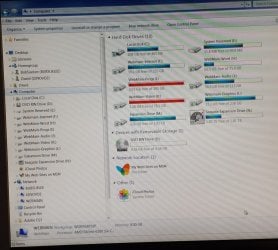
I have run the updated script which is attached as well as an image of my drive set up.(a picture is worth a thousand words someone said once).

Yes I am not happy about the payment however I was at wits end with no help after posting on 3 Windows forums for over a week. This is the longest it has ever taken, so I had to take some other action hoping I would get someone who could really help the situation. You would know I am sure, it is hit and miss with all tradesmen and techs.

Anyway, as I had to get access urgently, I accepted the workaround for the moment.

Could you clarify what exactly you mean by "it would not share the full drives"?

Whilst other computers on the LAN could see all the drives and folders in the Webmain computer, they could not get access to them.The No Access Panel would come up. He tried to allow access in the Workgroup but they were still unable to get access. He created a HomeGroup but still did not get access, theta is why he created a new folder in each drive and gave it full access. That was we were able to access the drive.

After arranging all your folders to be shared, I need you to summarise what shares need what kind of access. And please think twice before saying "all shares full read/write access by everyone", be specific about which shares. As you may have already observed there are 'default' shares that come with every Windows machine and those are not in question.

I am sorry but I am not exactly sure what you mean about 'specific shares' but maybe my explanation below will suffice.

I have left the folders as shown in your script until you tell me I can take put the folders back into the root of the drives as they were.

Since Dos, I have been able to share the drive from root to all directories in it. This is the first time I have ever had this problem.

I need full access to everything that is under user David except those that are normally restricted..
eg. Application Data,Start Menu,SendTo,Recent,PrintHood,Local Settings etc.

My set up is that each computer has a unique function, eg:, Graphics, Video, Admin, etc and they all need full access to the Main computer Webmain for file transfers etc.

I need to full access to the root of every drive and all folders under it except folders normally restricted.
eg.

C:\Local Disk
F:\Webmain Internet
H:\Webmain Word
I:\Webmain Progs
J:\Webmain AUDIO
K:\Webmain Video
L:\Webmain Graphics
M:\Expansion Drive Ext
N:\Seagate Expansion Drive Ext

It seems I still have full access to the 2 USB externals N:/ and M:/ and these shares have not been changed since they were first connected. The problem has been with the Drives inside the box.

I am really sorry to burden you with this, I can't say anymore but thanks for your assisrance.

oz
 

Attachments

  • ShareDetails.txt
    ShareDetails.txt
    28.1 KB · Views: 5
  • Computer Drives.jpg
    Computer Drives.jpg
    103.4 KB · Views: 1

My Computer My Computer

At a glance

Win 7 Pro 32 and 64 versions2.5 up4 to 8Nividia and AMD
Computer type
PC/Desktop
Computer Manufacturer/Model Number
Custom Builds but also Surface Pro 3, Dells Desk and HP laptop
OS
Win 7 Pro 32 and 64 versions
CPU
2.5 up
Motherboard
Different types
Memory
4 to 8
Graphics Card(s)
Nividia and AMD
Hard Drives
From 60GB to 2 TB
Antivirus
Avast Free
Browser
Firefox latest
Back
Top