Help to open a program upon log-in that is minimized

jdd89

New member
Local time
2:46 PM
Messages
6
Hi Everyone,

I have been pulling my hair out for the last 6 hours trying to get a key remapper program to boot in the background when the computer is turned on. I am putting the final touches on my custom HTPC, which includes an instant sheller that I have used before, and I have used Task Scheduler prior to this to open up anything and simply keep it minimized, but this program will not minimize. I have tried dozens of "Fixes" none of which worked.
I tried running a shortcut of the program and having the shortcut set to open minimized (within it's properties).
I tried using arguments such as \min or C\start or \t and several combinations.
I tried using a program called runminimized.exe which didn't work.
I tried writing a script that called the program to be open minimized.
I have tried so many other things that I can't even remember.

Please help!

To summarize
1) Must open and minimize without any keystroke (no mouse or keyboard will be attached when completed)
2) Explorer.exe is turned off, so it must not require explorer.exe to run.
3) The start-up folder is disabled due to Instant Sheller, so that is not an option.
4) I don't care if a command box flashes for a second, I just need it to be minimized.

I am running Windows 7 64 Bit Home Edition

Thank you

-Jon
 

My Computer My Computer

Computer type
PC/Desktop
OS
Windows 7 Home Edition 64 Bit
Maybe it's a typo but it should be /t or /min
 

My Computer My Computer

Computer type
PC/Desktop
Computer Manufacturer/Model Number
Custom Built
OS
Windows 10 Pro x64, Windows 8.1 Pro x64, Windows 7 Ultimate x64 SP1,
CPU
INTEL i9-7920X LGA 2066
Motherboard
Gigabyte X299-WU8 F3
Memory
64 GB (4 X 16 GB) G-Skill V Series DDR4 3200 Quad Channel
Graphics Card(s)
EVGA GTX 1060 SC 3 GB
Sound Card
Realtek Onboard ALC1220
Monitor(s) Displays
2 x Samsung S27E310
Screen Resolution
1920x1080
Hard Drives
Samsung 2 x 970 EVO Plus 500 GB NVMe
1 x 6TB WD 6003FZBX SATA
1 x 6TB WD 60EFRX SATA
12 x 3TB WD 30EFRX SATA
PSU
Seasonic X-1050
Case
Thermaltake Armor+
Cooling
Corsair H80i V2 Liquid AOI Cooler
Keyboard
Logitech G510s
Mouse
Logitech MX Master 2S
Internet Speed
200 Mb/s
Antivirus
ESET NOD32 13.1
Browser
EDGE (Dev, Canary, Beta), Chrome
Other Info
ASUS RT-AC68U router
Malwarebytes 4.0.4
Ya, I tried that with no avail. I did notice that if I close the program (the X in the corner, not end process) that it minimizes to the tray. Is there a script to have it close on startup? Even if I see it flicker for a second, I'm ok with that.

Thank you

-Jon
 

My Computer My Computer

Computer type
PC/Desktop
OS
Windows 7 Home Edition 64 Bit
Okay try this to launch on startup with no UAC prompt:

http://www.sevenforums.com/general-discussion/324485-launch-program-boot-delayed-no-uac.html

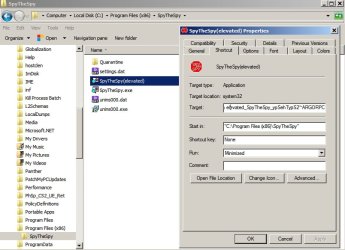
RE: Elevated program shortcut. - Create the shortcut and modify it so that it starts minimized.

Elevated-SpyTheSpy.jpg

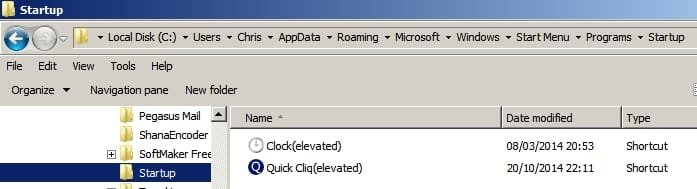
You can also try creating an elevated shortcut in your startup folder. Copy and paste this into an explorer window's address bar or the Start> Run dialog box.

%AppData%\Microsoft\Windows\Start Menu\Programs\Startup

Here's a couple of shortcuts that I use:

Startup.jpg

On another note - is there a reason for launching the program on boot? I use a key remapper that simply remaps keys permanently without needing to run. Or maybe you're trying to do something else.
 

My Computer My Computer

Computer type
Laptop
Computer Manufacturer/Model Number
ASUS
OS
Microsoft Windows 7 Home Premium 64-bit 7601 Multiprocessor Free Service Pack 1
CPU
AMD C-60 APU with Radeon(tm) HD Graphics
Motherboard
ASUSTeK COMPUTER INC. X501U
Memory
4.00 GB
Graphics Card(s)
AMD Radeon HD 6290 Graphics
Sound Card
(1) AMD High Definition Audio Device (2) Realtek High Defi
Screen Resolution
1366 x 768 x 32 bits (4294967296 colors) @ 60 Hz
Hard Drives
Hitachi HTS545050A7E380 SATA Disk Device
Antivirus
Comodo CIS & FW, SecureAplus App Whitelisting, Threatfire
Browser
Cyberfox 64bit, Opera 64bit, Airfox
Other Info
Spy-The-Spy, HitmanPro.Alert, Norton Connect Safe, MJRegWatcher, BitDefender TrafficLight, Voodoo Shield, Zemana AntiMalware
Well, Explorer.exe doesn't boot since I am using instant sheller, which means that the startup folder doesn't boot. I took everything in the start up folder and set it in task scheduler to boot on log in and set arguments. I tried editing the registry to reflect the key change, but the key I am changing is the browser home key, which is a special key that I couldn't get to read properly. If there is a way to permanently remap the browser home key that would work perfectly. I can't change the key on the remote I am using, so I have to change it on the computer.

Thank you
 

My Computer My Computer

Computer type
PC/Desktop
OS
Windows 7 Home Edition 64 Bit
Thanks for the information. I looked at Instant Sheller and it seems that it is too advanced for me. I've never used it.

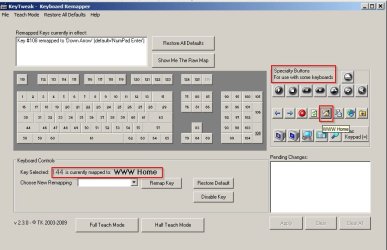
I can say that for keyboard remapping I use KeyTweak.

I do not have a keyboard with a "Browser Home" button but if it exists it can be remapped using KeyTweak.

KeyTweak - Keyboard Remapper.jpg

I'm not sure if remapping the key would take effect if you've modified windows boot!
 

My Computer My Computer

Computer type
Laptop
Computer Manufacturer/Model Number
ASUS
OS
Microsoft Windows 7 Home Premium 64-bit 7601 Multiprocessor Free Service Pack 1
CPU
AMD C-60 APU with Radeon(tm) HD Graphics
Motherboard
ASUSTeK COMPUTER INC. X501U
Memory
4.00 GB
Graphics Card(s)
AMD Radeon HD 6290 Graphics
Sound Card
(1) AMD High Definition Audio Device (2) Realtek High Defi
Screen Resolution
1366 x 768 x 32 bits (4294967296 colors) @ 60 Hz
Hard Drives
Hitachi HTS545050A7E380 SATA Disk Device
Antivirus
Comodo CIS & FW, SecureAplus App Whitelisting, Threatfire
Browser
Cyberfox 64bit, Opera 64bit, Airfox
Other Info
Spy-The-Spy, HitmanPro.Alert, Norton Connect Safe, MJRegWatcher, BitDefender TrafficLight, Voodoo Shield, Zemana AntiMalware
That worked perfectly! I couldn't find a program that would let me remap the browser home key within the registry, most of them wouldn't recognize the key and i didnt want to edit the registry manually without knowing the key information. This program worked wonderfully! Thank you, I can finally finish this project!

-Jon
 

My Computer My Computer

Computer type
PC/Desktop
OS
Windows 7 Home Edition 64 Bit
Great. Thanks for letting us know. :)
 

My Computer My Computer

Computer type
Laptop
Computer Manufacturer/Model Number
ASUS
OS
Microsoft Windows 7 Home Premium 64-bit 7601 Multiprocessor Free Service Pack 1
CPU
AMD C-60 APU with Radeon(tm) HD Graphics
Motherboard
ASUSTeK COMPUTER INC. X501U
Memory
4.00 GB
Graphics Card(s)
AMD Radeon HD 6290 Graphics
Sound Card
(1) AMD High Definition Audio Device (2) Realtek High Defi
Screen Resolution
1366 x 768 x 32 bits (4294967296 colors) @ 60 Hz
Hard Drives
Hitachi HTS545050A7E380 SATA Disk Device
Antivirus
Comodo CIS & FW, SecureAplus App Whitelisting, Threatfire
Browser
Cyberfox 64bit, Opera 64bit, Airfox
Other Info
Spy-The-Spy, HitmanPro.Alert, Norton Connect Safe, MJRegWatcher, BitDefender TrafficLight, Voodoo Shield, Zemana AntiMalware
Back
Top